12.3.1 - Release notes
Adaptive Modules: Personalize the Learning Journey
We’re introducing Adaptive Modules, a new way to tailor training activities based on individual learner achievements, roles, and behaviors. With Adaptive Modules, administrators can configure modules within a training activity to appear dynamically or become optional based on user-specific criteria. This enables a more efficient, personalized learning experience without compromising progress tracking.
When creating or editing a module, you can now enable the Adaptive Module option and select from two behaviors:
- Module appears if criteria met: The module remains hidden until the user meets the specified criteria (e.g., passing a test, earning a certificate, attending an event, or matching a job function).
- Module becomes optional if criteria met: The module is required until the user meets the criteria, after which it becomes optional and is excluded from progress tracking.
Supported criteria include:
- Test scores from H5P quizzes (question sets)
- Certificate earned
- Event attendance
- Assigned job function (user tag)
- SCORM or xAPI course completions
- Specific test question answers (with flexible AND/OR logic)
Highlights:
- Hidden adaptive modules do not affect the user's progress until unlocked.
- Optional modules are excluded from navigation and completion tracking once optional status is achieved.
- On-screen notifications alert users when a new module is unlocked or when modules become optional, making learning paths feel responsive and personalized.
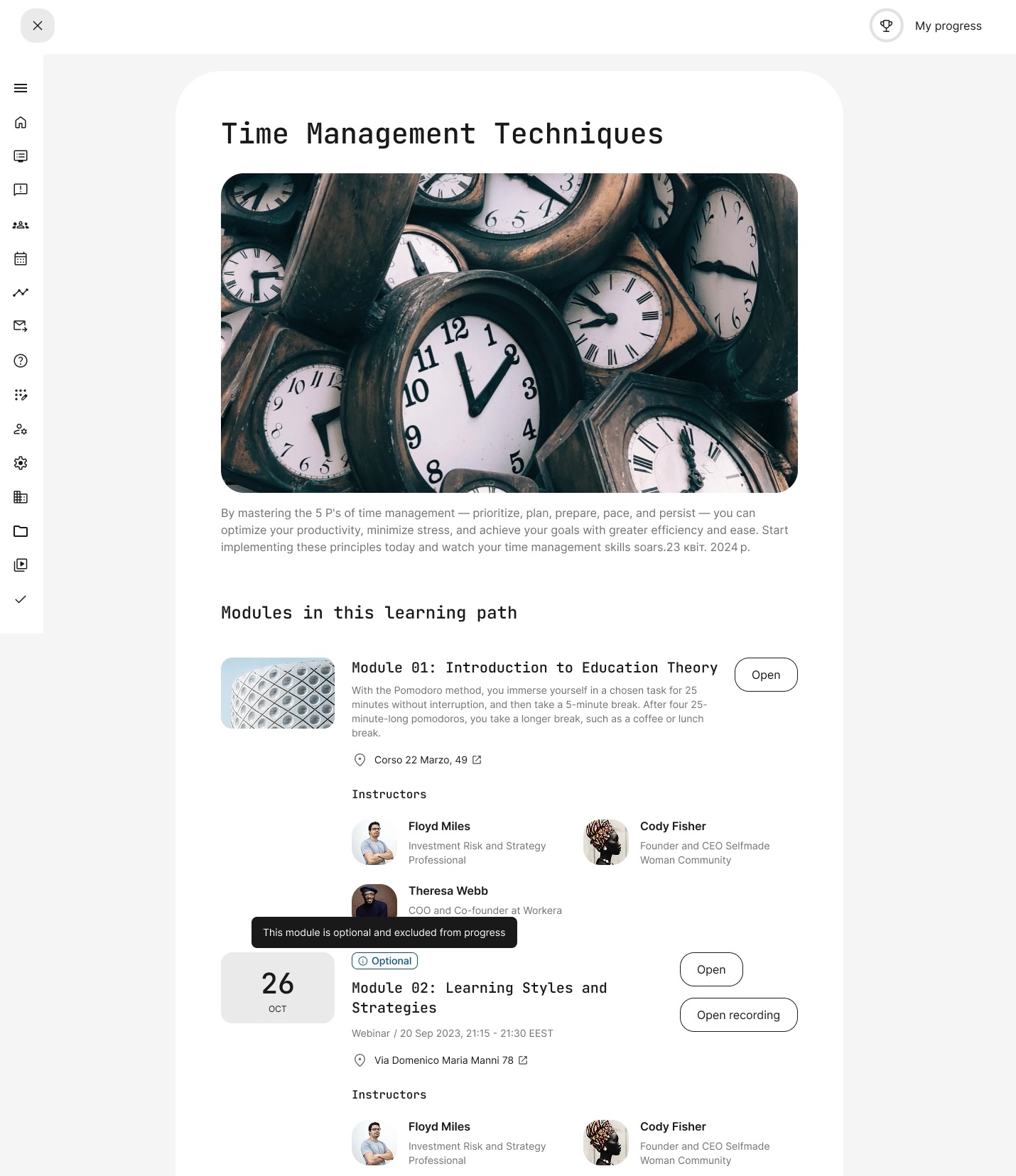
Learning path page dynamically updates once the adaptive module criteria are met.
New Adaptive Learning Report
Alongside Adaptive Modules, we’re introducing a new Adaptive Learning Report to track learner progress across adaptive activities. The report includes:
- User information (name, email, enrollment date)
- Module status (required, supplemental, or optional)
- Time spent per module
- Module status changes (e.g., when a module became optional)
- Certification and test scores
This new feature set empowers you to build smarter, more efficient learning journeys that adapt to each user’s needs, helping them stay engaged, focused, and motivated.
Personalized Module Recommendations
We’re adding Recommendation Management, a powerful new feature that personalizes learning paths based on user performance in course assessments. Now you can guide learners more effectively, recommending specific modules when a learner passes or fails a test.
Recommendations are triggered by performance in H5P Question Set quizzes and are available in any training activity that includes:
- At least two course modules
- At least one module containing a Question Set
When these conditions are met, a new Manage Recommendations button appears on the activity page. From this menu, you can:
- Define custom popup messages for both pass and fail outcomes
- Choose the module and quiz the recommendation is based on
- Select specific quiz questions for evaluation
- Set whether recommendations trigger on correct or incorrect answers
- Choose which modules will be recommended when the criteria are met
Learner experience:
After submitting a quiz, learners see a popup with your tailored message and recommended modules. Recommended modules are also labeled in the learning path overview for easy visibility.
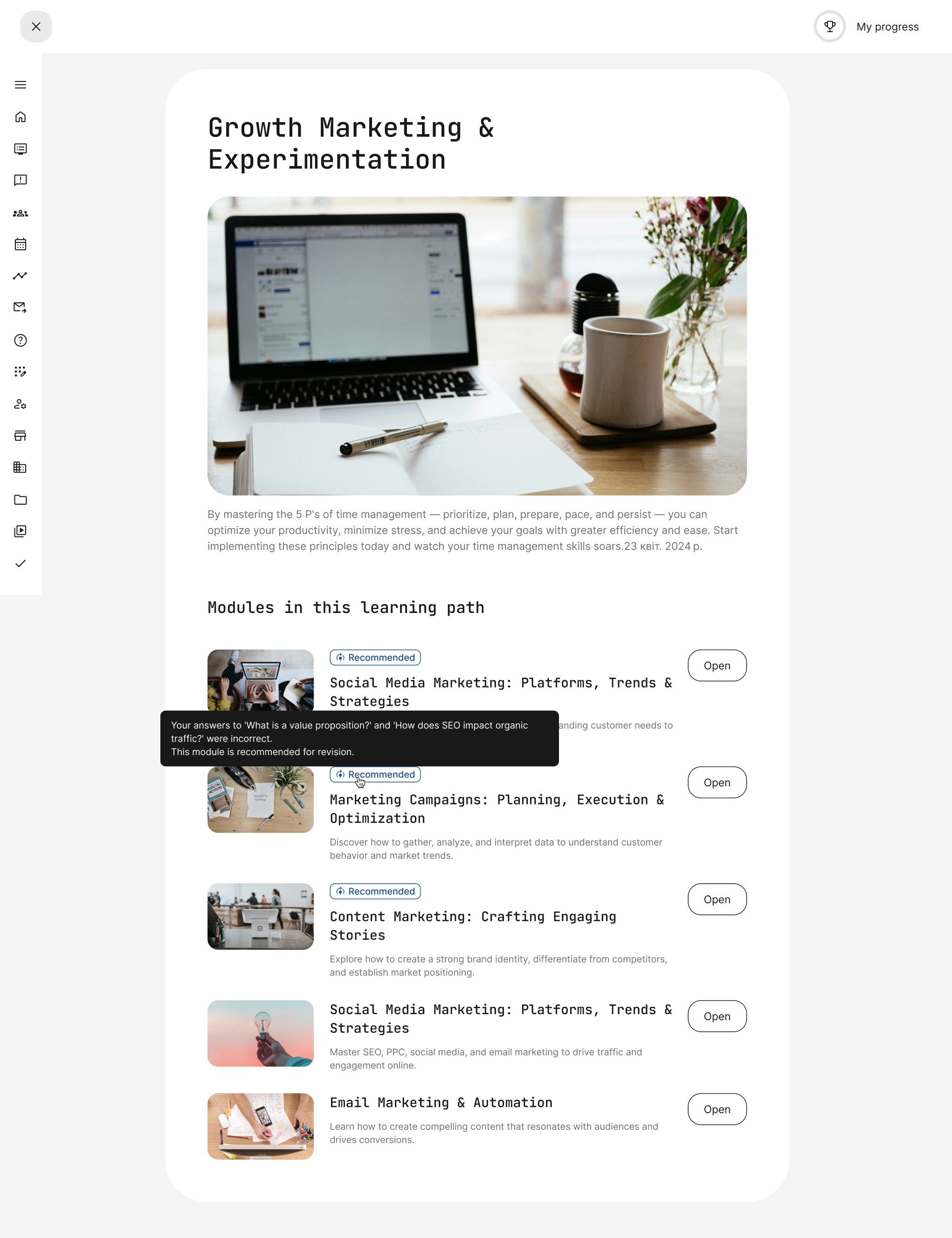
Recommended modules are displayed in the learning path, showing learners why they were suggested.
Improved Navigation on the Dashboard: New Categories in “Trainings I attend”
We’re upgrading the dashboard experience by organizing the “Trainings I attend” section into clear categories, making it easier for users to navigate their enrolled activities and take action faster.
New dashboard categories:
- Mandatory: Trainings with an upcoming deadline.
- Recertification: Trainings required to renew an existing certificate
- Missed deadline: Trainings where the deadline has passed
- Ongoing: Trainings that are in progress or not started (sorted with "In progress" first)
- Completed: Trainings that are completed (most recently completed first)
- Waiting list: Trainings awaiting approval
- Bookmarked: Trainings users have bookmarked from the course catalog
Empty categories are automatically hidden to keep the dashboard clean and personalized.
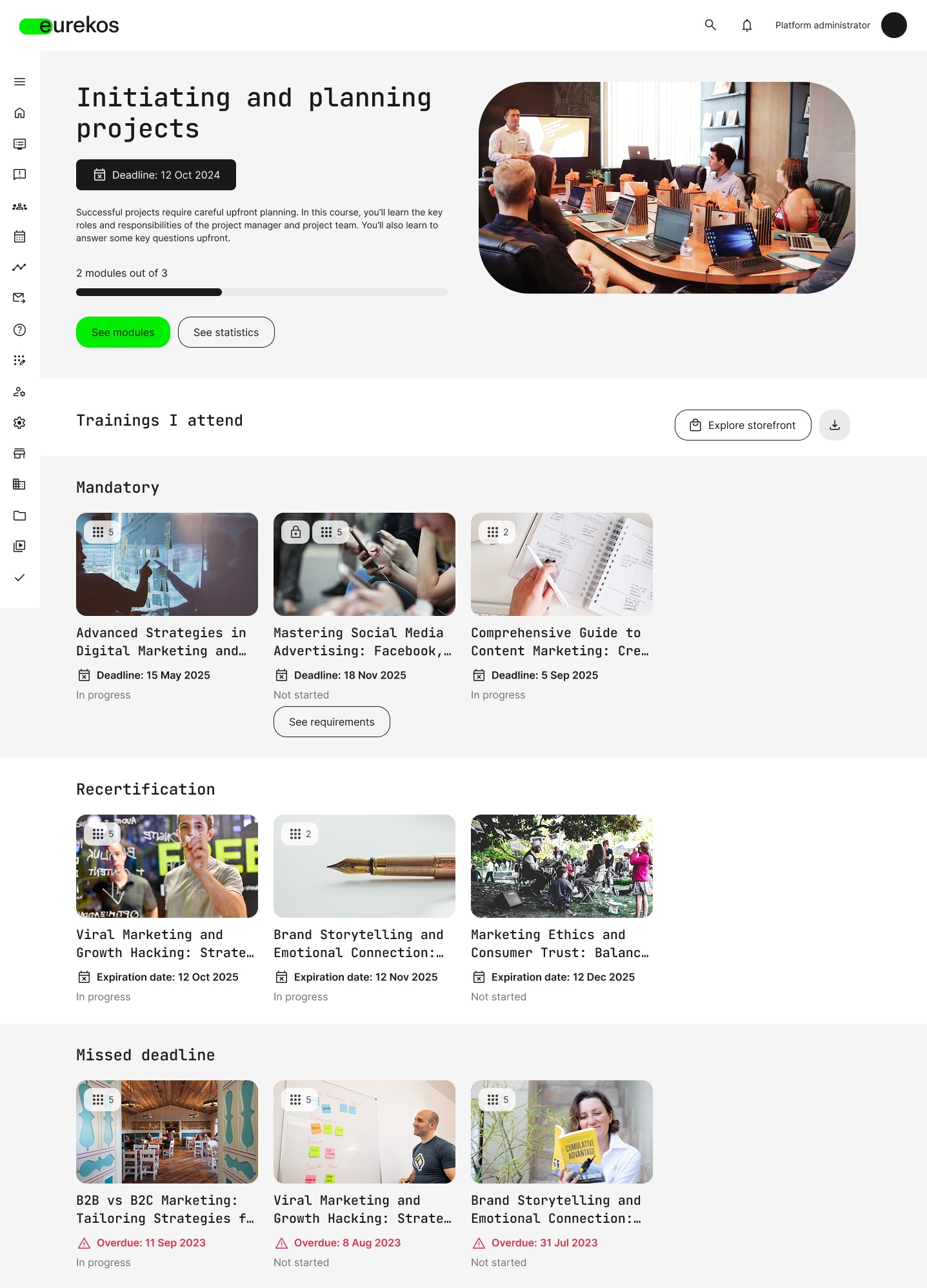
New dashboard layout organizes enrolled trainings into clear categories.
SCIM User Provisioning with Microsoft Entra ID
We’re making it easier to manage user identities with our new SCIM (System for Cross-domain Identity Management) integration. SCIM is an open standard for automating the exchange of user identity information between identity providers and service providers. With Eurekos, this means you can automatically provision, update, and de-provision users from Microsoft Entra ID — without requiring users to log in manually.
Note: SCIM is one-directional: From Microsoft Entra ID to Eurekos. Changes made in Eurekos will not sync back to Microsoft Entra ID.
SCIM operations supported
- POST: Create users in Eurekos
- GET: Retrieve user information
- PUT: Update full user profiles
- PATCH: Update specific fields
- DELETE: Delete a user
Configuration and setup
To configure SCIM provisioning with Microsoft Entra ID, follow these steps:
- In Eurekos, go to Settings > Third party integrations > API
- Click Add client secret to generate a Bearer token
- Copy the Bearer token
- In Microsoft Entra ID (Azure Active Directory), create a new application under App registrations
- Go to the Provisioning tab and enter the following:
- Tenant URL: This is your Eurekos SCIM endpoint
- Secret Token: Paste the Bearer token generated in Eurekos.
Once configured, Microsoft Entra ID will automatically sync users to Eurekos every 40 minutes. You can also manually trigger provisioning using the Provision on demand option in Entra ID.
Reminder: If your token expires, you'll need to generate a new one from Eurekos and update it in Entra ID to maintain the connection.
Shortlist of Additional Noticeable Changes:
- Activity level configuration for top and bottom pinned navigation: We’ve added a new navigation option at the activity level: top and bottom pinned navigation. When enabled, the usual left/right navigation is replaced with a top/bottom layout. Users will see a navigation button at the top of the course page to go to the previous module or page, and another at the bottom to continue forward. This gives you more flexibility in designing learning experiences that fit your course layout and content flow.
- Extended questionnaire reporting: The Questionnaire Report now supports all use cases, not just training feedback. This includes questionnaires used on course pages, in automated email workflows, anonymous surveys, participation approval workflows, on-demand requests, and onboarding rules. You can now track and analyze responses across the entire learner journey.