How Skills Appear - Article
Summary
Skill levels define progressive stages of competence within a skill framework. They allow organizations to measure development incrementally, structure learning pathways, and demonstrate growth from foundational understanding to advanced capability.
In this article you will learn:
- How skill levels represent progressive stages of competence
- How learning activities can be linked to different proficiency levels
- How progression helps track learner development over time
- How skill levels support structured learning and certification pathways
Using Skills for Scheduling Instructors
For organizations operating a TMS (Training Management System) or TRMS (Training & Resource Management System), skill assignment is a cornerstone of effective instructor planning and delivery. Eurekos brings together several capabilities that are often spread across multiple systems—skills, instructor availability, rooms, facilities, and equipment—into a single, connected ecosystem.
By combining Skills with the integrated Availability calendar, course administrators can immediately confirm that an instructor is qualified to deliver a specific course, available at the required time, and that the necessary physical or virtual resources are in place. This unified view supports confident, forward-looking scheduling and reduces operational risk caused by misassignment, resource conflicts, or late-stage changes.
The result is a more predictable and scalable training operation—well suited for professional training providers, certification-driven programs, and organizations managing complex instructor-led delivery across customers, partners, or regions.
Example: Scheduling Qualified Instructors for External Training Programs
Consider a professional training organization delivering certified training programs to manufacturing customers across multiple regions. These programs are scheduled months in advance and require instructors who are formally qualified to teach specific product lines, technologies, or compliance topics.
Using Skills and Availability together, course administrators can plan instructor-led sessions by answering three critical questions at the same time:
- Is this instructor certified and approved to teach this specific course or program?
- Is the instructor available on the required dates?
- Are the necessary rooms, facilities, or virtual environments available and booked accordingly?
In practice, this means that when scheduling a course six months ahead, planners filter the availability calendar by required instructor skills (for example, “Advanced Robotics Certification”) and immediately see which qualified instructors are available across locations. This prevents assigning instructors who are available but not authorized to teach the course—and avoids last-minute reassignments that disrupt customers and delivery commitments.
The same setup allows training providers to balance instructor workload, manage regional demand, and ensure consistent training quality across customers. Skills act as the qualification gate, availability ensures operational feasibility, and the calendar brings both together in one planning view.
This is particularly valuable for organizations that:
- Deliver instructor-led training as a commercial service
- Operate certification-based or regulated programs
- Need predictable, long-term scheduling across multiple instructors and customers
To unlock the Availability setup, a Platform Administrator or Global Administrator must first enable it from Settings → General, where it is located at the very bottom in the Features for instructors section.
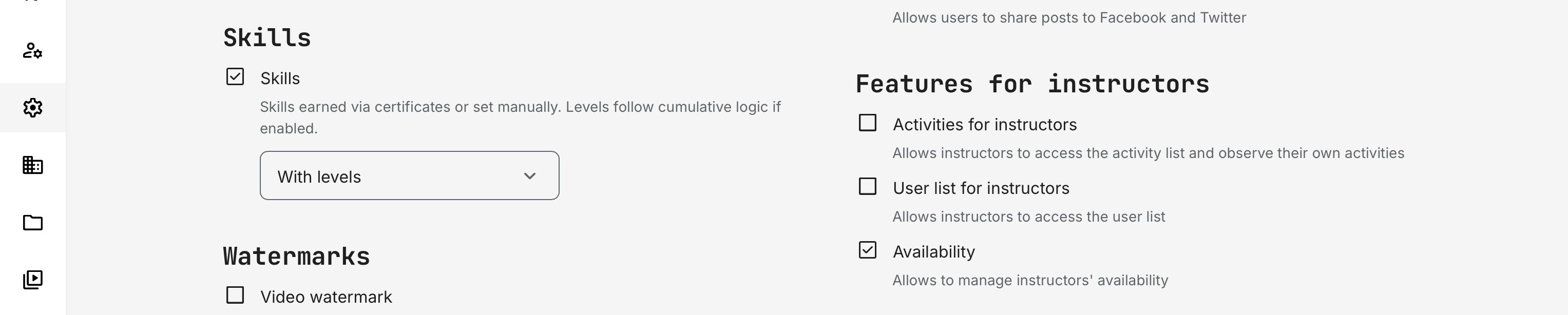
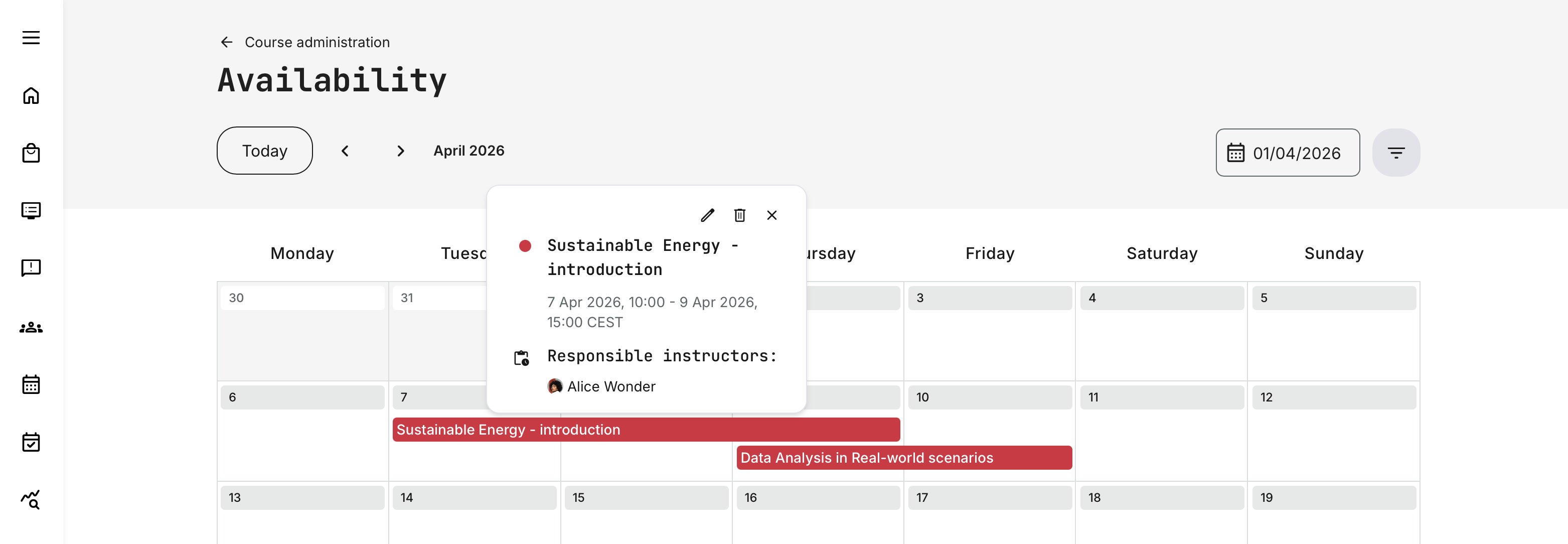
Once the relevant settings are enabled, users course administrators can access the Availability schedule via Course Administration → Availability.
From here, administrators can quickly assess instructor availability across multiple dimensions—such as skills, location, and required equipment—to support both planning overviews and the scheduling of instructor-led training activities, including events and learning paths.
Detailed guidance on using Availability for scheduling instructors across activities, events, and programs is covered in dedicated articles on availability and resource planning.
Instructor view: “My Availability”
Instructors experience the Availability feature differently from administrators.
Once enabled, instructors gain access to My Availability (main menu), where they can:
- View all activities and modules they are responsible for
- See their schedule across days, weeks, or months
- Add manual availability blocks (for example: vacation, travel, or other commitments)
- Maintain an accurate personal schedule that administrators can rely on
This view is intentionally scoped:
- Instructors only see and manage their own availability
- They cannot edit availability for other instructors
- They cannot override scheduling conflicts created by administrators
This design ensures:
- Instructors retain control over their personal availability
- Administrators have reliable data when scheduling courses
- Conflicts are surfaced early rather than discovered during delivery
From the instructor’s perspective, this is not about planning courses — it’s about protecting time, preventing overbooking, and supporting realistic delivery commitments.
How Administrators and Instructors Work Together
The system is deliberately asymmetric:
- Administrators plan and assign training using skills, availability, and resources
- Instructors maintain accurate availability so planning decisions remain valid
When an administrator attempts to schedule an instructor who is unavailable, the system warns them before finalizing the activity, allowing adjustments before issues propagate to learners or customers .
This shared responsibility model is what enables long-term planning without micromanagement.
Here’s a refined, cohesive section you can drop into the article, aligned with the tone and structure of the rest of the Skills documentation. I’ve kept it user-centric, referenced what’s already been explained elsewhere, and avoided re-explaining setup mechanics.
Here’s a refined version that tightens the language, improves flow, and clarifies intent—while keeping your structure and meaning intact and aligned with the rest of the article.
How Skills Appear for Learners
Skills are not an abstract backend construct—they are visible, meaningful signals of competence for learners and for the organization around them. They reflect the rules and structures under which they are earned and provide a clear summary of what a learner is qualified to do.
From a learner’s perspective, skills are acquired in two ways:
- By earning certificates through completed training activities
- By being manually assigned skills by an administrator, typically to acknowledge experience gained outside the platform
Regardless of how they are obtained, skills are surfaced consistently in the user profile, making them easy to understand, track, and reference.
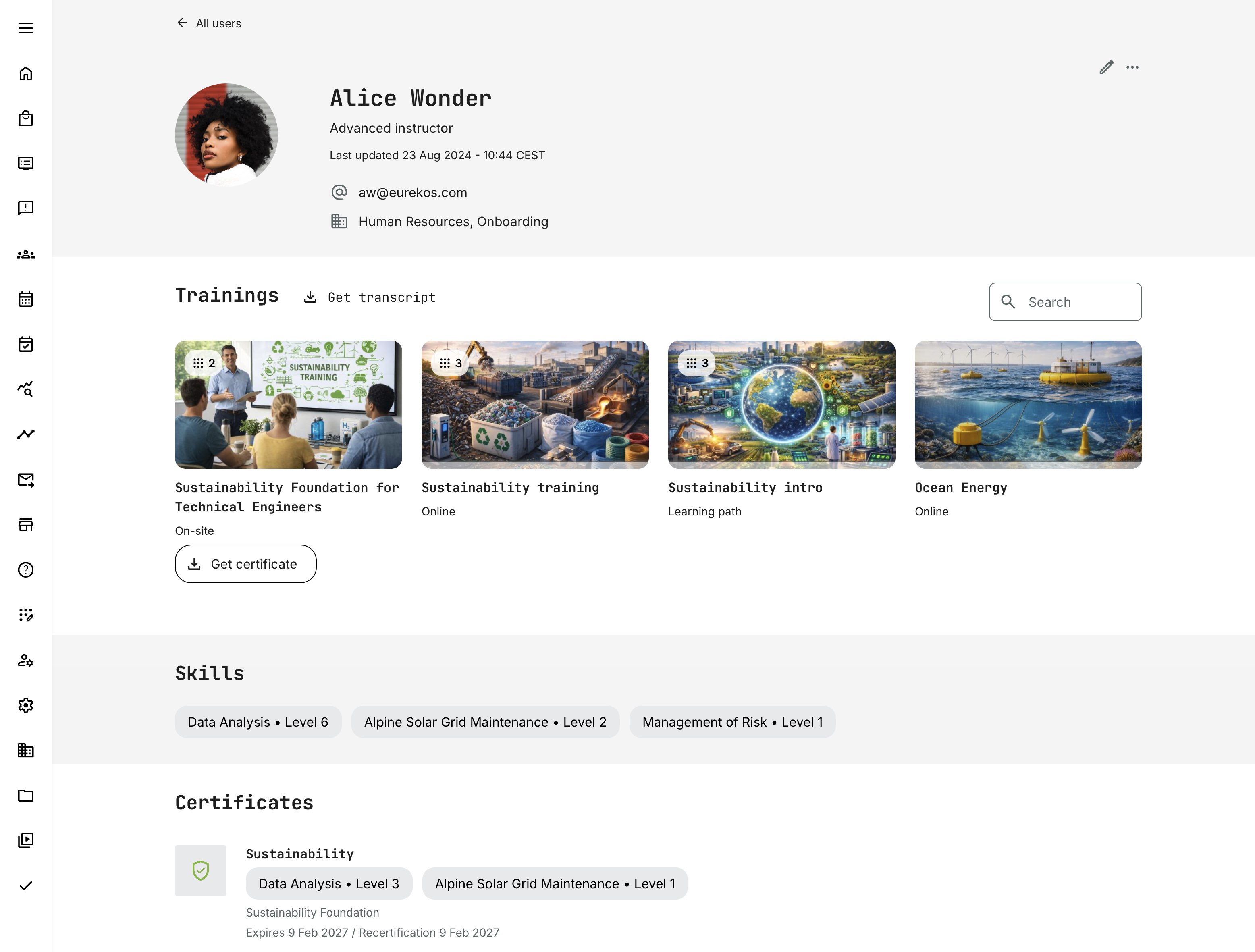
Learners can view their skills by opening their profile (clicking their name in the top-right corner and selecting View profile) and scrolling to the Skills section.
Here, skills are displayed as labeled entries, optionally with levels, giving a quick overview of the learner’s current capabilities. When multiple certificates contribute to the same skill, the platform displays the aggregated level, providing a consolidated view of proficiency rather than a fragmented list of individual achievements.
This means learners do not need to interpret individual courses or certificates to understand their standing—the skill summary reflects where they are now, across all earned contributions.
Certificates, Aggregation, and Expiry
While this snapshot is important, it is equally important to understand whether skills expire—and when. This context is provided by the Certificates section on the profile, which appears directly below the Skills overview.
When skills are granted through certificates, they inherit the behavior of those certificates:
- Levels accumulate across multiple certificates that include the same skill
- Expiry rules apply per certificate, meaning some skill contributions may expire while others remain valid
For example, if a learner earns:
- Data Analysis at Level 3 from one certificate (valid for two years)
- The same skill at Level 3 from another certificate (valid for one year)
The learner’s profile will initially show Level 6. When the second certificate expires, the profile automatically adjusts to Level 3—preserving accuracy without altering historical records.
For this reason, the Certificates section on the profile also lists the skills and levels earned per certificate, along with any expiration dates. This makes it easy for learners—and administrators—to see which competencies remain valid and which will need to be refreshed in the future.
This behavior applies consistently to skills both with and without levels, ensuring the profile always reflects the current and future state of a learner’s qualifications.
Manually Assigned Skills on Profiles
Skills assigned manually by administrators also appear in the Skills section of the profile, fully integrated alongside certificate-based skills.
These manual assignments:
- Can include levels
- Do not expire automatically
- Remain active until explicitly removed by an administrator
This approach is often used to recognize prior experience, external certifications, or practical expertise gained outside the platform, ensuring that learner profiles reflect real-world competence—not only formal training history.
Full Picture
Beyond the user profile, skills are surfaced and used across several parts of the platform where competence and readiness matter.
For administrators, skills support planning and oversight. They can be referenced when scheduling instructors and planning events, helping ensure that the right trainers—with the right certified competencies—are assigned to the appropriate activities. Skills are also available in filtering and reporting, enabling insight into capability distribution across teams, partners, or organizations.
For learners, skills appear as a clear outcome of enrollment. During enrollment and purchase flows, certificates—and the skills they confer—can be shown as part of the activity details, helping learners understand what competencies they will gain by completing the training. This is particularly valuable in KPI-driven, partner, or professional programs where learners need to confirm that a course contributes to required qualifications or progression targets.
In this way, skills function as a shared language between learning, certification, and operational decision-making: not a gating mechanism on their own, but a transparent and reliable signal of value, readiness, and outcomes throughout the platform.