13.1.0 - Release notes
Optional Modules in Learning Paths
We have extended the adaptive learning functionality to make it easier to include optional content in your learning paths. You can now define modules as always optional - without relying on user attributes or performance criteria - making it simpler to present additional or supplementary content to learners, while keeping learning paths clear and structured.
Features & Benefits
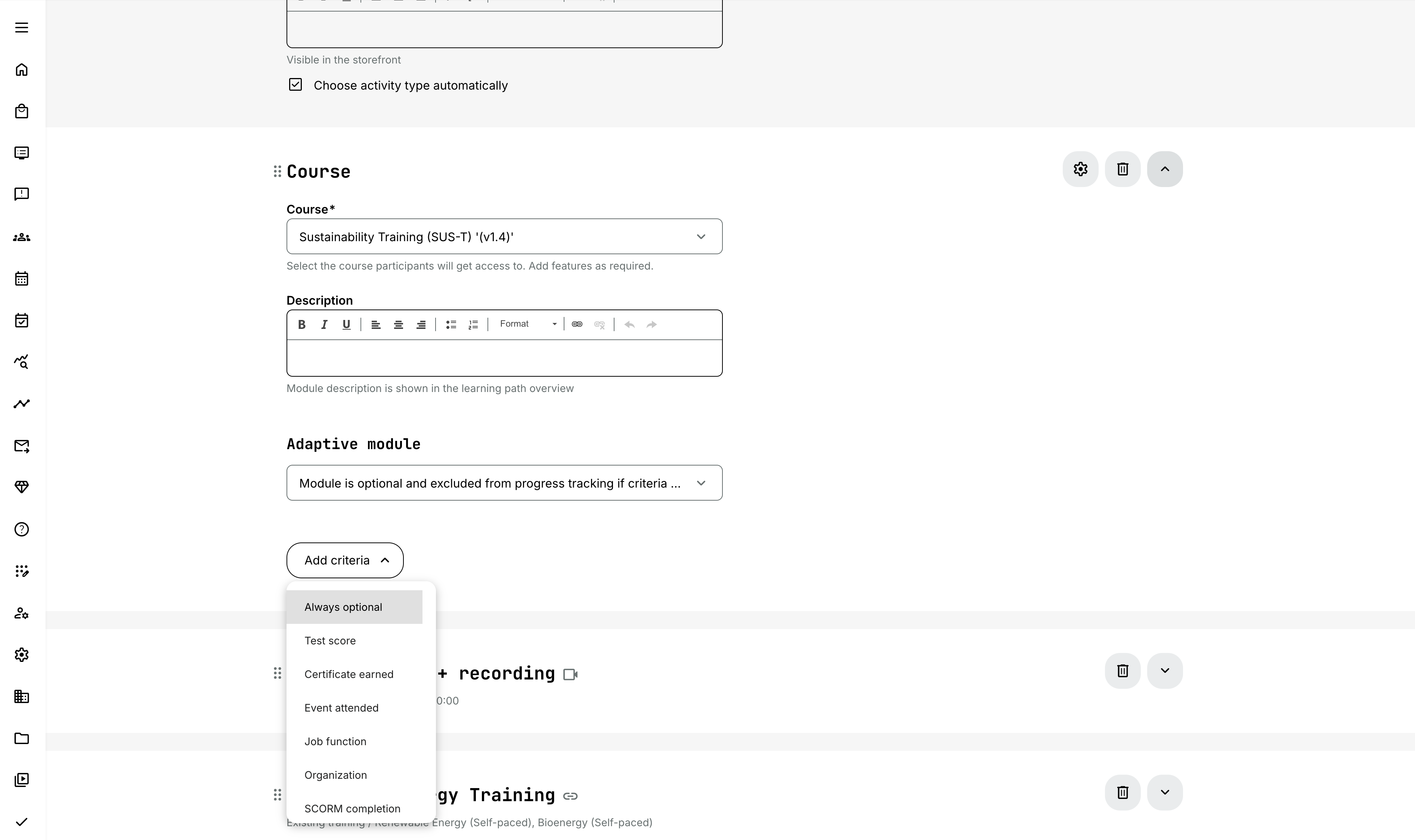
“Always optional” criteria for adaptive modules: You can now mark modules as always optional by selecting the new “Always optional” criteria within the adaptive module configuration.
This allows you to include optional content in learning paths without needing to define conditions based on user profile data or activity performance. THe module will be visible to all learners, clearly presented as optional, and excluded from progress tracking.
This is particularly useful when you want to provide:
- Supplementary learning materials
- Deep-dive content for learners who want to explore topics further
- Additional resources such as guides or reference materials.
Configuration
To use this option:
- Enable Adaptive module on the module
- Select “Module is optional and excluded from progress tracking if criteria met”
- Choose “Always optional” as the criteria
More Flexible Localisation Management
We have improved localisation management by allowing you to enable languages separately for the platform interface and for content.
This gives you greater control over how languages are used across your platform - making it easier to support multilingual learning content without increasing the complexity of maintaining multiple interface languages.
Features & Benefits
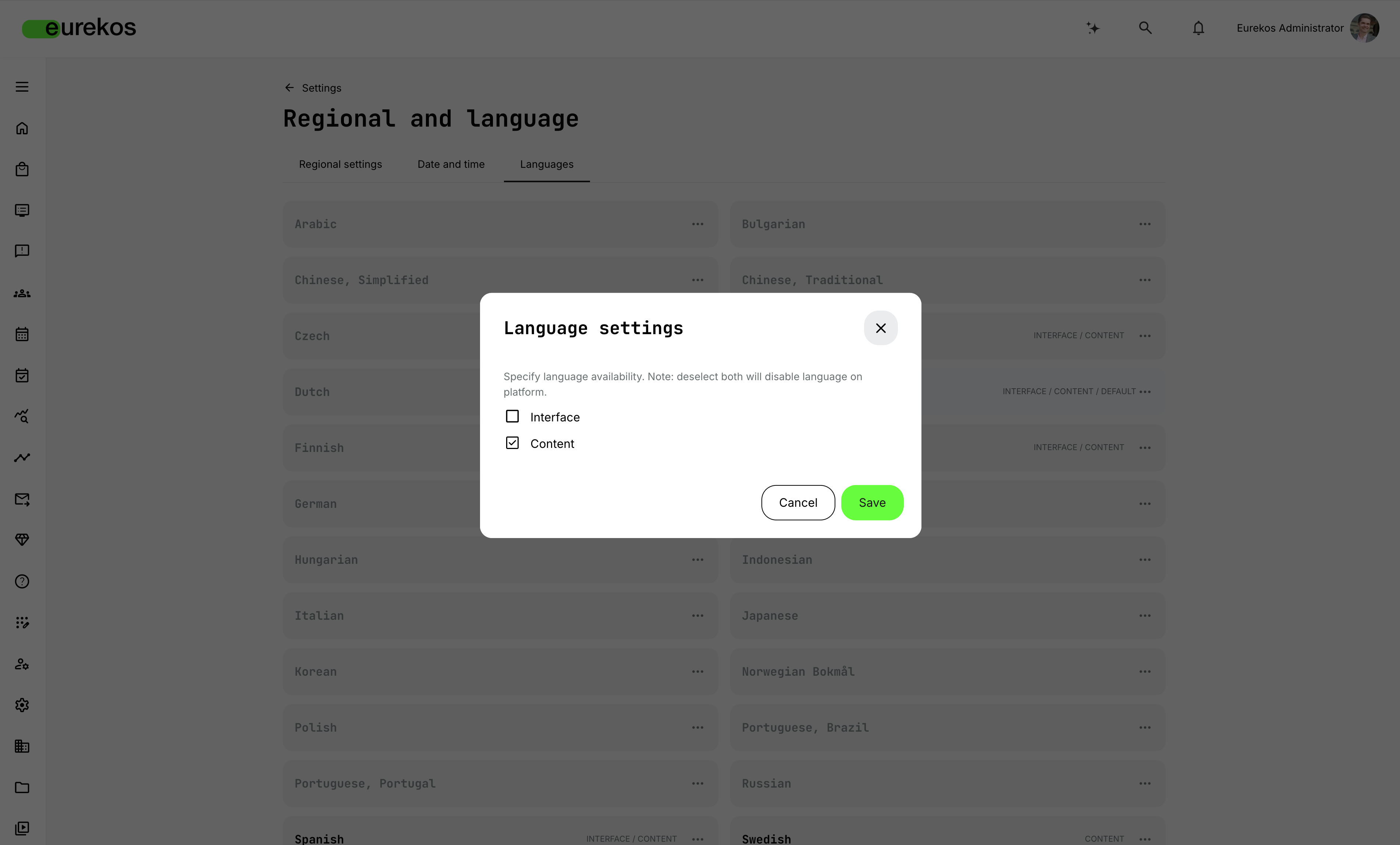
Separate control of interface and content languages: You can now choose whether a language should be available for the platform interface, for content, or both.
This allows you to support multiple content languages (e.g. for courses, activities, subtitles, and translations) without making those languages available as selectable interface languages for users.
As a result, you can:
- Offer multilingual training content without expanding interface language maintenance
- Limit the number of interface languages available to users
- Reduce the effort required to manage translations for text strings, system labels, and emails
Configuration
To configure language availability:
- Go to Settings → Regional and language → Languages
- Enable each language for Interface, Content, or both
Considerations
- Languages enabled for Content are available when assigning languages to courses, activities, and other content elements.
- Languages enabled for Interface are available for users to select in their profile preferences.
- Existing language configurations will continue to work as before but can now be adjusted with more granular control.
Extending Page Templates to SCORM/xAPI Workflows
We have extended page templates to support SCORM course pages, making it easier to create consistent and reusable layouts when using manual SCORM launch. This removes the need to build SCORM course pages from scratch for each new import, saving time and ensuring a more consistent learner experience.
Features & Benefits
Template support for SCORM course pages: You can now create and manage a dedicated page template for SCORM course pages used with the “Launch manually from the course page” option.
This allows you to define a standard layout for these pages using the native authoring tool - including elements such as the course banner, text, media, and the SCORM launch button.
By introducing a template for this page type, you can:
- Ensure a consistent structure across all SCORM course pages
- Reduce manual setup when importing new SCORM/xAPI packages
- Better maintain branding and content standards across your platform
Configuration
To configure the template:
- Go to Settings → Page templates → SCORM course page
- Customize the template using the authoring tool
The template is automatically applied when importing SCORM or xAPI courses when using the “Launch manually from the course page” option.
Simplified Immediate Manager Setup with Improved Analytics Access
For those of you who use the Immediate Manager feature, we have simplified how this works by removing the dedicated system role and relying entirely on the existing user relationship model. This makes the setup easier to understand while maintaining the same functionality you rely on today.
At the same time, we have improved the experience for immediate managers by introducing consistent, role-independent access to relevant analytics - making it easier to monitor staff progress and engagement.
Features & Benefits
Removal of the Immediate Manager system role: We have removed the dedicated Immediate Manager system role to streamline the platform and reduce complexity. Immediate manager responsibilities are now defined solely through the user profile field, where one or more users can be assigned as immediate managers.
This approach is more flexible, as any user - regardless of system role - can be assigned responsibility for specific users, without needing a separate role.
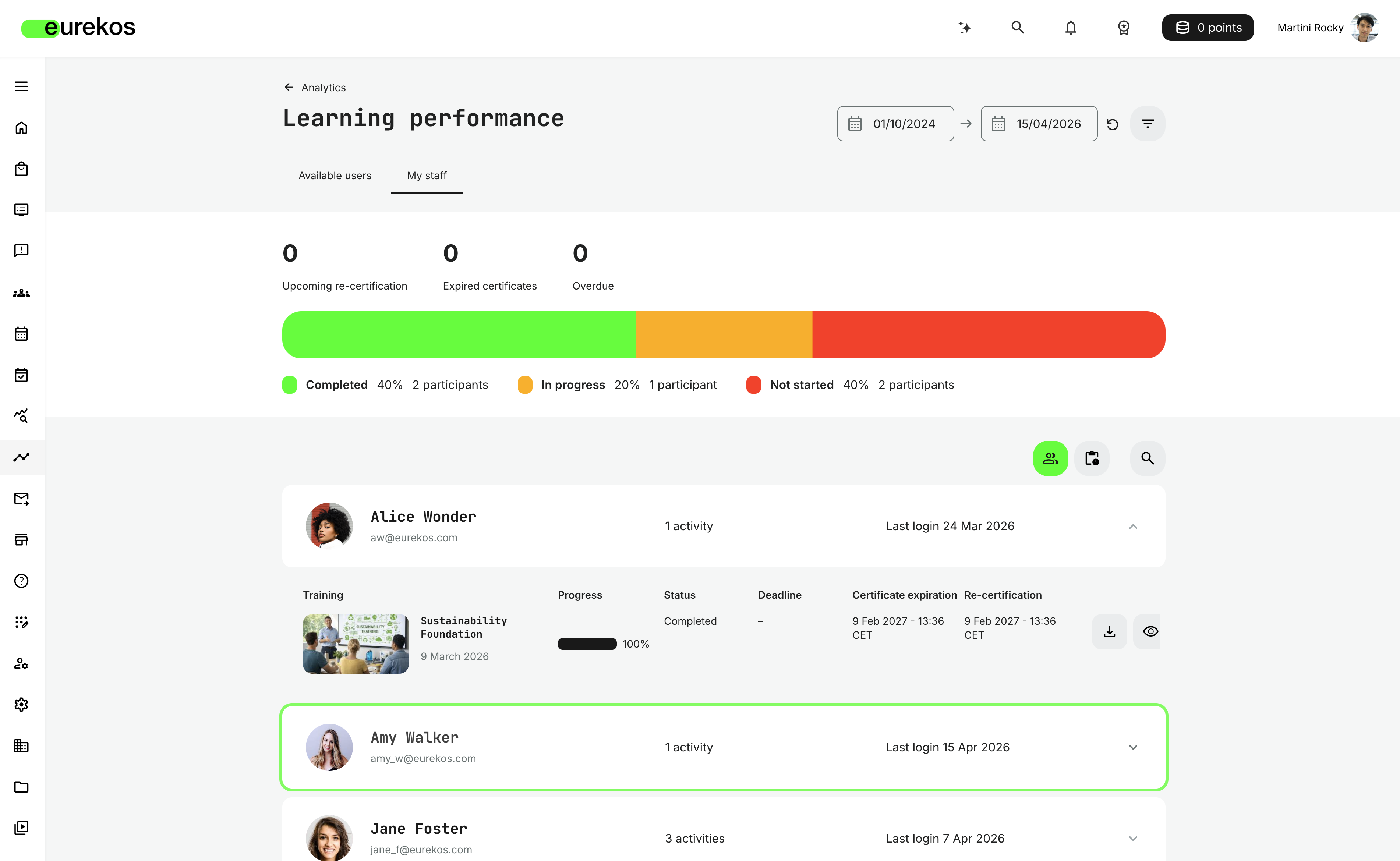
Improved analytics access for immediate managers: All users assigned as immediate managers now have access to a core set of analytics dashboards, regardless of their system role. These dashboards are automatically scoped to the users they are responsible for, making it easy to track performance and engagement.
Immediate managers now have access to the following reports in Analytics:
- Active users
- Learning performance
- Progress
If a user already has access to these dashboards through their system role (e.g. Manager), they will now see an additional My staff tab with a scoped view of the users they're responsible for.
Configuration
- The Immediate Manager feature is not enabled by default. Please contact Eurekos support or your CSM if you're interested in having it activated.
- If already enabled on your platform, no further configuration is required. Users previously assign the Immediate Manager role will automatically be migrated to the Participant role and retain all their assigned users and responsibilities.
Security Improvements 🔐
We have implemented a series of security enhancements focused on strengthening access control, improving data validation, and increasing overall platform resilience:
- Strengthened access control mechanisms: Improved server-side validation across multiple endpoints to ensure users can only access data and perform actions aligned with their permissions.
- Enhanced permission enforcement for content operations: Refined access checks for content and file management workflows to ensure actions are consistently validated based on user roles and ownership.
- Improved input handling and data validation: Addressed an issue related to unsafe input handling by reinforcing validation and sanitization across affected areas.
- Protection against abusive usage patterns: Introduced rate limiting on selected operations to reduce the risk of misuse and ensure platform stability.
- Dependency and package management updates: Updated handling of third-party components to improve maintainability and ensure timely security updates.
Shortlist of Additional Noticeable Changes
- New option to control account deletion by participants: A new setting is now available under Settings → Security to control whether participants can delete their own accounts. This option is enabled by default and can be disabled by administrators if needed.
- Improved access behavior for Activity Description Pages: Activity Description Pages will now always open, even if the user does not meet access requirements. Instead of showing a 403 page, users will see a clear message explaining why the activity is not available (e.g. “Self enrollment unavailable” or “You do not meet the requirements”), while sensitive elements such as price and enrollment options are hidden.
- Enhanced visual indicators for adaptive course pages: We have improved iconography and behavior for optional, supplemental, and recommended pages. Optional pages now clearly reflect their state, dynamically update when progress is made, and remain identifiable via tooltips. In addition, optional status now cascades from parent to child pages, and visual highlighting has been improved when adaptive criteria are met.
- Extended tax rules for online and offline training: Tax management now supports separate rules for online and offline training. You can define tax rules that specifically apply to online training, and mark activities accordingly. This allows for more accurate tax handling across different delivery formats for both activities and subscriptions.
- Subscriptions included in search and AI recommendations: Subscriptions are now indexed and included in global search and AI-powered recommendations. This makes it easier for users to discover relevant subscriptions and the activities included within them.
- Improved storefront behavior for Partner role: Users with the Partner role can now request on-demand activities and submit enrollment requests on behalf of their users - even if they are already enrolled themselves. This aligns the behavior more closely with the Manager role.
- Restricted organization management access for Manager and Partner roles: The ability to move organizations within the hierarchy has been removed for Manager and Partner roles. These operations are now limited to appropriate administrative roles to ensure better control of organizational structures.
- Corrected storefront sorting for focused activities: Activities marked as “focused” will now correctly take priority in storefront listings and appear before other activities.
- Improved handling of Existing Training modules with organizational filtering: We have improved how activities using the Existing Training module respect organizational access rules. Activities are now correctly available to users in suborganizations and nested structures, ensuring consistent behavior in complex organizational setups.