Introduction to Organizations - Article
Manage multi-tenancy across deep hierarchies of clients, distributors, regions and channel partners
The Organization entity is designed to provide effective segregation of users and information. You can create client and channel hierarchies with different settings, white labelling and segregation of members. Even content can be separated by organizations.
There is no specific limitation to the use cases around organizations; it is all up to you defining what constitutes an organization for your business and how you want to utilize the structure. This could be clients, distributors, resellers, countries, regions, partners, or departments. Or all of this at once, just for different audiences.
Use organizations when one or more statements are true:
- You need to provide multiple hierarchical layers with multiple administrators and strict user segregation between layers.
- You want to provide a course catalog with self-enrollment options and the offerings are not identical to everyone. Registered and unregistered.
- You want to provide Managers insight (internal or external Managers) on progress, compliance and reporting capabilities over a group of supervised members.
- You need to separate visual branding per organization.
- You need organization-wide discounts based on corporate agreements.
- You need ways to allow custom sign-up links or even SSO based relations with multiple clients and partners at once.
List of organizations
Organizations is a section of the main menu, which is available exclusively for Platform Administrators and Global Administrators. The list includes basic information, such as title, description and number of members.
- Default sorting is latest updated.
- Click on the column title to toggle the sorting order between alphabetic and number of members.
- Apply Search to quickly find an organization by name or use the updated schedule picker to limit the list further.
- Titles of organizations on the same level in the hierarchy must be unique.
- Export lets you export the full list of organizations in an excel sheet.
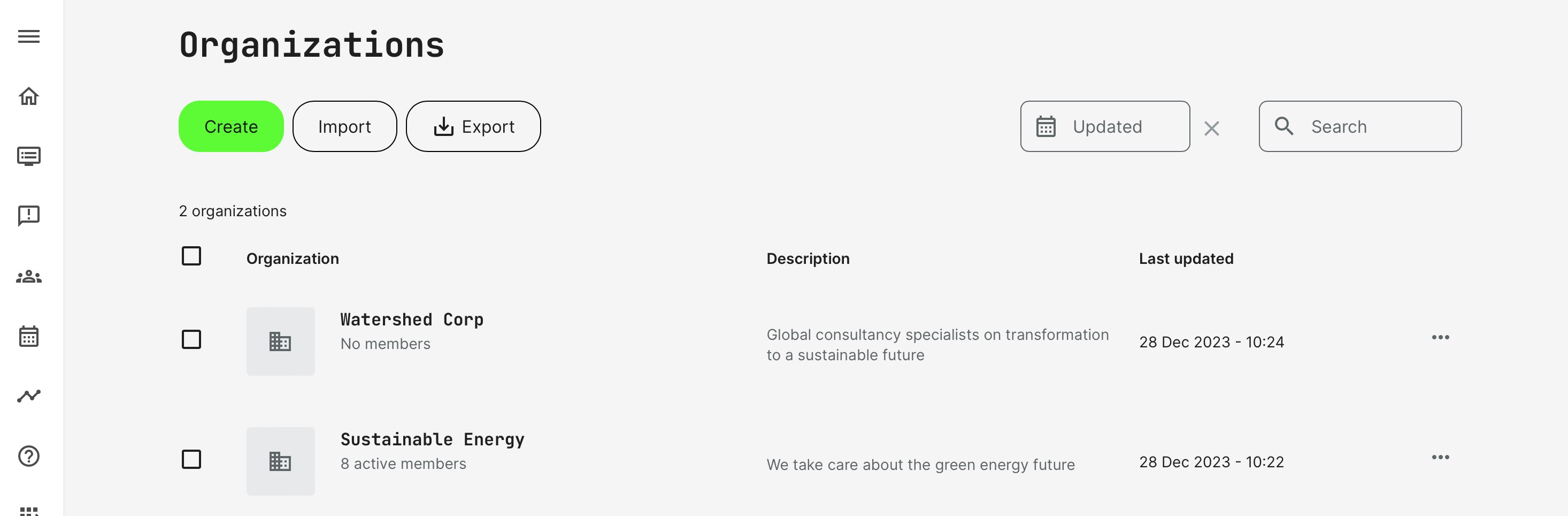
Under each organization title quantity members is displayed as information at-a-glance. This reflects active members, while blocked members are not taken into account in this view.
Managing members of an organization
Navigate by clicking the title of the organization. This will show a full list of the members. Members can be any registered user on the platform and is not restricted to any specific system role.
In all its simplicity, an organizational relation is a setting on the profile of a user. The relation itself, can be introduced through various practical processes.
The list of members show all members in this organization, including ones deeper in the hierarchical structure, for your convenience. The is called suborganizations.
- To add a member either add an already registered and existing user or create a new user. This will follow all the processes of creating new users.
- The Pen icon offers a direct way to a edit user profile from the organizational user list.
- The Trash icon remove a user from the organization and should not be confused with the regular Users list. Apart from removing the organizational relation, no other adverse actions are performed on the user.
- Use filters to find users by combinations of role, suborganization, and other options to isolate the user list. This is where you can limit the list of users to a specific suborganization. You don't need to click through multiple levels in a hierarchy to get to this list of users.
- Bulk operations can be performed using the check-boxes to select multiple users.
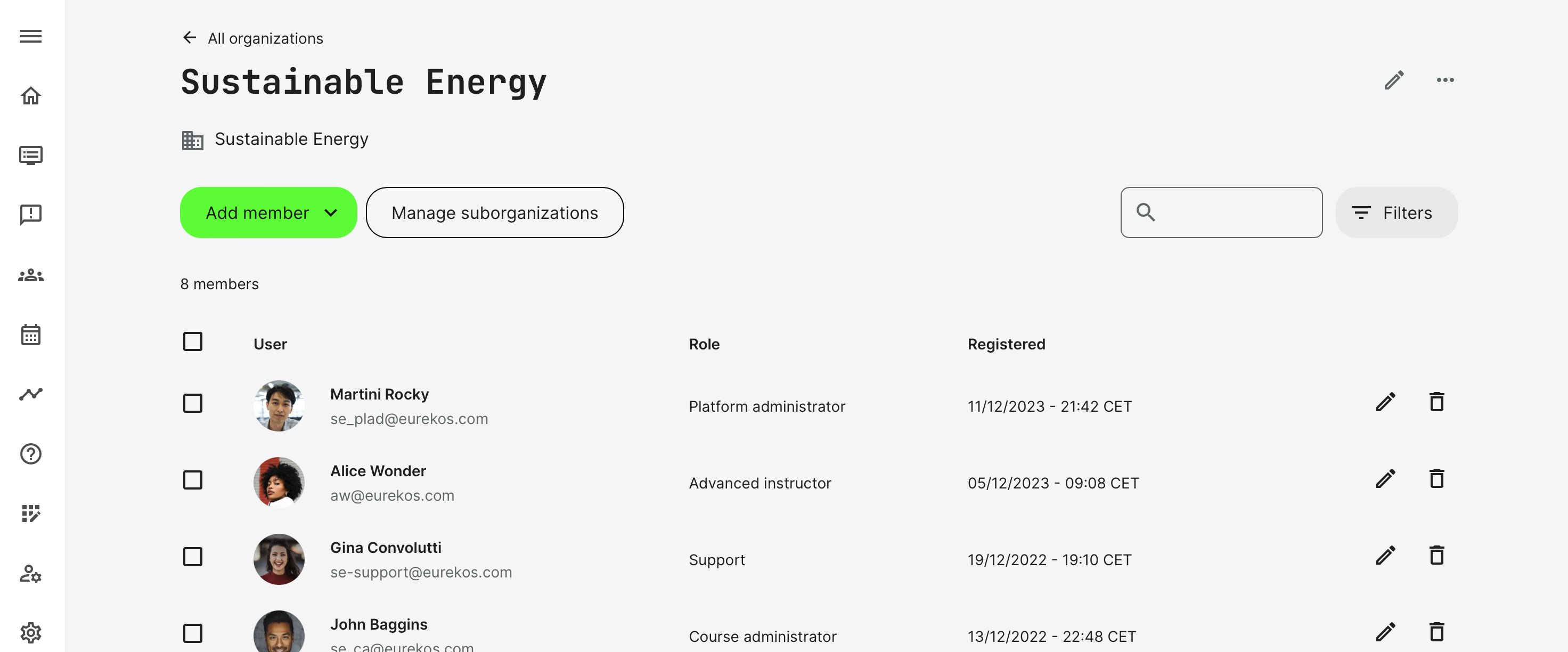
Both blocked and active members are taken into account, when listing the members of an organization.
Managing suborganizations
Suborganizations are managed similar to an organization. You can further branch out any structure by creating suborganizations within existing suborganizations.
Features of organizations
A number of powerful features follow organizations and the structure around them. These are detailed in other articles, but on an overview level, consider if these provide options that solve business requirements for you:
- Restrict certain Training Activities to specific organizations in your hierarchy.
- Organizations support member-limits to actively restrict the number of people an organization can hold - e.g., in combination with decentralized user management.
- Discount on organizational level, providing an overarching discount in percentage to anyone from a specific organization. This is accompanied by an expiry option at a certain date. The feature is designed to support corporate agreements with clients who "gets everything for free or at a discount", overruling standard pricing for anyone else.
- QR codes and manual invitations facilitate specific registration per organizations with user limits and expiry dates
- Sign-up by email-masking, which is basically a “white-list” of approved email address combinations. Advantages are two-fold:
- If xxx@orgdomain.com signs up, the user is automatically related to the appropriate organization. A good way to limit administration and let people self-service.
- This can also be combined with a pending option on sign-up. If you don't want general sign-up to be available to the world, but want to accept passthrough from certain white-listed email domains, this is the way to achieve this behavior.
Roles and permissions on organizational level
Any of the regular system security roles can be applied at any level of the organizational hierarchy. The idea of a hierarchy is also to create shutters between organizations and to organizations above any user's level in the branch.
- The Global Administrator is the role that supersedes any other role and works across the organizational restrictions.
- The Manager role is designed to monitor and manage processes within the organization and those below him.
- Any other role will be able to perform their duties with appropriate permissions within their organizational relation. E.g., user management will always exclusively be within their associated organization. The same goes for any other feature and function.
- Users can be a member of several organizations at the same time. This is necessary for some regional channel structures and within some organizational structures. In this case, it is a combined result.
Important. If the content segregation is enabled, then course content, assets, and content archives will also be segregated for everyone within the organization, following this principle.
FAQ
-
How do I check and change the organization assigned to content?
To see which organization content is assigned to:
- Go to Organizations.
- Open the Content tab.
The Content tab displays all platform content, including each item's title, content type, and assigned organization. You can also filter the list by content type to quickly find specific items.
From the Content tab, you can also change an item's assigned organization after it has been created.