Data Privacy and Anonymization - Article
Summary
Collecting personally identifiable information requires organizations to manage consent, data retention, and privacy obligations such as GDPR compliance. This article explains how Eurekos questionnaires support privacy-aware workflows through consent management, anonymization options, and automated handling of consent withdrawals.
In this article you will learn:
- How questionnaires can capture consent and manage personally identifiable information
- How anonymization settings control when submitted data is removed or anonymized
- How to handle consent withdrawal and maintain an audit trail
- How privacy-aware questionnaire design supports compliance and responsible data management
When you start collecting personally identifiable information (PII), you must address data privacy and comply with GDPR (and similar regulations). Consent management often goes beyond standard terms of service and privacy policies—for example when collecting demographic data, region-specific information, or activity-specific permissions such as photo consent or data sharing in a jointly sponsored program. In these cases, consent may need to be captured separately and tied to a specific context.
The challenge is not only collecting consent, but also managing withdrawals, presenting the right policy text at the right time, and maintaining an audit trail in case documentation is required.
This is a strong reason to use questionnaires in Eurekos: they support structured processes and automation while helping you manage consent and privacy with traceability—without relying on manual spreadsheets that are rarely complete or defensible.
Key capabilities include:
- Use questionnaires across workflows such as applications, on-demand requests, onboarding, and email-based intake, capturing the right data at the right step in the process.
- Configure anonymization rules to control when data is purged from the platform.
- Choose whether anonymization removes all submitted data, or only anonymizes who submitted it while keeping aggregated responses.
- Allow users to revoke consent, with automatic notification so administrators can take appropriate action.
We recommend using a shared email inbox for consent withdrawal notifications—accessible to all relevant administrators—to ensure requests are handled promptly.
Schedule Anonymization
The anonymization schedule is configured on the questionnaire itself (Course Administration → Questionnaires → [list of questionnaires]). Find the relevant questionnaire and select [Edit] to define its anonymization schedule.
This feature allows for automatic anonymization of respondents, or outright deletion of both respondents and their response data, including file uploads. When you check the box, you must decide to either Anonymous user data only (answers are stored) or Anonymize user data and responses (all data is deleted):
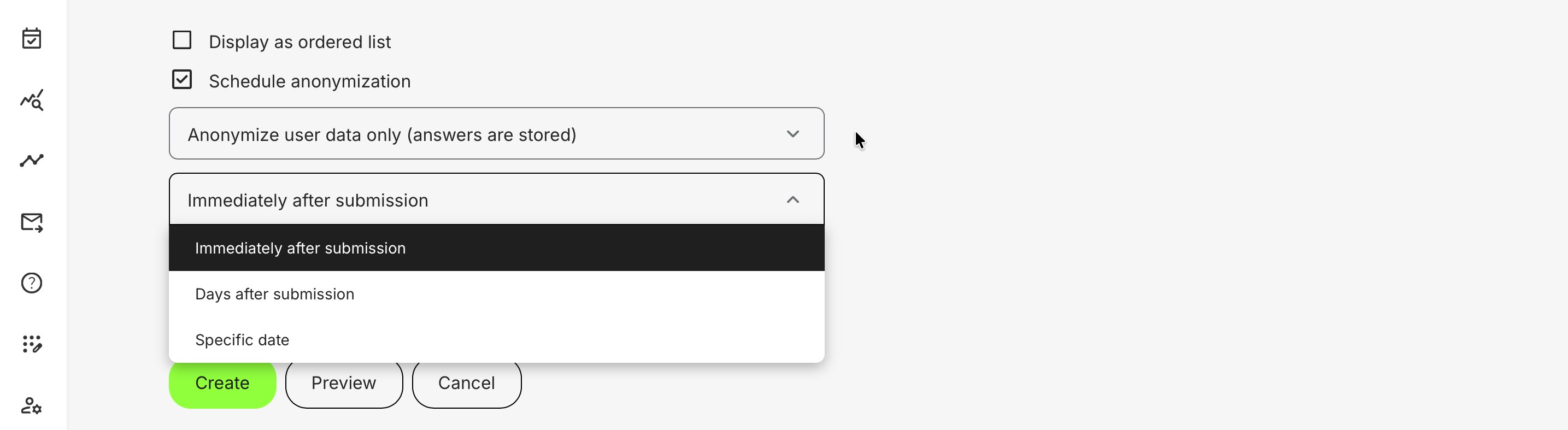
This option removes profile-linked identifiers such as name and email, so you can no longer identify who submitted the response. However, if your questionnaire asks for personal details or file uploads (e.g., a CV or accreditation), the submission content itself may still contain PII. Plan your questions accordingly.
- Immediately after submission — removes profile-linked identifiers right away. (This can also be configured separately as its own setting)
- Days after submission — removes identifiers after a specified number of days. Useful for meeting retention policies while allowing time to review the responses
- Specific date — removes identifiers on a chosen date and time, regardless of when the submission was made. Useful for fixed timelines, such as application windows and selection processes
If your process contains PII or even sensitive data and you have no valid reason to keep the data, legislation will most likely require you to remove it. This is also best practice by the principle of "data privacy by design". In this case, schedule for a full data purge.
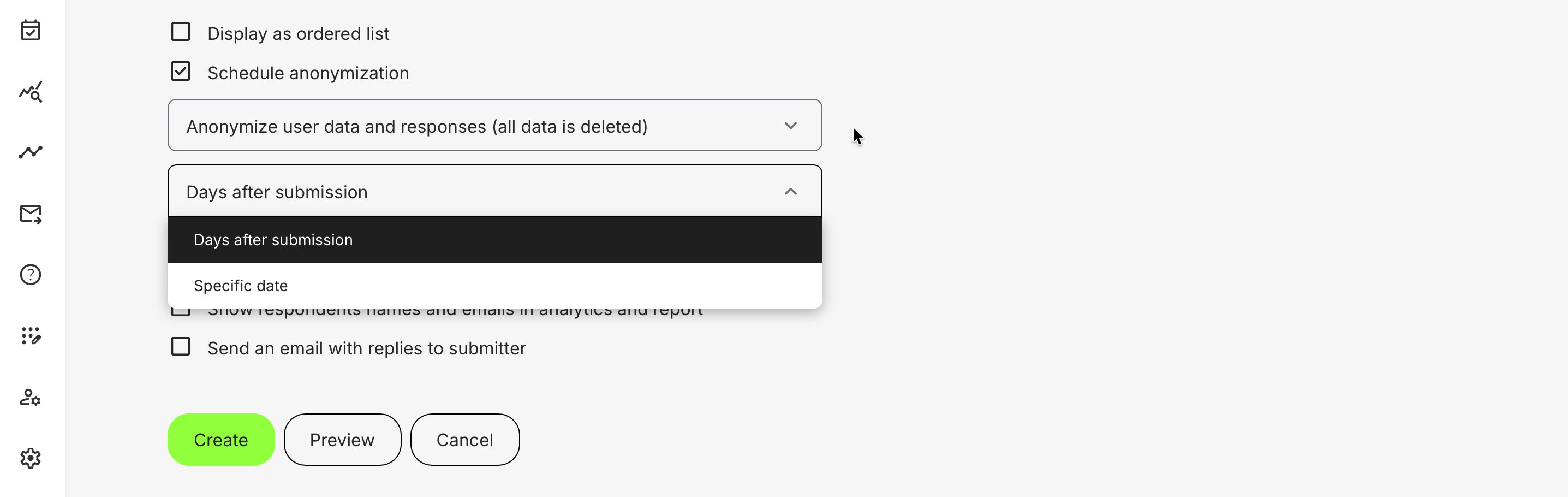
- Days after submission — removes all data after a specified number of days. Useful for meeting retention policies while allowing time to review the responses
- Specific date — removes all data on a chosen date and time, regardless of when the submission was made. Useful for fixed timelines, such as application windows and selection processes
This enables your organization to collect valuable user information and feedback while maintaining compliance and peace of mind—because privacy controls and related processes can be automated and applied consistently across multiple programs and workflows.