Setting Up Incentives - Article
Summary
Incentives configuration allows administrators to design structured reward programs that encourage engagement and reinforce learning behaviors. By combining general settings, earning rules, badges, and expiry schedules, organizations can create fair and motivating incentive systems aligned with business goals.
In this article you will learn:
- How to configure incentives using general settings and participation rules
- How earning rules define which behaviors generate points
- How badges recognize milestones and visible progress
- How expiry schedules balance motivation and long-term program sustainability
How Incentives Configuration Fits Together
This article guides administrators through setting up Incentives with both technical steps and business context, helping you understand not just how to configure incentives—but why you might choose one setup over another.
Incentives can support very different goals: partner enablement, customer loyalty, internal motivation, or campaign-based engagement. The configuration choices you make directly affect learner behavior, operational effort, and how meaningful rewards feel over time.
For this reason, the guide follows a recommended configuration sequence, explaining not only how to set up each element but why it matters and what outcomes to expect.
The first steps focus on four foundational areas:
- General settings define who can participate and how visible incentives are across the platform
- Rules determine which behaviors are rewarded and at what scale
- Badges convert accumulated effort into visible recognition and milestones
- Expiry schedules introduce urgency, seasonality, and long-term balance control
Each decision builds on the previous one. Starting with a clear use case—rather than configuring features in isolation—leads to incentive programs that are coherent, fair, and effective for both learners and administrators.
Step 1 — Enable Incentives in General Settings
Go to Settings → General and locate the Incentives configuration. Enabling Incentives unlocks the core controls that define who the incentive program is for and how is it experienced across the platform. Together, these choices answer a fundamental design question: “Who participates in this incentive program, and how visible and transactional should it be?”
These initial settings establish the foundation of your incentive strategy:
- Scope: Choose whether Incentives apply platform-wide or are limited to specific organizations. This determines whether points, badges, and rewards operate as a shared ecosystem or as separate, localized programs
- Leaderboard: Decide whether a leaderboard is available and who can see it (e.g. participants, instructors, or specific roles). Leaderboards introduce visibility and competition and should be enabled only when comparison is meaningful and appropriate for the audience
- Shop: Control whether the Incentives shop is available and which roles can access it. The shop defines where points are redeemed and should align with whether rewards are intended for learners, partners, or internal roles
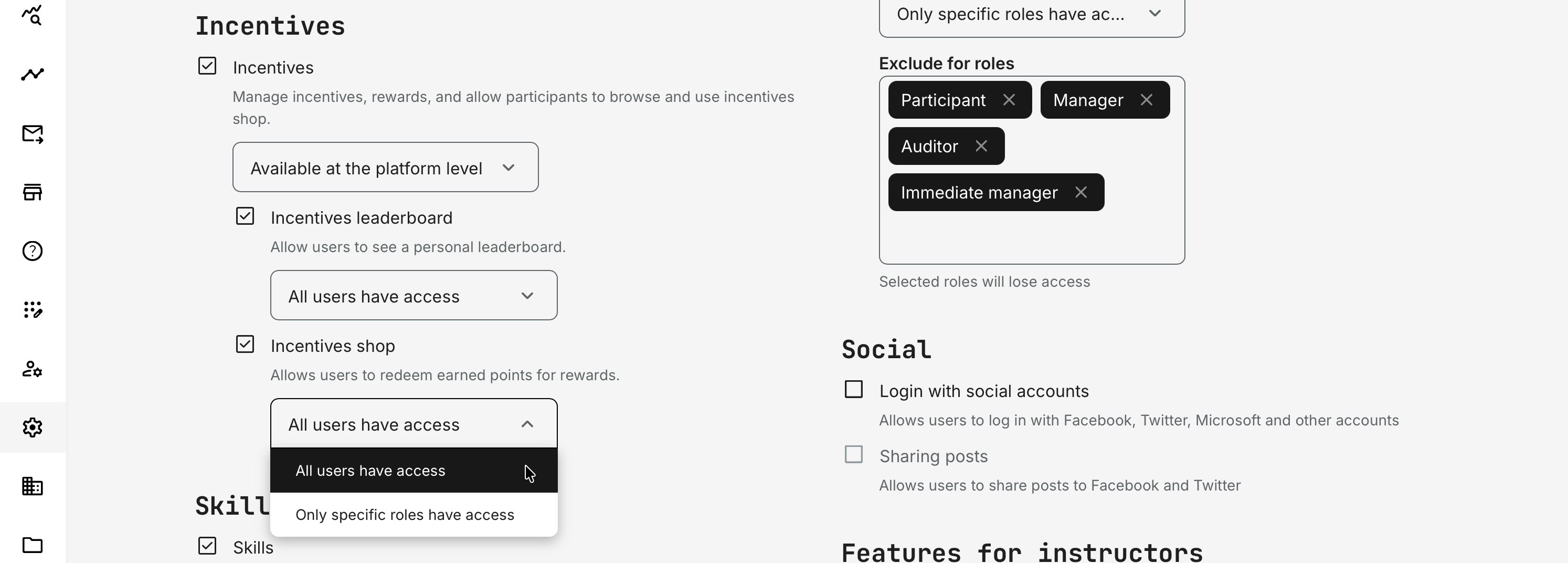
Platform-level Incentives
When Incentives are enabled at the platform level, all eligible users participate in a single, shared incentive economy. Points, badges, and rewards are earned and interpreted consistently across the entire audience.
This model works best when:
- The target audience is relatively homogeneous in role, access, and expectations
- Rewards represent brand value, recognition, or loyalty, rather than localized performance
- Consistency and visibility matter more than regional or organizational variation
In these scenarios, points function as a shared currency and badges become globally meaningful indicators of engagement, achievement, or expertise.
The trade-off is reduced flexibility. Administrators must design rules carefully to ensure that differences in role, access to content, or training volume do not create unintended advantages. In return, platform-level incentives offer simpler governance and stronger brand alignment.
Organization-level Incentives
When Incentives are configured per organization, each organization effectively operates its own incentive program.
This approach is typically chosen when:
- Incentives support local initiatives or performance goals, especially for external audiences
- Organizations have different KPIs, budgets, reward models, or campaign timelines
- Cross-organization comparison is not required or not meaningful
Organization-level incentives allow administrators to tailor point values, reward availability, expiry schedules, and campaigns to specific business contexts—such as regions, partners, or teams. Enable Incentives for each organization via Organizations → More (⋯) → Settings → Incentives within the contextual menu for that specific organization.
The trade-off is fragmentation: points and badges lose significance outside their local scope. This is often intentional and desirable when incentives are designed to drive behavior within a defined context, rather than signal value across the entire platform.
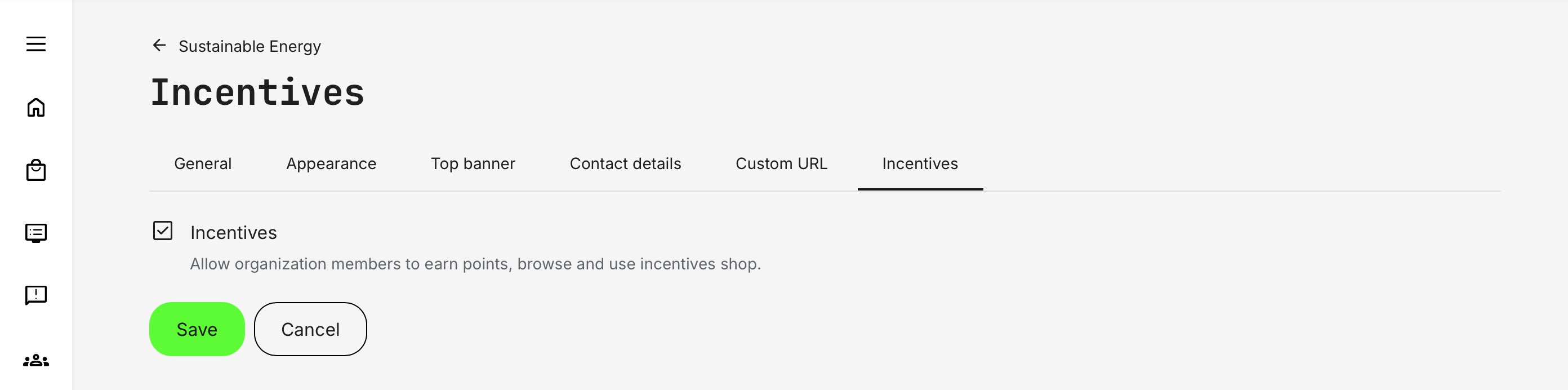
If you are running proof-of-concept programs, time-bound campaigns, or localized initiatives rather than an “always-on” incentive model, organization-level incentives are usually the best starting point.
Leaderboards — Competition, Context, and Privacy
Leaderboards introduce visibility and comparison, making incentives social and competitive by nature. When used thoughtfully, they can significantly increase engagement—but they also raise privacy and perception considerations, especially in mixed or external audiences.
Enable leaderboards when:
- Friendly competition is culturally accepted and encouraged
- Visibility of achievement supports motivation and recognition
- Participants are comfortable being compared within a known peer group
Use caution or restrict leaderboards when:
- Audiences span multiple organizations, regions, or roles with different expectations
- Public comparison could be perceived as unfair, sensitive, or intrusive
- Privacy considerations outweigh the benefits of public ranking
Applying organizational restrictions addresses both engagement and privacy concerns. Limiting leaderboards to the user’s own organization ensures that participants are only compared with peers they are likely to know and relate to. This reduces hesitation, avoids unintended exposure across customer or partner boundaries, and aligns better with common organizational privacy expectations.
In practice, organization-scoped leaderboards strike a balance: they preserve the motivational benefits of competition while remaining acceptable from a governance, privacy, and brand perspective—making leaderboards far less prohibitive for many organizations.
Role Exclusions and Trust
Incentives rely heavily on perceived fairness. Roles such as administrators, instructors, or auditors often interact with training in ways that are not comparable to learner participation. This is less about access control and more about protecting the integrity of the program.
Excluding specific roles (such as administrators, testers, or instructors) further improves relevance and trust by keeping rankings focused on the intended audience.
The Shop — Recognition vs. Rewards
The native shop turns points into tangible value. Enabling it is less a technical choice and more a strategic one: what kind of motivation are you designing for?
Incentives can work perfectly well without a shop. Points and badges alone can drive behavior when recognition, visibility, or status matter more than material rewards. In this setup, users still earn points, appear on leaderboards, and collect badges—but there is nothing to redeem.
Enable the shop when:
- You offer physical, digital, or voucher-based rewards
- You are prepared to manage fulfillment (shipping, codes, follow-up)
- Rewards are a clear part of the value proposition for the audience
Avoid enabling the shop when:
- Incentives are primarily symbolic or reputation-based
- Points are used to unlock status, access, or recognition
- You want to keep operational overhead to a minimum
Choosing whether to enable the shop defines whether your incentive program is about recognition, rewards, or a deliberate combination of both.
Step 2 — Defining What Is Rewarded (Rules)
With the scope defined, the next step is deciding what actions earn point. Rules are the backbone of the incentive system. They translate abstract business goals into concrete, repeatable behaviors and each rule should answer a simple but essential question: “What do we want participants to prioritize?”
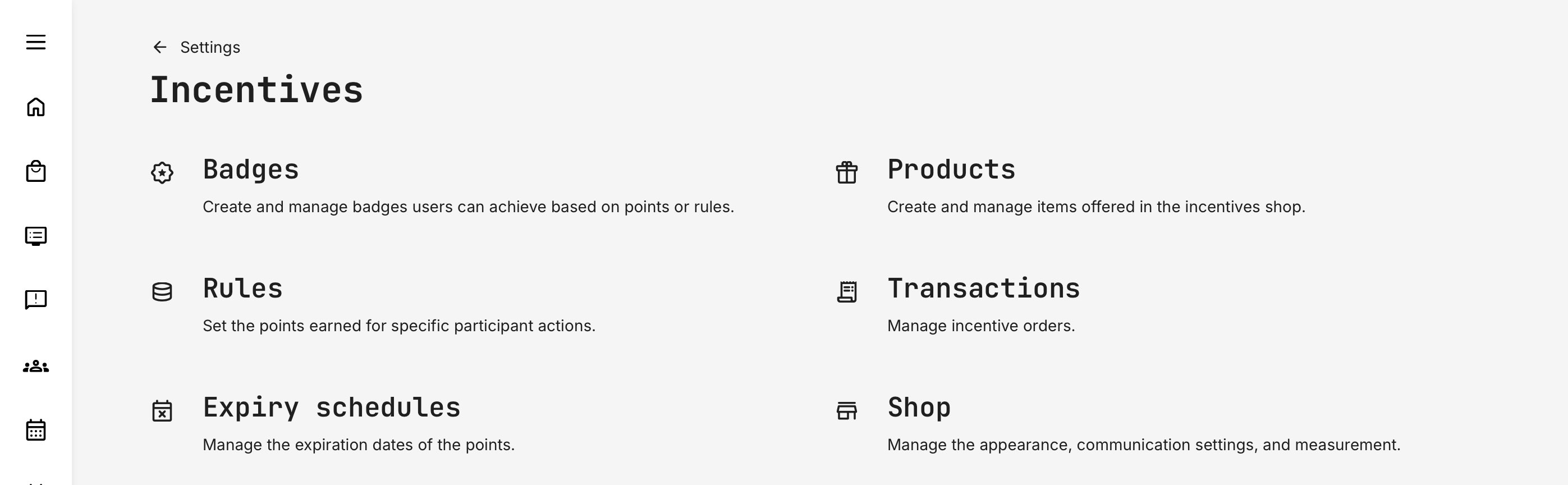
Go to Settings → Incentives → Rules (the rules page assigns points to predefined platform actions).
Incentive Rules and Point Logic — How Points Are Earned
Incentive rules define which participant actions are rewarded with points. Each rule represents a meaningful learning or engagement milestone—such as completing training, earning a certificate, or submitting feedback.
Rules are global: once enabled, they apply across the entire platform for all eligible users and content. This makes them powerful, but also important to calibrate carefully. The number of points assigned to each rule should reflect:
- The effort required to trigger it
- The volume of content users have access to
- The business importance of the behavior you want to encourage
Points are awarded at the moment the triggering action occurs. Changes to point values only affect future actions—previously earned points are never recalculated.
Terminology note: “Points” can be renamed using platform translations (e.g. coins, credits, tokens) to better match your business or brand language.
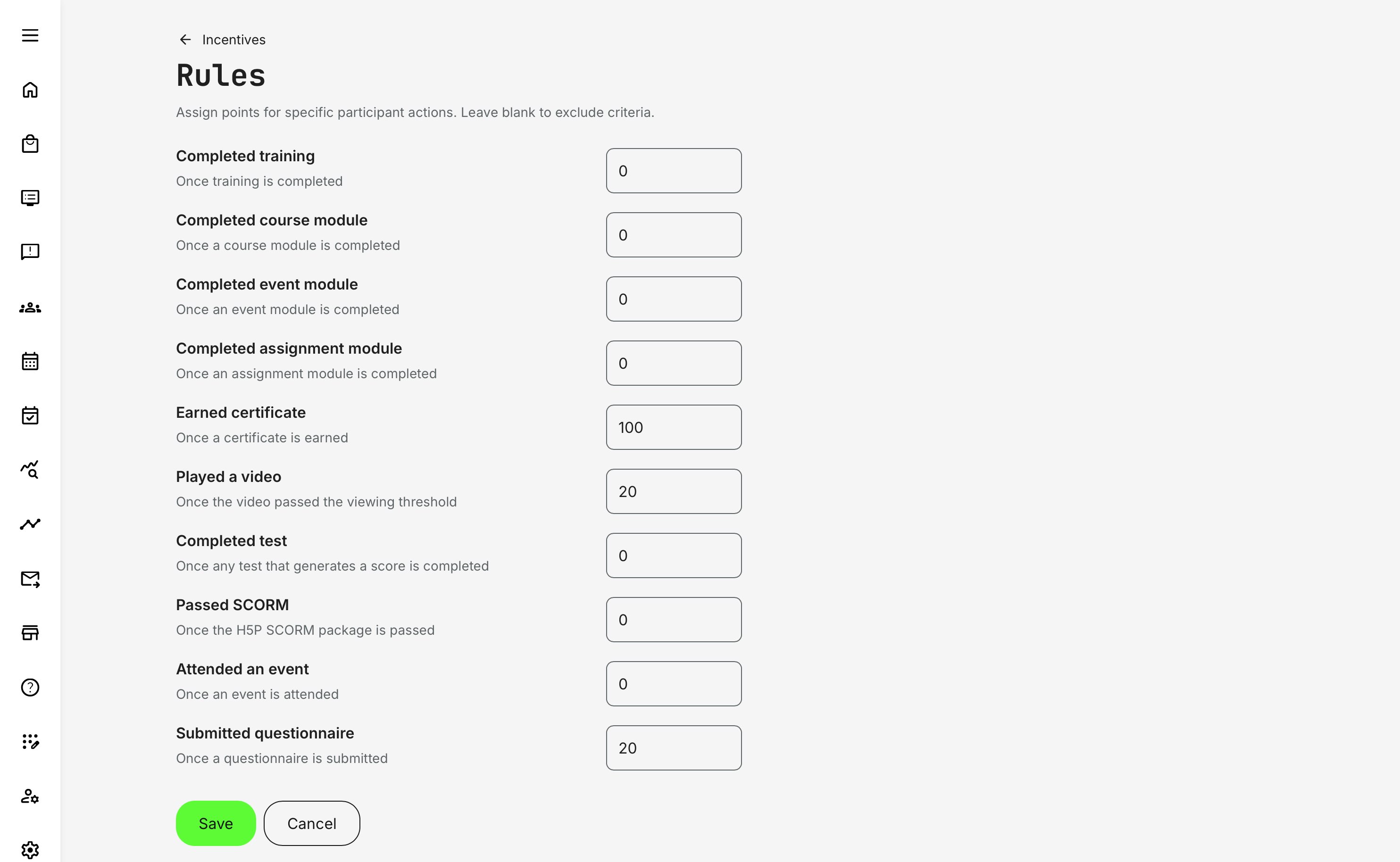
Incentive Rules — Actions and Triggers
The table below shows when each rule is triggered, helping administrators select the right rules without unintentionally inflating points or overlapping outcomes.
| Rule | Triggered When |
|---|---|
| Completed training | The entire activity is marked Completed according to activity completion rules (schedule, certificate, or content completion logic) |
| Completed course module | A course module reaches 100% completion (pages, videos, tests completed as defined) |
| Completed event module | An event module is completed (typically after attendance is marked or end date passes, depending on configuration) |
| Completed assignment module | An assignment is submitted and marked complete according to assignment rules |
| Earned certificate | A certificate is issued to the participant (manual or automatic issuance). Recertification issues points as well |
| Played a video | A video passes the configured viewing threshold (default: 50% viewed) |
| Completed test | Any test or assessment that produces a score is completed (regardless of pass/fail unless otherwise configured) |
| Passed SCORM | The H5P SCORM package reports a Passed status (or Completed mapped to Passed, if configured) |
| Attended an event | Attendance is explicitly marked for the participant |
| Submitted questionnaire | A questionnaire submission is completed and recorded |
Design Guidance: Avoid Point Inflation
Because rules apply across all content, assigning points is not just about importance—it’s about scale.
For example:
- If users have access to many videos, assigning points to video plays should be modest
- Certificates or completed trainings often justify higher point values, as they represent aggregated effort
- Questionnaires and attendance rewards should align with whether feedback and presence are core behaviors or secondary signals
Well-balanced rules ensure that:
- Points feel earned, not automatic
- Rewards remain aspirational, not guaranteed
- Incentives support engagement without distorting learning priorities
This balance is what turns incentives into a sustainable gamification system, rather than a points generator. Leaving a rule empty is a deliberate choice — it tells the system (and the learner) that the action is expected, but not incentivized.
Make the Incentive Program Explicit for Learners
Incentive programs only work if participants understand that they exist, how they work, and why they should care. You cannot assume learners will discover this on their own—especially when incentives are layered on top of learning activities rather than being the learning itself.
A common and effective approach is to introduce the incentive program explicitly at login, particularly for the target audience it applies to.
Recommended Practice: Simple Program Introduction
One of the most effective ways to onboard users is a short explainer video or message shown when learners first log in (or when a campaign starts). This introduction should clearly cover:
- What the incentive program is for
- How points are earned (at a high level, not every rule)
- What points can be redeemed for—or what badges represent
- Where users can see their points, rewards, and progress
- Any key conditions (time limits, expirations, eligibility)
This sets expectations early and prevents confusion later—especially around why points appear, reset, or expire.
Keep It Simple — for You and for Them
From both a learning and operational perspective, simplicity wins:
- Learners will not intuitively understand complex rule combinations
- Overly granular point logic is difficult to explain and harder to trust
- Clear, predictable rewards reinforce motivation better than clever mechanics
Design incentive programs that are:
- Easy to explain in under a minute
- Aligned with a small number of meaningful actions
- Tailored to the specific audience and program goals
If a learner cannot quickly answer “What do I need to do, and what do I get?”, the program is likely too complex. Well-designed incentives feel intuitive, transparent, and purposeful—supporting engagement without distracting from learning.
How Users Experience Points
Users receive on-screen notifications when they earn points, including what action triggered the reward. This immediate feedback is an important part of the incentive experience.
Notifications are delivered asynchronously and may appear with a short delay. If a learner closes the browser or leaves the platform before the message is shown, the notification will appear in a later session. Regardless, users can always track their point balance in the platform header and on their profile, ensuring full transparency and continuity.
Step 3 — Adding Recognition Through Badges
Badges shift motivation from “earning more” to “reaching something.” They represent accumulated achievements and are especially effective for marking milestones and long-term progress. When designed intentionally, badges help learners understand where they are in a journey, not just how many points they have collected.
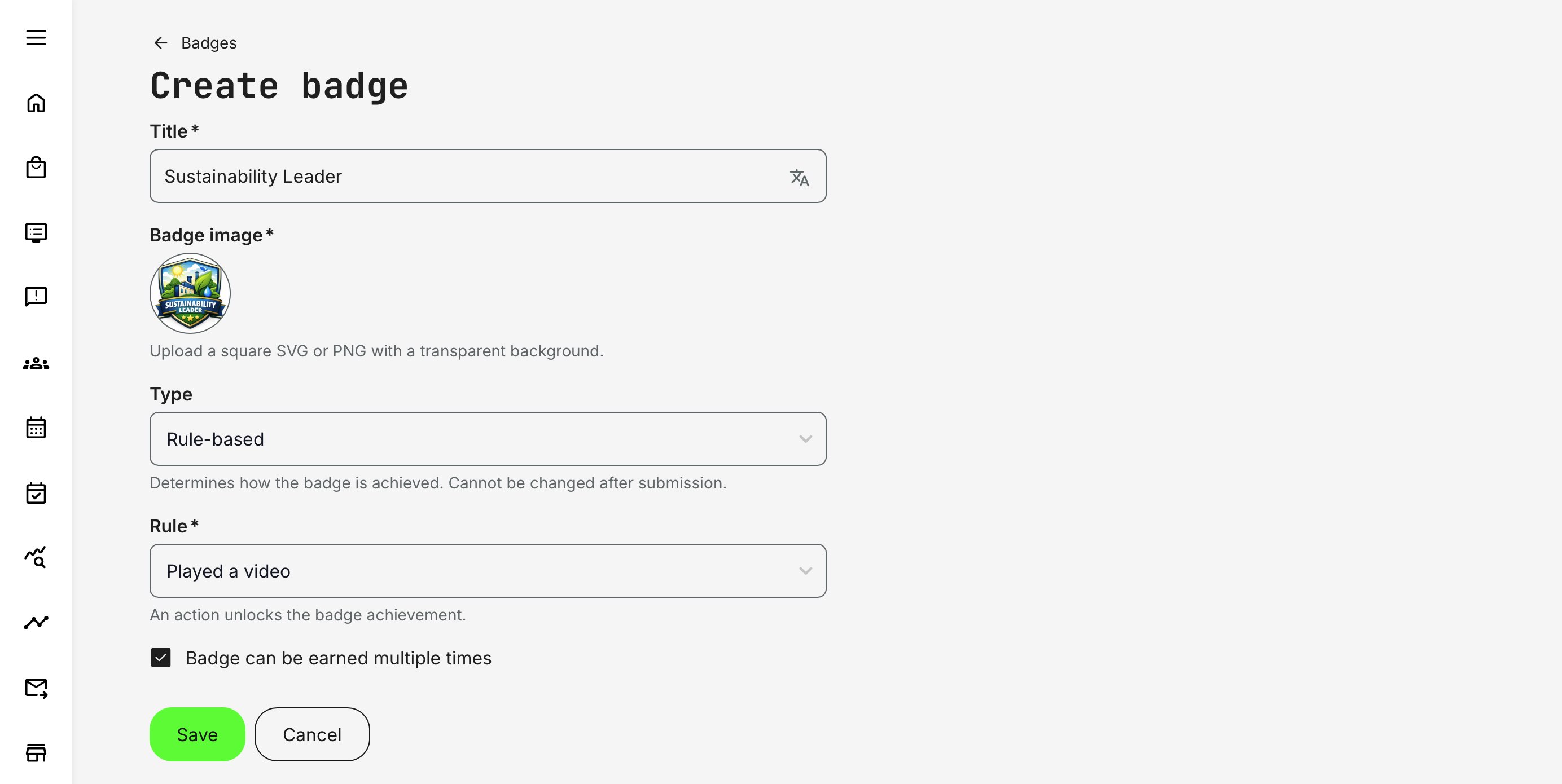
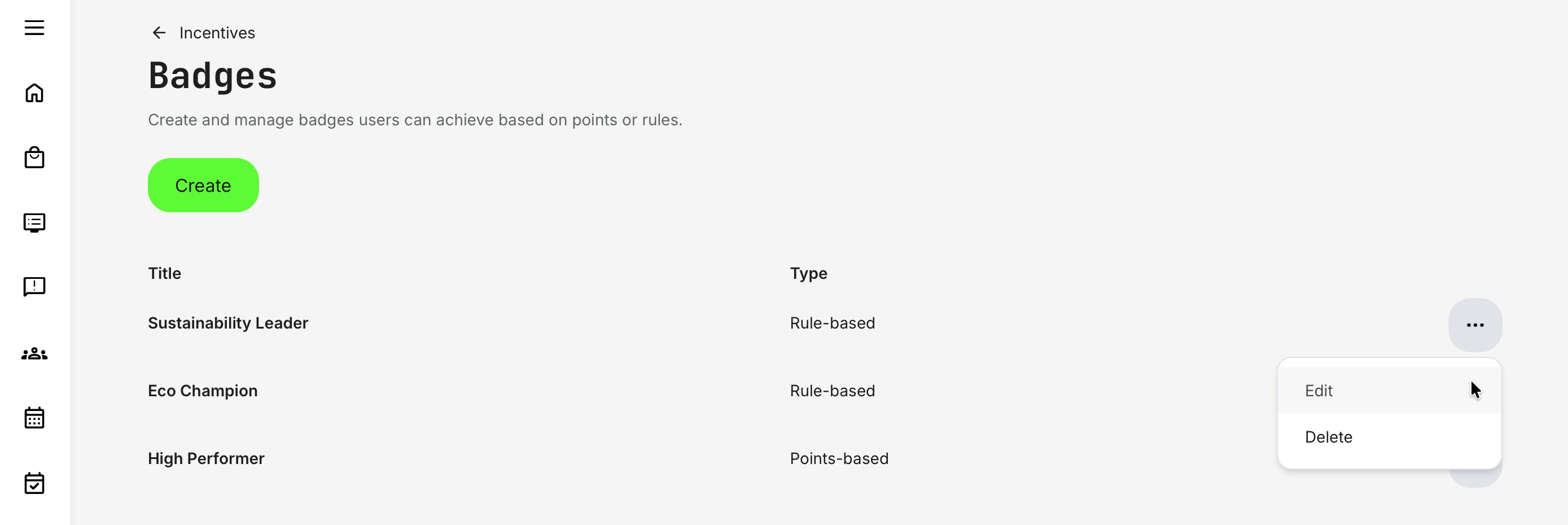
To configure badges, go to Settings → Incentives → Badges and click [Create]. Once multiple badges are set up, they can be managed from the Badge Overview, which provides a clear list of badge titles and types for easy administration.
When creating a badge, administrators define:
- Title: The public-facing name of the badge, shown to users when it is earned
- Badge image: A square image (SVG or PNG). Transparent backgrounds work best for consistent display
- Type: Points-based (earned by accumulating points) or Rule-based (earned when a specific action is completed, using the same rules as point assignment)
- Badge score: Available for points-based badges only. Defines the point threshold required to earn the badge
An optional setting allows a badge to be earned multiple times. When enabled, each achievement is counted and reflected in the user profile and leaderboards. This is particularly useful for long-running programs or scenarios where tangible rewards are limited or not used. This option is available for both badge types.
Badges can function independently of rewards, providing recognition even when no shop or products are enabled. Used on their own, they still reinforce progress, achievement, and engagement across the platform.
Points-Based Badges and Tiered Progression
Points-based badges reward accumulated effort over time rather than a single action. A badge is configured with a point threshold (for example, 100 points), which represents a meaningful level of engagement in your incentive program.
- Single-award badge: The badge is earned once when the user reaches the threshold and best used for clear milestones such as “Qualified Partner” or “Program Completion.”
- Repeatable badge (tiered progression): When “Badge can be earned multiple times” is enabled, the badge becomes a tiered progression marker. E.g., a badge threshold is 100 points. The user earns points continuously:
- At 100 points → badge is awarded (1st time)
- At 200 points → badge is awarded again (2nd time)
- At 300 points → badge is awarded again (3rd time), and so on
Points are not reset after earning the badge. Instead, each new threshold crossing awards the badge again, signaling sustained engagement rather than a one-off achievement.
Tiered point-based badges are especially effective when you want to:
- Encourage ongoing participation, not just completion
- Reward consistency and volume of effort
- Create visible progression without forcing complex rule logic
- Support long-running programs, seasonal campaigns, or recurring enablement
Rule-Based Badges — Targeted Recognition
Rule-based badges are awarded when a specific action or condition is met, rather than through accumulated points. They are ideal for recognizing clear milestones, qualifications, or behaviors that matter independently of overall engagement volume.
Unlike points-based badges, rule-based badges are typically earned once per rule occurrence and communicate what was achieved, not how much effort was invested over time.
Use rule-based badges when you want to:
- Mark formal achievements (e.g. certification earned, event attended)
- Signal readiness, qualification, or compliance
- Reward specific actions without encouraging point farming
- Keep badge meaning explicit and easy to understand
Rule-based badges work best when they are intentional and limited, reinforcing clarity rather than noise.
Rule-Based Badge Triggers — Completion Outcomes Reference
The table below shows when each rule is triggered, helping administrators select the right rules without unintentionally inflating badges or overlapping outcomes.
| Rule | Triggered When |
|---|---|
| Completed training | The entire activity is marked Completed according to activity completion rules (schedule, certificate, or content completion logic) |
| Completed course module | A course module reaches 100% completion (pages, videos, tests completed as defined) |
| Completed event module | An event module is completed (typically after attendance is marked or end date passes, depending on configuration) |
| Completed assignment module | An assignment is submitted and marked complete according to assignment rules |
| Earned certificate | A certificate is issued to the participant (manual or automatic issuance). Recertification issues a badge as well |
| Played a video | A video passes the configured viewing threshold (default: 50% viewed) |
| Completed test | Any test or assessment that produces a score is completed (regardless of pass/fail unless otherwise configured) |
| Passed SCORM | The H5P SCORM package reports a Passed status (or Completed mapped to Passed, if configured) |
| Attended an event | Attendance is explicitly marked for the participant |
| Submitted questionnaire | A questionnaire submission is completed and recorded |
Important context
Rules are global and apply across the platform. The same action can be triggered many times depending on how much content a learner has access to. Choose rules deliberately to ensure badges reflect meaningful outcomes—not sheer volume.
Together with points-based badges, rule-based badges provide clarity and structure, ensuring learners understand what matters in your incentive program—not just how to accumulate points.
Managing Badges
Once a badge is created, administrators can manage it from the Badge Overview (Settings → Incentives → Badges).
- Visual elements such as the badge title and image can be updated without affecting previously earned badges
- However, core logic settings—including badge type (points-based or rule-based), earning criteria, and score thresholds—should be treated as fixed once the badge is in use, as changing them can impact consistency and interpretation of achievements.
In practice, if earning logic needs to change significantly, it is recommended to create a new badge rather than modifying an existing one, preserving historical accuracy and learner trust.
Points-Based vs Rule-Based Badges — Comparison Overview
| Aspect | Points-Based Badges | Rule-Based Badges |
|---|---|---|
| What they represent | Cumulative effort and ongoing engagement | Completion of a specific requirement or milestone |
| How they are earned | By reaching defined point thresholds | By completing a defined action or condition |
| Trigger type | Accumulation over time | Immediate, single-event trigger |
| Progress visibility | Gradual progression toward next badge tier | Binary: earned or not earned |
| Learner question answered | “How far have I progressed?” | “Have I completed this requirement?” |
| Typical timing | Earned after sustained activity | Earned immediately upon action |
| Dependency on volume | Depends on number of rewarded actions available | Independent of overall activity volume |
| Use across campaigns | Well suited for long-running or recurring programs | Best for fixed requirements or checkpoints |
| Sensitivity to rule changes | Thresholds affect future progress only | Rules apply only to future completions |
| Role in gamification | Motivation, momentum, friendly competition | Validation, recognition, qualification |
| Best used for | Engagement, loyalty, prioritization, participation | Compliance, accreditation, eligibility |
| Common examples | Bronze / Silver / Gold tiers | “Certified”, “Onboarding Complete”, “Event Attended” |
| Works well with | Leaderboards, shops, seasonal campaigns | Certificates, audits, access control |
| Risk if misused | Over-inflated points if rules are too broad | Badge fatigue if too many are created |
Step 4: Configure Expiry Schedules — Driving Momentum
Expiry schedules define how long points remain valid and when they reset. This is a critical part of incentive program design because it directly influences learner behavior over time. Without expiry, points tend to accumulate passively; with expiry, incentives become time-bound and action-oriented.
From a business perspective, expiry schedules are what turn incentives into campaigns, seasons, or recurring engagement cycles rather than a one-time setup.
An expiry schedule determines:
- Which users are affected (the target audience)
- When their points expire (once or on a recurring basis)
- Whether users are notified before or after a reset
When points expire, they are removed from the user’s balance, are no longer visible, and cannot be redeemed. This applies only to future balances; historical transactions remain intact for reporting and audit purposes.
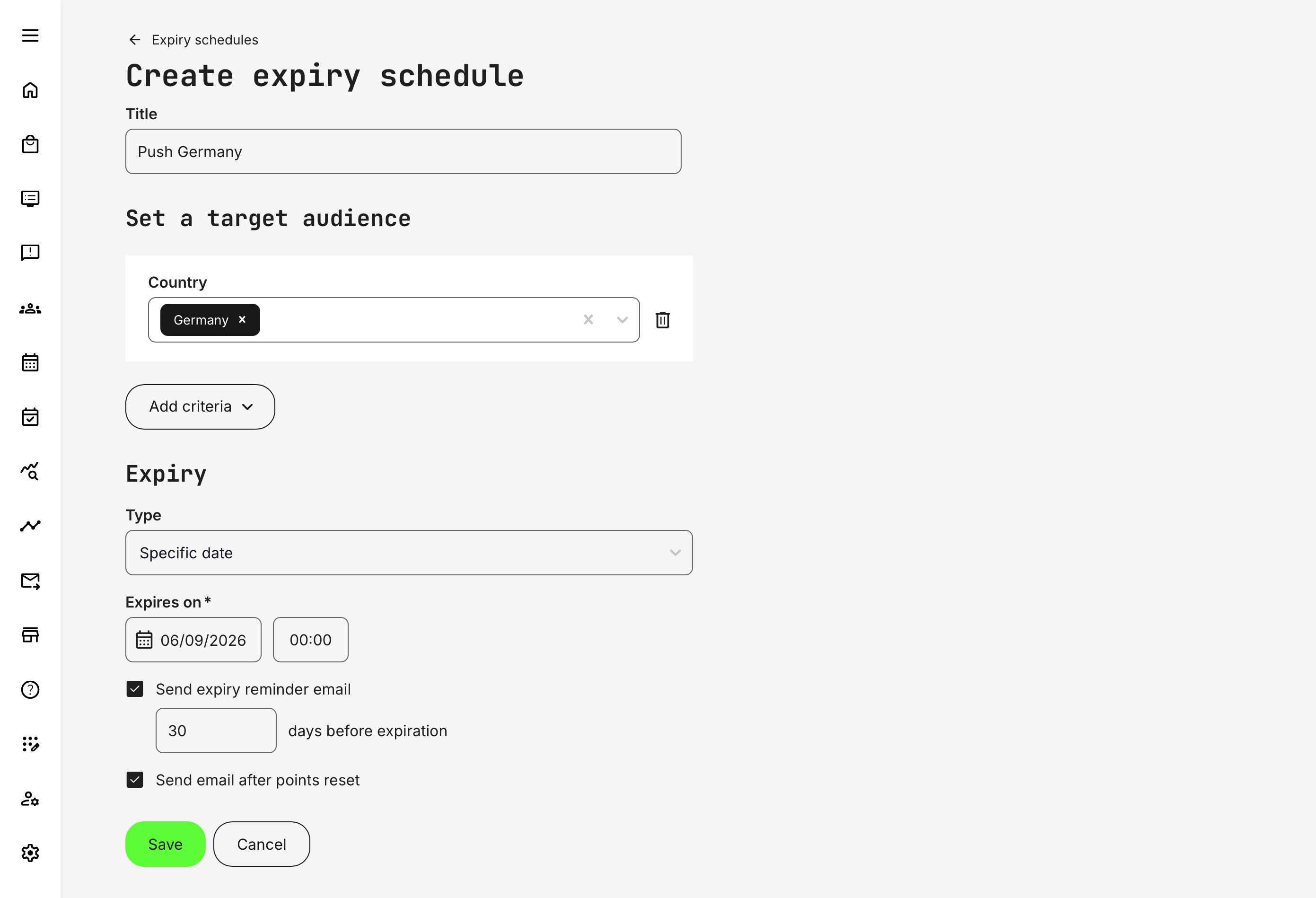
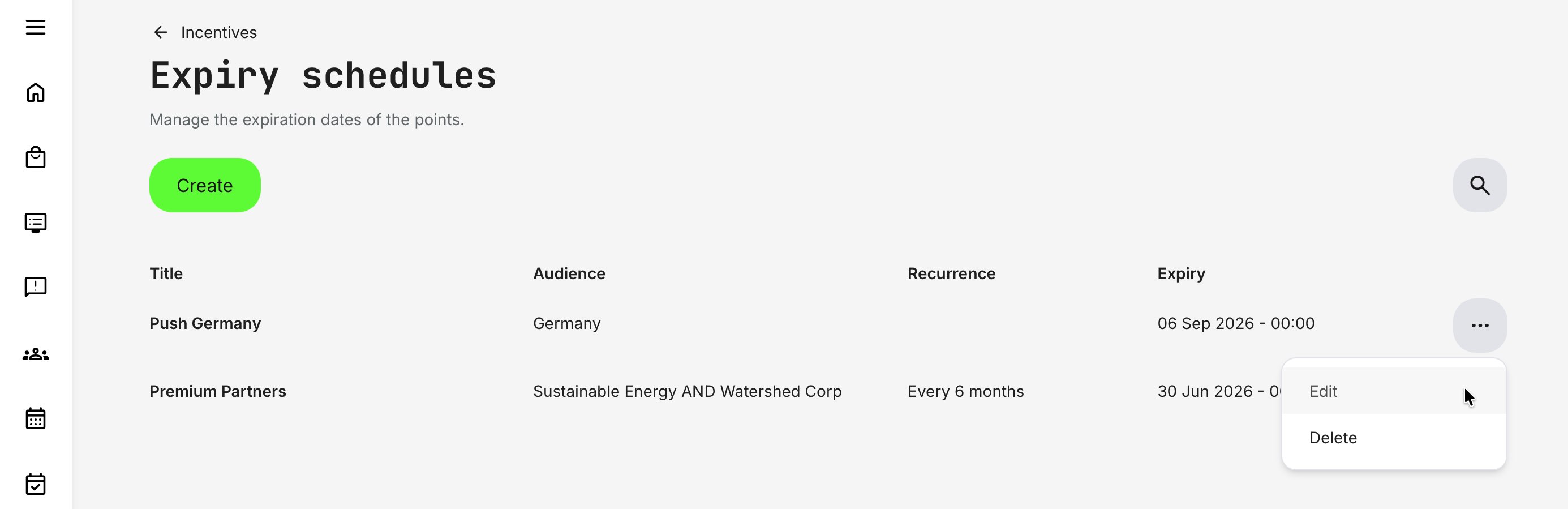
Go to Settings → Incentives → Expiry schedules and click [Create]. Once multiple expiry schedules are in place, they can be managed from the Expiry Schedules overview, which provides a clear list of schedules, their titles, target audiences, and expiration logic for ongoing administration.
When creating an expiry schedule, administrators define:
- Title: The title is internal but important. Use it to clearly describe why the schedule exists, for example: “Q4 Partner Campaign”, “Annual Certification Cycle”, or “Premium Resellers – Biannual Reset”. Clear naming helps avoid overlap and supports long-term program management.
- Target audience: Expiry schedules are audience-specific, allowing point resets to align with real business structures such as regions, organizations, or roles. This ensures that expiry logic supports the operational and commercial context of each audience.
- Expiry model—Two models are available:
- Specific date, suitable for one-off campaigns or fixed initiatives
- Recurring expiration, designed for ongoing incentive programs that reset on a defined cadence (for example quarterly or annually)
In addition, communication can be automated to support engagement and transparency. Administrators can enable:
- Expiry reminder notifications sent before points expire with—configurable schedule
- Confirmation emails sent after points are reset
These notifications help create urgency, reduce confusion, and reinforce the intent of the incentive program—turning expiry from a technical reset into a clear and predictable part of the learner experience.
These emails are configured and translated under Settings → Email sending → System emails → Incentives). From here, you can adapt the standard messages to match your tone of voice, branding, and the specific communication you want to deliver to your audience.
Customizing these emails allows you to clearly explain why points expire, when it happens, and what actions learners can take—reinforcing trust, transparency, and engagement across your incentive program.
Target Audience and Logic
Expiry schedules apply to specific audiences, using the same criteria-based logic as other areas of the platform.
Administrators define the audience by adding one or more criteria (for example, Organization, Country, Role, or Group):
- Within each criterion, selecting multiple values uses OR logic (e.g. Organization = Partner A or Partner B)
- Between different criteria, administrators explicitly choose AND or OR logic (e.g. Organization = Partner A and Country = Germany)
This makes it possible to scope expiry schedules precisely—from broad audience groups to tightly defined segments—while using a consistent and familiar configuration model.
Audience logic should be designed with care: broader OR-based selections increase reach, while AND-based combinations narrow eligibility and reduce unintended resets.
Design Guidance: When and How to Use Expiry Schedules
Expiry schedules are a strategic tool—not a technical necessity. They shape behavior, set expectations, and signal how incentives relate to real business cycles. Used well, expiry reinforces momentum and relevance; used poorly, it can undermine trust or motivation.
Use Expiry Schedules When:
- You want to create urgency and momentum—Time-bound points encourage action and help prevent “I’ll do it later” behavior, especially in competitive or fast-moving environments
- Incentives align with commercial, product, or partner cycles—Many external programs reset alongside product launches, sales quarters, certification renewals, or seasonal campaigns. In these cases, expiry mirrors how the business actually operates
- Rewards are limited, costly, or operationally constrained—Expiry helps control liability and fulfillment volume by ensuring rewards are earned and redeemed within a predictable timeframe
- You want to avoid dormant or inflated point balances—Resetting points keeps the incentive economy meaningful and prevents long-term accumulation from distorting engagement or perceived value
Be Cautious With Expiry Schedules When:
- Incentives are primarily symbolic or recognition-based—If points represent status, trust, or long-term expertise, expiry may feel arbitrary rather than motivating
- Users earn points infrequently—In low-volume or niche programs, expiry can feel punitive if participants have limited opportunities to earn
- The learning journey is long-horizon or cumulative by design—Programs focused on mastery, progression, or professional development often benefit from persistence rather than reset
A Balanced Approach
A common and effective pattern is to combine recurring expiry for core programs (e.g. quarterly or annual resets) with specific-date expiry for campaigns or short-term initiatives. This provides structure for long-running incentive models while retaining flexibility for targeted business efforts.
The key question to ask is not “Should points expire?” but “What behavior should this program reinforce—and over what time horizon?”
Managing Expiry Rules
Once created, expiry schedules are listed in the Expiry Rules Overview where administrators can quickly review and manage (Settings → Incentives → Expiry Rules).
This overview acts as the operational control center for monitoring upcoming resets, validating audience scope, and maintaining alignment with active campaigns or incentive programs. Changes will impact future scenarios.
FAQ
-
What happens to leaderboards when learners belong to multiple organizations?
A prerequisite for this behavior is that Incentives are restricted to specific organizations.
When a learner is associated with multiple organizations, leaderboard visibility follows the organizational context in which the incentives program is configured.
- If incentives are segmented by organization, the learner will appear on the leaderboard within each relevant organization, but comparisons remain isolated within that specific audience. This ensures fair benchmarking and prevents unintended cross-organizational visibility
- If a learner belongs to multiple organizations included within the same incentives scope, they appear in a combined leaderboard view spanning all learners in those organizations, sorted according to their overall ranking within that defined scope
Filters can further refine the leaderboard, allowing learners and administrators to focus on a specific organizational relationship when needed.