Setting up Products and the Incentives Shop - Article
Summary
The Incentives Shop allows organizations to convert earned points into tangible rewards such as products, experiences, or digital benefits. Administrators configure reward products, availability, and redemption rules to create meaningful incentives while maintaining balanced program governance.
In this article you will learn:
- How to enable and configure the Incentives Shop
- How to create reward products and define point values
- How availability limits and expiry control reward distribution
- How redemption options connect learning effort with real-world rewards
Setting up Products and the Incentives Shop
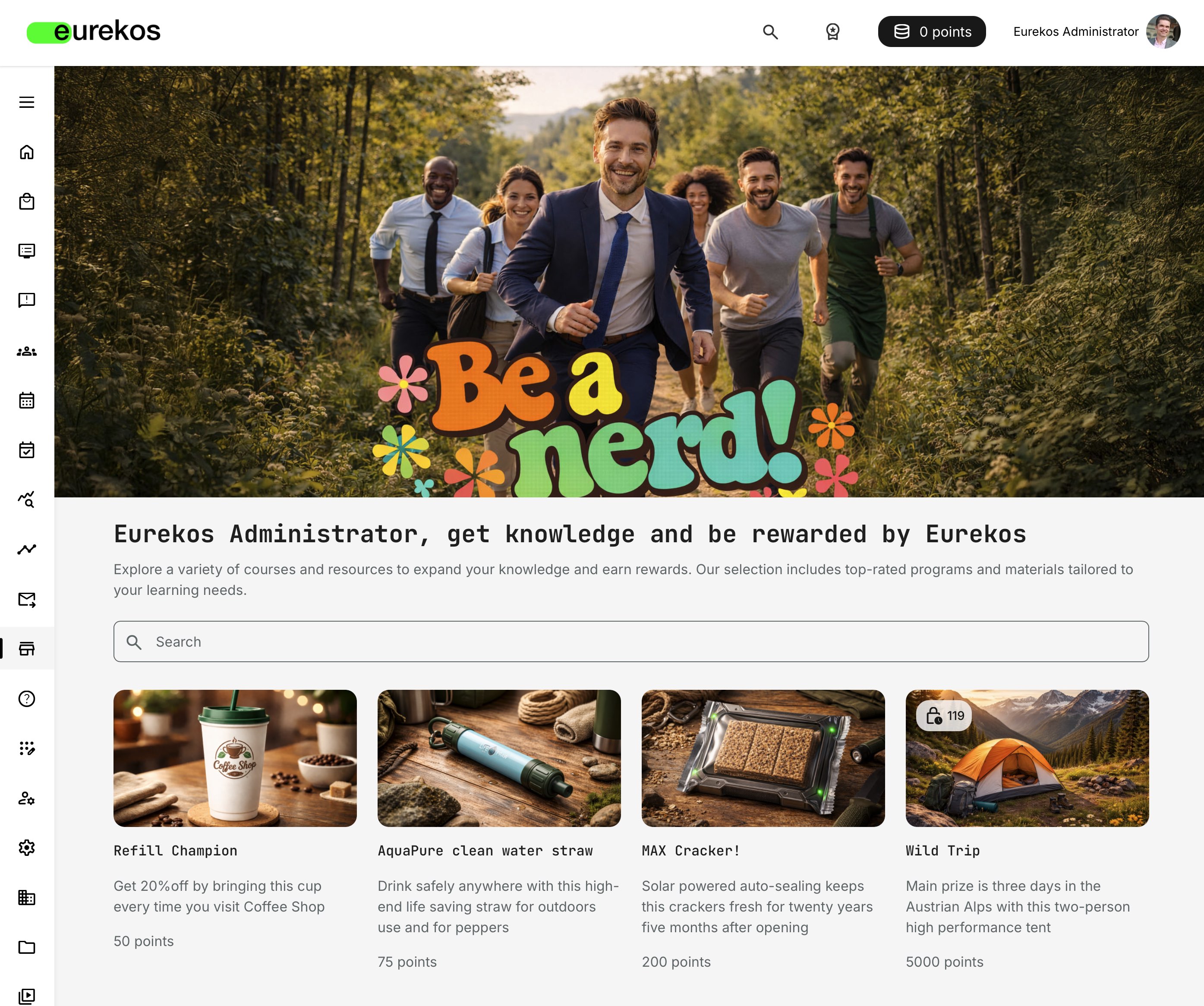
The Incentives Shop is where effort turns into tangible value. When enabled, it displays the products learners can redeem using the points they earn through rewarded actions.
Products can be configured with limits and expiry rules, allowing you to introduce urgency and balance. Some rewards can be simple and easily attainable, while others may be exclusive or time-bound to increase their perceived value and help control cost. This flexibility lets you design a reward mix that motivates participation without over-incentivizing or inflating point balances.
While points and badges are strong motivators on their own, the shop introduces a powerful psychological shift: exchange. Moving from “I earned something” to “I can choose something” turns effort into a tangible, personal reward. It bridges digital achievement with real-world value, triggers emotional engagement, and significantly amplifies motivation beyond recognition alone.
The shop is optional—but when enabled, it becomes the most visible and experiential expression of your incentives strategy.
Step 1: Configuring the Shop
Before products can be created or redeemed, the Incentives Shop must be enabled. This is done in Settings → General, as described in the related setup article. Enabling the shop activates both product management and the learner-facing shop experience.
The shop itself is intentionally simple to configure. It does not introduce complex logic of its own—instead, it reflects the rules, audiences, point values, and expiry schedules you have already defined elsewhere. This keeps day-to-day administration lightweight while ensuring the shop stays aligned with your overall incentives strategy.
To configure the shop, go to Settings → Incentives → Shop.
Controlling the Look and Feel of the Shop
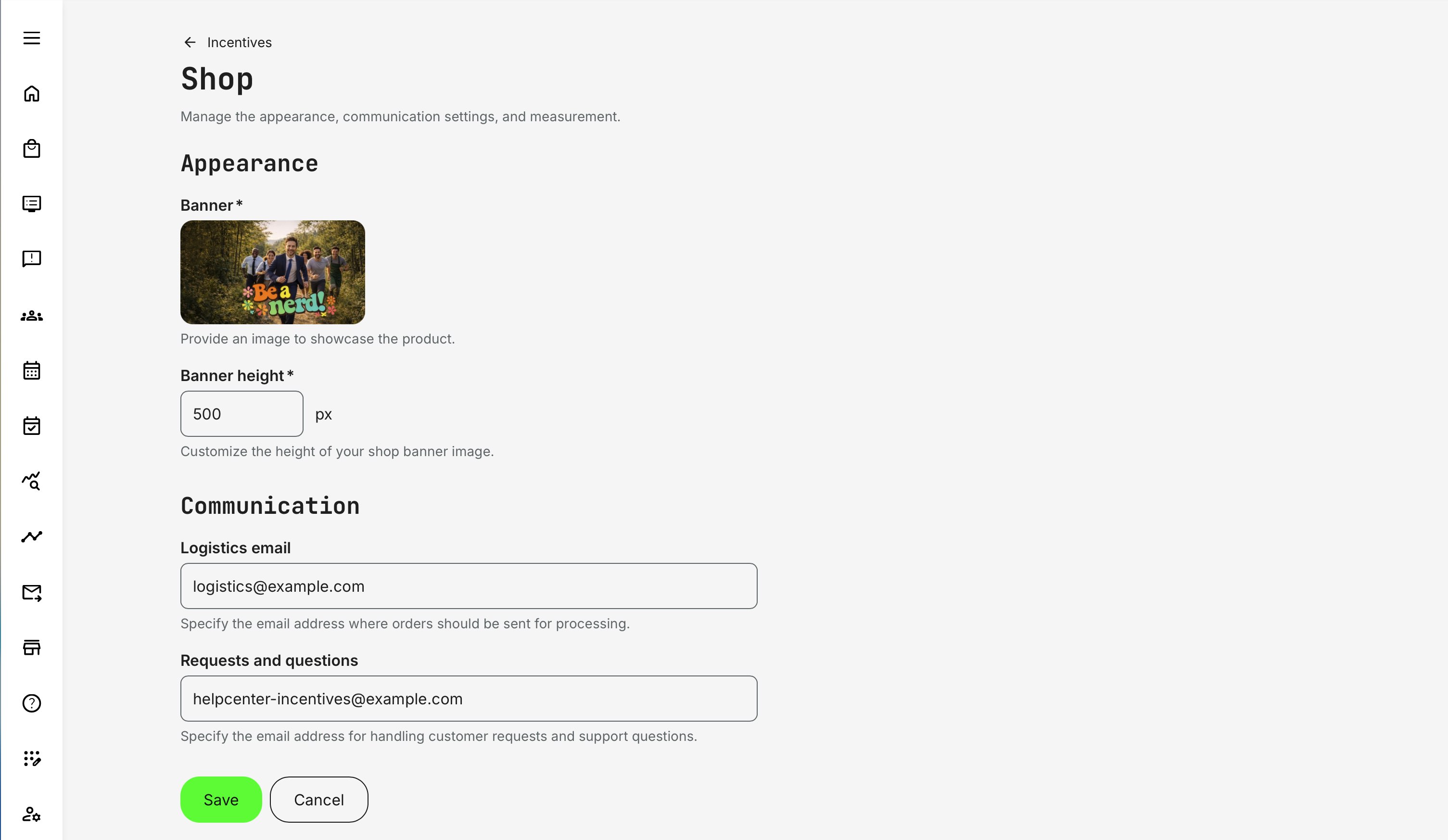
You can shape the visual presentation of the Incentives Shop using a small set of appearance settings. The banner is especially important—it is the first signal users receive about the purpose, tone, and credibility of your incentive program.
- Banner image: Use the banner to communicate intent and brand value. A strong visual reinforces trust and helps users immediately understand that the shop is part of a meaningful program—not just a reward catalog.
- Banner height: Adjust the height for clarity and responsiveness rather than visual dominance. The goal is to support orientation, not distract from the rewards themselves.
We recommend creating a banner of 1280 px in width, and between 200-500 px in height.
The configuration allows you to adjust the visible height, which dynamically crops the image. This makes it easy to fine-tune the presentation without recreating or reuploading assets. The banner scales responsively with the browser window, so embedded text should be avoided or kept purely decorative to prevent layout issues.
Headline, Introduction, and Search
Below the banner, the shop displays:
- A headline
- A short introductory or promotional message
- A search field for finding products
These elements follow standard platform styling (fonts, colors, spacing) and fully support multiple languages. You can customize the text under Settings → Translations → Interface, using the following default strings as reference:
- “!username, get knowledge and be rewarded by !company”
- “Explore a variety of courses and resources to expand your knowledge and earn rewards. Our selection includes top-rated programs and materials tailored to your learning needs.”
You can adapt these texts freely for each supported language. Dynamic tokens such as !username and !company are optional and can be removed or replaced—but if you keep them, ensure they remain contextually correct, as they are populated automatically from user and organization data.
Communication — Operational Readiness
Two communication email fields define how reward fulfillment is handled. These fields are used for back-office purposes only and are intended for administrators or teams responsible for managing rewards and fulfillment.
In many organizations, fulfillment is handled by a separate department or a centralized office. The notification emails generated from these fields include all necessary details from the product configuration—such as product information, recipient details, and shipping data for physical goods—so fulfillment can be managed efficiently without additional coordination.
- Logistics email—Used for internal processing of orders (shipping, digital delivery, follow-up)
- Requests and questions—Routes user inquiries related to rewards and redemption
These emails can be fully customized under Settings → Email Sending → System emails → Incentives, allowing you to align tone, language, and expectations with your audience.
Step 2: Creating Products (Rewards)
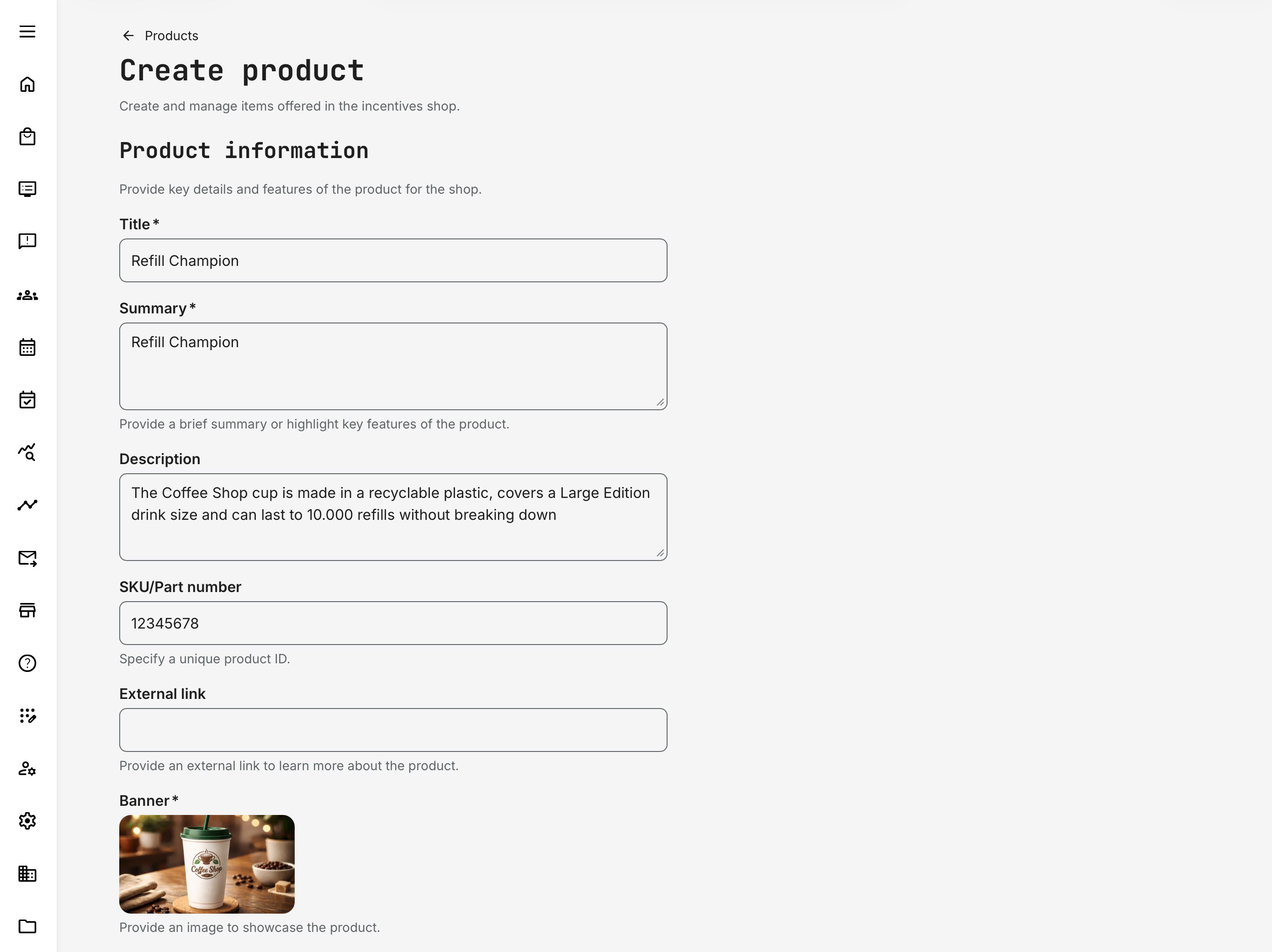
When creating products for the Incentives Shop, administrators define both how the reward is presented to learners and how it is managed operationally behind the scenes. The fields below control visibility, availability, cost in points, and—where relevant—logistics and fulfillment.
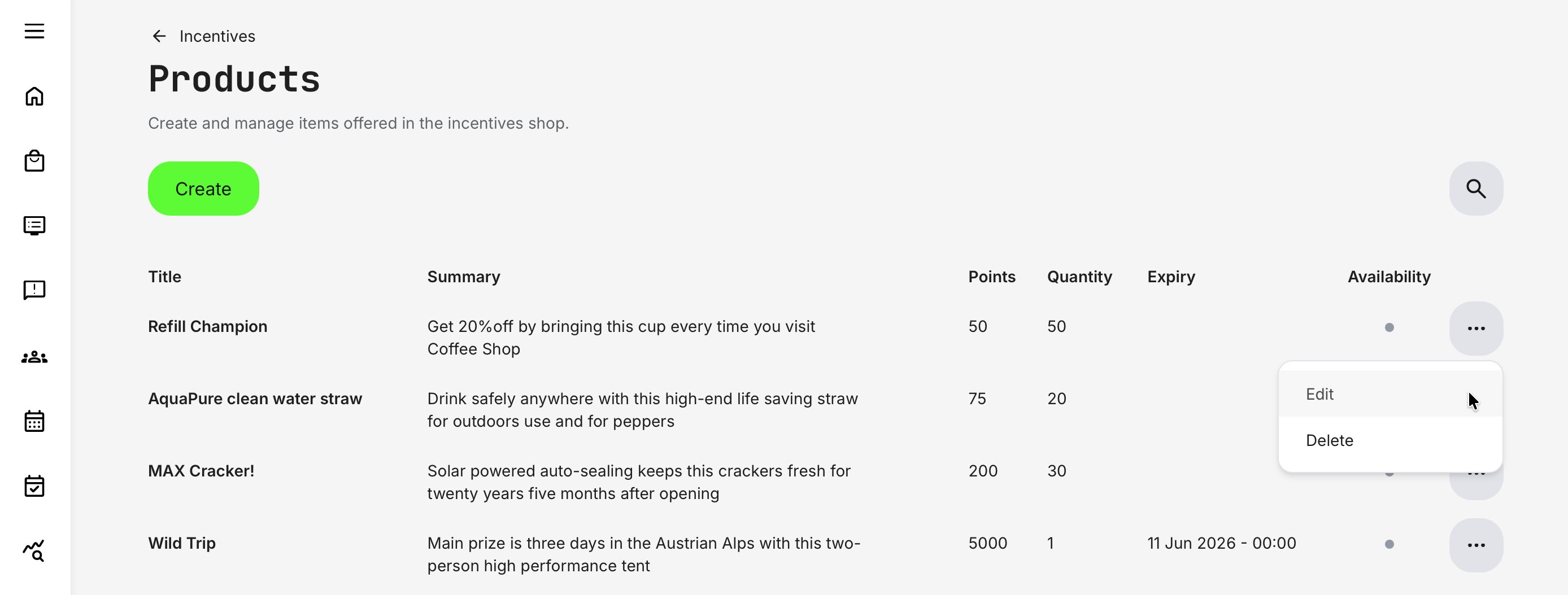
To configure products, go to Settings → Incentives → Products and click [Create]. Once multiple products are set up, they can be managed from the Products Overview, which provides a clear list of product titles and summary fields for easy administration.
Product Creation — Field Reference
| Section | Field | Description |
|---|---|---|
| Product Information | Title* | The primary name of the product, shown in listings and product pages. Use a clear, concise title that immediately communicates what the reward is |
| Summary* | A short description shown in product listings. Use this to highlight the key value or appeal of the product at a glance | |
| Description | A detailed explanation of the product, including features, benefits, usage details, or any conditions that help users decide whether to redeem it | |
| SKU / Part Number | A unique internal or external identifier used for inventory management, fulfillment, or integration with external systems | |
| External Link | An optional link to additional information, such as a product page, partner site, or terms and conditions | |
| Banner* | A visual representation of the product used in listings and detail views. A single banner image can be uploaded per product. Create the product image banner 16:9 in format | |
| Packaging & Shipping | Weight | Used for logistics and shipping calculations for physical products |
| Length | Physical length of the product package | |
| Width | Physical width of the product package | |
| Height | Physical height of the product package | |
| Product Management | Available From / To | Defines the time window during which the product is available in the shop. Useful for limited offers, campaigns, or seasonal rewards |
| Quantity* | The total number of units available. When the quantity is reached, the product becomes unavailable, helping control cost and exclusivity | |
| Cost in Points* | The number of points required to redeem the product. This directly ties the reward to learner effort and program economics | |
| Organization | Controls product visibility by assigning it to a specific organization. Only users within the selected organization(s) will see and redeem the product |
* Required fields
Designing Reward Tiers for Effective Incentives Programs
Effective incentive programs rarely rely on a single type of reward. Research across loyalty programs, behavioral economics, and partner enablement consistently shows that variety, attainability, and perceived fairness matter more than the absolute value of individual rewards.
The most successful setups therefore combine multiple reward types, each serving a different motivational role. Rather than optimizing for one-off excitement, they are designed to support participation over time—from initial engagement to sustained effort and long-term recognition.
Well-designed programs typically follow a three-tier reward mix:
- Low-friction rewards help participants get started by reducing the psychological distance between effort and reward
- Mid-tier rewards support habit formation and goal-oriented learning over time
- Scarce or time-limited rewards introduce urgency and perceived value, reinforcing commitment without requiring high redemption volume
Together, these tiers create a balanced incentives ecosystem—one that motivates consistently, scales responsibly, and aligns learner behavior with business objectives.
Common Reward Tiers in Incentives Programs
| Reward Tier | Typical Examples | Purpose and Behavioral Impact |
|---|---|---|
| Attainable, Low-Friction Rewards |
| These rewards reinforce early momentum. From a behavioral perspective, they reduce the “distance to reward,” which is critical for keeping new participants engaged long enough to understand how the program works |
| Mid-Tier Motivators for Sustained Engagement |
| Support habit formation and long-term participation. Learners begin to plan learning activity around meaningful learning milestones rather than immediate gratification, which is especially effective in partner and professional education programs |
| Scarce or Time-Limited Signature Rewards |
| These products should be intentionally scarce and often time-bound. Their role is not volume redemption, but signaling value and recognition. Research shows that scarcity increases perceived worth even when redemption rates are low |
Why Expiry, Quantity, and Availability Matter
Product availability windows and quantity limits are not just operational controls—they shape behavior.
- Time-bound availability aligns incentives with commercial cycles, product launches, or seasonal initiatives
- Limited quantities prevent budget overruns while increasing perceived exclusivity
- Clear availability rules reduce frustration and build trust in the program
Well-designed programs make these constraints visible and predictable, so learners understand why something may no longer be available.
Align Products with Your Audience and Effort Model
A critical best practice is ensuring that point cost reflects effort, not just reward value. If a product feels “too cheap” relative to the work required, it undermines trust. If it feels unattainable, engagement drops.
Because incentive rules apply platform-wide, administrators should always evaluate:
- How much content different audiences can realistically access
- How often points can be earned
- Whether rewards scale fairly across roles, regions, or partner tiers
This is why many organizations start with conservative point costs and adjust over time based on redemption behavior.
The Strategic Outcome
When products are designed as part of a balanced system—not standalone prizes—the shop becomes more than a catalog. It becomes a behavior-shaping interface that reinforces learning priorities, aligns with business goals, and sustains engagement without requiring constant manual intervention.
Incentives work best when learners feel progress is achievable, rewards feel meaningful, and the rules feel transparent.
Managing Products and the Shop
Once created, products and shop settings can be updated and managed centrally:
- Products can be edited, paused, or restricted
- Availability and quantities can be adjusted
- Communication settings can evolve over time
This makes the shop adaptable without redesigning the incentives program itself.
When Not to Use the Incentives Shop
The Incentives Shop is not required for every incentives strategy. In some scenarios, enabling a shop can add unnecessary complexity without improving outcomes.
You should consider not enabling the shop when:
- Incentives are primarily about recognition, status, or access—If your goal is to signal achievement (e.g. expertise, progression, eligibility, reputation), points and badges alone are often more effective than redeemable products
- Rewards are symbolic rather than transactional—Programs focused on learning culture, internal enablement, or professional credibility typically benefit more from visible milestones than from material rewards
- Operational overhead outweighs the benefit—Physical rewards, vouchers, or fulfillment workflows require logistics, support, and follow-up. If these processes are not mature or resourced, a shop can create friction rather than motivation
- Engagement volume is low or highly infrequent—If users earn points rarely or over long time horizons, redemption may feel distant and disengaging. In these cases, long-term recognition mechanisms perform better
- You want maximum simplicity during early rollout or pilot—For proof-of-concept programs, starting without a shop allows you to validate rules, point balance, and behavior change before introducing redemption mechanics
In these situations, points and badges still deliver value by making progress visible, reinforcing desired behaviors, and supporting leaderboards or recognition—without the complexity of a transactional layer.
The shop should be enabled when rewards are part of the value proposition, not when they become the value proposition.