Transactions and Administrative Follow-Up - Article
Summary
The incentives transaction view allows administrators to track reward redemptions and manage fulfillment processes. It provides a structured record of purchases, shipping details, and status updates to maintain transparency and accountability in incentive programs.
In this article you will learn:
- How administrators review incentive redemption transactions
- How reward fulfillment and status tracking are managed
- How shipping information and tracking details are recorded
- How the transaction view supports transparency and auditability
Transactions and Administrative Follow-Up
Incentives do not end when points are earned or rewards are redeemed.
From an administrative perspective, the Transactions layer is where incentives move from motivation to execution—ensuring rewards are delivered, tracked, and auditable. A transaction is created every time a learner redeems points for a product in the incentives shop.
Each transaction represents:
- A confirmed redemption
- A deduction of points from the learner’s balance
- An operational task (shipping, digital delivery, or follow-up)
Transactions within Incentives exist independently of learning activity. They are part of incentive operations, not training delivery.
Transaction Overview
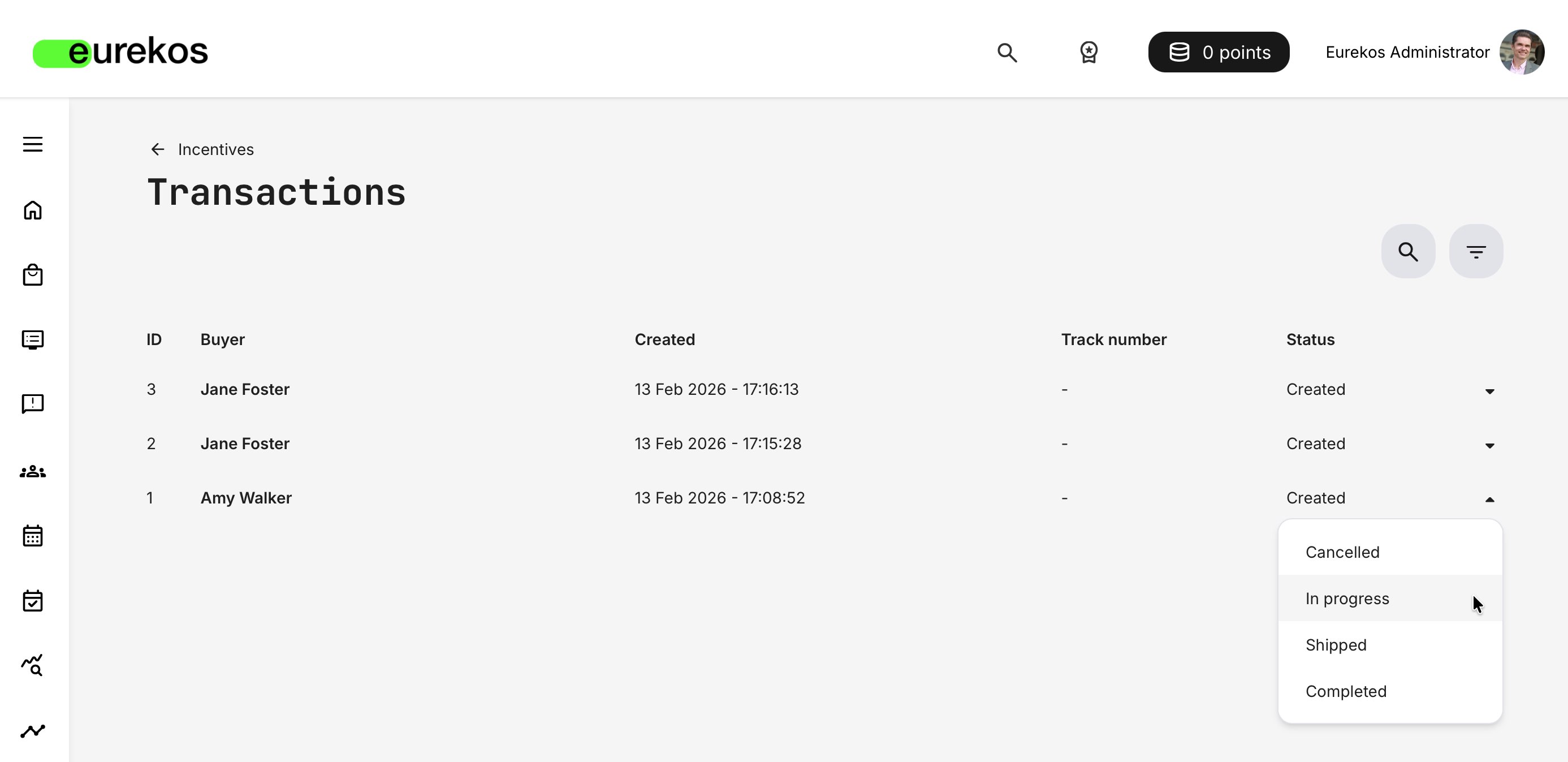
The Transactions overview serves as the operational control center for all reward redemptions. It allows administrators to track each redemption through its lifecycle, update statuses, and follow up on exceptions such as delays, errors, or manual handling needs.
Transactions are managed via Settings → Incentives → Transactions, providing a centralized and lightweight way to oversee reward fulfillment without introducing unnecessary complexity.
The list includes the following fields:
- ID – Unique identifier for the transaction
- Buyer – The user who redeemed the reward
- Created – Date and time the transaction was generated
- Track number – Shipment reference, with a copy action for quick reuse
- Status – Current fulfillment state, editable directly from the list
A status dropdown is available on each row, allowing administrators to update the transaction as it moves through the fulfillment process.
To support efficient handling, the overview includes lightweight operational tools:
- Search – Locate transactions by buyer name, email address, or tracking number
- Filters – Narrow the list by status (Cancelled, Created, In progress, Shipped, Completed)
Transactions provide a lightweight, native way to manage incentive redemptions and fulfillment status. The intent is not to replace full logistics or ERP systems, but to give administrators a simple, reliable overview of what has been redeemed and what action is required.
While fulfillment emails already contain all necessary details, the transactions view acts as a practical bookkeeping layer—allowing you to update statuses, track progress, and maintain visibility over rewards that have been handled manually or by different teams.
In some organizations, these emails are routed directly to a “merchandises partner”, back-office or external fulfillment system. In others, administrators manage fulfillment directly within Eurekos. The transactions view supports all these approaches by providing a minimal but structured management option that keeps incentive handling transparent and auditable without adding operational complexity.
Transaction Detail View
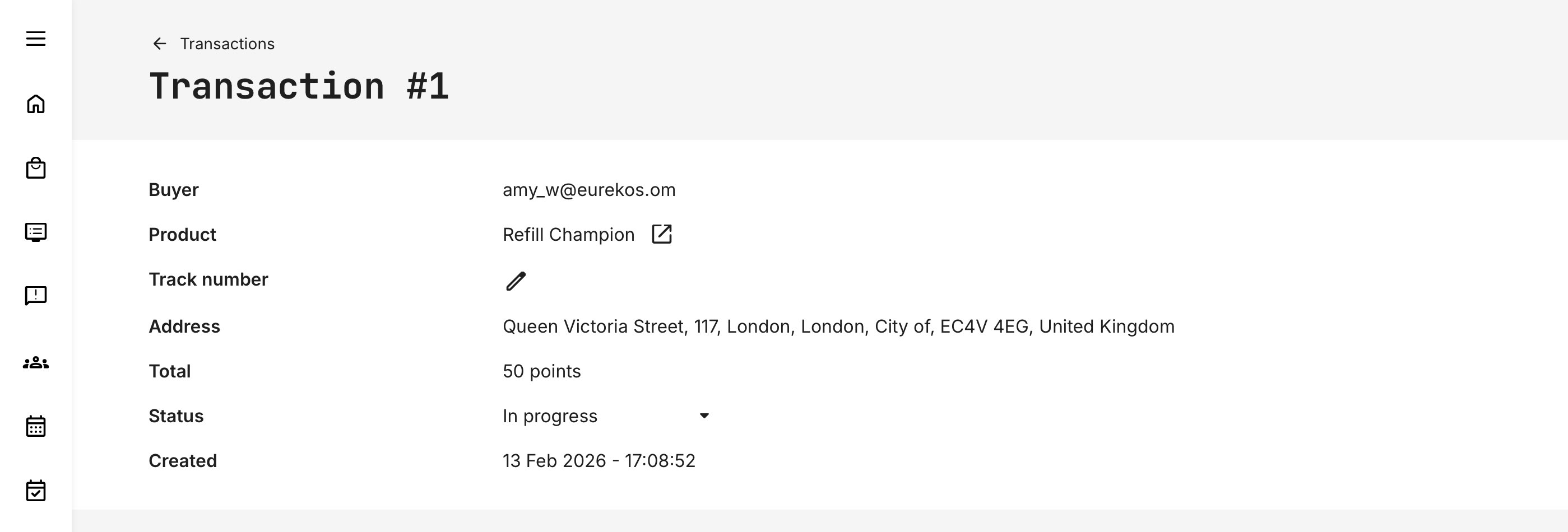
Selecting a transaction opens the detail page, which provides the full context needed to complete fulfillment.
- Buyer – Including email reference
- Product – With a direct link to the product definition
- Tracking number – Editable allowing administrators to add a shipping tracking code and a copy action
- Address – Shipping address for physical rewards
- Phone – Shown if provided by the user
- Total – Points spent
- Status – Editable via dropdown
- Created – Timestamp for audit and traceability
Transaction Status and Lifecycle
Each transaction moves through a simple lifecycle, typically including statuses such as:
- Created – redemption confirmed, fulfillment pending
- Shipped – reward delivered or dispatched
- Completed – transaction closed
- Cancelled – redemption cancelled for any reason
Statuses
Transaction statuses reflect operational progress, not financial processing. Updating a transaction status helps maintain transparency—both internally and for learners tracking the fulfillment of their rewards.
- When a status is set to Shipped, an automated email is sent to the learner. This message can be customized under Settings → Email Sending → Incentives
- Status updates complement the initial order confirmation email that is sent when a reward is redeemed. This workflow is primarily relevant for physical products or rewards that require manual handling and tracking within the native Transactions interface
- For digital rewards, use the Completed status to finalize the transaction without triggering a shipping notification email
Digital vs. Physical Rewards — Operational Considerations
Digital rewards or non-physical incentives do not automatically mean no management. Vouchers, licenses, access codes, or third-party rewards often still require manual steps—such as issuing codes, initiating communication, or coordinating with external partners responsible for fulfillment. These flows frequently span multiple systems, processes, or teams rather than a fully automated integration.
Physical products can introduce similar—or even greater—complexity. Shipping, ordering, and fulfillment may involve internal teams, regional offices, or external vendors, each with their own timelines and dependencies.
Do not underestimate this operational layer when designing your incentive mix. The type and volume of rewards you offer directly impact the administrative effort required to sustain the program. A well-balanced mix considers not only motivational value, but also the practicality of fulfillment at scale.
This is why complete and accurate order details matter. The transaction record becomes the single source of truth, ensuring that whoever fulfills the reward—internally or externally—has all necessary information to process requests efficiently and without unnecessary follow-up.
Best Practices for Administrators
To keep incentives effective and trusted:
- Review transactions regularly
- Update statuses promptly
- Communicate clearly if fulfillment is delayed
- Align reward availability with operational capacity
- Treat transactions as part of customer or partner experience—not back-office noise
Well-managed transactions reinforce the value of the entire incentives program.