Introduction to the Resource Library - Article
Summary
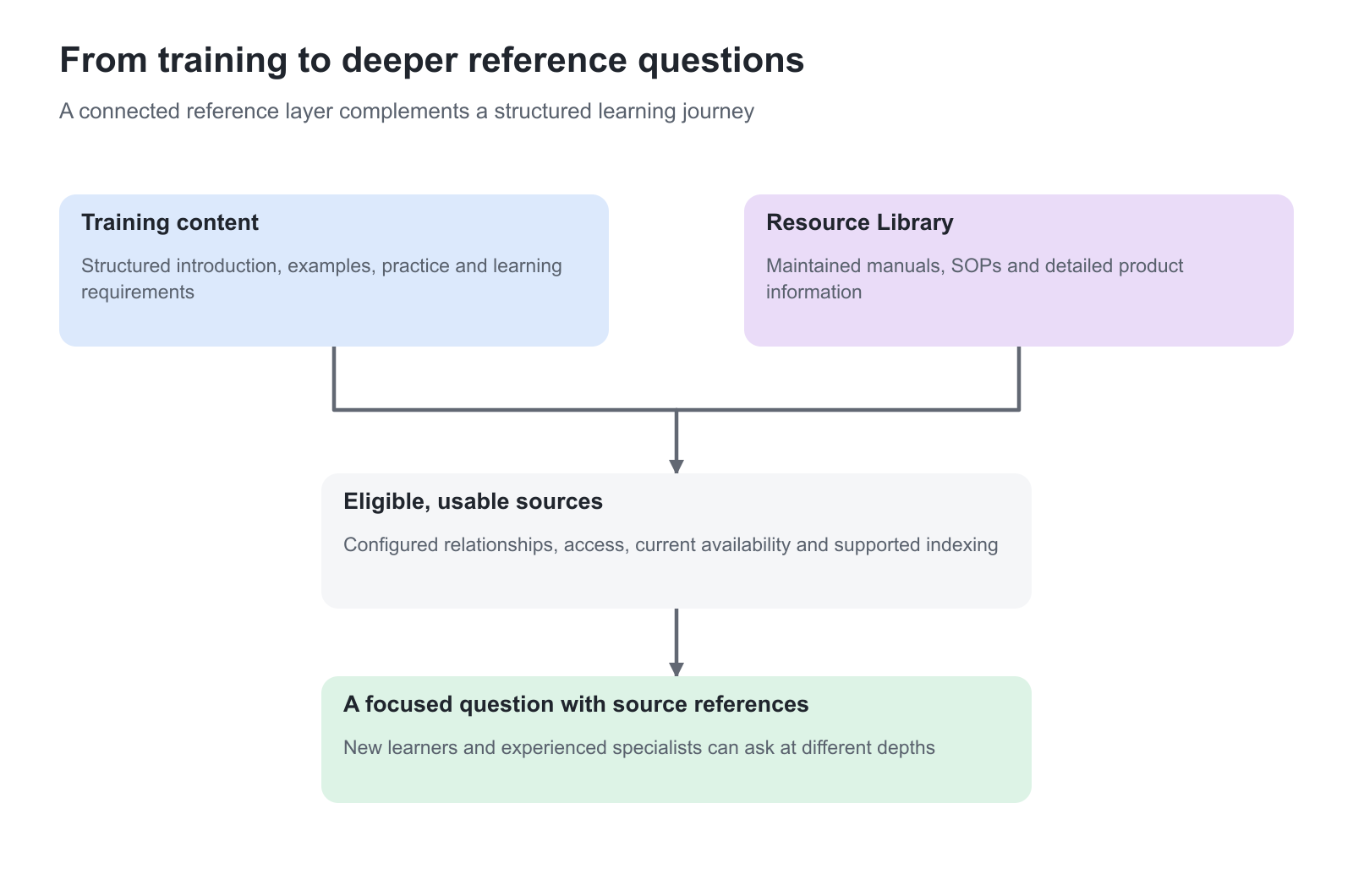
Training introduces people to a product, service or way of working. The Resource Library keeps the detailed reference information close at hand afterwards: product manuals, operating procedures, technical specifications and other maintained documents. Where enabled, it connects relevant documentation with the people who need it through the platform’s categories, interests and access rules. The AI learning assistant (Saga) can also use eligible, indexed documents to support more detailed questions.
Use this article to:
- Understand how training and reference information work together
- Choose broad or audience-relevant document sharing
- Understand permissions, interests and AI-assisted reference access
Availability and activation
The Resource Library is an optional add-on, available on request. Eurekos must activate it and configure the appropriate access for your platform. Additional charges may apply; contact Eurekos to confirm availability, scope and pricing before planning your rollout. Conversational access to the collection also requires the AI learning assistant to be enabled and configured.
Connect learning with the work that follows
A distributor should not need one portal for training and another unfamiliar system for every product manual. A service team should not have to insert a hundred-page technical reference into every introductory Course simply to make the information accessible. The Resource Library provides a simple document-sharing service inside Eurekos, using relationships already maintained around your learning offer.
This makes the library useful across a value chain. A manufacturer can support customers, distributors and service partners with a common reference collection, while using the configured access model to keep each audience’s view relevant. Formal training and reference documents remain different assets: the Course teaches a structured learning journey; the document supplies the detail needed for a particular task.
Publish a collection prepared for external audiences
An internal knowledge base or shared drive often contains a mixture of approved information, working drafts, internal notes and documents intended only for colleagues. Giving customers or partners access to that wider collection can make it difficult to keep the right material separate.
The Resource Library provides a dedicated collection for the documents you have reviewed and approved for the intended audience. Your internal systems can continue to support everyday collaboration, while customers, distributors and service partners receive maintained product information through Eurekos. This keeps the boundary between internal working knowledge and externally approved guidance clear and manageable.
For example, a manufacturer can publish an approved battery-service manual and customer-facing SOP while keeping draft engineering procedures, internal troubleshooting notes and commercial working documents in its internal repository. Content owners decide what is ready to share and maintain its quality; the library’s configured role and organization rules govern access. Categories and interests then help people find the relevant part of that approved collection.
Use one reference collection at different levels of experience
Consider an illustrative battery-service program. An introductory Course explains safe isolation, the inspection sequence and escalation responsibilities. The adjoining library holds the current service manual, model-specific inspection criteria and the approved SOP.
| Person and need | Useful experience | Business value |
|---|---|---|
| A new service partner learning the inspection process | Complete the training, then open the relevant SOP when preparing a job | A consistent introduction with a usable reference afterwards |
| An experienced technician checking a model-specific criterion | Find the detailed manual or ask the AI learning assistant a focused question against eligible reference material | Depth without making every introductory module longer |
| A product owner updating an approved procedure | Maintain the reference document and review its availability and expiry | Less duplication across the Course portfolio |
The experienced technician might ask, “Which inspection criteria apply to this battery model before it returns to service?” The answer can draw on accessible, indexed documentation even when the detail is beyond the introductory lesson. The person should still inspect the cited source and follow the current approved procedure. An AI explanation does not become a new approved SOP or a record of training completion.
Understand the relationship with categories and interests
The library’s main folders come from the platform’s Category classification and its child categories. In a training-led setup, enrollment in categorized training can populate the person’s Interests, making the corresponding document collection relevant to that person. Interests can also be maintained in the profile, depending on configuration.
For example, a partner enrolled in training for one product family can find the supporting product information through the same category relationship. This reduces the need to grant and maintain a separate folder invitation for every training participant.
Keep relevance and permission distinct. Show folders by user interests is an optional filtering setting; when a person has no interests, that filter does not apply. Administrative roles can also have broader folder access. Platform access roles and the organization layer provide additional access boundaries. A confidential collection must therefore be designed and tested using the complete access model, rather than relying on the presence of one interest.
Choose a sharing model that fits your audience
| Operating model | Appropriate use | What to decide |
|---|---|---|
| A broad registered-user collection | General product literature, common guidance or shared reference information | Who may enter the library and which organization rules apply |
| A training-led collection | Supporting documentation for the products or services a person is learning about | Category structure, how interests are populated and the intended learner view |
| A governed reference service | SOPs, manuals and time-sensitive technical material | Responsible maintainers, review dates, expiration and authorized access |
These models can coexist. A broad collection can hold general guidance while targeted categories provide specialist material. Establish the intended experience for a customer or partner with one training enrollment, someone with several product interests, and someone whose profile has no interests.
Add conversational access with the AI learning assistant
The native AI assistant can retrieve eligible Resource Library documents automatically when the relevant relationships and permissions are in place. The source must also contain supported, usable indexed content. Uploading a file does not mean every format can be interpreted by the assistant, and access to one document does not grant access to the rest of the collection.
The same reference layer can support a general enquiry or a more advanced question during training. Use clear filenames and maintained source documents so the person can recognize the source and return to it. Expired library files are excluded from the assistant’s sources. For the wider distinction between discovery, enrolled learning and conversational support, see Introduction to the AI Learning Assistant.
Give each service a clear purpose
The Archive supplies reusable authoring assets and downloadable Course resources. The Resource Library is a continuing document-sharing service for the intended audience. A File list on a Course page provides documents in that page’s learning context. These can complement each other; they are not interchangeable names for the same storage view. Manage Files, Archives, and Downloadable Resources owns the authoring-file workflow.
Plan the collection with a content owner as well as a platform administrator. The content owner establishes which procedure is authoritative and when it needs review. The administrator configures the categories, delegated access and optional working features. Usage reporting can help identify which documents people use, but a download is not proof that a person read, understood or formally acknowledged the contents.
Related guidance: Find and Use Resource Library Documents; Configure and Maintain Resource Library Access and Documents; Review Document Usage and Keep Reference Information Current.
FAQ
-
Does a Resource Library document have to be copied into every Course?
No. The library provides a reference collection alongside training. Eligible documents can be available through the configured category, interest and permission relationships, and Saga can retrieve supported indexed content automatically.
-
Does an Interest alone restrict confidential documents?
No. Interests can filter the folder view, and the filter does not apply when interests are empty. Review library-entry roles, organization boundaries and the relevant user view as well.
-
Does opening a manual count as completing training?
No. Document access and usage reporting are separate from the requirements and evidence of a Training Activity.