Introduction to the AI Learning Assistant - Article
Summary
The AI Learning Assistant gives people a conversational way to find relevant training and understand learning material. Instead of knowing the exact page or course name, a learner can describe a need, ask for an explanation or continue with a focused follow-up question. The conversation can also introduce another relevant training offer—including paid training—as a useful next step.
Saga is the default assistant name; your platform can use another name. It is an optional capability, not an unrestricted internet chatbot or an enrollment and assessment authority. Its usefulness depends on the available content, the person’s access and the organization’s configuration.
Use this article to:
- Understand the assistant’s purpose, discovery value and boundaries
- Distinguish discovery from enrolled learning support
- Choose general or training-specific chat
- Plan a useful rollout with appropriate content and governance
Use conversation to reach a real outcome
| Need | Example question | Useful outcome |
|---|---|---|
| Choose a relevant offer | “I help manage a building. Which available training introduces avoidable energy use?” | Compare suitable offers and follow the description into the normal enrollment process. |
| Understand a concept | “Explain the difference between energy efficiency and simply using equipment for fewer hours.” | Get an explanation grounded in accessible learning material, then inspect its sources. |
| Connect ideas across a training | “How does this lesson relate to the operating-hours example in the other module?” | Use the training’s accessible modules without manually searching each page. |
| Find a reference | “Where is the guidance about standby consumption?” | Open the relevant page, document or indexed video passage. |
| Decide what to explore next | “What suitable training could I consider after this introduction?” | Review relevant accessible offers; a recommendation does not assign or enroll you. |
Connect learning needs with the wider training offer
The assistant can do more than help someone find a known course or understand the material already in front of them. A question about a task or goal can bring another relevant training into the conversation. That training may provide the deeper explanation, related knowledge or practical next step the learner needs. This connects learning across the catalog without requiring people to know every available offer in advance.
Eligible recommendations can include free training and, where commerce is used, paid offers. For customers, partners and employees, the benefit is discovering learning that fits a real need. For a training provider, the same capability supports cross-selling and upselling: a relevant course, workshop or advanced program can become visible at the moment someone expresses an interest or identifies a knowledge gap. The recommendation leads to the offer’s description; normal eligibility, enrollment, approval and payment rules still apply.
Useful activity descriptions and accurate keywords are therefore important to both learning discovery and the commercial journey. Explain who an offer is for, the problem it addresses and the outcomes it supports so the assistant has meaningful context for connecting it with a learner’s question. Keep the actual offer current rather than relying on a title or generic promotional wording. Find Answers and Training with Saga explains this discovery-to-participation journey with a practical example.
Understand what changes along the learning journey
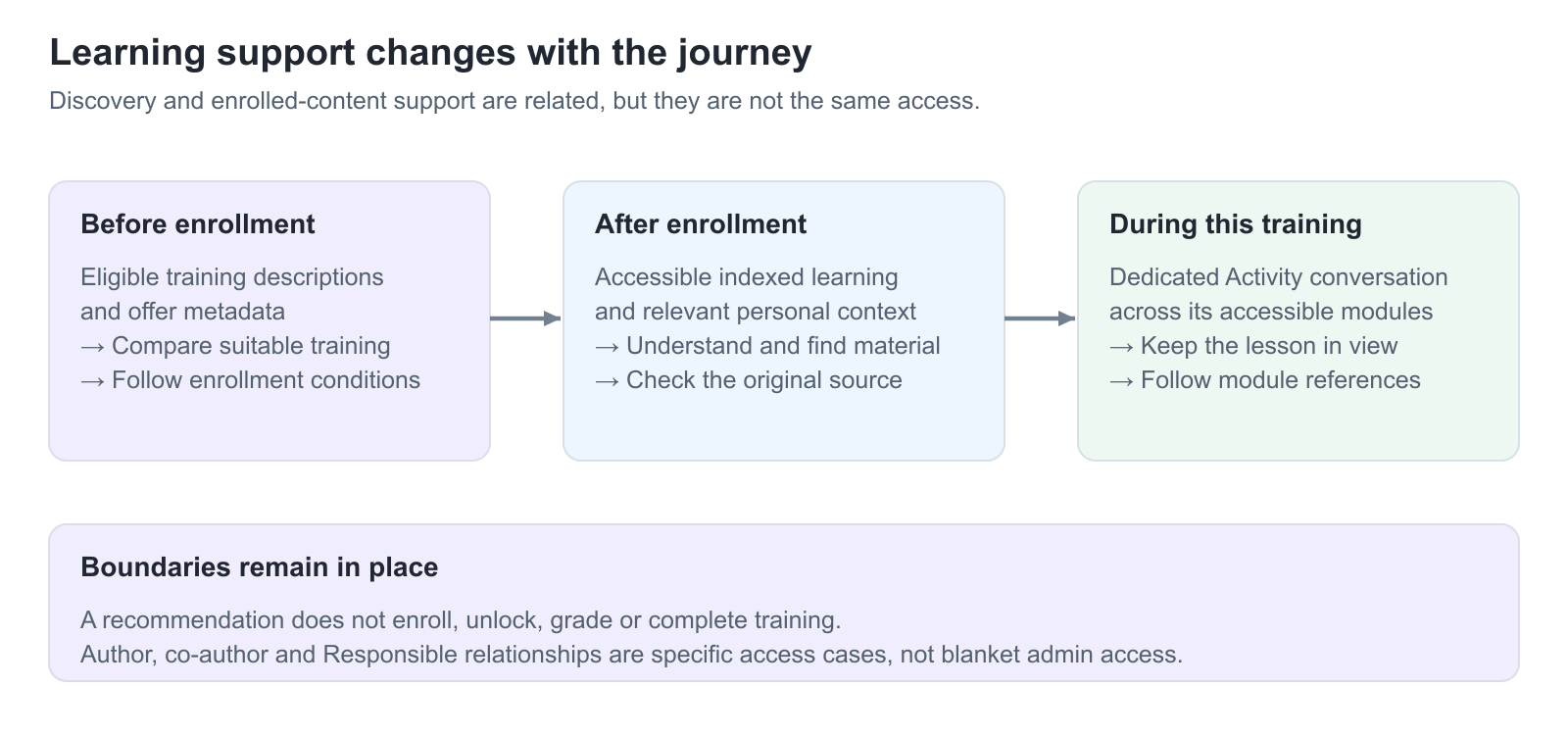
Before enrollment, Saga can help a learner discover eligible self-enrollable training from the descriptions and metadata made available through their personal Storefront. A useful recommendation does not mean the assistant can reveal that offer’s protected lessons.
After enrollment, the assistant can use supported indexed learning material that is accessible to the learner. Page restrictions and hidden content still matter. Inside a particular training, the dedicated chat focuses on that Training Activity and its modules, with relevant Storefront offers as an additional discovery route.
For the detailed learner workflows, see Find Answers and Training with Saga and Use Saga During Training.
Keep permissions and content usage distinct
Saga normally treats people as learners for content retrieval. An administrative role’s broad management search is not automatically the assistant’s answer scope. Authors and co-authors can have access to their own course content, and Responsible relationships can provide relevant activity or module content; these are specific relationships, not a general promise that an administrator can ask about every course.
An item must also have usable indexed content. H5P and SCORM extraction can be enabled or disabled, and individual objects can be excluded. This is especially important for graded assessments: enabling quiz extraction can make question and answer material available. Exclude assessment bodies deliberately and verify the processed result. See Control AI Content Indexing and Protect Assessments.
Choose the right tool
| Tool | What it does | When to choose it |
|---|---|---|
| Storefront search | Returns eligible training offers and matching extracts. | You want to compare the catalogue directly. |
| Global Search | Returns relevant source items. | You need a particular page, video, file or other learning item. |
| General Saga chat | Generates an answer using permitted learning and discovery context. | You want an explanation or a broader conversation. |
| Training-specific Saga chat | Generates answers within one Training Activity’s accessible learning context. | You want support while continuing that training. |
Know what the assistant does not do
- It does not enroll you, approve a request, purchase an offer, record attendance, pass an assessment or issue a certificate merely because you asked.
- A chat response does not replace the actual learning activity or its completion requirements.
- It is not a guarantee that every sentence is correct or that every file and recording has usable extracted content.
- It does not make an excluded assessment safe if the same answers are published in another accessible source.
- It does not establish the organization’s data-processing terms. Provider, hosting, retention and information-handling requirements must be reviewed separately.
Roll out the capability deliberately
Start with a defined audience and several meaningful learning tasks. Prepare useful descriptions, accurate subtitles and clearly structured source material. Check a positive example, a missing-content example and a restricted-content example using ordinary learner access. A pilot can then show where content quality, access configuration or guidance needs improvement before expanding availability.
Use Configure Saga Availability and Access for platform or Organization availability, and Understand AI Providers, Data Processing, and Governance for the information-governance review.
Troubleshooting
| Problem | What to check |
|---|---|
| Saga is not visible | Check feature activation, the platform or Organization availability rules and the current entry route. Hiding the navigation link alone is not the same as disabling the assistant. |
| An answer is generic or incomplete | Ask a more focused question and inspect available sources. Check source quality, access and indexing before expecting a more specific answer. |
| An administrator expects all managed courses to be answer sources | Administrative search access and AI retrieval are different. Confirm author, co-author, Responsible or learner relationships instead. |
FAQ
-
Is Saga available on every Eurekos platform?
No. It is optional and can be enabled for the platform or selected Organizations. The name can also differ from Saga.
-
Can Saga complete training for me?
No. A conversation does not replace enrollment, learning, assessment, attendance, confirmation or certification requirements.
-
Can administrators ask Saga about everything they can manage?
Not automatically. The assistant’s learner-oriented retrieval scope differs from broad administrative search, with specific author, co-author and Responsible exceptions.