Forms - Article
Summary
Forms define how user data is collected, structured, and reused across the Eurekos platform. They control when information is requested during the user journey and how that data supports segmentation, personalization, reporting, and business logic.
In this article you will learn:
- How forms are connected to the user profile and data model
- How tags and vocabularies define available fields
- How forms support different stages of the user journey
- How to configure fields, requirements, and visibility across forms
Business Context
Forms are part of a connected data collection framework that underpins the entire platform and service layer. As such, they represent one of the most critical integration points in the system, directly influencing both operational processes and business outcomes. Their importance cannot be overstated, as they define how user data is introduced, structured, and maintained across all platform interactions.
Every interaction involving a user — from signup to enrollment, login, communication, and reporting — depends on how data is collected and structured through forms. What may appear as simple input fields is, in reality, a foundational system that determines how users are understood, categorized, and acted upon throughout the platform.
At the center of this is the user profile, which serves as the persistent data layer. All forms either:
- Contribute data to the profile
- Reuse profile data
- Or depend on profile data for logic and targeting
This means that configuring forms is not just about layout — it is about designing how your organization:
- Understands users
- Segments audiences
- Supports business processes (e.g. sales, recommendations, compliance, reporting)
How Forms, Fields, and Data Are Connected
Before configuring individual forms, it is essential to understand where fields come from and how they become available.
Forms do not independently define all fields. Instead, they expose and organize fields that originate from the platform’s underlying data model. This includes both system-defined attributes and administrator-defined structures such as tags and vocabularies.
This separation is important: forms are not where data is invented — they are where data is organized and collected at the right moment.
Field Availability Model
| Step | Description |
|---|---|
| Define | Create tags and vocabularies (e.g. Department, Job function, Region) |
| Activate | Choose where fields should be used (e.g. Profile, Signup, Enroll) |
| Configure | Control visibility, requirement, and placement within forms |
Once a field is activated (typically in the Profile), it becomes available across relevant forms, where its behavior can be configured individually depending on the context in which it is used.
Tags and Vocabularies in Forms
Tags and vocabularies allow administrators to define structured attributes that extend beyond standard system fields. They represent how an organization classifies users in ways that are meaningful for learning, reporting, and business processes.
Unlike simple text fields, vocabularies introduce controlled and reusable values, ensuring consistency across the platform.
Examples include:
- Department
- Job function
- User type
- Customer category
- Region
These are not just form fields, but structured data drivers that play a critical role across the platform. They are used to support target audience rules, enable reporting and segmentation, influence enrollment logic, and drive incentives and personalization, making them central to how the system understands and acts on user data.
Activation Principle
Tags and vocabularies must be explicitly activated for use in forms, which gives administrators control over when and where data is collected.
| Activation Location | Effect |
|---|---|
| Profile | Field becomes part of the user record |
| Signup | Field can be collected at registration |
| Create User | Field becomes part of the user record upon creation |
| Contact | Field can be used to identify or qualify requests |
This enables progressive profiling, where data is collected gradually across the user journey instead of all at once.
Field Configuration Model
While each form serves a different purpose, the way fields behave and are configured is consistent across the platform. This consistency is what allows administrators to design a coherent user experience while still adapting to different use cases.
Understanding this shared configuration model makes it easier to manage forms holistically rather than as isolated configurations.
| Configuration Option | Description | Impact |
|---|---|---|
| Enable / Disable | Show or hide a field | Controls whether data is collected |
| Required / Optional | Define if input is mandatory | Affects validation and completeness |
| Field Order | Drag-and-drop positioning | Impacts user experience |
| Label Editing | Customize field names | Aligns with business terminology |
| Translations | Multi-language labels | Supports global platforms |
| Context Activation | Define where field appears | Controls when data is collected |
| User Edit | Allow end users to edit this field | Defines whether users can edit or only view |
This consistent model allows the same field to appear in multiple forms while behaving differently depending on context.
⚠️ While most fields share the same configuration options, a small number of core fields are system-defined and cannot be disabled or modified. These fields are essential for the platform to function correctly, as they represent the minimum information required to create and manage a user account. As such, they are always present and enforced by the system. These include First Name, Last Name, Username, Email, Password, Status (active or blocked), and system Role.
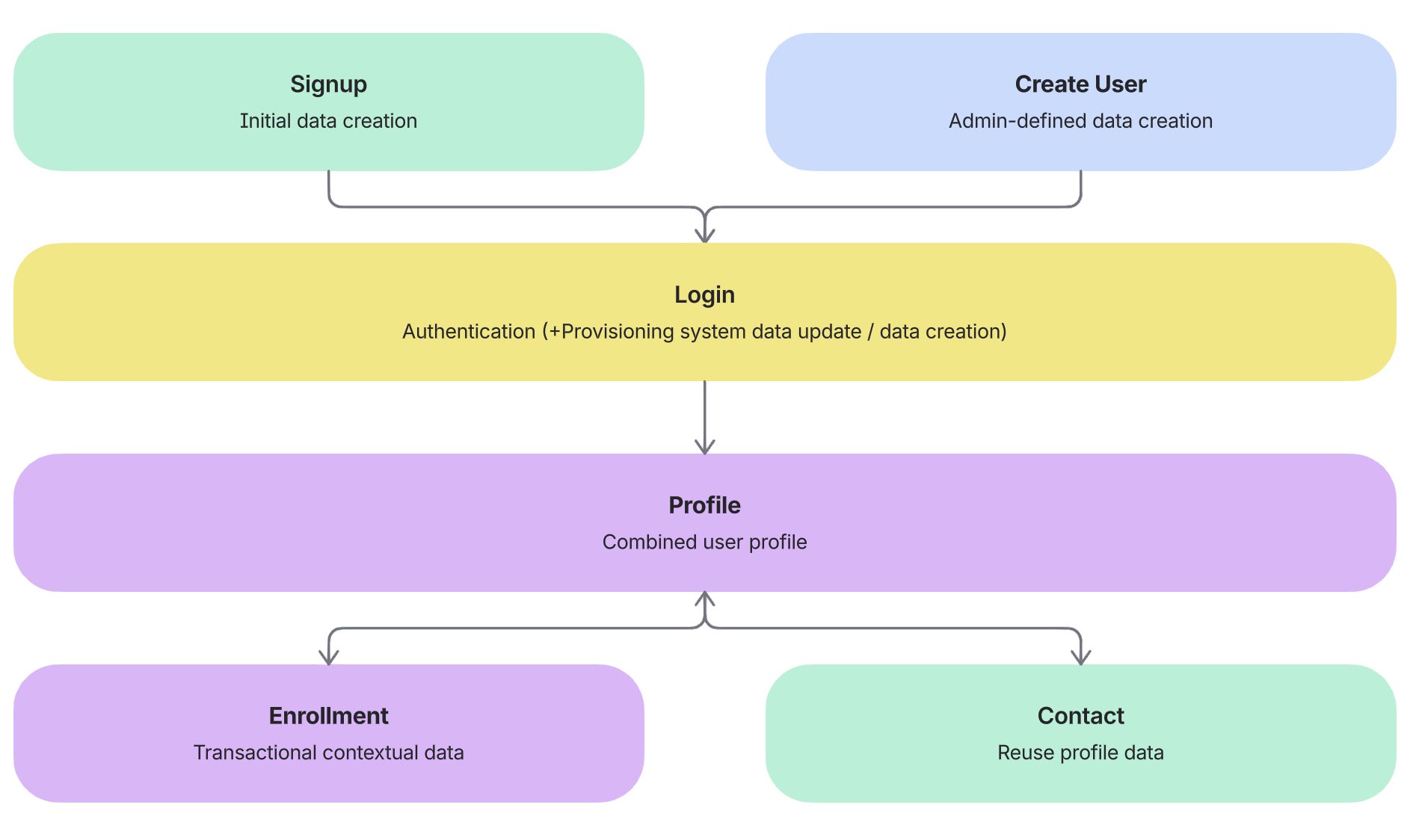
Forms and the User Journey
Each form in Eurekos plays a specific role in the overall user lifecycle. Rather than collecting all data at once, the platform supports a phased approach where information is gathered progressively, based on when it becomes relevant. For example, in commercially driven scenarios, it is often beneficial to reduce the barrier to signup by collecting only essential information initially. Additional details can then be requested later as needed—such as during specific enrollment or purchase—while access to free content can remain frictionless and require minimal input.
This approach improves both user experience and data quality, ensuring that users are not overwhelmed while still enabling administrators to collect meaningful data over time. This is also good practice from a data privacy perspective.
| Stage | Form | Purpose |
|---|---|---|
| Data Model | Profile | Defines full user structure |
| Entry | Signup / Create user | Creates initial identity |
| Access | Login | Controls authentication |
| Transaction | Enroll | Collects context-specific data |
| Communication | Contact | Reuses profile data for interaction |
Understanding this flow is essential when deciding:
- What data to collect
- When to collect it
- How much to require at each stage
Profile Form
The Profile form defines the complete structure of the user record and serves as the foundation for all other forms. It represents the most comprehensive view of user data and is where administrators establish what information the platform can store and use.
Because all other forms either feed into or depend on the profile, this configuration should be approached as a data modeling exercise, not just a UI setup.
Before configuring individual fields, it is important to consider:
- What data is required for segmentation and reporting
- Which fields should be controlled by users vs administrators
- How tags and vocabularies should be structured
| Area | Description | Why It Matters |
|---|---|---|
| Core Fields | Name, email, role, status | Required for system functionality |
| Extended Fields | Address, phone, organization | Supports segmentation and reporting |
| Tag-Based Fields | Vocabulary-driven attributes | Enables targeting and automation |
| Editability | User vs admin control | Protects data integrity |
| Required Fields | Mandatory attributes | Ensures data completeness |
| Field Order | Layout and grouping | Improves usability |
| Translations | Multi-language labels | Ensures consistency |
If a field is not part of the Profile, it cannot reliably:
- Drive segmentation
- Be reused across forms
- Support reporting
Signup Form
The Signup form defines what information is collected when a user first enters the platform. It acts as the entry point into the data model, creating the initial version of the user profile.
This is one of the most important configuration points for user experience, as it directly affects conversion rates and onboarding friction. Collecting too much information too early can discourage users, while collecting too little may limit early segmentation.
The goal is to strike a balance by selecting only the fields that are essential at the moment of entry.
| Area | Description | Why It Matters |
|---|---|---|
| Field Selection | Subset of profile fields | Controls onboarding experience |
| Required Fields | Mandatory inputs | Balances data vs conversion |
| Field Order | Registration flow | Improves usability |
| Identity Fields | Email, username, password | Ensures valid account creation |
| Tag-Based Fields | Optional early segmentation | Enables targeting from entry |
| Translations | Multi-language support | Global usability |
Signup should collect only what is necessary. Additional data should be collected later through:
- Profile updates
- Enrollment
- Questionnaires
Login Form
The Login form defines how users authenticate and access the platform. While it does not contribute directly to the user data model, it plays a critical role in shaping the entry experience and access strategy.
Different login methods can reflect different types of platforms — from open environments to enterprise setups with strict identity management.
This makes login configuration less about data collection and more about clarity, security, and user expectations.
| Area | Description | Why It Matters |
|---|---|---|
| Login Methods | Email/password, SSO, social login | Defines identity model |
| Primary Method | Default login option | Guides user behavior |
| Secondary Methods | Additional login options | Supports flexibility |
| Visibility | Show/hide methods | Reduces confusion |
| Texts | Labels and instructions | Improves clarity |
| Translations | Multi-language support | Global usability |
Login configuration reflects your identity and access strategy, not your data model.
⚠️ This form includes a live preview function, allowing you to immediately see how changes will appear without needing to log in and out. Any updates made are applied instantly, so it is important to work carefully, as changes are reflected in real time.
Enroll Form
The Enroll form is where data collection becomes contextual and business-driven. Unlike Signup, which focuses on initial access, the Enroll form is tied to specific actions such as course registration, purchase, or administrative enrollment for some use cases.
This means that the data collected here often relates to:
- Transactions
- Billing
- Organizational context
- Customer type
Because of this, the Enroll form is typically more dynamic and can vary depending on the scenario.
| Tab | Purpose |
|---|---|
| Individual | Personal enrollment |
| Company | B2B enrollment |
| Government | Public sector |
| Other | Additional contextual data, comments |
Enroll is where you collect data that only makes sense in a transactional context, such as billing or company details.
| Area | Description | Why It Matters |
|---|---|---|
| Context Fields | Vary by tab | Supports real-world scenarios |
| Company Data | VAT, registration, address | Enables B2B workflows |
| Address Fields | Billing/location data | Required for tax logic |
| Tag-Based Fields | Segmentation data | Supports reporting |
| Comments | Free-text input | Supports admin workflows |
| Required Rules | Per-context validation | Ensures correct data |
Contact Form
The Contact form enables users to communicate with the organization while leveraging existing profile data. Rather than asking users to re-enter known information, the form reuses and prepopulates fields, making the experience more efficient.
| Area | Description | Why It Matters |
|---|---|---|
| Field Inclusion | Based on profile fields | Ensures consistency |
| Prefilled Data | Uses profile data | Reduces effort |
| Subject | Categorizes inquiries | Enables routing |
| Additional Fields | Contextual input | Improves support quality |
| Translations | Multi-language support | Global usability |
💡 The form includes predefined subject categories, which can be updated upon request through the Eurekos Service Desk. Each subject can be assigned a specific email receiver, allowing inquiries to be routed to the appropriate department or responsible person. Changes to both available subjects and their routing are handled centrally via the Service Desk.
Create User Form
The Create User form allows administrators—and in some cases managers with the appropriate permissions—to create users directly from the platform interface, bypassing the standard signup process.
Because this is an administrator-driven process, it is reasonable to assume that the person creating the user has more context about who the user is and how they relate to the organization. This allows for a richer set of fields to be presented compared to the Signup form. While not all fields need to be mandatory, including additional structured information at this stage can significantly improve the data foundation from the outset.
Unlike Signup, which must balance simplicity and conversion, the Create User form prioritizes administrative control and data completeness. Administrators are generally less sensitive to the number of fields presented and are better equipped to provide accurate and relevant information, making this form an ideal place to capture more detailed user attributes early in the lifecycle.
| Area | Description | Why It Matters |
|---|---|---|
| Required Fields | Minimum user data | Ensures valid profiles |
| Role & Status | Access control | Defines permissions |
| Password Options | Admin vs user setup | Supports workflows |
| Tag-Based Fields | Organizational data | Enables segmentation |
| Conditional Fields | Feature-dependent | Reflects platform setup |
| Field Order | Admin efficiency | Improves usability |
This form provides a controlled and structured entry point into the user model.
Governance and Best Practices
Forms should not be treated as static configurations. As your platform evolves—through new audiences, commercial models, integrations, or reporting needs—your data model and form structure should evolve accordingly. Regularly revisiting how and when data is collected ensures that forms continue to support both user experience and business requirements effectively.
| Recommendation | Why It Matters |
|---|---|
| Design The Profile First | The profile defines your data model. All forms depend on it, and poor structure here leads to weak segmentation, reporting, and automation later. |
| Use Tags And Vocabularies Strategically | Structured fields ensure consistency and enable targeting, reporting, and automation across the platform. |
| Collect Data Progressively Across The User Journey | Reduces friction at entry while still allowing rich data collection when it becomes relevant. Improves both conversion and data quality. |
| Avoid Overloading The Signup Form | Too many required fields at signup reduce completion rates and user adoption, especially in open or commercial environments. |
| Use Enroll Forms For Transactional Context | Enrollment is the right moment to collect business-critical data such as billing, company, and compliance-related information. |
| Ensure Alignment Between Forms And Targeting Logic | Fields used for segmentation must be consistently structured and available across relevant forms to avoid gaps in targeting. |
| Regularly Review Field Requirements | As use cases evolve, fields may become redundant or missing. Continuous review ensures the data model stays relevant and efficient. |