Design Your Organization Hierarchy and Access Model - Article
Summary
Design the organization structure around the people who need to work together and the responsibilities they should hold. A well-planned hierarchy makes delegated administration, relevant learning, and central oversight easier to manage as your academy grows.
This article explains how to:
- Choose meaningful organizations and suborganizations.
- Separate role permissions from organizational scope.
- Account for shared users, shared content, and reporting.
- Verify that the structure produces the intended access boundaries.
Start with the operating model
Before creating a hierarchy, identify the relationships you are trying to support. A regional sales structure, customer contract structure, and legal company structure may look different. The learning platform does not have to reproduce all three.
For each proposed organization, describe its purpose in one sentence: “This is the customer population managed by the customer's training coordinator,” or “This is the regional branch whose local team manages technician development.” If a level has no distinct responsibility, audience, or reporting purpose, it may not be necessary.
| Design decision | Use it when | Consider the consequence |
|---|---|---|
| Separate top-level organizations | Customers or business relationships should be managed as distinct populations. | Cross-organization collaboration and shared administration must be intentional. |
| Suborganizations within a parent | Branches belong to a common business relationship and require meaningful local structure. | Higher-level oversight can include lower branches where the role and feature permit it. |
| Membership in several organizations | A person genuinely works across customers, partners, or business units. | Membership can broaden the person's combined scope and affect branding, administration, and the choice of paying organization. |
| A Training Activity or cohort instead of another organization | The relationship is mainly one delivery, course intake, or temporary learning group. | Keep the delivery in Course Administration rather than making every course a permanent organizational branch. |
| An existing profile field instead of another hierarchy level | The need is primarily to describe or filter a characteristic, such as job function or country. | A reporting characteristic does not necessarily require an administrative boundary. |
The maximum supported hierarchy depth is configuration-dependent. Plan the necessary levels, then confirm that the platform supports that depth. Do not build a design around a presumed universal level limit.
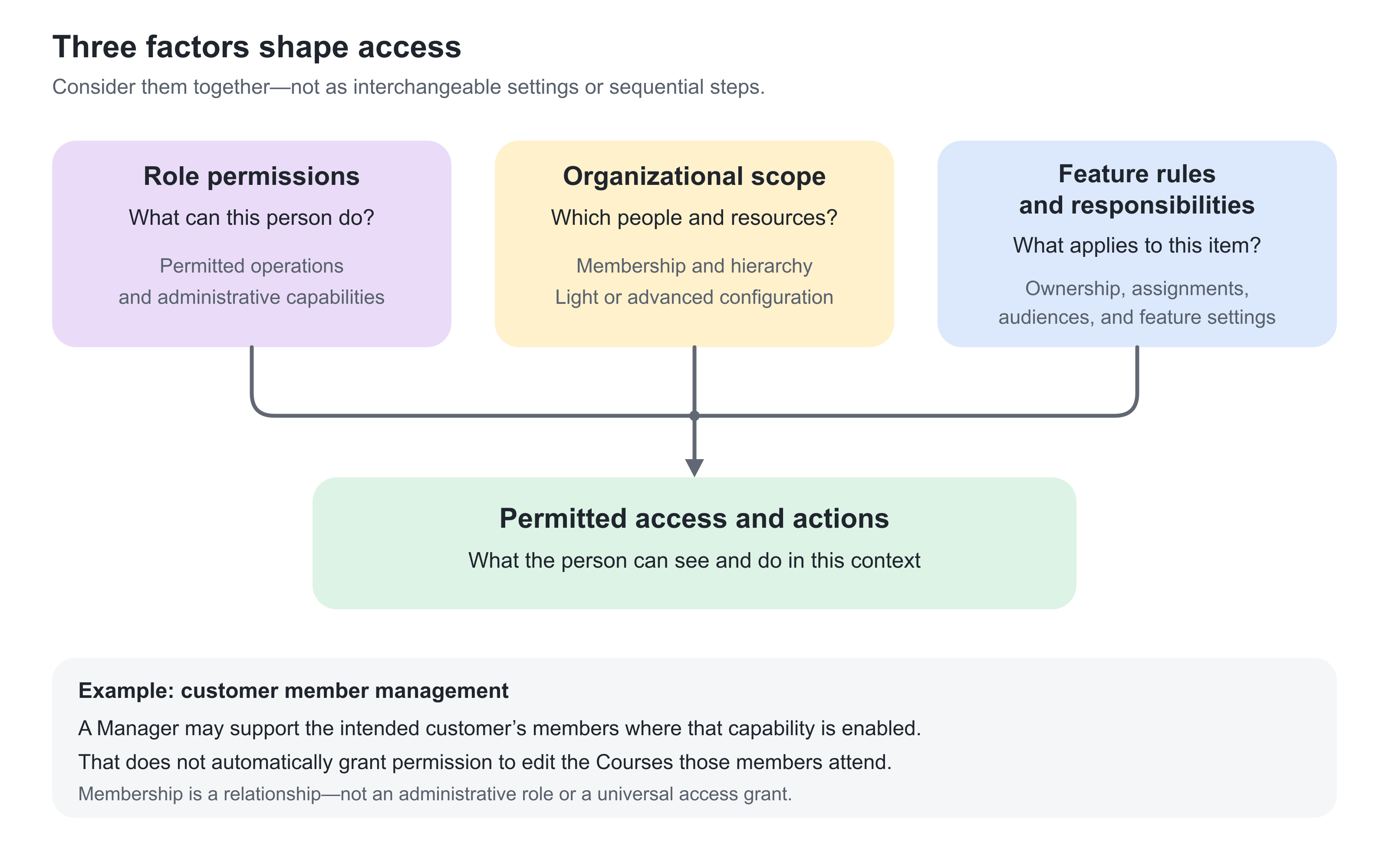
Separate three access questions
A useful access model answers three different questions.
| Question | Main control | Example |
|---|---|---|
| What can this person do? | Role and permitted operations | A Manager may manage members or enroll staff where permitted; a participant does not receive those administrative powers merely by joining an organization. |
| Which people and content can those actions reach? | Organization membership, hierarchy, and Organization filter configuration | A local administrator can be scoped to the relevant customer or branch rather than the entire platform. |
| Are there additional rules for this feature or item? | Feature settings, content relationships, and explicit assignments | Activity responsibility, Course ownership, audience settings, or report-specific rules can affect the result. |
Do not use one of these controls as a substitute for the others. Membership alone does not grant an administrative role. Assigning a role does not by itself describe a safe customer boundary. Making an activity visible to a customer does not automatically authorize that customer's administrators to edit its source content.
Understand the Organization filter
Organizations provide a foundation for managing different audiences within one platform. They help determine which learning opportunities people can discover, which users a Manager can oversee, and how organizational relationships affect access.
Organization filtering can support both a lighter organizational model and an advanced configuration with stricter separation. The right approach depends on whether you mainly need to organize audiences and management responsibilities or also need stronger boundaries around content and administration.
Light and advanced organizational filtering
| Approach | What it supports | When it is useful |
|---|---|---|
| Light organizational filtering | Uses organizational relationships in areas such as Storefront visibility, Manager scope, and other relevant features, without enabling the full set of strict content and administrative restrictions. | You need to manage different audiences, customers, partners, or business units while keeping administration and shared resources relatively centralized. |
| Advanced organizational filtering | Extends organization-based restrictions across relevant user lists, activity lists, content, archives, assets, certificates, and other administrative areas. It also provides further configuration for managing content relationships and organizational access. | Different branches need greater independence and separation, with local administrators managing their respective areas and a central administrator maintaining oversight. |
The advanced configuration is not simply another list filter. It changes which resources administrators can see and manage, and makes organizational relationships more consequential throughout the platform.
How the advanced configuration becomes available
The advanced configuration is enabled through Eurekos support. Its configuration options are not initially visible to a Platform Administrator. Organizations normally discuss this requirement with Eurekos when their structure calls for stricter separation.
As part of this setup, a designated Platform Administrator is elevated to Global Administrator. The relevant configuration becomes available to global administration, while Platform Administrators operate within the stricter organizational model.
With this configuration enabled, Platform Administrators no longer have access to Settings. Global administration manages those platform-level settings and provides central oversight.
What stricter separation means in practice
| Area | What changes for administration |
|---|---|
| People and management | Organizational scope constrains which users and records administrators can see and manage. Their role still determines which actions they may perform. |
| Activities, content, and assets | Organization relationships become stronger boundaries around access and administration. Shared learning resources, archives, and assets need deliberate relationships so the intended branches can use and maintain them. |
| Certificates and reporting | Access to relevant definitions, learning records, and reports is affected by organizational scope together with the applicable role and feature rules. |
| Newly created resources | The creator’s organizational context can influence the relationships assigned to new content and records. Administrators need to understand where they are creating a resource and who should subsequently have access to it. |
| Shared and cross-organization resources | Additional configuration supports management of organizational relationships. Central administrators must govern resources that serve several branches rather than assuming everything is either completely shared or completely isolated. |
The hierarchy can support oversight of related lower organizational levels where the role and feature permit it. It does not give every member administrative rights over subordinate organizations, and not every feature follows an identical inheritance rule.
Choose the level of separation deliberately
For example, a centrally managed academy may only need organizations to distinguish customer audiences and Manager responsibilities. A platform serving several independently administered partner academies may need the advanced configuration so each partner manages its own users and resources within clearer boundaries.
Stricter separation also requires more administrative oversight. Before requesting it, agree on global and local responsibilities, how existing resources should be associated with organizations, and how shared content will be maintained.
The advanced configuration can be turned off again through coordination with Eurekos support. However, changing the configuration should not be treated as automatically undoing the organizational relationships established while it was enabled.
For detailed role capabilities, see Roles (Overview and Permissions).
Delegate the responsibility that is actually needed
A customer coordinator may need to add members and follow their progress but not create training content. A regional academy team may need to maintain activities and coordinate instructors. A central administrator may need to manage organization relationships across the whole platform.
Choose the role and scope for each responsibility rather than selecting a powerful role simply because it makes a missing button appear. Manager invitation, removal, and user-status operations can be configured separately. Their availability should match your operating policy.
Where enabled by Eurekos support, Managers can also be permitted to change users between Participant and Manager within their organization and create new users with the Manager role. This supports local coordination without granting unrestricted role administration. See Manage Organization Members and Member Limits for the membership context.
Shared users deserve particular attention. If a person belongs to two customers, a local action on their user account may affect more than the local relationship. For example, blocking an account is different from removing one organization membership. Manager editing and status controls may therefore be restricted when users belong to other organizations.
Design shared learning and local learning deliberately
Consider a provider that maintains one standard product Course for several customers. The central content team owns updates to that Course. Regional delivery teams maintain their Training Activities, while each customer coordinator manages the appropriate members and follows their progress within permitted scope. Customer participants can take the training without their coordinators being allowed to edit the shared Course.
Start with the light model if content administration remains central. Consider advanced filtering when customer or regional teams must independently maintain their own content and assets, and agree how the shared Course will remain available. A local delivery requirement should not accidentally transfer responsibility for the common learning standard.
Keep these decisions separate:
- Content responsibility: who maintains or administers the item.
- Audience: who should discover or be offered the training.
- Participation: who is actually enrolled.
- Oversight: who needs to report on the resulting learning.
For activity-level setup, use Organization Visibility and Audience Targeting. For organization relationships on content, use Manage Organization Content and Learning Visibility.
Practical configuration patterns
| Requirement | Suggested design | Business outcome |
|---|---|---|
| Centrally managed customer academy | Use the light model: customer organizations, appropriate Storefront audiences, and permitted Manager responsibilities. Keep learning content centrally maintained. | Customers receive relevant learning and local member support without unnecessary content-administration boundaries. |
| Independently administered partner academies | Agree advanced filtering with Eurekos support. Designate a Global Administrator; give local administrators the appropriate roles and organizational relationships for their users, activities, content, and assets. | Partners can manage their own operations within stricter boundaries while the provider retains central oversight. |
| Regional teams oversee local partner branches | Create meaningful regional and branch relationships. Use permitted Manager responsibilities for routine member support; consider advanced filtering when regional teams also need separate content and activity administration. | Regional oversight and local responsibility match the actual work rather than assuming that every hierarchy requires strict filtering. |
| Shared core learning with departmental administration | Use the light model for member and audience management. If departments independently manage content and assets, use advanced filtering and govern the relationships that keep core learning available across departments. | Common standards coexist with local accountability and deliberate sharing. |
| Consultants support several customers | Use deliberate multi-organization membership and an appropriate role. In the advanced configuration, review the organizational context used when creating resources and the resulting content relationships. Test relevant features and reports. | Shared specialists support the intended customers without duplicate accounts or accidental access. |
| Pilot a capability with one audience | Use that feature’s organization-level availability controls where supported. A limited audience pilot does not itself require advanced organizational filtering. | A defined group can trial the capability without unnecessarily changing the platform-wide access model. |
Maintain the model as the business changes
Mergers, new partners, reorganizations, and staff transfers can change the meaning of a hierarchy. Moving a branch is not only a visual rearrangement: it changes its place within the relationships used by the platform.
Before a significant change, identify the users, content, local administrators, reporting responsibilities, and funding arrangements involved. Afterward, verify representative access and results. Keep a named owner for the organization design so that local exceptions do not gradually become the undocumented operating model.
Verify the setup
| Scenario or check | Expected result or evidence |
|---|---|
| Local administration Use a representative local role to inspect the intended people and operations. | The role can do the approved work without unnecessary wider access. |
| Customer separation Check another customer account, including relevant direct links. | Private people and content remain outside that account's permitted scope. |
| Shared learning Open the relevant activity as intended participants from each audience. | The offer and enrolled learning are available as designed. |
| Shared users Check a user with the actual multi-organization memberships your business requires. | Administrative actions and user experience behave appropriately across those relationships. |
| Oversight Open the required reports as local and central roles. | Each role can obtain the evidence it is responsible for, without assuming every report has the same scope. |
Troubleshooting
| What you observe | What to check |
|---|---|
| A local administrator cannot perform an expected action | Check both role permissions and organizational scope. Then inspect feature-specific permissions and explicit responsibilities. |
| A participant sees an offer that an administrator cannot edit | Compare activity audience configuration with the content's organizational relationship and the administrator's role. Visibility and editing are separate. |
| An administrator cannot open Settings | Check whether advanced organizational filtering is enabled. In that configuration, Platform Administrators do not have access to Settings; the designated Global Administrator handles platform-level changes. |
| A report does not match the administration list | Check the report's own scope, filters, user population, activity relationships, and applicable configuration. |
| A user has unexpectedly broad access | Review all organization memberships, assigned roles, and explicit content or activity responsibilities—not only the organization currently being viewed. |
FAQ
-
Who can enable advanced organizational filtering?
Only Eurekos support can enable the advanced configuration. Its controls are not initially visible to a Platform Administrator. As part of the agreed setup, a designated Platform Administrator is elevated to Global Administrator for central oversight and configuration.
-
Does a role determine which customer’s data an administrator can manage?
A role defines the operations a person may perform. Organization membership, hierarchy, the light or advanced filtering configuration, content relationships, and feature-specific rules determine where those operations apply. Assigning a role alone does not establish the intended customer boundary.
-
Does a parent organization’s member automatically administer every lower branch?
No. A higher organizational position does not grant administrative powers by itself. The person’s role, organizational relationships, and the relevant feature permissions must support the intended oversight.
-
Why can a Platform Administrator no longer open Settings?
With advanced organizational filtering enabled, Platform Administrators no longer have access to Settings. The designated Global Administrator handles platform-level changes. Ordinary use of organizations in the light model should not be confused with this advanced configuration.
-
Is there one inheritance rule for content, branding, and reporting?
No. These areas have different rules and configuration options. Verify each outcome needed by the business, particularly where users belong to several organizations or content must be shared across branches.
-
Can advanced organizational filtering be turned off again?
Yes, through coordination with Eurekos support. Plan the change with the central administrator and review existing users, content relationships, and responsibilities. Turning the configuration off should not be treated as automatically undoing organizational relationships established while it was enabled.