Configure Saga Availability and Access - Article
Summary
Assistant availability can support a controlled pilot, a partner offering or a wider learning service. The important decision is which people should have the capability and how they will recognize and reach it.
Eurekos manages the provider setup; authorized customer administrators configure who can use the enabled capability. Availability is configured separately from the content the assistant may use. Giving a group Saga does not grant that group access to every course, and hiding a navigation link is not the same as disabling the capability.
Use this article to:
- Choose a platform-wide or Organization-based rollout
- Understand empty selections, sub-organizations and exclusion rules
- Configure naming and navigation deliberately
- Verify availability and content boundaries with representative users
Confirm the capability and configuration owner
Saga is optional. Eurekos configures the AI provider connection and supported model. Provider setup and changes are handled by Eurekos, not through the customer administrator’s availability controls. Contact your Customer Success Manager or Eurekos Support to agree or change the provider and to enable any required AI or indexing capability.
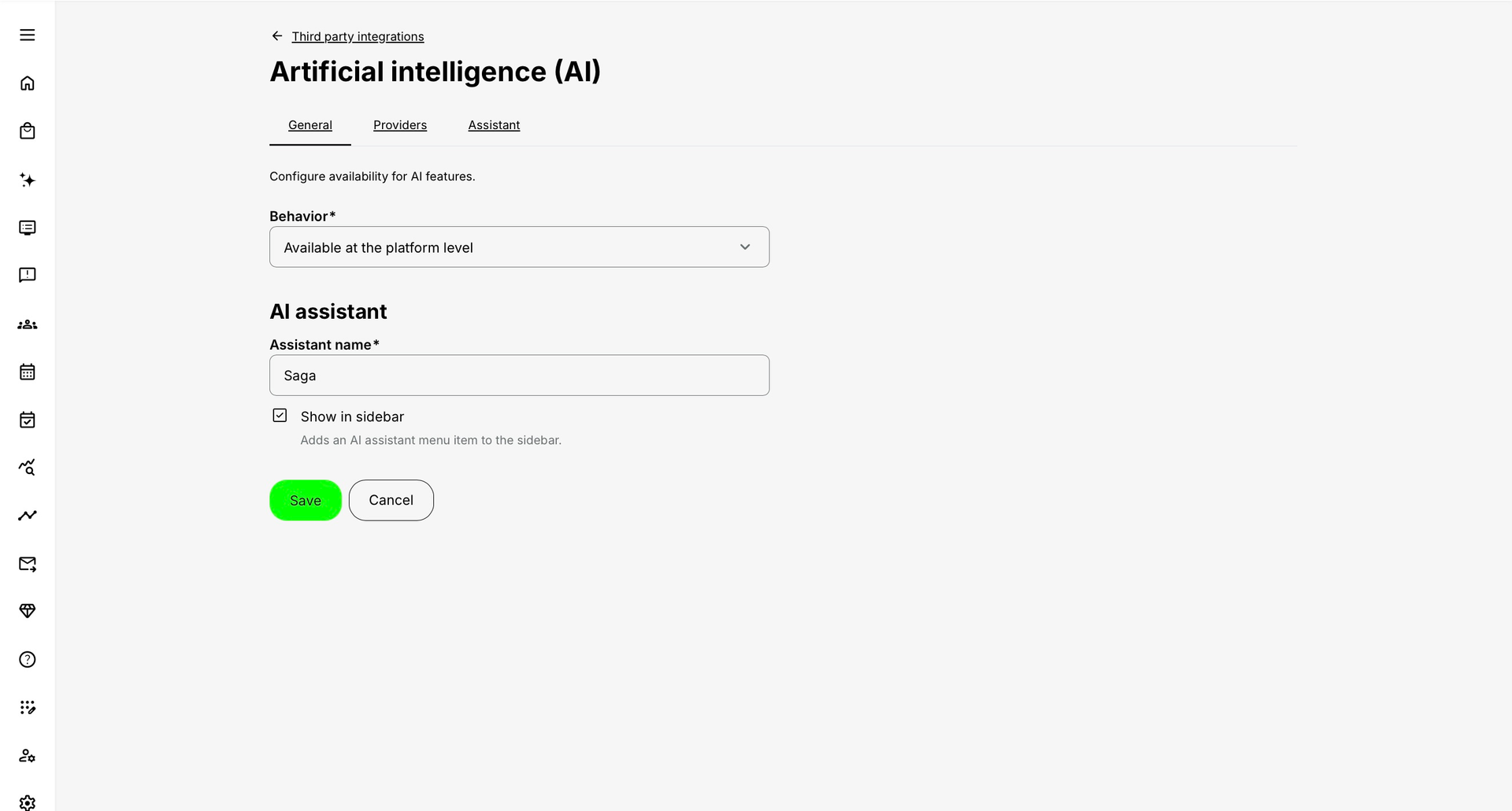
Authorized customer administrators use Settings → Third Party Integrations → Artificial intelligence (AI) to maintain availability, the assistant’s name and navigation. Access to this page does not grant access to Providers or the underlying connection credentials. The customer view can omit technical tabs that appear in Eurekos’ administrative interface.
Eurekos offers and uses Microsoft Azure OpenAI as the default assistant configuration, with Microsoft’s standard guardrails configured. OpenAI models run through Microsoft’s Azure service, separately from a personal ChatGPT account. Eurekos also offers a direct OpenAI connection and supported configurations based on Claude (Anthropic) and Gemini (Google). Direct OpenAI and Microsoft-hosted OpenAI are different service routes with their own processing arrangements. Agree the appropriate provider, model and hosting arrangement with Eurekos; this is not an option to connect any model or customer-supplied endpoint.
For retrieval, safety and grounding safeguards, Microsoft-hosted data protections, and the distinction between chat history and diagnostic records, use Understand AI Providers, Data Processing, and Governance. Audio transcription, text translation and other processing services are separate choices, not automatically defined by the assistant provider.
Choose the availability behavior
| Behavior | Effect | When it is appropriate |
|---|---|---|
| Disabled | The AI capability is not made available through this availability configuration. | Pause access or keep the capability unavailable until governance and testing are ready. |
| Available at platform level | Availability applies across the platform’s eligible signed-in users. | The organization has approved a broad rollout. |
| Available at organization level | Availability follows the selected Organization rules, including any sub-organization and exclusion conditions. | Pilot with a department, offer the capability to selected customers, or exclude a particular population. |
Build the Organization rule deliberately
For Organization-based availability, read the rule as an audience definition rather than a simple list of names. Selecting an Organization can cover its descendant branches. A sub-organization selection can narrow the included branch. Use the available selectors to define the intended hierarchy, then test a user in each relevant branch.
An empty Organization selection in Organization-level mode can mean all Organizations. It is not a safe way to create an empty pilot audience. Likewise, Exclude reverses the rule: the selected population is left out rather than included.
| Intended rollout | Configuration approach | Verification |
|---|---|---|
| Pilot one customer Organization | Include the intended Organization and, if needed, the chosen sub-organization branch. | Test a member inside the branch, a sibling branch and an unrelated Organization. |
| Offer the service broadly except one population | Use the exclusion rule for that population. | Test both an excluded user and an ordinary included user; verify descendant behavior. |
| Enable the entire platform | Use the deliberate platform-level behavior rather than relying on an ambiguous empty pilot selection. | Test representative learner and staff accounts and the required entry routes. |
Set the name and navigation
Assistant name changes the label shown for the assistant. Saga is the default; choose a recognizable name that can be explained consistently in learner guidance. Renaming does not change access, providers or the learning content, and the configured name is not automatically translated into a different name for each interface language.
Show in sidebar controls the navigation-menu entry. The header assistant and other enabled entry points can still be available when that menu link is hidden. Use Disabled or an appropriate availability rule when the objective is to remove access, not merely reduce navigation clutter.
Understand the adjacent configuration layers
- Providers: Eurekos maintains the technical connection and supported model, separately from customer audience selection. Request provider changes through your Customer Success Manager or Eurekos Support; do not paste credentials into learner content or ordinary support examples.
- Assistant: The assistant and suggested-question services can have their own enabled state and provider selection in the technical configuration managed by Eurekos. Customer availability controls do not select a provider. System instructions are managed rather than freely editable.
- Content indexing: Optional H5P and SCORM extraction needs a separate content policy. Availability alone does not determine whether assessment bodies are included.
- Recommendations: Dashboard recommendation slides and questionnaire-generated recommendations are separate features. Do not assume that switching Saga on configures the carousel.
See Understand AI Providers, Data Processing, and Governance, Control AI Content Indexing and Protect Assessments and Configure Recommendations on My Overview for those owners.
Verify before expanding the audience
- Record the intended audience, exclusions and configuration owner.
- Apply the settings using Save where provided. Reopen the page to confirm the stored values.
- Test an included user and an excluded user in the actual Organization hierarchy. Do not rely only on an Administrator’s interface.
- Check both the header entry and any navigation link. Then test a permitted lesson and a restricted or excluded item.
- Confirm that learner guidance uses the configured assistant name and explains sources, limitations and the human-support route.
Troubleshooting
| Problem | What to check |
|---|---|
| A pilot appears available to everyone | Check for an empty Organization selection and whether the behavior is platform-level. Confirm that Exclude has not reversed your intended rule. |
| A child Organization has unexpected access | Inspect the parent selection, sub-organization branch and descendant behavior. Test sibling and nested branches explicitly. |
| The menu link is hidden but Saga still opens | Show in sidebar controls navigation, not the whole capability. Review availability if access should be disabled. |
| A technical tab is missing | The Providers tab is not part of the customer availability interface; Eurekos manages provider setup. Other technical tabs also depend on permissions and enabled modules. Contact Eurekos rather than changing roles to expose a provider field. |
FAQ
-
Does an empty Organization selection mean no one can use Saga?
No. In Organization-level mode an empty selection can cover all Organizations. Define and verify a pilot audience explicitly.
-
Does Show in sidebar disable the header assistant?
No. It controls the navigation entry. Availability and the enabled assistant services are separate controls.
-
Can changing the assistant name change its permissions?
No. Naming is presentation. Availability, content access, indexing and provider configuration remain separate.