Control AI Content Indexing and Protect Assessments - Article
Summary
Indexing can make packaged and interactive learning much more useful to an assistant. It can also make assessment questions and answers available if those objects are included without a deliberate policy.
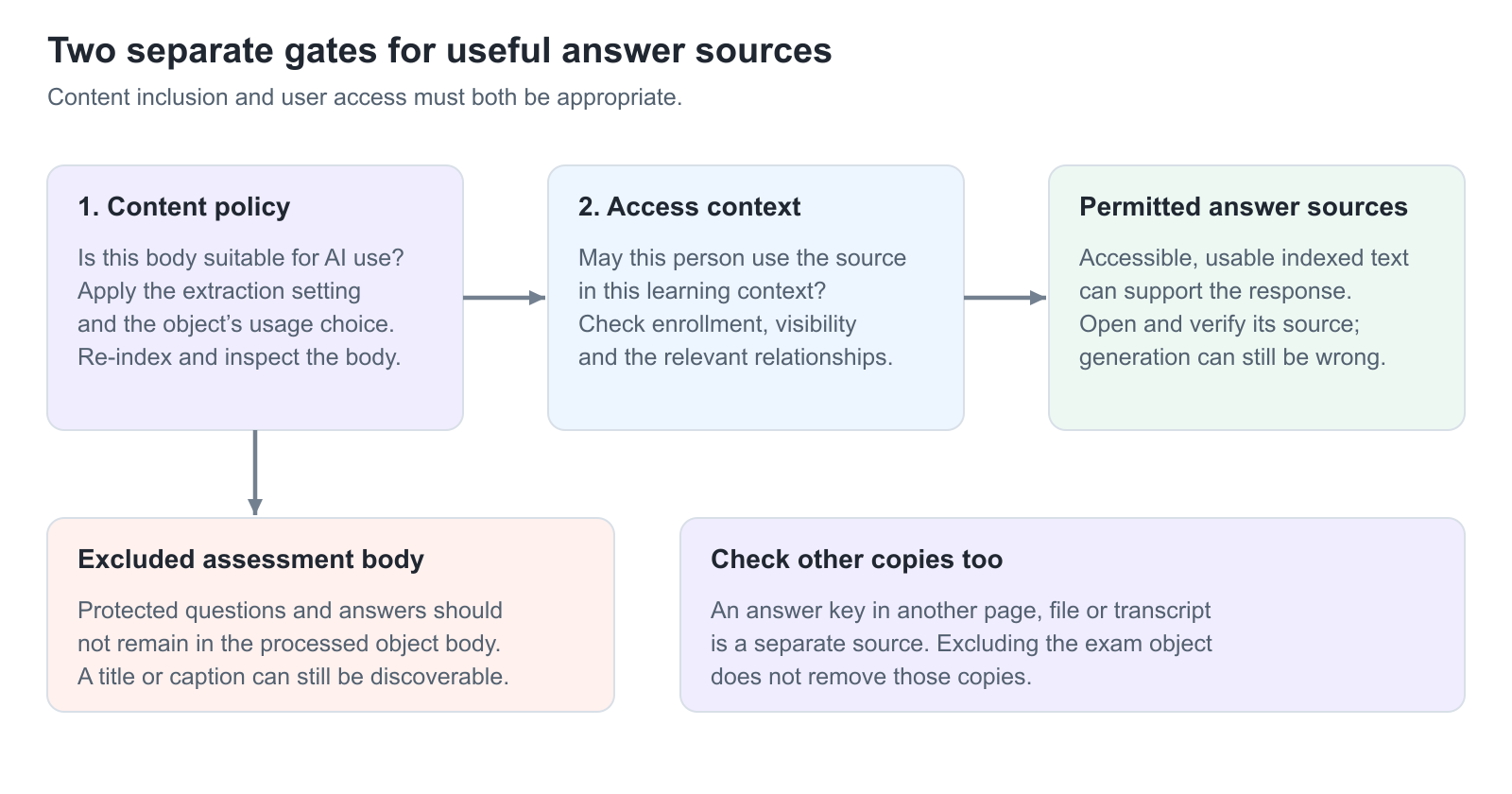
Eurekos provides platform-level extraction settings and object-level usage choices. Use both to distinguish material intended for learning support from graded or confidential assessment content. Excluding one body does not remove copies of the same information elsewhere.
Use this article to:
- Choose an appropriate extraction default
- Include or exclude individual H5P and SCORM objects
- Reprocess existing content after relevant policy changes
- Verify assessment boundaries with realistic learner access
Separate the two decisions
| Decision | What it controls | What it does not control |
|---|---|---|
| Extraction and content usage | Whether supported object content is processed and made available for the relevant indexed-content services. | The learner’s enrollment, a page prerequisite, an object’s completion rule or a certificate criterion. |
| Permission and learning access | Whether the person can use the source in the current context. | Whether the source has useful extracted text or whether assessment content should be indexed at all. |
Choose the platform extraction policy
Where the Content indexing capability is enabled, its technical configuration controls extraction for H5P and SCORM and the default behavior. The setup can be maintained by Eurekos; contact your Customer Success Manager or Support if the controls are not exposed to your role.
| Choice | Meaning | Practical implication |
|---|---|---|
| Only selected objects | Detailed content is used when individual objects are explicitly selected for use. | A conservative starting point when content owners must approve what is included. |
| All objects | Objects use the platform-wide inclusion default unless individually excluded. | Efficient for broad learning support, but requires a deliberate assessment and confidential-content review. |
| Extract H5P content / Extract SCORM content | Enable the corresponding supported extraction service. | Object inclusion alone is insufficient when the relevant extraction service is disabled. H5P contained inside SCORM follows the package extraction route. |
Changing a global default does not automatically replace every existing indexed object. Existing content can remain in the index until the affected objects are resaved or re-indexed. Plan and verify that processing before relying on a new exclusion policy.
Set usage for the individual object
- Identify the reusable H5P object or SCORM/xAPI course that contains the material. Review its complete content, not only its title.
- For H5P, open the object’s Edit interface. For a SCORM/xAPI course, open its Course Settings and the General area; the usage choice can also be available during import.
- Locate the object’s usage setting. The inclusion choices are Use, Do not use and Default, which follows the applicable platform default. Read any resolved default description rather than assuming Default always means included.
- Choose Do not use for an assessment body that must not support assistant answers. Save the source and complete the required re-indexing.
- Inspect the resulting index and repeat the learner tests before considering the change verified.
The usage choice concerns the object body, not whether the source remains present in the course. A title, caption or other metadata can remain discoverable when the detailed body is excluded.
Protect the assessment, not only one checkbox
When quiz content is extracted, questions, answer options and related feedback can become part of the usable body. Do not assume that a generated-answer layer automatically recognizes and withholds every graded answer. Exclude the relevant H5P or SCORM body when the assessment should not be an answer source.
A package that contains both instruction and an exam creates a real design decision. Excluding the whole package protects its body but also removes its lesson text from that extraction route. If AI support for lessons is important, consider maintaining instructional material and protected assessments as separate objects or packages, then apply and verify the appropriate policy to each.
Review duplicate answer material in native pages, supporting files, video subtitles and other accessible sources. Excluding the exam object cannot hide an answer key that is deliberately published as an ordinary resource. Likewise, content exclusion is not a claim that the assistant cannot explain general subject knowledge.
Verify with a positive and a negative test
| Test | Expected evidence |
|---|---|
| Allowed lesson | A distinctive phrase from an included, accessible lesson is present in the processed content and can support a relevant answer. |
| Excluded assessment body | After processing, protected questions and answers are absent from that body’s usable indexed content. A metadata title may still be present. |
| Ordinary learner | The intended learner can use allowed content but cannot retrieve an inaccessible or excluded source. Do not use only an Administrator test. |
| Updated policy | The index timestamp and body reflect the changed policy, not a queued update over an older included version. |
| Other copies | The same protected answer is not being retrieved from a separate page, transcript or file. |
Maintain the policy over time
Assign responsibility for reviewing newly imported packages, copied H5P objects and assessment revisions. Check the resolved default on new objects, particularly if the platform default changes. Recheck extraction after a package replacement: a previously simple lesson can acquire an exam in a later version.
Use Maintain Searchable Content and Check the Search Index for the general inspection workflow, and Understand AI Providers, Data Processing, and Governance for processing and provider considerations.
Troubleshooting
| Problem | What to check |
|---|---|
| An excluded exam still appears by title | Check whether only metadata is returned. Title discoverability and access to the detailed body are separate. |
| Old answers remain after changing the default | Resave or re-index affected objects and verify the processed body. A global default change alone is not proof of removal. |
| A lesson inside an excluded package is unavailable | The exclusion can cover the package body. Separate lesson and assessment assets if different usage policies are needed. |
| The assistant still explains the subject | Check whether it is using a permitted lesson or another source rather than the excluded exam. Exclusion is not suppression of all general knowledge. |
| The usage field is not available | Confirm that the optional extraction capability is enabled and that you have the correct object-editing permissions. Ask the configuration owner for help. |
FAQ
-
Are assessment answers automatically redacted?
Do not rely on automatic redaction. If quiz content is indexed, it can include questions and answer material. Exclude protected assessment bodies and verify the processed result.
-
Does changing the platform default update every old object immediately?
No. Existing objects can require resaving or re-indexing. Verify the current processed content before relying on the new policy.
-
Can I include lessons but exclude an exam inside one package?
A package-level exclusion can affect its whole extracted body. If different policies are required, consider separate lesson and assessment objects or packages and verify each one.