Managed Subscriptions - Article
Summary
Managed subscriptions allow administrators to create subscription access for organizations under negotiated agreements such as invoicing or purchase orders. They support enterprise billing arrangements while preserving seat management, learner access control, and subscription lifecycle governance.
In this article you will learn:
- What managed subscriptions are and when they should be used
- How administrators create and configure managed subscription agreements
- How managed subscriptions can be adjusted, extended, or canceled
- How subscription owners manage seats and learning access
Overview
Managed subscriptions allow administrators to grant organizations subscription access without requiring standard online checkout. Instead of purchasing through the storefront, subscriptions can be created directly by administrators and billed through external arrangements such as invoicing, purchase orders (POs), or negotiated commercial agreements.
This model is particularly useful for enterprise and extended-enterprise learning scenarios where organizations require alternative procurement processes, negotiated pricing, or centralized billing arrangements.
In many real-world training agreements, purchasing and subscription management are handled separately. Large organizations may require centralized billing combined with decentralized seat management, while public institutions often rely on invoicing to comply with procurement procedures or tender requirements. In other cases, subscriptions are based on negotiated pricing, fixed enterprise agreements, or contracts covering large groups of learners.
Managed subscriptions provide a structured way to support these scenarios within the platform. Administrators can configure subscriptions that reflect negotiated agreements while maintaining operational oversight through billing information, renewal dates, and reminder workflows.
These reminders allow administrators or account managers to follow up with customers ahead of renewal or expiry, ensuring that ongoing agreements, pricing adjustments, or contract extensions can be handled as part of the organization’s commercial and relationship management processes.
Managed subscriptions extend the Team Subscription model. After setup, they operate in the same way operationally: subscription owners can manage seats, invite members, and monitor usage. The key difference is that payments are handled outside the Eurekos platform, while transactional information and billing timelines remain visible for administrative tracking and financial reference.
By combining enterprise billing flexibility with structured administrative oversight, managed subscriptions enable organizations to support complex commercial agreements while maintaining scalable subscription management within the platform.
Key characteristics:
- Alternative billing arrangements—Managed subscriptions support invoice-based billing, purchase orders, or other externally managed payment agreements. This allows organizations to align subscription-based learning access with internal procurement and finance processes.
- Administrator-created subscriptions—System administrators create managed subscriptions directly in the platform rather than relying on storefront purchasing. This allows commercial agreements to be configured centrally and delivered to customers as ready-to-use subscriptions.
- Custom commercial agreements—Managed subscriptions support negotiated pricing structures and tailored subscription terms. Administrators can define billing parameters, seat allocation, and customer-specific conditions that reflect agreed commercial arrangements.
- Ownership transfer to the customer—Once the managed subscription is created, the designated subscription owner receives an invitation to take ownership. After accepting the invitation, the owner can manage seats, invite members, and supervise the subscription like any other team subscription.
- Built-in administrative oversight—Managed subscriptions include renewal timelines and reminder mechanisms that support follow-up workflows. This allows administrators or account managers to track agreements, prepare renewals, and manage ongoing negotiations with customers before subscriptions expire.
Operational Differences From Self-service Subscriptions
After setup, managed subscriptions function similarly to Team Subscriptions in terms of learning administration. The subscription owner can manage seats, invite or remove members, and monitor learning activity within the organization.
Actions available to the subscription owner include:
- Assigning and unassigning seats
- Inviting members to the subscription
- Managing team access to the included learning content
- Monitoring learner participation and progress
However, certain aspects of the subscription lifecycle remain under administrator control. Subscription owners cannot modify billing terms, purchase additional seats, or change the billing schedule. These elements are defined as part of the managed agreement and must be adjusted by a system administrator if required.
Creating a Managed Subscription
Administrators create managed subscriptions from Course Administration → Subscriptions → Ownership and Billing by selecting [Create managed subscription]. This opens a configuration form where the commercial agreement, seat allocation, and customer ownership are defined.
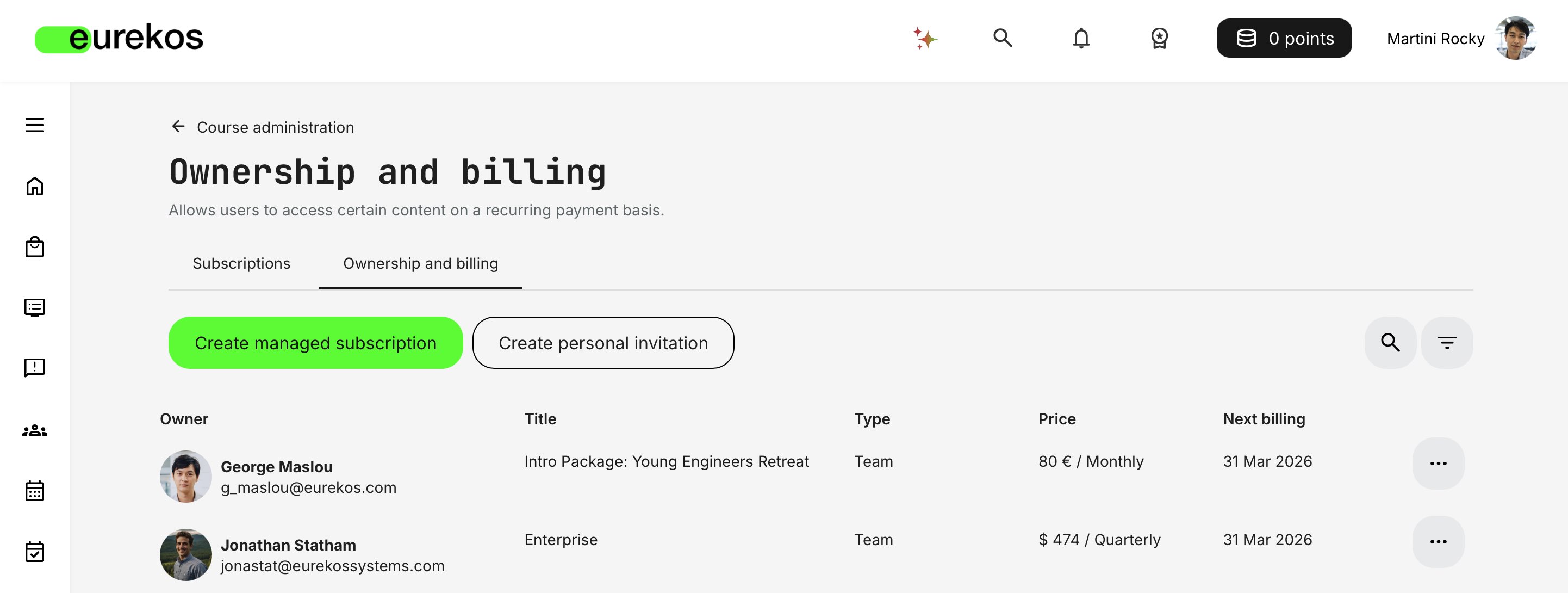
Managed subscriptions are typically used when the subscription has been negotiated outside the platform—for example through enterprise agreements, invoicing arrangements, purchase orders, or other custom billing models.
Selecting the Subscription Configuration
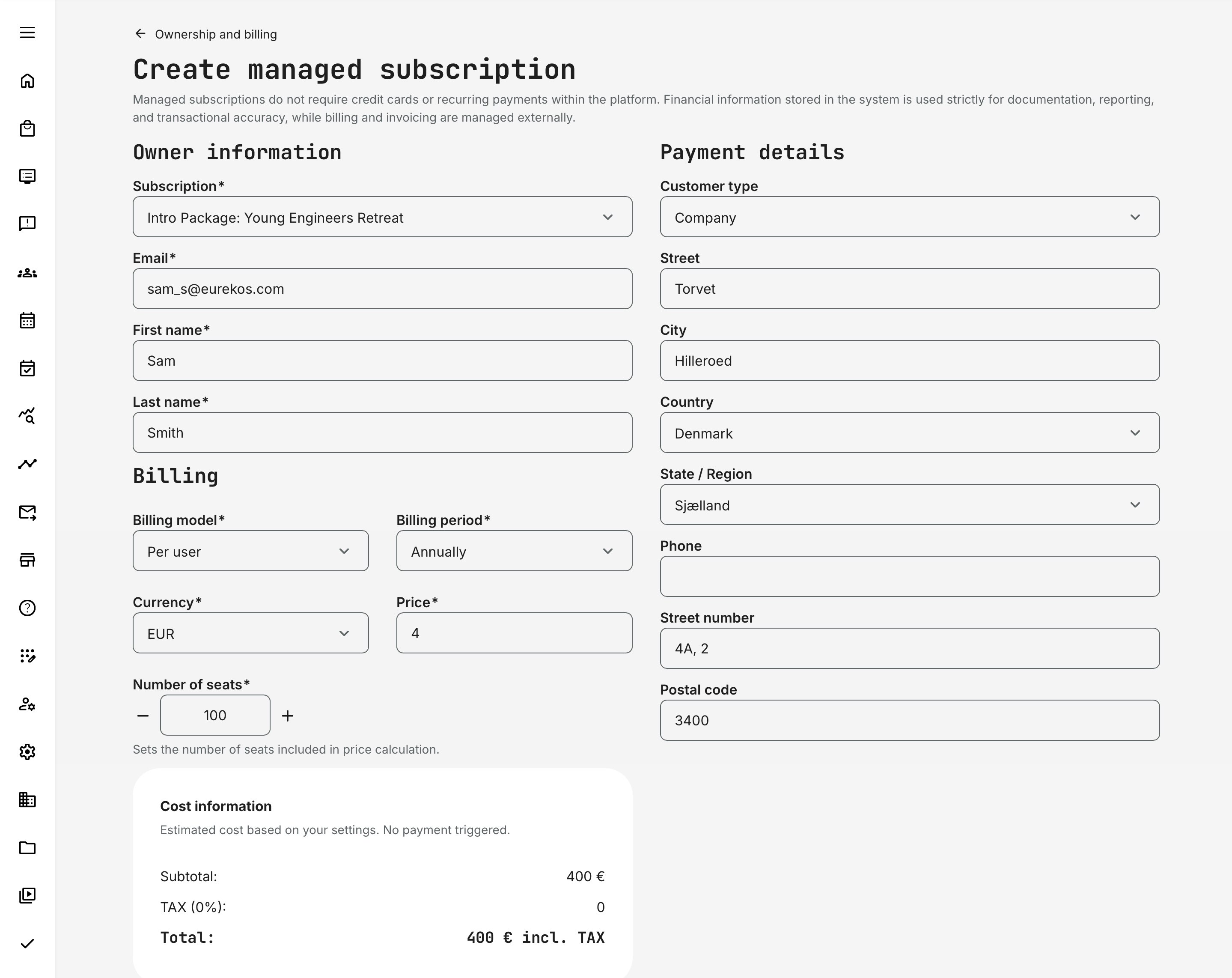
The administrator first selects an existing subscription template. This template defines the standard subscription configuration, including:
- Available billing period options
- Default pricing per seat
- Supported currencies
- The learning content included in the subscription
During creation, administrators can choose from the available billing options defined in the subscription template. If required, the price per seat can be overridden for the selected currency or replaced with a negotiated fixed price for the duration of the subscription.
Billing Configuration and Pricing
The Billing section defines how the subscription will be structured for the customer.
Administrators configure:
- Billing model (for example per user)
- Billing period (for example monthly or annually)
- Currency and negotiated pricing
- Number of seats included in the agreement
The seat limit defines the maximum number of users that can be assigned to the subscription. This ensures that the subscription owner cannot exceed the number of seats agreed upon in the commercial contract.
Even though managed subscriptions do not trigger automatic payments within the platform, the system still calculates and records the expected subscription value. This information provides administrative visibility and can support external invoicing workflows, reporting, or integrations through exports or APIs.
Customer and Owner Information
Managed subscriptions are created with a designated subscription owner. This person represents the customer organization and is responsible for managing seats and members once the subscription becomes active.
The administrator enters the owner’s email address when creating the subscription. If the user is already registered in the platform, relevant profile information—such as name and contact details—may be prefilled automatically.
Once the managed subscription is created, the designated owner receives an email invitation asking them to accept ownership of the subscription. After accepting the invitation, the subscription becomes visible in their Main menu → Subscriptions, where they can begin inviting members and assigning seats.
Email notifications related to subscriptions can be configured under Settings → Email sending → Subscriptions.
⚠️ If an invitation to take ownership is sent to a recipient who does not yet have an account on the platform, the standard sign-up and user creation process is initiated. This ensures that the recipient has an authenticated user account, which is required to complete the operation, access the subscription content library, and maintain accurate transaction records.
Customer Billing Details
The Payment details section records customer information such as company name, address, and contact details. These fields help ensure that the subscription record contains the information required for invoicing, tax calculations, and financial documentation.
Although payment processing occurs outside the Eurekos platform, storing these details provides useful context for administrators managing enterprise agreements and billing processes.
Renewal Reminders and Follow-up Workflows
Managed subscriptions support administrative follow-up through renewal reminders. Administrators can specify which stakeholders—such as account managers or customer contacts—should receive reminder notifications before the subscription renewal date.
These reminders help organizations manage ongoing customer relationships by prompting follow-up conversations regarding renewal, pricing adjustments, contract extensions, or seat changes.
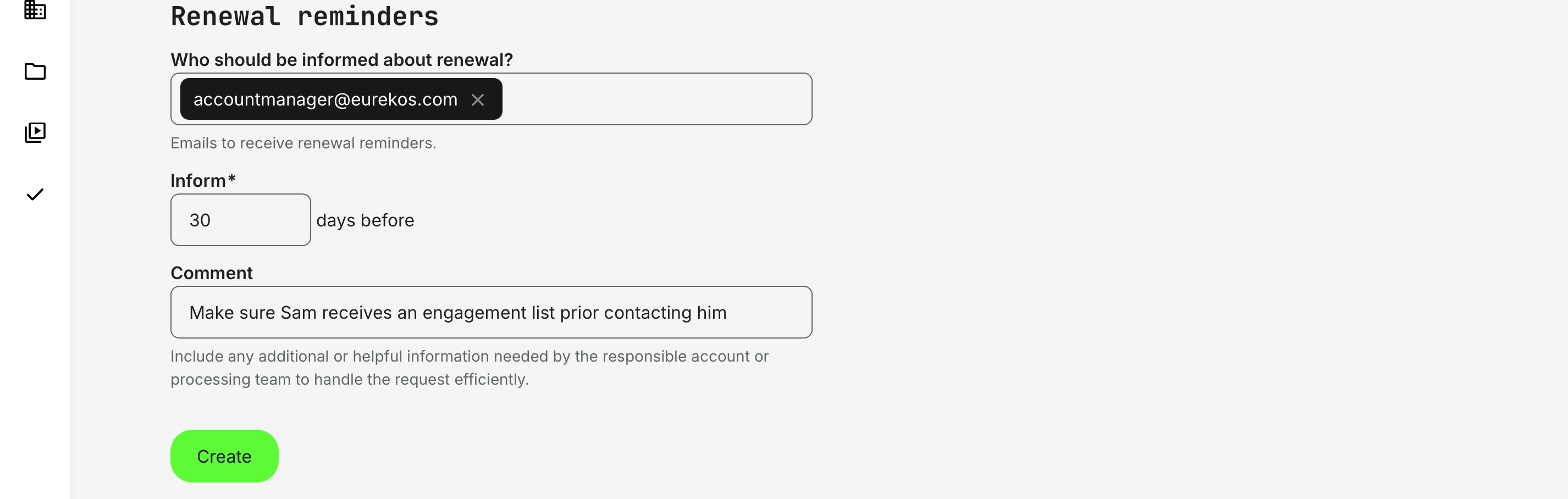
An optional comment field allows administrators to include notes or instructions for the responsible team, such as reminders to review usage data or prepare engagement reports before contacting the customer.
Adjusting a Managed Subscription
Managed subscriptions can be monitored and adjusted from Course Administration → Subscriptions → Ownership and billing. This overview lists all subscription owners and their associated subscriptions, including pricing details and the next billing date.
Administrators can locate managed subscriptions by searching or filtering the list. In this example, the overview has been filtered to display Managed subscriptions only, making it easier to monitor enterprise agreements and externally billed subscriptions.
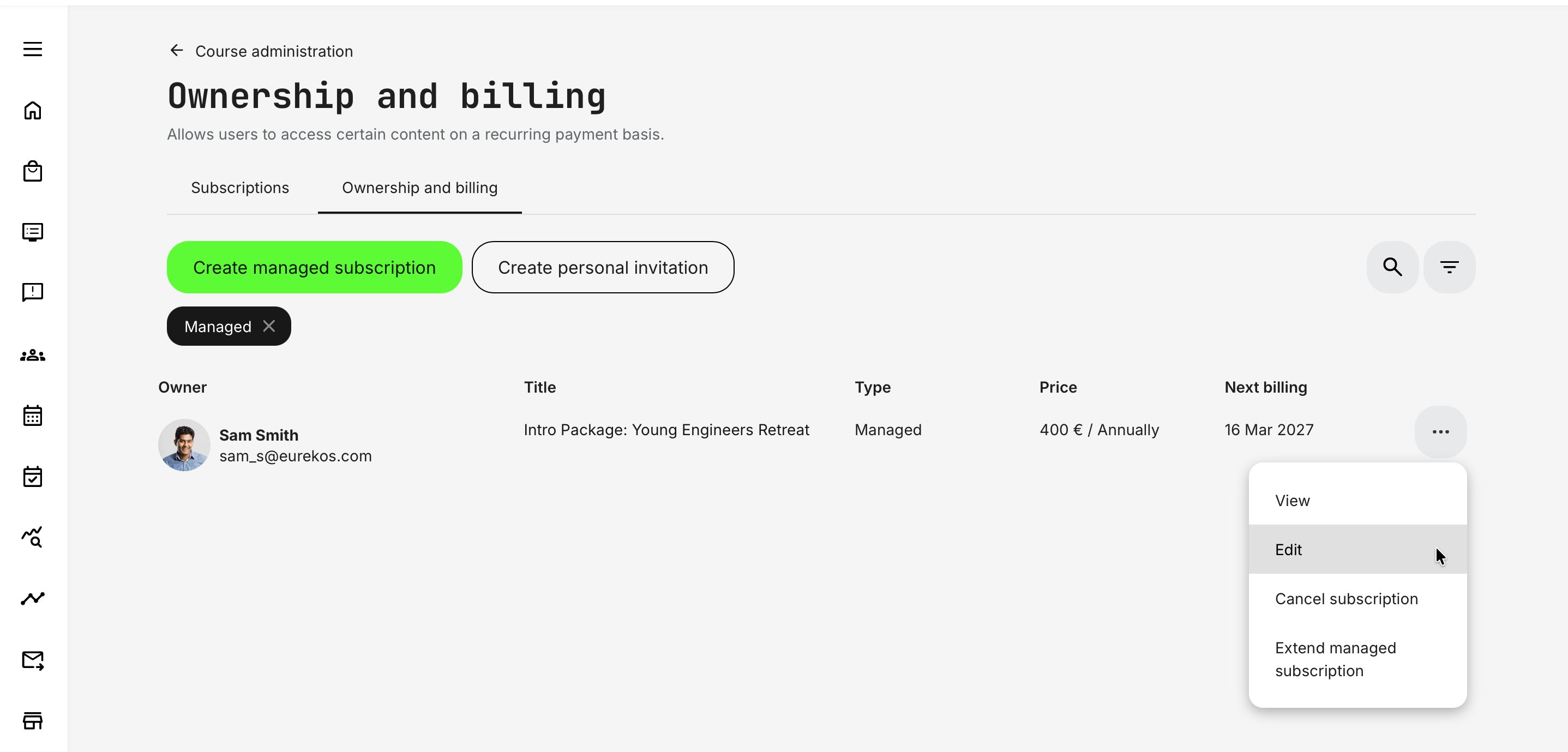
Each managed subscription includes an action menu that provides several administrative options:
- View – Opens the subscription record to review the current agreement details.
- Edit – Allows administrators to update certain commercial or administrative parameters of the managed subscription.
- Cancel subscription – Terminates the subscription according to the agreed lifecycle.
- Extend managed subscription – Extends the subscription period while preserving the existing agreement conditions.
Selecting Edit opens the managed subscription configuration form, where administrators can adjust limited aspects of the agreement.
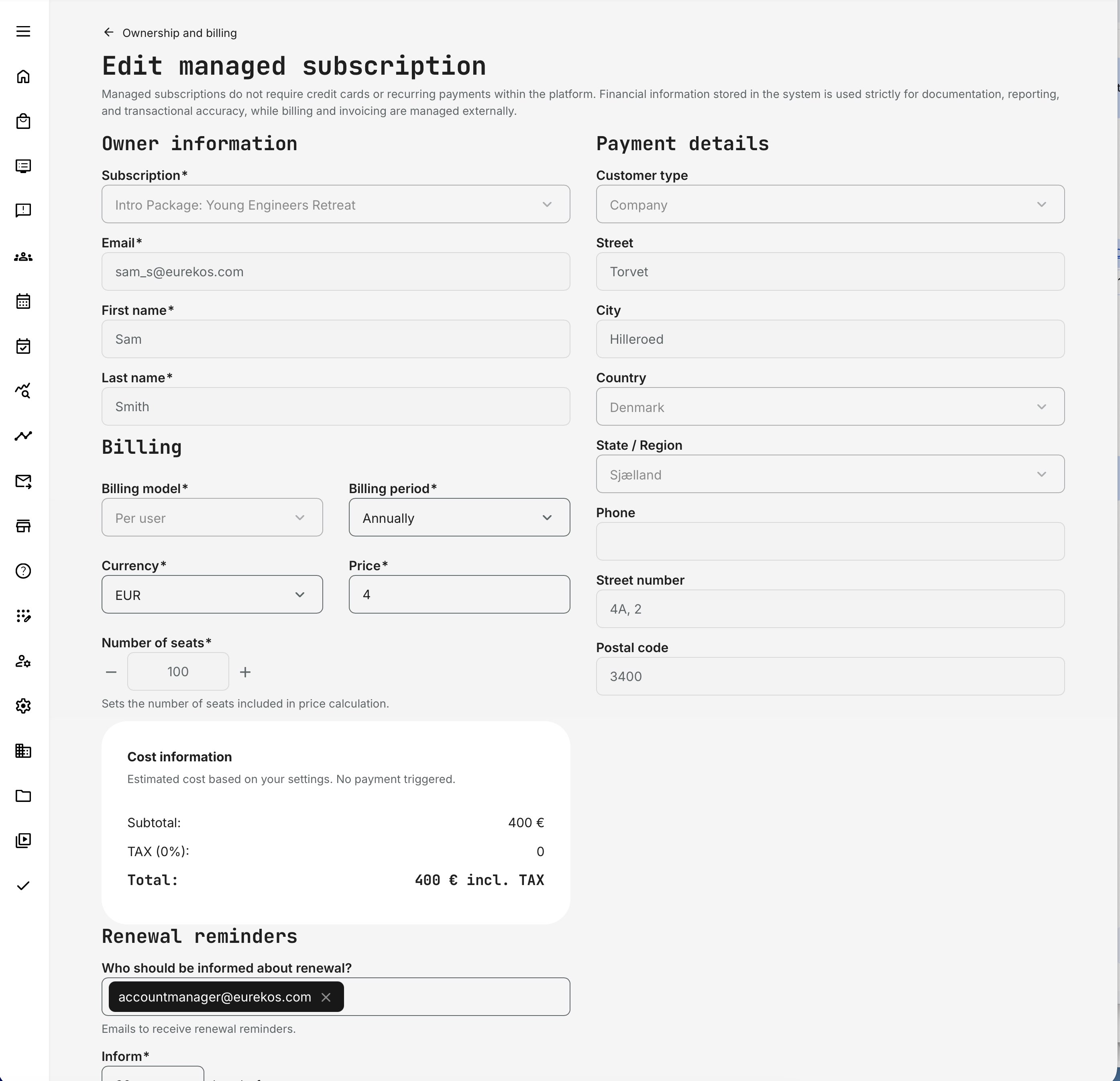
Administrators can modify:
- Billing period
- Currency
- Price or negotiated seat cost
- Renewal reminder recipients
- Renewal reminder timing
- Administrative notes related to renewal follow-up
These changes allow administrators to update negotiated pricing, adjust billing parameters, or manage internal follow-up workflows without recreating the subscription.
When a New Managed Subscription is Required
Some changes cannot be applied to an existing managed subscription. If the agreement structure changes significantly—such as exchanging the underlying subscription template, seat model, or other core commercial conditions—a new managed subscription must be created to replace the existing one.
This approach preserves transactional accuracy and avoids conflicts with historical billing records, seat allocations, and previously agreed contract terms.
When a new agreement replaces an existing one, administrators typically cancel or expire the current subscription and create a new managed subscription reflecting the updated conditions.
Here is a refined Help Center section explaining extending and canceling managed subscriptions, with clearer language and alignment to the lifecycle behavior described in the Team Subscription article.
Extending or Canceling a Managed Subscription
Administrators can manage the lifecycle of a managed subscription directly from the Ownership and billing overview. From the action menu of a managed subscription, the following lifecycle actions are available:
- Extend managed subscription – Extends the subscription period based on the agreed renewal terms
- Cancel subscription – Ends the managed subscription according to the current agreement
These options allow administrators to maintain accurate subscription timelines when agreements are renewed or terminated outside the platform.
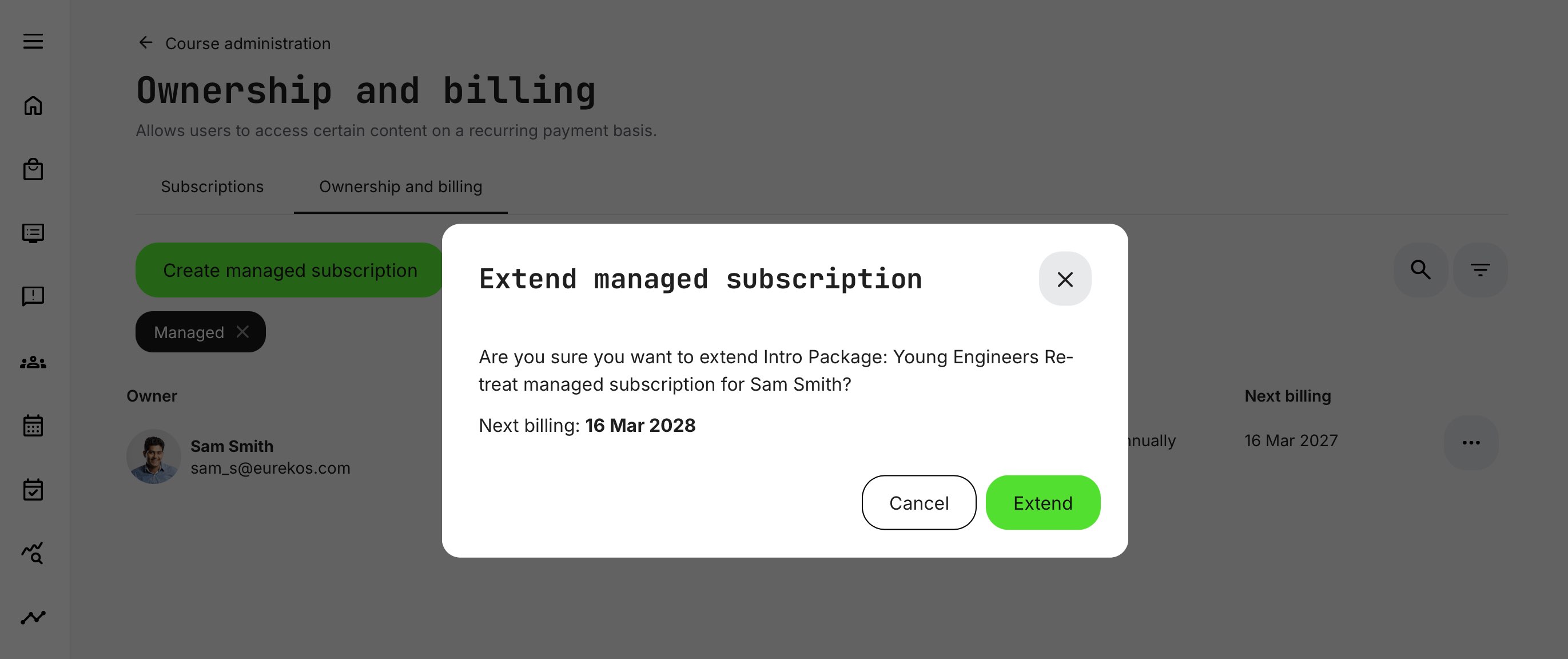
Extending a Managed Subscription
When a new commercial agreement is reached with a customer, administrators can extend the existing managed subscription instead of creating a new one.
Extending a managed subscription adds a new billing period to the subscription while preserving the remaining time of the current agreement. For example, if a renewal is agreed 30 days before the existing expiration date, the new period is added on top of the remaining time.
This means the subscription continues uninterrupted and the next billing date is updated accordingly.
Example scenario:
- Current agreement expires 16 March 2027
- Renewal agreement reached 30 days before expiry
- Subscription extended by 12 months
The new billing date becomes 16 March 2028, preserving the remaining time of the existing agreement while applying the new renewal period.
This behavior mirrors the lifecycle logic used for team subscriptions and ensures that early renewals do not reduce the value of the existing agreement.
Canceling a Managed Subscription
Administrators can cancel a managed subscription when the agreement with the customer ends.
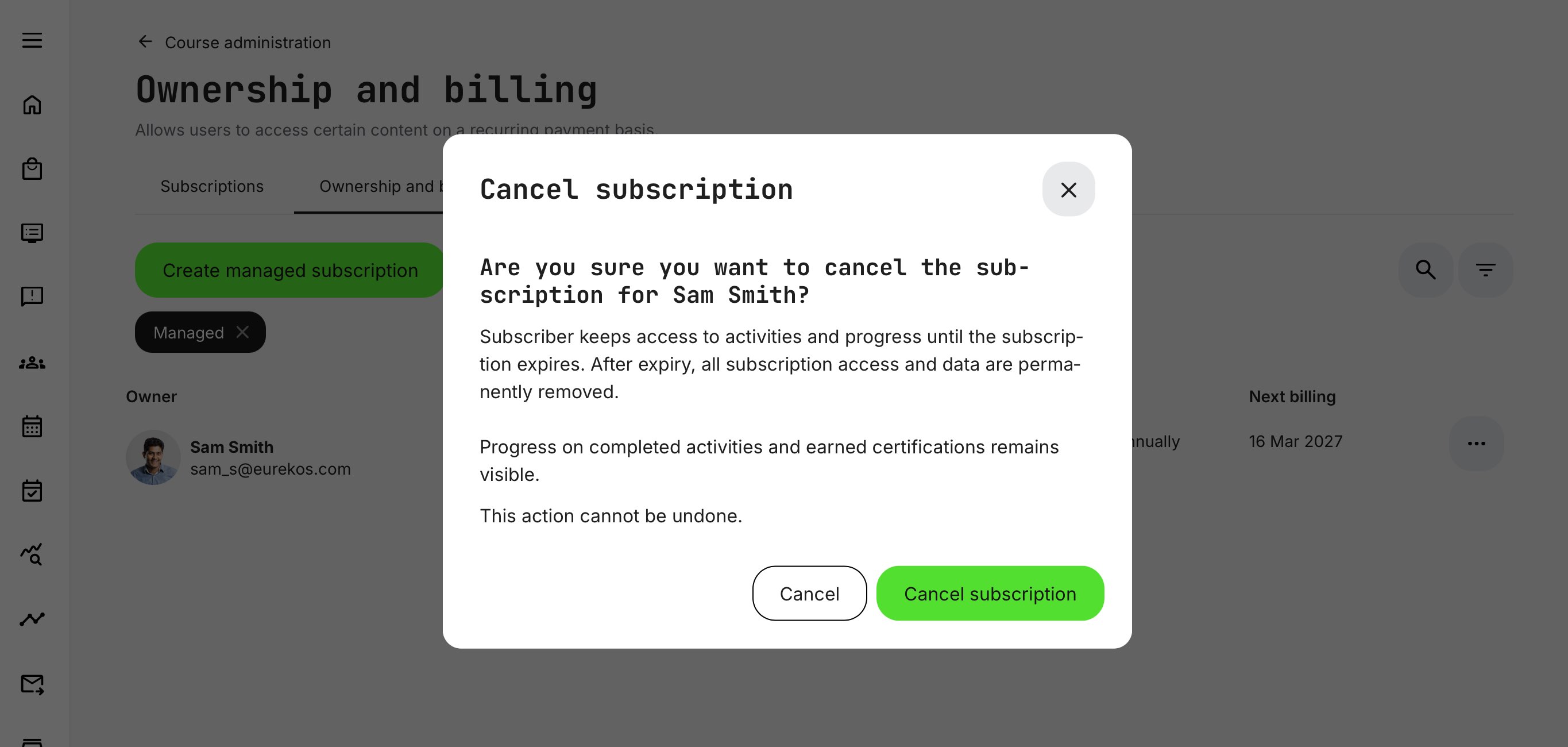
When a subscription is canceled:
- The subscriber retains access to the learning content until the current subscription period expires.
- After the expiration date, subscription access is removed.
- Historical progress and earned certifications remain visible.
Canceling a subscription does not remove historical learning records, ensuring that learner achievements remain documented.
Operational Consistency
Because managed subscriptions often involve commercial agreements and financial transactions handled outside the Eurekos platform, lifecycle actions follow the same operational behavior used for standard subscriptions.
Maintaining these consistent lifecycle rules helps preserve the integrity of subscription timelines, learner access, and reporting across the platform.
Experience For the Subscription Owner
After accepting the ownership invitation, the designated contact person becomes the subscription owner and can manage access to the subscription from the Subscriptions section of the platform.
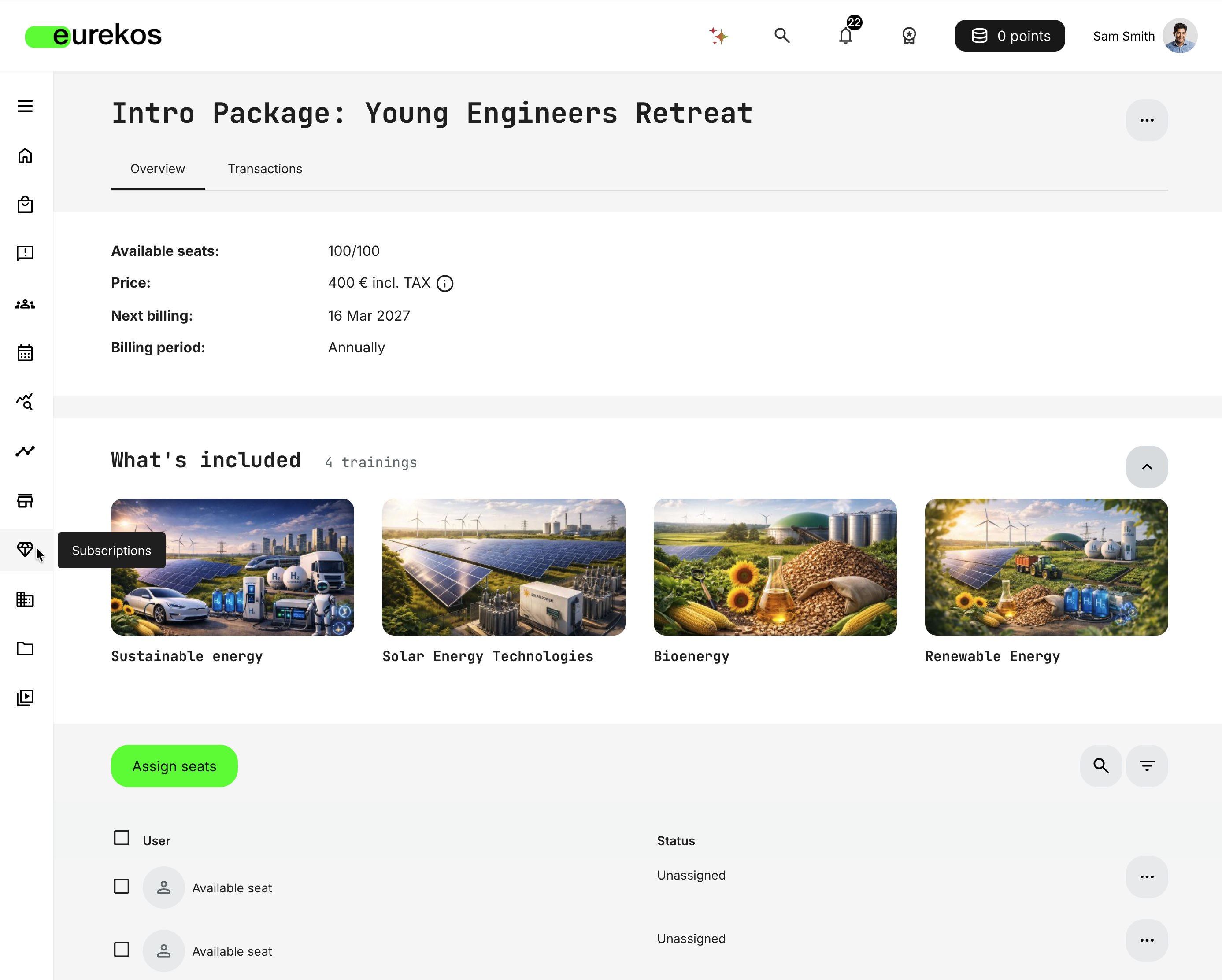
The subscription owner sees an overview of the subscription arrangement, including:
- Total number of available seats
- Current price and billing period (for reference)
- The next billing date
- The training content included in the subscription
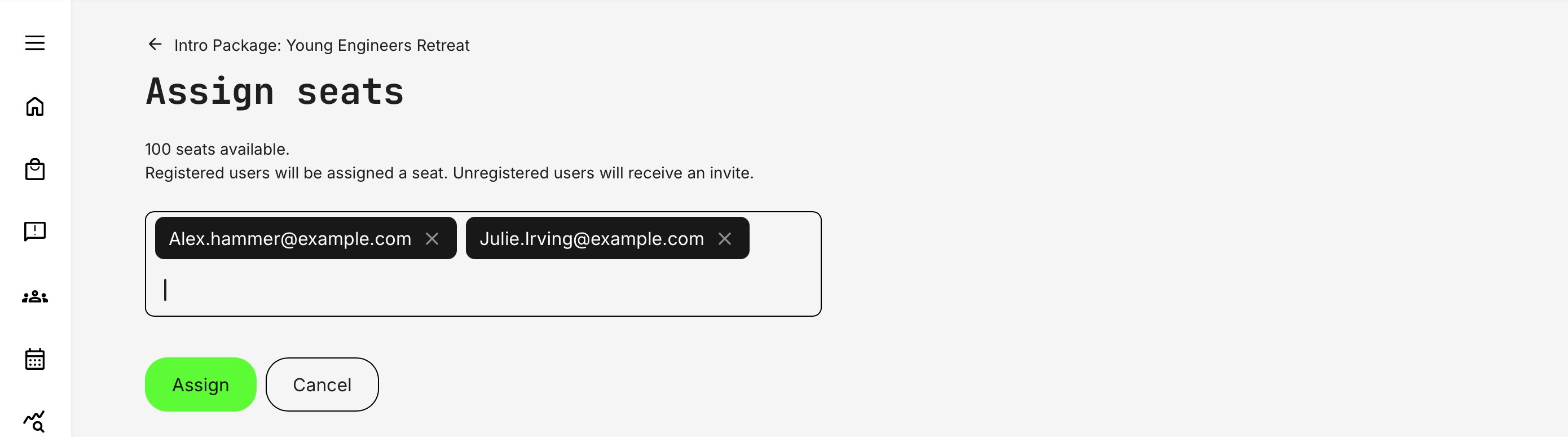
Below the overview, the owner can manage seats within the limits defined in the managed agreement. In this example, the subscription owner has 100 seats available, which represent the maximum number of learners that can be assigned to the subscription.
Assigning Seats
The subscription owner can invite or assign users to available seats by entering email addresses in the Assign seats interface.
- Registered users are assigned a seat immediately.
- Unregistered users receive an email invitation to join the platform and activate their seat.
Seats can be reassigned at any time by unassigning a user and assigning the seat to another learner.
Subscription Owner Permissions
The subscription owner can manage the operational use of the subscription, including:
- Assigning and unassigning seats
- Inviting learners to join the subscription
- Monitoring learning participation and progress
- Viewing subscription transactions and activity
However, commercial aspects of the managed subscription cannot be changed by the owner. Pricing, billing terms, and seat limits are defined as part of the negotiated agreement and can only be modified by a system administrator.
⚠️ The subscription owner therefore manages learning access and seat allocation, while administrators retain control over the commercial and contractual configuration of the managed subscription. This reflects the difference between standard self-service subscriptions purchased through the platform and managed subscriptions, which are governed by negotiated agreements and administrative billing arrangements.
Managed Subscription Configuration Overview
When creating a managed subscription, administrators define the commercial agreement and operational setup for the customer.
This typically includes:
- Selecting an existing subscription template
- Defining the subscription owner
- Configuring billing model, billing period, and negotiated pricing
- Defining the number of seats included in the agreement
- Entering customer and billing information
- Configuring renewal reminders for administrative follow-up
- Adding optional administrative notes
Once created, the designated owner receives an invitation to take ownership of the subscription. After accepting the invitation, the subscription becomes active and can be managed through seat assignment and learner management.