Use Global Search to Find Learning Content - Article
Summary
Global Search helps you retrieve useful learning material without remembering which course page or resource contains it. A distinctive term can lead directly to the explanation, video or file you need.
Global Search is an optional signed-in platform feature. It returns source items rather than a generated explanation. Its results follow your access and the platform’s indexed content; administrative users can have a different search population from ordinary learners.
Use this article to:
- Open Global Search and expand its results
- Recognize result types and matching context
- Understand how enrollment, restrictions and roles affect results
- Continue into the source rather than treating a snippet as the complete answer
Open and use Global Search
- Select the Search control in the platform header.
- Enter a useful topic or phrase. Recent searches can provide a quick way back to previous queries. Suggested questions may also appear where the AI features are enabled.
- Review the initial matching results. Open a relevant item directly, or use Show all or Enter to open the full result page.
- On the full page, compare the highlighted matches and result types. Use Load more when additional results are available.
- Open a result and read or watch it in its source context. Use the source’s navigation to continue the learning journey.
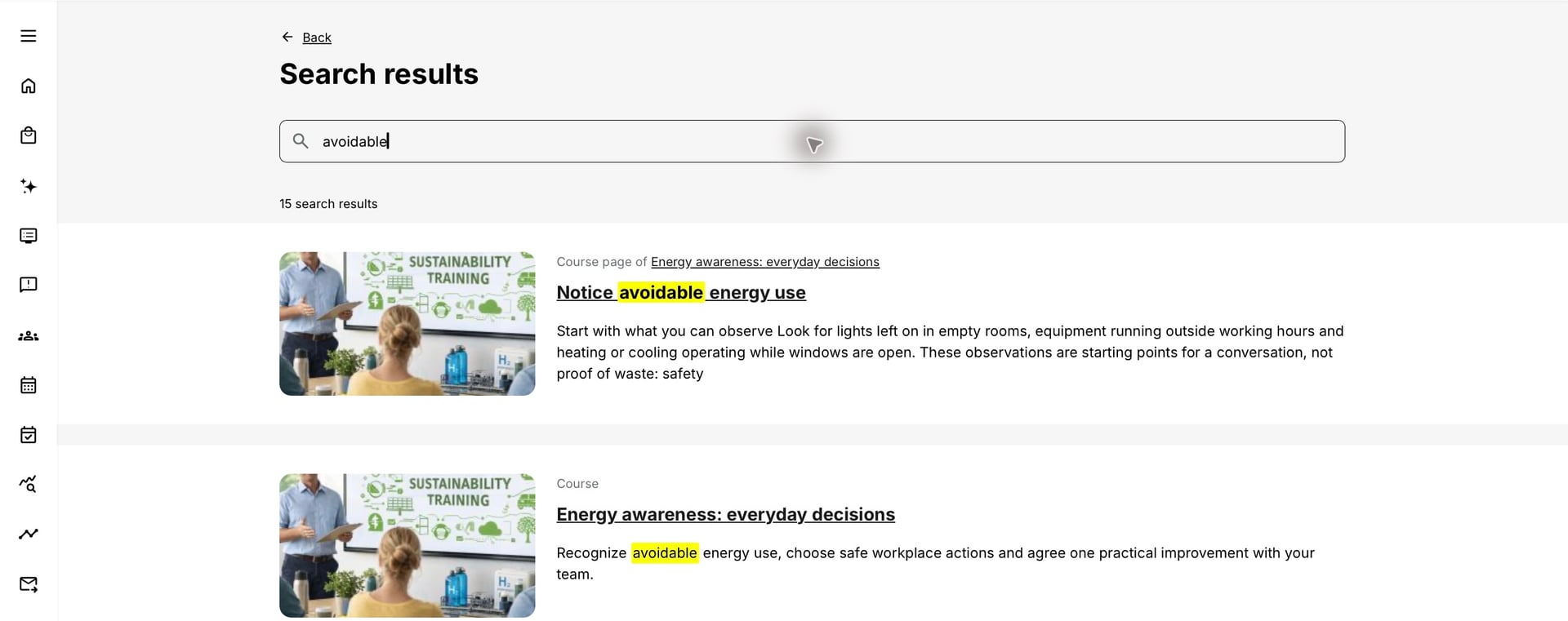
Recognize what each result can lead to
| Result | What it represents | Useful next action |
|---|---|---|
| Training or activity description | An eligible offer or description, including relevant activity and module information. | Review the purpose and available participation route. |
| Course or course page | A native course or a particular indexed page. | Open the explanation in context; course navigation and access rules still apply. |
| Video or playlist item | Indexed title, subtitle or other supported video information. | Watch the relevant section; transcript matching depends on available indexed text. |
| File or interaction | An indexed resource or supported learning object associated with accessible material. | Open the original item to inspect its full content and behavior. |
| Community or Resource Library material | Supported descriptions or resources where the corresponding feature and access are available. | Continue into the permitted community or resource location; do not assume all discussion posts are searched. |
Know what is searchable
Matching can use activity titles and descriptions, course and page text, captions, links, asset titles, video subtitles and supported file content. H5P and SCORM body text depend on extraction and content-usage configuration. A result title can remain searchable even when an object’s detailed body is excluded.
Searchable document formats include TXT, VTT, SRT, PDF, DOC, XLS, PPT, DOCX, XLSX, PPTX, PPSX, ODT, ODS and ODP. A supported extension does not guarantee that every protected, scanned or complex file yields useful text. A document title alone is not proof that the file’s full content was extracted.
An external link or embedded service does not make the remote website’s entire content part of the Eurekos index. Search cannot be assumed to read material behind another provider’s login. See Maintain Searchable Content and Check the Search Index for author and administrator checks.
Understand results before and after enrollment
Before enrollment, an ordinary learner can discover eligible training descriptions under the applicable Storefront and self-enrollment rules. That discovery does not open protected course pages. After enrollment, accessible learning content can contribute more detailed results. Hidden pages and unavailable restricted pages are not a shortcut through the learning route.
An administrator, author or other permitted role may find content for maintenance that would not appear for a participant. Broader management search does not mean all participants see the same content, and it is not the same as the AI assistant’s retrieval scope. Use Introduction to the AI Learning Assistant to understand the conversational route.
Make the query more useful
- Search for a specific concept or task, such as “standby consumption”, rather than a general word such as “energy”.
- Try a synonym or a shorter complete phrase if the original wording produces weak results. Search can normalize words and tolerate some spelling differences, but this is not a promise that any misspelling or fragment will match.
- Use the source language when translated phrasing does not give a useful match.
- Read the highlighted passage and result type before opening several similarly named items.
- Check the original source before using an extract to make a technical, compliance or operational decision.
Recognize session limitations
Global Search is a signed-in feature, not the anonymous Storefront search. Restricted entry experiences, such as a course-QR route or an authentication-only instance, may not expose the normal platform header search. This does not mean that every SSO login disables search; the entry route and configured platform experience matter.
Troubleshooting
| Problem | What to check |
|---|---|
| The header has no Search control | Check feature activation, the current entry route and whether you are in a restricted experience. Use Storefront or the relevant local search when appropriate. |
| I find the course title but not its questions | The object may be excluded from extraction or AI/search content usage. This can be intentional assessment protection, not an indexing failure. |
| A new paragraph does not appear in results | Verify that it is saved, visible and indexed. Ask a permitted maintainer to inspect Search index and re-index where appropriate. |
| An extract looks incomplete | Open the source. Search snippets are navigation aids, not a replacement for the full lesson, file or video. |
FAQ
-
Can Global Search search inside every video?
It can use supported indexed video information such as subtitles. It should not be assumed to understand every recording without an available transcription or indexed text.
-
Can I use Global Search without signing in?
Global Search is a signed-in platform feature. A configured public Storefront can still provide training discovery for visitors.
-
Why can I find a quiz title but not its body?
Metadata and extracted body content are separate. A title can remain discoverable while the object’s content is intentionally excluded, including for assessment protection.