LRS - Article
Summary
Connect Eurekos with a Learning Record Store (LRS) to enable xAPI-based tracking of detailed learning interactions, supporting advanced analytics, external reporting, and integration with third-party learning ecosystems.
In this article you will learn:
- What xAPI and an LRS are and when they are relevant
- How Eurekos interacts with an external LRS
- What type of learning data is sent to an LRS
- What limitations and behaviors apply to xAPI tracking
- How to configure and connect an LRS to Eurekos
Business Context
Eurekos includes comprehensive built-in tracking and reporting capabilities that meet the needs of most organizations. In many cases, there is no requirement to integrate with an external Learning Record Store (LRS). However, if you want to import xAPI content, such as courses created in a 3rd party authoring tool, an LRS is required to operate appropriately with data.
Organizations may require:
- Cross-platform learning tracking
- Integration with external learning ecosystems
- Custom learning analytics beyond standard LMS reporting
- Support for xAPI-based content and learning experiences
This is where an LRS becomes relevant.
An LRS allows organizations to collect detailed, standardized learning activity data across multiple systems—not just Eurekos—making it possible to track learning beyond the LMS itself.
Typical use cases include:
- Advanced analytics and BI integration
- Tracking learning across multiple platforms
- Using external authoring tools that rely on xAPI
- Capturing granular learning interactions beyond what is supported by Eurekos charts and reports
For learning tools already integrated into Eurekos—such as H5P, which can be created and managed natively—the platform supports access to key interaction data directly within its built-in analytics. This means that, for most use cases, no LRS connection is required to gain meaningful insights.
An LRS integration becomes relevant only in more advanced scenarios, where an organization requires access to a broader or more granular set of data points than what is available within Eurekos. This typically applies when there is a clear business need for full data extraction, cross-system tracking, or custom analytics beyond standard reporting capabilities.
xAPI (Experience API) and Learning Record Store (LRS)
xAPI (Experience API) is a modern standard for tracking learning experiences across systems. Instead of being limited to traditional events such as course completion, xAPI captures learning as structured statements—often described as “Actor – Verb – Object” (for example, “User completed Course A”). This approach enables much more flexible tracking of learning activities, including interactions with content, video engagement, simulations, and learning that happens outside the LMS.
A Learning Record Store (LRS) is the system designed to receive and manage these xAPI statements. It acts as a centralized repository where learning data can be stored, queried, and analyzed independently of the platform where the learning took place. This makes it possible to track learning across multiple systems and environments, supporting more advanced analytics and integration scenarios.
While Eurekos supports xAPI through LRS integration, it is important to note that the standard itself—and how it is implemented—can vary depending on your chosen tools and setup. For this reason, we recommend consulting official xAPI and LRS documentation when designing your tracking strategy:
- https://xapi.com (xAPI overview and specification guidance)
- https://adlnet.gov/projects/xapi/ (official ADL xAPI documentation)
These resources provide deeper guidance on how to structure statements, design learning experiences, and ensure compatibility across systems.
When an LRS Is Required
An LRS integration is typically required when:
- Using xAPI-based content from external tools
- Tracking learning outside Eurekos
- Exporting raw learning data to external systems
- Performing advanced or custom analytics
It is not required for standard Eurekos usage.
Feature Overview
The LRS integration enables Eurekos to communicate with an external LRS using the xAPI standard.
| Capability | Description |
|---|---|
| xAPI statement generation | Eurekos generates learning activity statements |
| Data export | Statements are sent to the LRS |
| External analytics | Data can be analyzed outside Eurekos |
| xAPI content support | Enables tracking of xAPI-based learning materials |
How the Integration Works
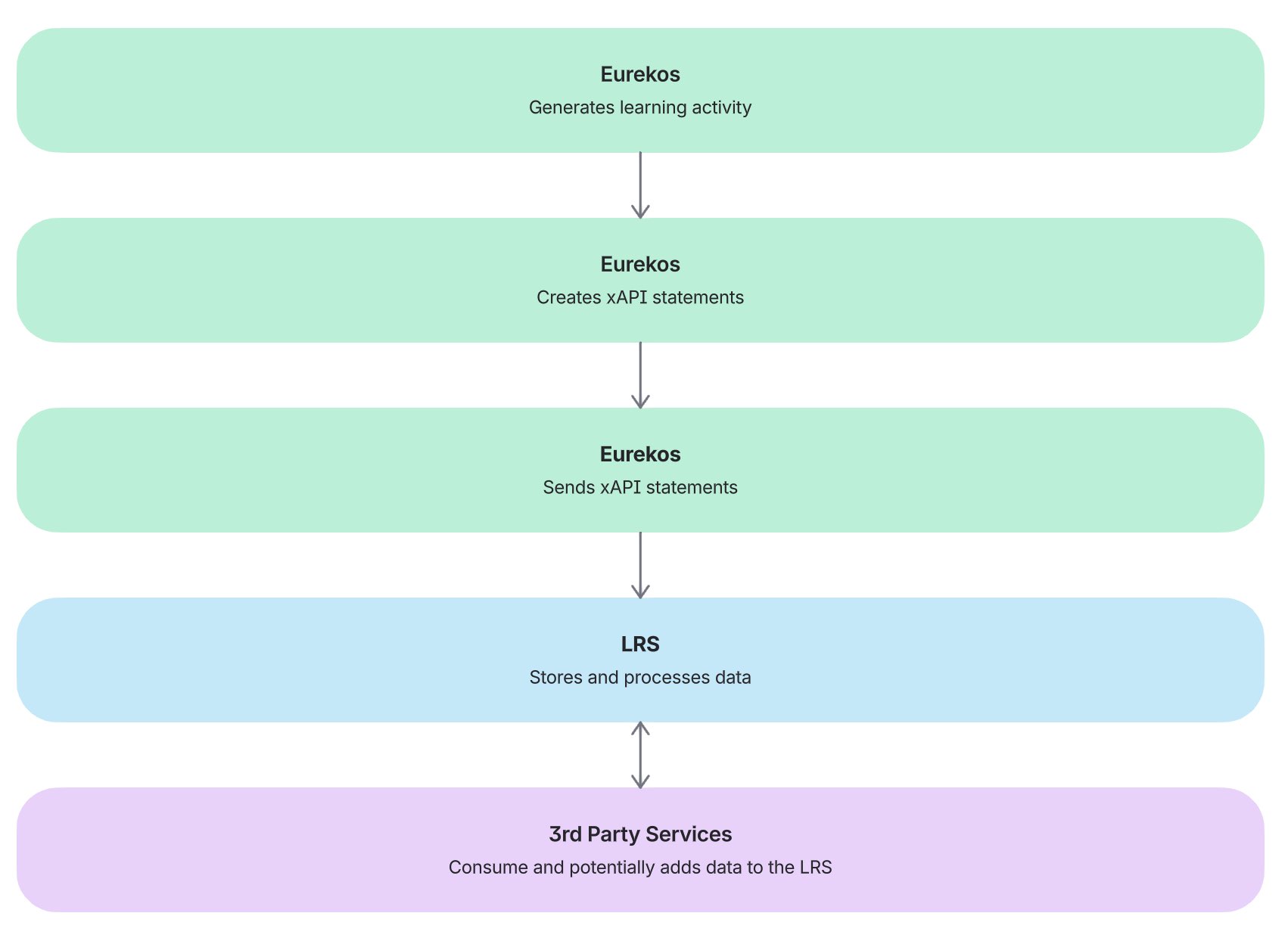
The integration operates as a data flow from Eurekos to the LRS.
1. Platform-Level Configuration
- LRS endpoint and credentials are configured
- Integration is enabled
2. Learning Activity Occurs in Eurekos → users interact with content that generates xAPI statements, such as:
- Course pages
- Videos
- Interactive content (e.g. H5P)
3. Data Is Sent to the LRS
- Eurekos transmits statements to the configured LRS
- Data is sent at regular intervals (asynchronous processing)
- Data Is Stored and Processed in the LRS → The LRS:
- Stores statements
- Makes data available for reporting
- Enables external analytics
What Data Is Sent
The following activities generate xAPI statements in Eurekos:
| Activity | Description |
|---|---|
| Viewing a course page | Tracks page access |
| Watching a video | Tracks engagement |
| Interacting with H5P content | Tracks interactions |
| 3rd party xAPI embedded or imported content | Tracks interactions |
These statements are sent to the configured LRS, where they are stored and made available for analysis. Certain learning tools, such as H5P, generate rich and detailed xAPI statements based on the specific interactions within each content type. The structure and scope of these statements are defined by the tool itself and can be explored in the official xAPI documentation provided by H5P.
For third-party or externally authored content, xAPI statements may be custom-designed within the respective authoring tools. These statements are transmitted through Eurekos but are defined and controlled outside of the platform, meaning their structure and level of detail depend on the originating tool rather than Eurekos.
Important Behavior
There are important technical considerations when working with xAPI:
- Progress is not continuously updated in real time
- A trigger (e.g. page reload or navigation) is required for updates to be sent
- Updates are processed in intervals and temporary delays may occur
External Content Behavior → If xAPI content links to another system:
- Data may be stored in that external system
- Eurekos may not receive or display that data
This depends on how the xAPI package is configured.
What the Integration Does NOT Do
It is important to clearly define scope:
| Does NOT Do | Explanation |
|---|---|
| Replace Eurekos reporting | Eurekos still handles core reporting |
| Guarantee external data return | Data flow is outbound |
| Track all external activity automatically | Depends on xAPI configuration |
| Visualize LRS data in Eurekos | Visualization happens in the LRS |
When to Use an LRS (Guidance)
Use an LRS when:
- You need cross-system tracking
- You use external xAPI content tools
- You require advanced analytics and e.g., business intelligence requirements (align with your LRS of choice)
| Recommendation | Why It Matters |
|---|---|
| Only implement LRS when required | Avoid unnecessary complexity |
| Align xAPI strategy with business goals | Ensure meaningful data collection |
| Validate xAPI content behavior | Prevent data fragmentation |
| Ensure LRS supports Eurekos statements | Required for compatibility |
| Test data flow thoroughly | Confirm statements are received correctly |
| Define reporting ownership | Decide whether Eurekos or LRS is primary |
| Monitor synchronization delays | Avoid confusion in reporting |
Configuration
To connect Eurekos with an external LRS, you must configure connection details provided by your LRS provider.
Step 1: Navigate to LRS Settings
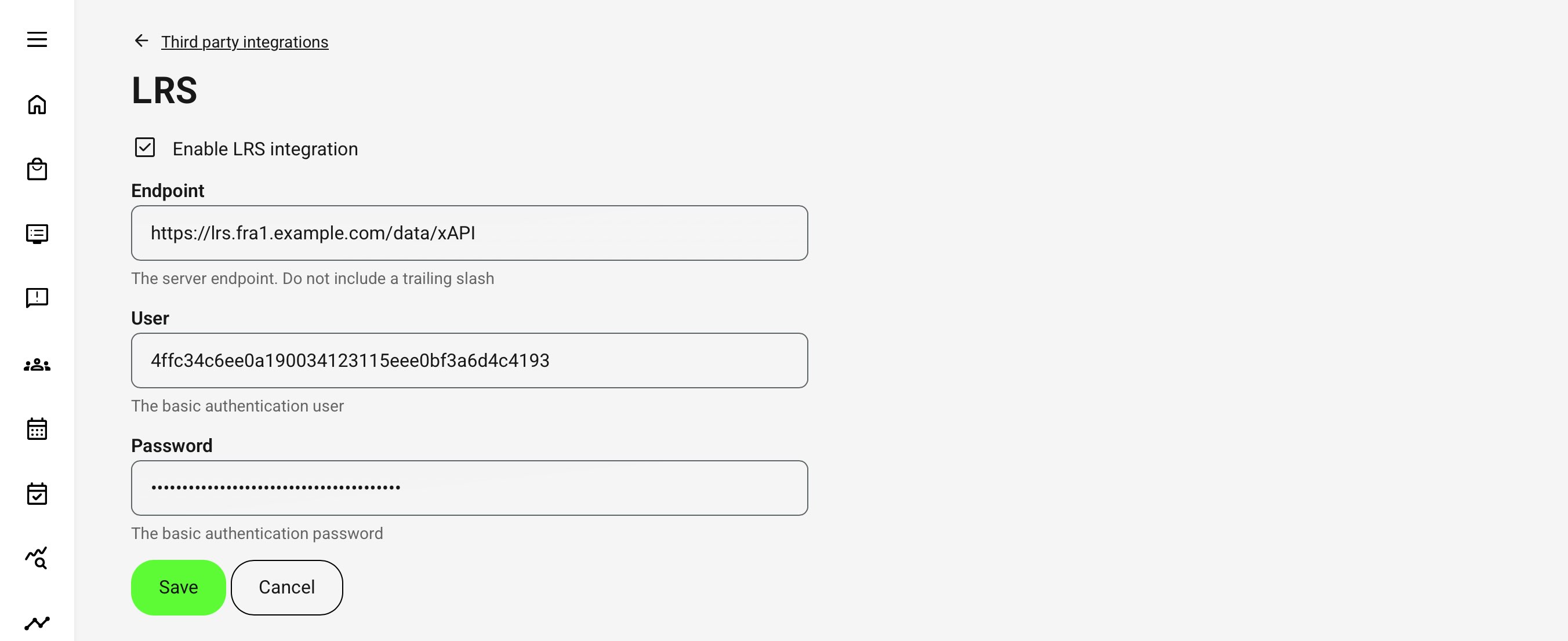
Go to: Settings → Third Party Integrations → LRS.
Step 2: Enable LRS Integration
Enable LRS integration. This activates the configuration fields.
Step 3: Enter LRS Connection Details
You must provide the following:
| Field | Description |
|---|---|
| Endpoint | URL where xAPI statements are sent |
| User | Authentication identifier (API user/key) |
| Password | Authentication secret/token |
- Endpoint Format → The endpoint is typically a REST API endpoint following the xAPI specification.
- Example format: https://lrs.example.com/xAPI/statements
- Authentication Model → The integration uses basic authentication:
- User = API key or client ID
- Password = secret or token
- These credentials are provided by your LRS system.
Step 4: Save Configuration
Click Save → Once saved:
- Eurekos begins sending xAPI statements
- Data is transmitted at regular intervals
- Integration becomes active immediately
Step 5: Validate Integration
After configuration:
- Perform test activity (e.g. view course, play video)
- Verify statements are received in the LRS
- Confirm correct structure and timestamps
The validation is best explored in details with reference to the connected service.
Key Considerations
- The LRS must support xAPI specification
- Endpoint must accept statements from Eurekos
- Credentials must be valid and active
- Domain and endpoint formatting must be correct
FAQ
-
Do I need an LRS to use Eurekos?
No. Eurekos includes built-in tracking and reporting that covers most learning scenarios.
An LRS is only required if you:
- Use xAPI-based content from external tools
- Need cross-system tracking
- Require advanced analytics or external data processing beyond Eurekos reporting
-
What type of data does Eurekos send to an LRS?
Eurekos generates xAPI statements based on learning activity, such as:
- Viewing course pages
- Watching videos
- Interacting with H5P content
- Engaging with third-party xAPI content
These are sent as structured “Actor – Verb – Object” statements and stored in the LRS for analysis.
-
Is data sent to the LRS in real time?
No, not continuously in real time.
- Data is sent asynchronously in intervals
- A trigger (e.g. navigation or page reload) is typically required
- Short delays in data transmission can occur
This is expected behavior when working with xAPI and external LRS systems.
-
Does Eurekos receive data back from the LRS?
No.
The integration is one-way (Eurekos → LRS):
- Eurekos sends xAPI statements to the LRS
- Data is stored and analyzed externally
- Eurekos does not retrieve or visualize LRS data
Reporting and analysis must be done within the LRS or connected tools.
-
Will all learning activity automatically be tracked in the LRS?
Not necessarily.
Tracking depends on:
- How the content is implemented
- Whether it generates xAPI statements
- How external tools are configured
For example:
- Native Eurekos features generate defined statements
- Tools like H5P produce detailed xAPI data
- External content may store or control data outside Eurekos
This means tracking behavior can vary depending on the learning tools used.