SAML Identity Provider (IdP) - Article
Summary
Configure Eurekos as a SAML Identity Provider (IdP) to enable secure single sign-on (SSO) into external systems, allowing Eurekos to authenticate users and provide identity data to connected applications.
In this article you will learn:
- How Eurekos functions as a SAML Identity Provider
- How authentication and identity data are shared with external systems
- How user attributes are mapped and provisioned to service providers
- How to configure SAML IdP applications in Eurekos
- How to test and validate SSO flows between systems
Business Context
In most identity integrations, Eurekos acts as a Service Provider (SP), relying on external identity systems such as Microsoft Entra ID, Okta, or OneLogin to authenticate users.
However, there are scenarios where Eurekos itself becomes the central system managing user identity and access across multiple platforms. In these cases, Eurekos is configured as a SAML Identity Provider (IdP).
This approach is typically used when Eurekos sits at the center of a broader digital ecosystem and needs to provide seamless access to connected systems.
Common use cases include:
- Launching external tools (e.g. webinar platforms, partner portals, or content systems) directly from Eurekos
- Providing a unified login experience across multiple learning-related systems
- Managing users and organizational structure centrally within Eurekos
- Supporting partner or customer-facing environments where Eurekos is the primary entry point
A practical example
A learner logs into Eurekos and launches a live session hosted on an external platform such as Zoom. Instead of encountering a second login, the authentication flow is handled transparently in the background.
If the external system requires verification, the user is redirected to Eurekos, where their identity is confirmed. Eurekos then returns a secure SAML assertion to the platform, allowing access to be granted immediately without any additional steps.
From the user’s perspective, this feels seamless—they move between systems without interruption. From an administrative perspective, this model ensures:
- No duplicate user accounts across systems
- Consistent and reliable user data
- Centralized control over authentication and access
Why organizations use this approach
Using Eurekos as an Identity Provider is most relevant in environments where Eurekos is positioned as the central system for managing users and access across multiple platforms.
In these setups, external systems rely on Eurekos rather than maintaining their own identity layer. This is particularly valuable when:
- Eurekos manages the primary user base and organizational structure
- External systems should not maintain separate or duplicate user databases
- A consistent and controlled login experience is required across platforms
- Identity and access need to be governed centrally
By consolidating authentication and identity management in one place, organizations reduce fragmentation, improve the user experience, and ensure that access and user data remain aligned across the entire ecosystem..
Feature Overview
When Eurekos is configured as a SAML Identity Provider (IdP), it takes on the role of a central authentication and identity authority for connected systems. This means that external applications no longer need to manage users independently. Instead, they rely on Eurekos to verify who the user is and provide the necessary identity data to grant access.
In practice, this introduces four closely connected capabilities:
1. Authentication → When a user attempts to access a connected system, authentication is handled by Eurekos.
The user is redirected to Eurekos and logs in using the available authentication method, which may include:
- Standard username and password
- Existing SSO (if Eurekos itself is connected to another Identity Provider)
- Multi-factor authentication (MFA), depending on configuration
At this stage, Eurekos is responsible for verifying the user’s identity. The external system does not handle credentials or authentication directly—it simply trusts the result provided by Eurekos.
Eurekos is now positioned as a central access point, ensuring that authentication policies and user verification are applied consistently across multiple systems.
2. Identity Assertion → Once authentication is successful, Eurekos generates a SAML assertion, which is a secure, standardized message that confirms the user’s identity.
This assertion contains:
- A unique identifier for the user (NameID, typically email)
- A set of user attributes (such as name, department, or organization)
- A confirmation that authentication has taken place
The assertion is digitally signed using a certificate, ensuring that the receiving system can verify both its authenticity and integrity.
From the perspective of the external system, this replaces the need for its own login process. Instead of asking the user to authenticate again, it trusts the assertion provided by Eurekos and uses it as the basis for access.
3. User Data Provisioning → Beyond authentication, Eurekos also provides structured user data to the external system as part of the SAML assertion.
This means that:
- User profile data in Eurekos is mapped to SAML attributes
- External systems receive consistent and up-to-date identity information
- There is no need to manually create or maintain users in the target system
For example, when a user logs in:
- Their name, email, and organizational data are sent automatically
- The external system can create or update the user profile based on this data
- The user is immediately ready to use the system without additional setup
This significantly reduces administrative overhead and ensures that identity data remains consistent across platforms.
4. Access Control Delegation → By using Eurekos as the Identity Provider, external systems delegate both authentication and identity context to Eurekos.
This means that the external system relies on Eurekos to:
- Confirm whether a user is authenticated
- Provide the necessary identity attributes
- Indirectly control whether access should be granted
In effect, Eurekos becomes the source of truth for user identity and access eligibility.
For example:
- If a user exists and can log in to Eurekos → access can be granted externally
- If a user is removed or disabled in Eurekos → access to connected systems is no longer possible
This creates a trusted relationship where Eurekos governs access across systems without needing to manage permissions directly in each external platform.
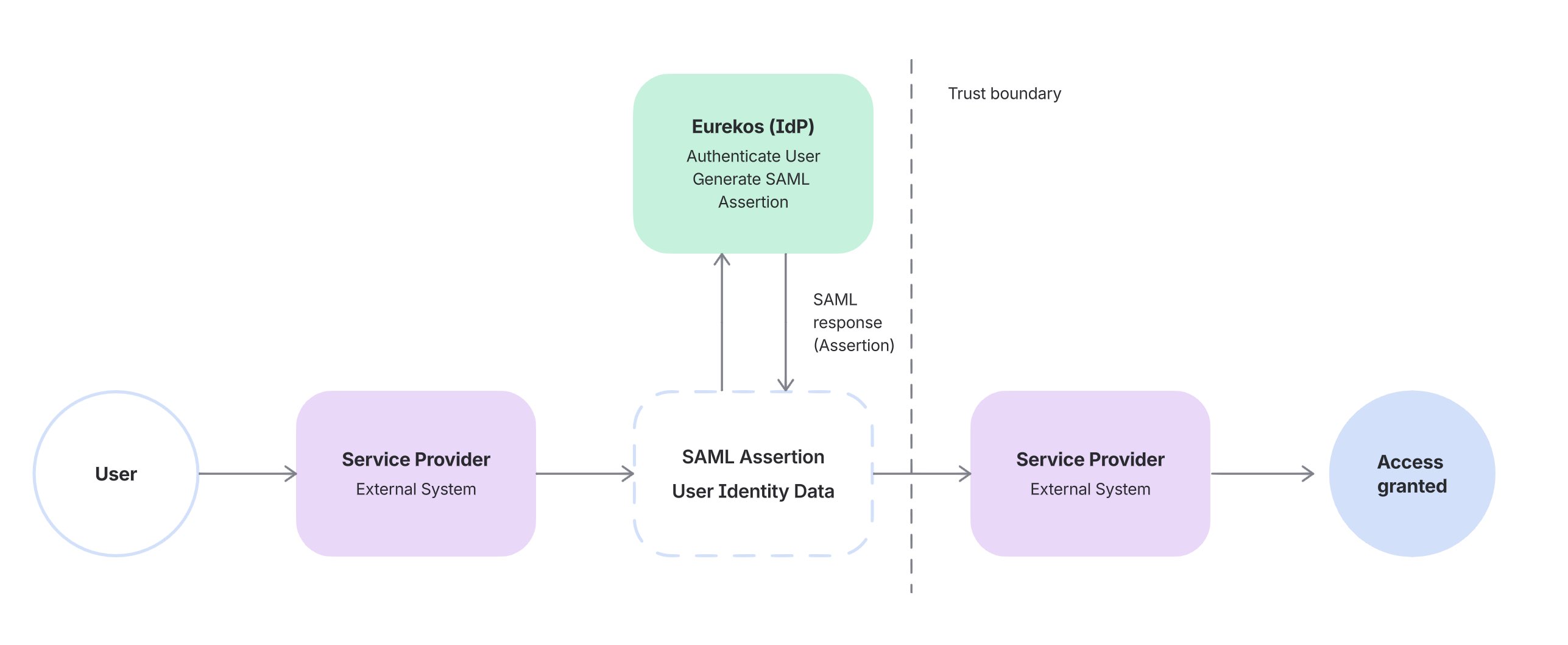
How the Integration Works
The SAML IdP integration is best understood as a trusted identity exchange between Eurekos and external systems, rather than a simple login redirect.
When a user accesses a connected system, the external platform does not authenticate the user directly. Instead, it relies on Eurekos to perform authentication and confirm identity.
A typical flow looks like this:
- The user attempts to access an external system
- The system redirects the user to Eurekos for authentication
- The user logs in (if not already authenticated)
- Eurekos generates a signed SAML assertion
- The assertion is sent back to the external system
- The external system validates the assertion and grants access
From the user’s perspective, this happens almost instantly and without interruption. They move between systems without needing to log in multiple times. From a system perspective, responsibilities are clearly separated:
- Eurekos handles authentication and identity
- External systems trust and consume that identity
This separation is what makes the integration both secure and scalable.
Configuration
Configuring Eurekos as a SAML Identity Provider is not just about connecting two systems—it defines how identity is established, verified, and shared across your ecosystem.
At a technical level, the configuration ensures that:
- Eurekos can authenticate users
- Eurekos can generate trusted SAML assertions
- External systems can validate and consume those assertions correctly
This is achieved by aligning three core elements:
- Trust → via certificates and metadata
- Identity → via NameID and attributes
- Flow → via endpoints such as the ACS URL
Step 1: Enable and Prepare SAML IdP
Navigate to Settings → Third party integrations → SAML IdP.
Before configuring any integrations, Eurekos must be prepared to act as a trusted Identity Provider. This involves setting up the components used to sign and expose identity information:
- A certificate, used to digitally sign SAML assertions
- An Entity ID, which uniquely identifies Eurekos as the Identity Provider
- An SSO endpoint, where external systems redirect users for authentication
- A metadata URL, which exposes all of the above in a standardized format
The certificate plays a critical role. Every SAML assertion generated by Eurekos is signed using this certificate, allowing the external system to:
- Verify that the assertion originates from Eurekos
- Ensure the content has not been tampered with
💡 Without a valid certificate and metadata, external systems cannot establish trust and will reject authentication attempts.
Step 2: Create a SAML Application (Service Provider Connection)
Each external system must be configured as a separate application, defining how Eurekos communicates with that specific Service Provider.
Navigate to SAML IdP → Applications → Create application.
Here, you define the target and delivery of the SAML assertion.
Key configuration elements include:
- ACS URL (Assertion Consumer Service URL) → This is the endpoint in the external system where Eurekos sends the SAML response. It is effectively the “receiving endpoint” for identity data.
- Entity ID (Audience URI) → This identifies the external system and ensures that the assertion is only accepted by the intended recipient.
- NameID format and value → This defines how the user is uniquely identified. In most cases, this is set to email, and is used to match or create users in the external system.
Together, these settings define Where the assertion is sent, who it is intended for, and how the user is identified. Even small mismatches (e.g. incorrect ACS URL or Entity ID) will cause the external system to reject the assertion.
Step 3: Configure Attribute Mapping
Once the connection is defined, the next step is to control exactly what identity data Eurekos shares with the external system. When a user authenticates, Eurekos generates a SAML assertion containing:
- A NameID (unique user identifier)
- A set of SAML attributes, derived from the user’s profile
Attribute mapping defines how Eurekos user profile fields are translated into these SAML attributes.
For example:
- Eurekos email → email (or NameID)
- Eurekos first name → first_name
- Eurekos last name → last_name
- Eurekos organization → organization
These values are embedded in the SAML assertion and sent to the external system during login. From the receiving system’s perspective, this data is used to:
- Identify the user uniquely
- Create or update the user account
- Assign roles, permissions, or access based on attributes
This step therefore determines:
- How users are identified across systems
- What data is available for provisioning and access control
- How consistently identity is represented across platforms
💡 If an expected attribute is missing or incorrectly named, authentication may succeed but the user may not be created correctly or may not receive the expected access.
Step 4: Share Metadata and Establish Trust
Once the application is configured, Eurekos provides a metadata URL containing all Identity Provider details.
This metadata includes:
- SSO endpoint
- Entity ID
- Signing certificate
- Protocol configuration
The external system uses this metadata to:
- Establish trust with Eurekos
- Validate incoming SAML assertions
- Configure its authentication flow
Using metadata ensures that both systems remain aligned and reduces the risk of manual configuration errors.
Step 5: Configure the External System (Service Provider)
In the external system, Eurekos must be registered as the Identity Provider.
This typically involves:
- Importing the Eurekos metadata
- Defining the expected NameID format
- Configuring required attributes
- Enabling SAML-based authentication
At this stage, the external system defines:
- How it interprets the incoming assertion
- Which attributes are required for access
- How users are created or matched
This is where alignment is critical—both systems must agree on identifiers and attribute names.
Step 6: Test and Validate the End-to-End Flow
Before enabling the integration for users, the full authentication and provisioning flow must be validated in realistic conditions. A successful SAML IdP setup is not only about confirming that users can log in, but also that identity data is correctly generated, transmitted, and interpreted by the external system.
At this stage, you are validating the complete identity exchange:
- Eurekos authenticates the user
- Eurekos generates a valid SAML assertion
- The external system accepts and processes that assertion correctly
Validation approach
Start by testing the full login flow from the user’s perspective:
- The user is redirected to Eurekos for authentication
- Authentication succeeds without errors
- The user is returned to the external system
- Access is granted without requiring additional login
Once the flow works, validation should focus on what is actually exchanged between systems.
What to verify in the SAML assertion
During login, Eurekos sends a SAML assertion to the external system. This should be validated to ensure:
- The assertion is successfully received
- The signature is valid (trusted certificate)
- The NameID is present and correctly formatted
- All required attributes are included and correctly named
If possible, use the external system’s logs or SAML debugging tools to inspect the assertion.
Scenario-based validation
To ensure robustness, test multiple user scenarios:
- A new user (to validate provisioning behavior)
- An existing user (to validate matching and reuse)
- A user with complete profile data
- A user with missing or partial attributes
This ensures the integration behaves correctly beyond a single ideal test case.
Validation Checklist
Use this checklist as a final verification step before rollout:
| Area | What to Test | Expected Outcome |
|---|---|---|
| Authentication flow | User accesses external system | User is redirected to Eurekos, authenticates successfully, and returns without errors |
| ACS URL / Response handling | Login roundtrip | SAML response is delivered to correct endpoint and accepted |
| SAML assertion | Assertion content | Assertion is received, correctly structured, and processed |
| Signature validation | Certificate trust | Assertion signature is valid and trusted by the external system |
| NameID mapping | User identification | User is correctly identified (typically via email) |
| Attribute mapping | User data received | All required attributes are present and correctly mapped |
| New user provisioning | First-time login | User is created or recognized correctly in the external system |
| Existing user matching | Returning user login | Existing account is reused; no duplicates created |
| Missing data handling | Incomplete user profile | Login succeeds or fails gracefully based on system requirements |
| Access control | Post-login behavior | User receives correct access/permissions in external system |
| Multiple user scenarios | Different user types | Consistent behavior across users with varying data |
Recommended rollout approach:
- Test in a non-production environment first
- Start with a small pilot group
- Validate both technical setup and real user behavior
- Confirm alignment between Eurekos and the external system before scaling
FAQ
-
What is the role of Eurekos in a SAML IdP setup?
Eurekos acts as the Identity Provider, meaning it authenticates users and sends verified identity data to external systems, which rely on Eurekos to grant access.
-
Do users need separate accounts in external systems?
No. Users authenticate in Eurekos, and their identity is shared via SAML. External systems can create or update users automatically based on the received attributes.
-
What is a SAML assertion?
A SAML assertion is a secure, signed message generated by Eurekos after authentication. It contains the user’s identity (NameID) and mapped attributes used by the external system.
-
What is the NameID and why is it important?
The NameID is the unique identifier for the user, typically an email address. It is used by the external system to match or create user accounts.
-
What happens if attribute mapping is incorrect?
Authentication may still succeed, but users may not be created correctly or may not receive proper access in the external system.
-
What is the ACS URL?
The Assertion Consumer Service (ACS) URL is the endpoint in the external system where Eurekos sends the SAML response after authentication.
-
Why is a certificate required?
The certificate is used to sign SAML assertions. External systems use it to verify that the assertion is authentic and has not been modified.
-
Can Eurekos integrate with multiple external systems?
Yes. Each external system is configured as a separate SAML application, allowing Eurekos to act as a central Identity Provider across multiple platforms.
-
What happens when a user is removed or deactivated in Eurekos?
The user will no longer be able to authenticate, and access to all connected external systems will be blocked.
-
How do I troubleshoot login issues in a SAML setup?
Start by checking:
- ACS URL and Entity ID alignment
- Certificate validity
- NameID and attribute mapping
- SAML assertion logs in the external system
Most issues are caused by configuration mismatches rather than system errors.