Understand Progress During Training - Article
Summary
Progress is useful when it explains what remains, not only how much has been visited. Eurekos combines evidence at page, module and activity level and presents the requirements participants still need to satisfy.
Progress helps participants understand what has been recorded and what remains. Eurekos can show progress at page, module, and activity level, while certificates can add separate criteria. The percentage reflects configured evidence; it should be interpreted together with the detailed requirements.
Use this article to:
- Distinguish page, module, activity, and certificate progress
- Understand how common learning objects contribute
- Interpret Event, Assignment, Course, and Existing Training progress
- Understand adaptive routes and forced completion
- Troubleshoot progress that appears incomplete or unexpected
Open progress details
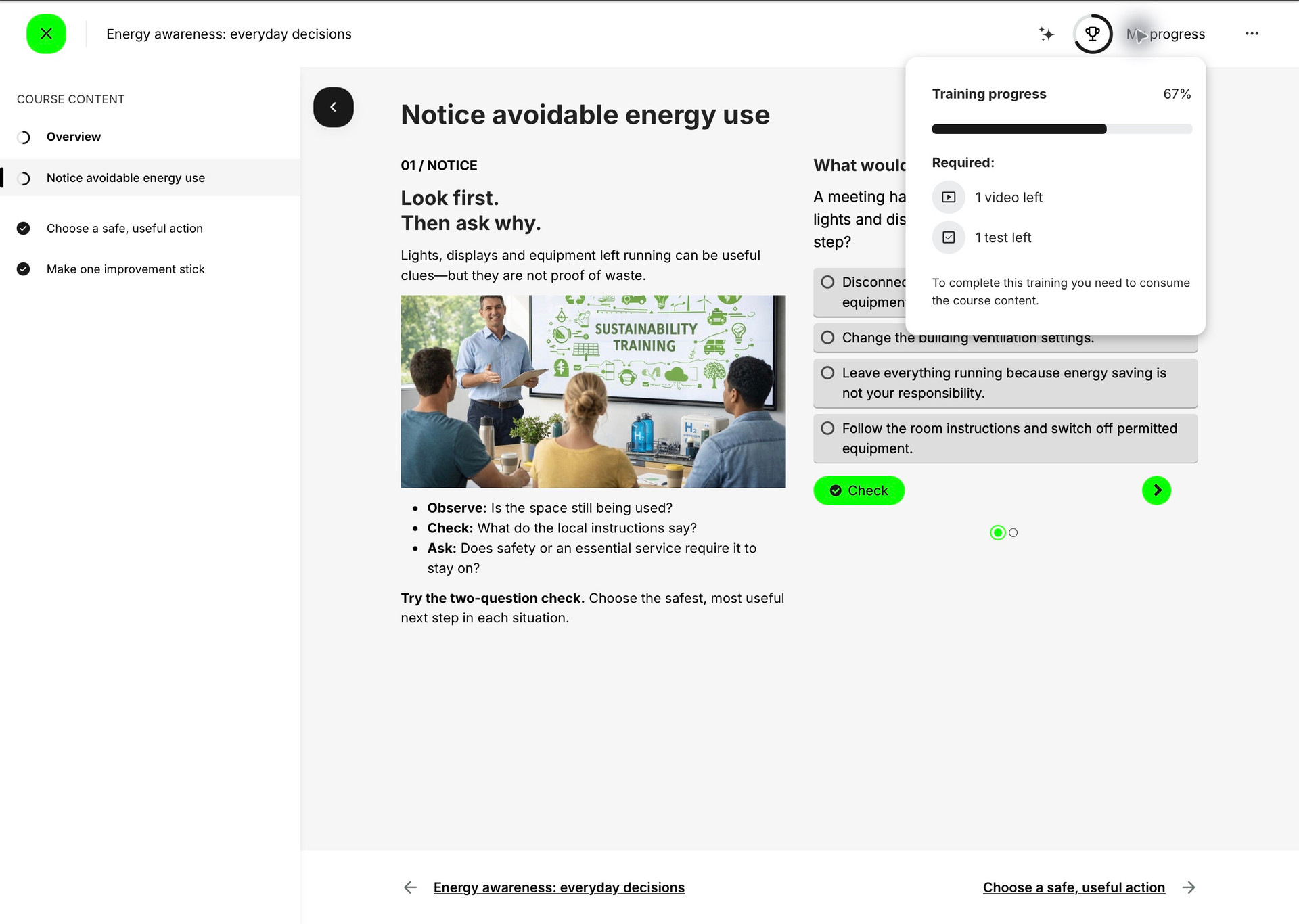
Where progress display is enabled, the participant can open the progress control in Learn mode. The control can show a percentage and a detailed explanation of required actions. The detail is more useful than the percentage alone because it identifies the evidence that remains.
At Course-page level, the current page can also expose an incomplete-progress indicator. Hovering or opening the indicator shows the learning objects or requirements that remain on that page. The detail is omitted at 100 percent because no incomplete requirement remains.
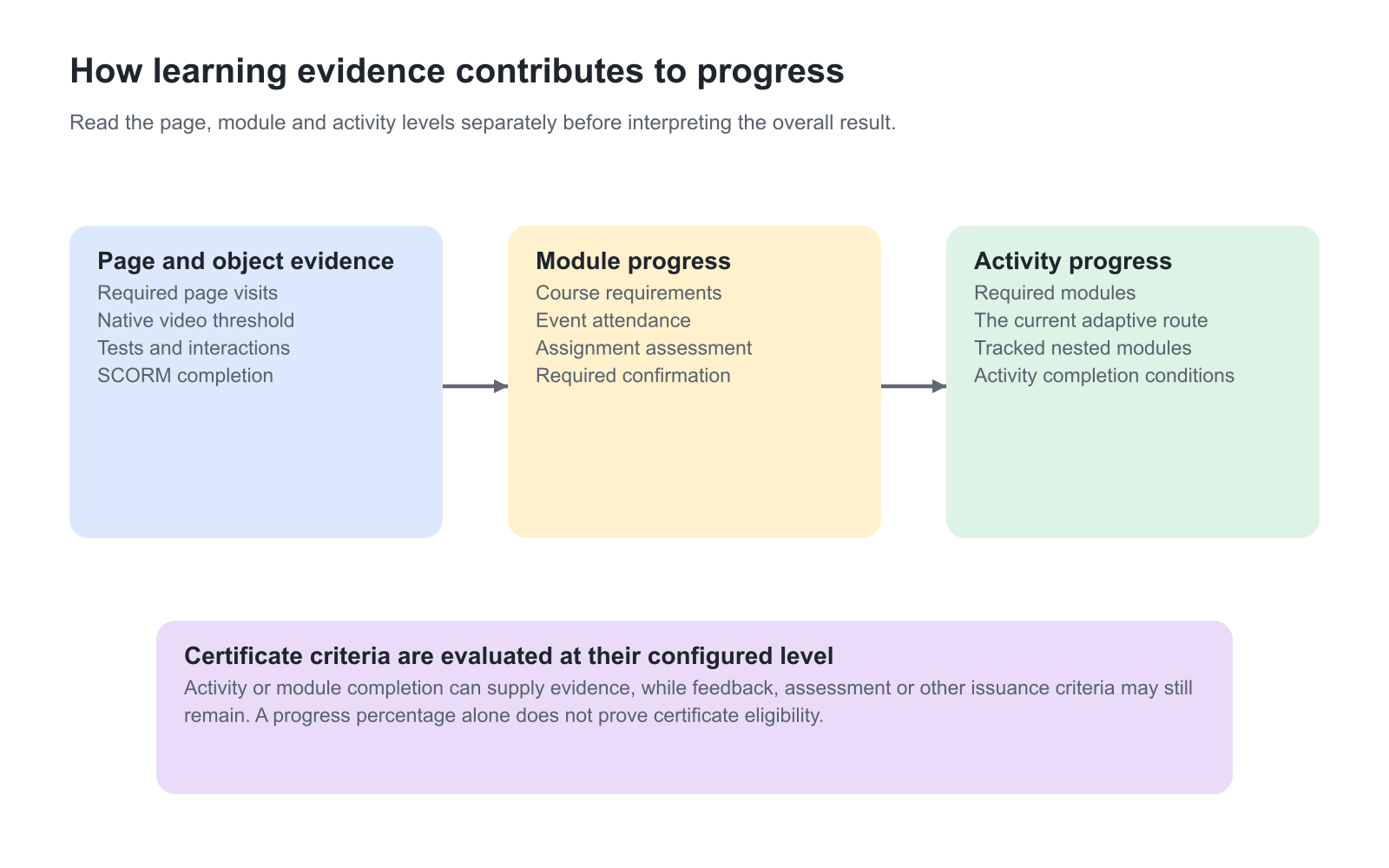
Understand the progress levels
| Level | What it measures | Typical evidence |
|---|---|---|
| Page progress | Whether the current Course page’s required objects have been completed. | Page visit, native video threshold, H5P, SCORM, test, or other required object on that page. |
| Module progress | How much of the module’s configured completion work has been satisfied. | Course requirements, Event attendance, Assignment assessment, or module confirmation. |
| Activity progress | Completion across the required modules in the participant’s route. | Required Course, Event, Assignment, and linked activity outcomes, including adaptive changes. |
| Certificate criteria | Whether the configured evidence required for issuance has been satisfied. | Activity completion plus feedback, questionnaire, skill, certificate, or other supported criteria. |
How Course content contributes
Course progress is calculated from the learning objects and page requirements configured by the author. Typical evidence includes:
- Course pages recorded as visited where page visitation is part of progress.
- Native videos recorded according to the configured viewing threshold; the standard progress model commonly uses at least half of the video.
- Embedded external videos recorded when playback begins because the external provider does not return the same detailed viewing evidence as the native video service.
- H5P objects recorded according to the selected object and its completion or pass behavior.
- SCORM packages recorded from the completion and success information the package sends.
- Tests and Question Sets recorded from the configured passing or completion behavior.
- Participant confirmation recorded only after the participant selects Complete when confirmation is required.
Repeating the same content object does not necessarily create duplicate progress requirements in the detailed page explanation. Each Course page is nevertheless evaluated in its own position in the Course structure.
Example: turn a percentage into an actionable next step
This sample Course has an overview and three unit pages. The participant has opened all four pages, but the native video and Question Set are still unfinished. The header shows 67 percent, and the progress panel identifies “1 video left” and “1 test left.” The useful next step is to finish those requirements, not simply reopen the pages. The percentage reflects this Course’s configured learning evidence; another Course can have different requirements.
Event, Assignment, and linked activity progress
| Module | Typical progress behavior | Why it can remain incomplete |
|---|---|---|
| Event | Often changes from 0 to 100 percent when attendance is recorded. | The Event occurred, but the participant has not been marked Attended or another condition remains. |
| Assignment | Often changes from 0 to 100 percent when the required assessment outcome is recorded. | Submission alone is not sufficient when a Passed assessment is required. |
| Existing Training | Can expose progress from the linked activity when tracking is enabled. | The participant is not enrolled in the linked activity, tracking is disabled, or its own requirements remain. |
| SCORM or external content | Depends on the evidence returned by the external object. | The object did not send completion, was closed before saving, or uses a different success model. |
Adaptive routes change the denominator
Adaptive learning can change which modules are required for a participant. A Supplemental module can add required work when its criteria are met. An Optional Adaptive Module can remove a module from the required route for a qualified participant. Progress is recalculated against the participant’s current required route rather than against one universal module count.
When criteria change after a retake, profile update, certificate change, or other re-evaluation, progress can also change. Test recalculation deliberately when the adaptive criterion can be repeated or revoked.
Example: the required route changes after an assessment
A foundation module starts as required. A participant demonstrates the qualifying knowledge in an assessment, and the configured Optional Adaptive Module rule makes that foundation module optional. It can remain visible for reference while no longer contributing to the required route. A higher progress result in this case does not mean the participant watched the foundation material; it means the requirement changed for that participant.
In another design, an assessment identifies a knowledge gap and reveals a Supplemental module that counts toward progress. The participant now has additional required work, so the percentage can decrease when the activity is recalculated. That decrease does not by itself mean earlier completed work was lost. Check the newly revealed requirement and the participant’s recorded results before asking them to repeat completed learning.
If the Supplemental module is configured with Do not count progress, revealing it does not create that additional required-progress contribution. Distinguish optional guidance from required remediation when explaining the change to participants or interpreting a manager’s completion figures.
Progress and certificates are related but not identical
The progress panel can show certificate-related requirements that the participant can satisfy within the current activity. If the certificate uses criteria that cannot be completed in the activity, the configuration can expose an impossible or confusing path. Review certificate criteria together with the activity and participant journey.
A participant can reach 100 percent activity progress and still wait for a required questionnaire, feedback submission, administrative issuance process, or other certificate condition. Conversely, a certificate held from prior evidence does not automatically mean the current activity’s progress is complete unless that relationship is configured.
Forced completion and underlying evidence
An authorized administrator can force a participant’s completion status to Completed. Learn mode can then show 100 percent and Completed even when the original learning evidence was not naturally satisfied. The underlying evidence can remain visible in participant statistics, My Progress, or administrative analytics.
Use forced completion as an explicit administrative decision, not as a repair for an unclear or unreachable learning path. Document why it was used when the distinction matters for audit or compliance.
Read the evidence behind an unchanged percentage
For an Event with attendance tracking, joining a calendar meeting or reaching the Event’s end time does not itself record Attended. For an assessed Assignment, uploading the work does not itself record Passed. The participant may have completed their immediate task while the instructor still has a legitimate attendance or assessment action to perform.
Native and supported embedded video also supply different evidence. A native video contributes watched progress from the documented viewing threshold, normally 50 percent or more. A supported external video can count as soon as playback starts. The latter is a play signal, not proof that the whole external video was watched. Use the detailed requirement and the intended assessment model when interpreting either result.
If participant confirmation is required, the content can be ready while the module remains incomplete until Complete is selected. For example, a Course can show 100 percent content progress while its Learning Path still counts 0/10 completed modules. Selecting Complete records the module as Completed and changes the path count to 1/10. A practical instruction such as “After the test, return here and select Complete to record your acknowledgement” makes that remaining action explicit.
Certificate requirements in the progress panel are related to what can be completed within the current activity, including the supported first level of nested training. If an issuance criterion refers to learning unavailable in that activity, an administrator should review the certificate connection and accepted evidence. The participant cannot resolve an impossible criterion by repeatedly revisiting completed pages.
Why familiar Course material can already have progress
The same native Course can be used in more than one Training Activity. Whether its progress is reused depends on the platform’s progress-tracking configuration and the Course’s Statistics behaviour setting where that setting is enabled. Current activity keeps the learning relationship activity-specific; All assigned activities shares the Course progress across the participant’s activities that contain it.
For example, a learner may study a shared energy-awareness Course during onboarding and later encounter it in a sustainability program. An existing progress result can be intentional when shared tracking is configured. A similar title alone does not establish shared progress, and it does not prove that delivery-specific attendance or assessment has been satisfied.
Re-certification needs particular care with shared tracking: starting a new attempt can reset the shared Course progress in other activities that use that Course. If progress appears to have returned to the beginning, ask the administrator to check the attempt and tracking relationship before assuming that saved work was lost or instructing the participant to repeat unrelated training.
Use progress as participant guidance
Progress is most valuable when the participant can act on it. Name modules clearly, keep page requirements proportionate, explain delayed assessment or attendance, and avoid percentages that imply precision unsupported by the underlying evidence. The detailed progress view should answer “what remains?” without requiring the participant to understand the administration model.
Troubleshooting
| Problem | What to check |
|---|---|
| A page remains incomplete after it was opened | Open page progress details and check required video, H5P, SCORM, test, or confirmation evidence. A visit alone may not be sufficient. |
| An Event remains at 0 percent after it ended | Confirm the participant was marked Attended and that any additional completion condition has been satisfied. |
| An Assignment remains incomplete after submission | Check whether a Passed assessment is required and whether the instructor has completed the assessment. |
| Progress decreased after a retake or profile change | Review adaptive criteria and recalculation. The required route may have changed. |
| The activity shows 100 percent but statistics show unfinished objects | Check whether completion was forced. The completed status can coexist with incomplete underlying evidence. |
| Certificate requirements appear impossible | Confirm every criterion can be satisfied from the current activity or accepted prior evidence. Correct the certificate/activity configuration rather than relying on participant interpretation. |
FAQ
-
Why is a Course page still incomplete after I opened it?
The page may contain a required video threshold, H5P object, SCORM package, test, or participant confirmation. Open the page progress details to see the remaining evidence.
-
Why is an Event still at zero percent after it ended?
Event progress commonly depends on recorded attendance, not only the scheduled end time. Confirm that the participant was marked Attended and that no additional condition remains.
-
Can progress decrease?
Yes. Adaptive criteria, retakes, profile changes, or recalculation can change the participant’s required route. Test how repeatable criteria affect the progress denominator.
-
Does 100 percent progress guarantee a certificate?
No. A certificate can require additional feedback, questionnaire, skills, prior evidence, validity, or issuance conditions. Activity progress and certificate criteria are related but separate.
-
Why do statistics show unfinished content after the activity was completed?
An administrator may have forced completion. Learn mode can show Completed and 100 percent while the underlying learning-object evidence remains visible in statistics or My Progress.