Configure Questionnaire Rules and Profile Updates - Article
Summary
Rules make a questionnaire useful beyond collecting answers. A response can reveal a relevant follow-up question, assign a suitable Training Activity or map a person to a configured profile value. These are separate effects with different risks and purposes.
Use conditional questions to reduce irrelevant work, assignments for a known training need, and profile updates only where the organization intends the respondent's answer to maintain that information. A rule is not an automatic approver, qualification assessment or general-purpose workflow engine.
Use this article to:
- Open and configure the questionnaire's three rule types
- Design conditional follow-up without overwhelming every respondent
- Map stated needs to activities or governed profile values
- Distinguish direct field updates from supplemental profile links
- Verify rule behavior and maintain it after questionnaire changes
Start with a saved questionnaire and a clear effect
Create the questions and answer options first, including any questions that should appear only conditionally, and save the questionnaire. Go to Course administration → Questionnaires and select Create rules or Edit rules beside it.
The rules area contains Conditional question, Assign activity and Update profile. Configure and save the relevant types separately. Do not assume that selecting a follow-up question also assigns training, or that an assignment automatically updates a profile.
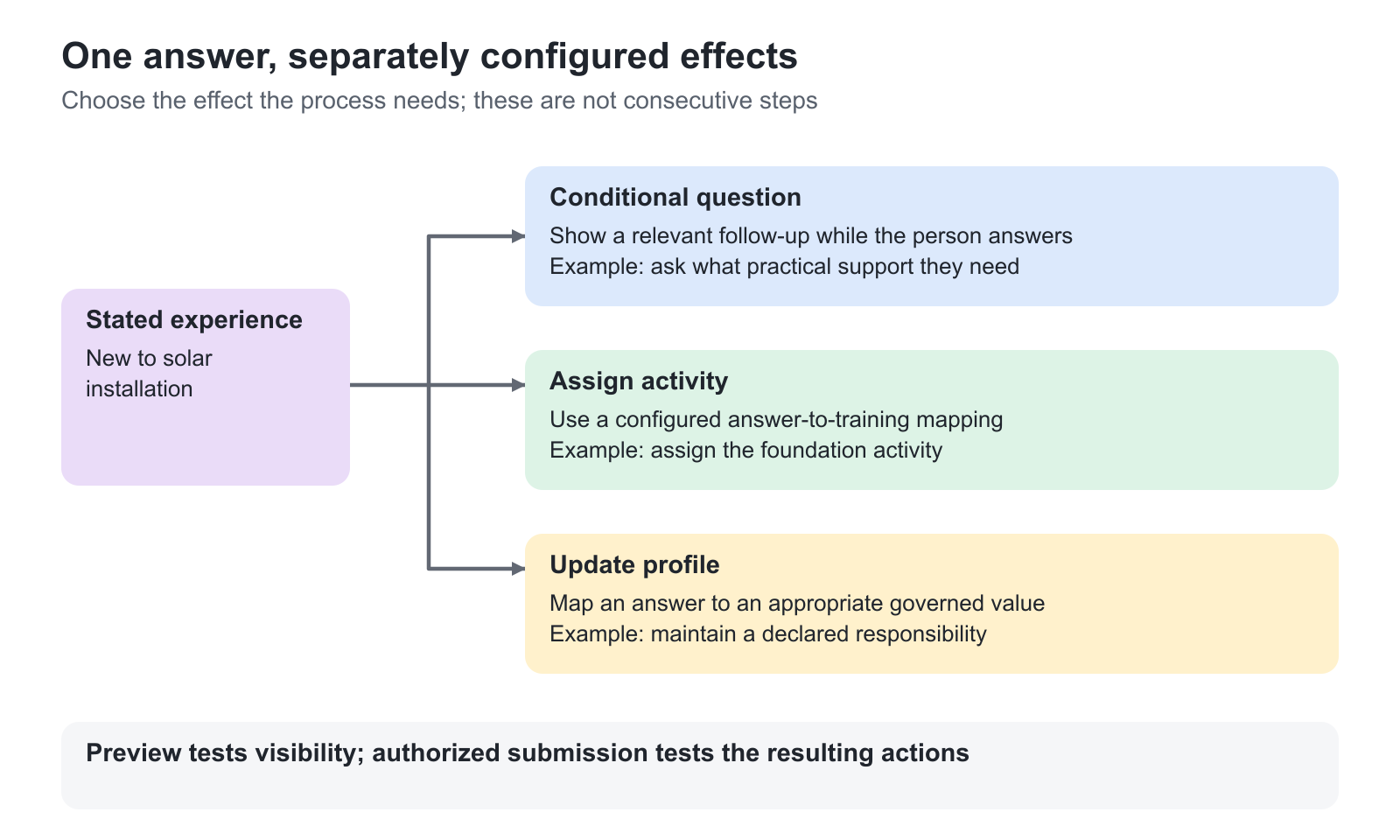
Use a simple business example to plan the mapping. A partner academy might ask whether a learner is new to solar installation. A matching answer could reveal an experience question, or assign a foundation activity if that is the intended programme. A separate profile rule could maintain a declared responsibility. These are design choices, not automatic consequences of asking about experience.
Show a follow-up question conditionally
Open Conditional question and select Add rule. Choose the trigger Question and the answer condition offered for it, then select the conditional question to show. Add further answer mappings or rules where needed and use Create or Save as appropriate.
Keep the trigger before its follow-up in the respondent's flow. For example, “Do you need an on-site workshop?” could reveal “Which region should the workshop be delivered in?” only for the relevant answer. The regional question should already exist in the saved questionnaire before it is selected as a conditional.
Available trigger and follow-up choices depend on question type. Use the actual selectors rather than assuming every presentation element or answer type can trigger a rule. A conditional question is not a separate form that appears after submission: it changes the questions shown while the person answers.
Use Preview to test a matching answer, a non-matching answer and changing the trigger after the follow-up is visible. Only relevant follow-ups should remain. In reports, a conditional question that was not answered can have a blank field; that is not necessarily an abandoned required answer. Feedback emails include the questions actually answered, rather than every possible conditional path.
Assign a known Training Activity from an answer
Open Assign activity and use Add rule where needed. Under Specify a question that triggers the rule, select the Question and the relevant Answer option or options. Under Assign relevant activities based on answers, select the intended Activity. Save the rule.
Use this when the next step is known and appropriate for the audience—for example, assigning the academy's foundation training to a respondent who declares they are new to the subject. The activity must be the actual delivery entity, not merely a Course with a similar name.
Review every destination before enabling a copied rule. The original rule might point to a previous cohort, a specific customer's delivery or an activity that is no longer appropriate. Check publication, participation conditions, capacity and operational ownership as part of the actual test journey.
Do not assume that Add criteria creates an all-conditions-must-match expression. Test each selected answer and combinations across questions before using a rule for a consequential assignment. If the business requirement is “only after all these prerequisites are verified”, use the appropriate enrollment or approval mechanism rather than assuming a questionnaire rule proves eligibility.
Map answers to governed profile values
Open Update profile and configure the trigger Question and Answer criteria. Choose the target Vocabulary or profile-field selector, then the value to assign. Save the rule and verify the actual target field after an authorized test submission.
The destination selector can offer organizational, classification or other enabled profile values. Choose only fields the business process is permitted to maintain. For example, a plain-language answer about working with commissioning could map to a defined Job function value used for learning segmentation.
A profile value can influence other configured features, including targeting and reporting. That makes the mapping powerful, but it also makes an incorrect mapping consequential. Do not let a self-declared answer silently establish an access-sensitive organization relationship or overwrite authoritative master data without the responsible owner's agreement.
Re-submission can apply a configured mapping again. Decide how this relates to manual corrections, imports and identity-provider synchronization. Do not configure competing mechanisms to own the same field without understanding which update should prevail.
Distinguish the three profile-maintenance mechanisms
| Mechanism | How it works | Appropriate purpose |
|---|---|---|
| Update profile rule | Maps selected answer criteria to a configured profile value | Translate a user-facing response into a governed business classification |
| Direct question-level update | Writes the submitted value from an eligible question into its configured field | Collect Company, enabled Address fields, Time zone or supported Date values without retyping |
| Link to supplemental question | Connects a supported question with a field in the platform's supplemental questionnaire | Reuse existing answers and maintain extended profile information across forms |
For Short answer, the direct mapping uses Update text field in profile, with Company available. For Address, choose Custom fields and review the individual Update profile… checkboxes. Time zone has Update profile time zone; date updates depend on their enabled configuration. These controls are in the questionnaire editor, not the rules tabs.
Direct updates require a logged-in respondent and full submission. They can replace existing values; a public response or Preview does not update a resolved user profile. Create and Maintain a Questionnaire covers the question controls. Maintain Supplemental Profile Information with Questionnaires explains the separate linked-answer behavior.
Keep recommendations separate from assignment
An Assign activity rule implements a selected training destination. An optional Generate AI-powered recommendations completion outcome provides generated guidance from the relevant questionnaire journey. It does not mean the same thing as enrollment, approval or a required Learning Path.
Choose a prescribed assignment when the organization knows the required next step. Use recommendations when the learner needs help exploring suitable offers. Clear questions, accurate activity descriptions and realistic prerequisites support that guidance better than a large collection of vague preferences.
Review and re-save affected rules after changes
Changes to a questionnaire can create a revision and make its connected rules inactive. The list can highlight Edit rules with a warning, and saving the questionnaire can prompt a review of each rule type.
Open every affected rules tab. Compare Previous and Current where the comparison is available. Re-select renamed or removed question references, inspect changed option text and confirm that each destination still means what the business process intends. Save each relevant rule type again after the review.
Do not reconnect an answer merely because it occupies the same position in the list. “Installer” changed to “Programme coordinator” is a different meaning even if it is still option two. Re-test copied and revised rules before exposing the questionnaire to the next audience.
Verify effects, not just the rule's appearance
Preview is useful for conditional visibility, but it does not save answers or perform a live profile update or assignment. Test those effects through the intended delivery route with a permitted test account and inspect the resulting records.
Use contrasting answers, an Other response where available, multi-selection combinations and repeat submission where the route permits it. Check both a new user and a user with existing relevant profile data or training. Record the expected business result first so a technically successful submission is not mistaken for the right outcome.
Troubleshooting
| Problem | What to check |
|---|---|
| A follow-up always appears or never appears | Check that it exists in the saved questionnaire, the actual trigger reference and the matching answer path |
| The form previews correctly but no activity is assigned | Preview is not submission. Check the Assign activity rule and test the real journey |
| A rule targets the wrong delivery | Review the selected Training Activity, especially after cloning a form or preparing another cohort |
| A profile changed unexpectedly | Inspect both rules and direct question-level mappings, plus other systems that maintain the same field |
| Multiple criteria trigger more broadly than expected | Do not assume AND logic; test each condition and combinations before deploying |
| Rules stop after a form edit | Review the warning and Previous/Current comparison, then re-save every affected rule type |
FAQ
-
Does questionnaire Preview test activity assignments and profile updates?
No. Preview is for inspecting the form and its conditional behavior; answers there are not stored as responses. Verify an assignment or profile-writing effect with an authorized test submission through the intended delivery route, then inspect the resulting training or profile record.
-
What should I do when questionnaire rules become inactive?
Open Edit rules and review every affected rule type. Use the Previous/Current comparison where available to inspect changed questions and options, reselect the intended references and confirm destinations. Save each relevant rule type again and test the actual response paths before relying on the automation.
-
How are direct profile updates different from questionnaire rules?
A direct question-level mapping writes the submitted value into its configured profile field, such as Company or an enabled Address field. An Update profile rule maps selected answer criteria to a configured value. Link to supplemental question instead maintains an answer relationship with the supplemental profile. Review all three before allowing several mechanisms to own the same information.