Introduction to Questionnaires and Common Use Cases - Article
Summary
Questionnaires connect a person's needs, circumstances or feedback with the next useful action. A training provider can qualify a customer request before preparing a proposal; an academy can gather comparable application evidence; a learning team can identify where its training needs improvement. The same tool can also maintain profile information and support configured training assignments or recommendations.
The value comes from joining up the process: ask purposeful questions, present them at the right moment, decide who will use the answers, and configure any follow-up deliberately. Collecting a response does not by itself approve an application, establish competence or complete enrollment.
Use this article to:
- Match a business requirement to a suitable questionnaire journey
- Distinguish feedback, intake, approval and assessment
- Understand how responses can support profile updates and training guidance
- Plan ownership, reporting and follow-up before asking for information
One questionnaire tool, different business purposes
In this topic, survey describes a use case, not a separate form-building system. You create a Questionnaire and choose where to offer it. It can be a short evaluation, a detailed application or a reusable intake form. Its delivery route establishes important context, including whether it belongs to a Training Activity, an onboarding rule or a direct URL submission.
A questionnaire contains questions and presentation elements. Optional rules can show follow-up questions, assign an activity or update a profile. Separate configuration places the questionnaire in the learner journey. Analytics and reports then help authorized people interpret the submitted evidence. These layers work together, but they are not interchangeable.
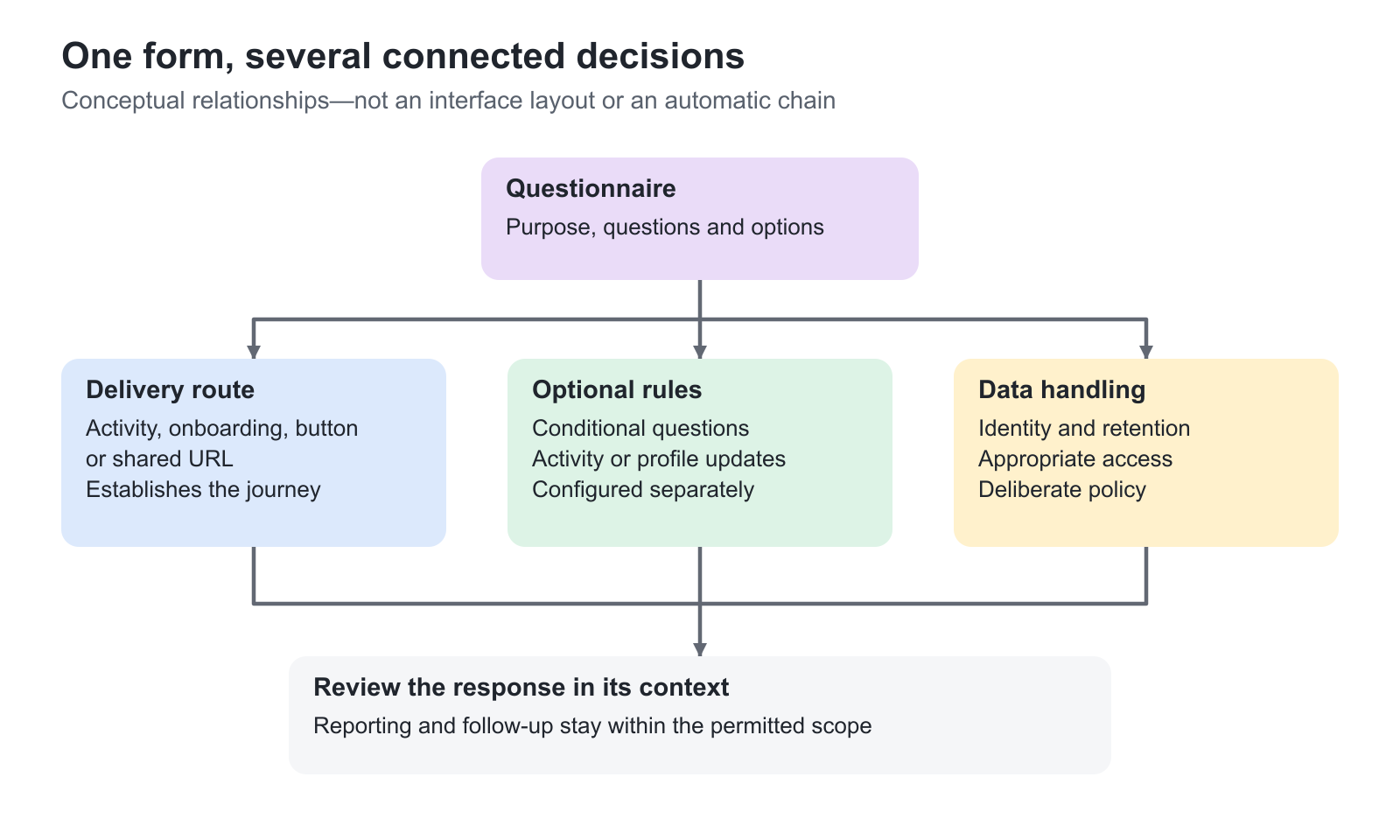
Start with the decision, not a blank form
| Business need | Useful questionnaire approach | Intended outcome |
|---|---|---|
| Understand an audience before recommending training | Focused onboarding or guidance questions about responsibilities, experience and goals | A more relevant starting point, rather than the same generic offer for everyone |
| Qualify a customer training request | On-demand intake covering audience size, objectives, format and timing | A better-informed proposal and fewer clarification emails |
| Review applicants consistently | Questionnaire in the participation-approval process | Comparable evidence for the appointed approver; approval remains a separate decision |
| Collect information before self-enrollment | Complete questionnaire as an enrollment requirement | Required information collected within that activity's enrollment flow |
| Confirm practical details after approval | Participation-confirmation questionnaire | The applicant supplies the requested details and confirms participation before continuing |
| Improve training and facilitation | Activity- or module-level evaluation, or a deliberately placed Course button | Evidence about relevance, delivery, confidence or a particular learning experience |
| Maintain additional information about a person | Supplemental questionnaire and linked questions | A maintainable profile record that can be reused instead of repeatedly asking the same questions |
| Reach people outside the platform | Shared questionnaire URL | Responses from an external audience without requiring a platform account |
Use Questionnaires Across Enrollment, Training and Onboarding explains the configuration routes and their different consequences.
Enrich a profile without rebuilding your source systems
An identity provider, CRM or other provisioning process may supply a name and email but not the detail needed to guide learning. For example, a partner academy may need to know whether a learner installs equipment, supports customers or plans projects. A questionnaire can collect that context in language the audience understands.
Where configured, responses can update supported profile fields or map an answer to a profile value. Those values may then affect targeting, reporting or other configured workflows. This is useful for customers, partners and other external audiences as well as employees. The response does not acquire those effects simply because it has been stored: the mapping and downstream configuration must exist.
Agree which system owns each field before enabling updates. Do not overwrite a centrally maintained organization or other access-sensitive value merely to make a recommendation easier. Use Maintain Supplemental Profile Information with Questionnaires when the requirement is an extended, editable profile rather than a one-off survey response.
Turn demand into an actionable training conversation
On-demand intake is useful when a standard public schedule does not fit a customer's requirements. A customer might need a workshop for 18 service partners in one region, a different delivery language or a blended programme combining preparation and a facilitated session. Ask for the information the training team needs to assess feasibility and propose a useful solution.
Suitable questions include the intended outcome, participant count, delivery format, location when relevant, preferred timeframe and any genuine prerequisites. A concise open question can capture a business challenge that a predefined list would miss. Avoid requesting a complete participant roster before it is needed.
The submitted request supports commercial or practical follow-up; it is not a booking, reserved capacity or an agreed price. Name the team responsible for responding and explain what the requester should expect next. Configure the intake through the activity's On-demand feature, not by assuming that an ordinary evaluation questionnaire creates a training request.
Support applications without automating the wrong decision
An application questionnaire can gather background information, a reason for attending or supporting documentation for a programme with limited places. Comparable questions help reviewers make consistent decisions instead of interpreting unrelated email exchanges.
Use the Participation approval route when an appointed person must decide. Requiring a questionnaire before self-enrollment is a different mechanism: it requires submission, not an approver's evaluation of the answers. Likewise, an Assign activity rule is an operational automation, not a substitute for a formal eligibility review.
Where participation confirmation is required after approval, the applicant has another step to complete. This can help collect final logistics or confirm commitment, but approval, confirmation, payment and seat availability remain distinct parts of the journey. See Enroll and register participants for the wider enrollment process.
Collect feedback that somebody will use
Use an evaluation to answer a specific improvement question: was the material relevant, did the pacing fit the audience, or what should the facilitator clarify next? Learner and instructor feedback can reveal different perspectives on the same delivery. A programme-level evaluation and a module-level evaluation also answer different questions.
Place feedback at meaningful moments. Repeated questionnaires on every page can create fatigue; a focused end-of-module evaluation may provide better evidence. For an extremely lightweight page-level sentiment signal, consider the native page feedback tool rather than reproducing a long evaluation form.
Use the dedicated NPS question type when measuring likelihood to recommend. A satisfaction rating or a self-reported confidence question is not automatically NPS, a scored assessment or verified evidence that the learner can perform a task.
Make guidance useful without making it compulsory
Where the optional AI questionnaire recommendation capability is enabled, Generate AI-powered recommendations can use responses as a starting point for relevant training suggestions. Clear goals, realistic experience options and well-described training offers give that guidance a meaningful basis.
This creates an opportunity to connect a learner with another useful offer, including paid training where appropriate. It supports discoverability and a continuing learning relationship; it does not enroll the person, guarantee suitability or bypass the offer's participation conditions. Prescribed training assignments and generated recommendations solve different needs. The wider learner-facing discovery experience is covered in Find Answers and Training with Saga.
Plan the evidence and its owner
Decide who will review responses, what action they can take and how long the information is needed. An instructor may need a cohort's practical concerns, while a customer-training team needs request details and a content owner needs trends across deliveries. These do not all require the same identifying information or access.
Use Analytics beside the questionnaire to investigate responses, subject to the user's analytics permission and data scope. Use Get report for the available export workflow. Questionnaires Analytics and Report owns the detailed reporting guidance. Data Privacy and Anonymization explains why hiding names, removing identifiers and deleting responses are different choices.
Troubleshooting
| Problem | What to check |
|---|---|
| The form exists but learners never see it | Creating a questionnaire does not deliver it. Configure the appropriate activity feature, onboarding rule, Course button or URL route |
| An application is submitted but no one is enrolled | Check whether an approver, confirmation, payment or another enrollment condition is still required |
| Responses do not influence the learner's next step | Check the relevant rules or recommendation configuration. Stored answers alone do not create a mapping or assignment |
| The team collects data but gains little insight | Revisit the business question, reporting context and named follow-up owner before adding more questions |
FAQ
-
Are surveys and questionnaires different tools in Eurekos?
They use the same Questionnaire tool. Survey describes the purpose, such as an evaluation or needs analysis, rather than a separate form-building system. The selected delivery route determines how respondents encounter the form and what context is available afterwards.
-
Does submitting a questionnaire approve an enrollment request?
Not by itself. In a participation-approval flow, submission supplies information for the appointed approver. A questionnaire used as an enrollment restriction instead satisfies that requirement within the relevant activity's enrollment flow. Approval, confirmation, payment and seat availability can still be separate steps.
-
Can a questionnaire recommend training instead of assigning it?
Yes, where the optional AI questionnaire recommendation capability is enabled and the relevant completion outcome is configured. Generate AI-powered recommendations provides guidance from the questionnaire journey. It is different from an Assign activity rule and does not itself complete enrollment or bypass participation conditions.
-
Does a required questionnaire answer prove a learner is competent?
No. Required means the form expects an answer, not that the answer has been assessed or independently verified. Self-reported confidence, a declaration and an evaluation are different evidence from a scored assessment or governed qualification process. Choose the tool and review process for the actual requirement.