Maintain Supplemental Profile Information with Questionnaires - Article
Summary
A Supplemental questionnaire provides maintainable profile information beyond the platform's standard fields. It can hold the practical context a customer academy or partner programme needs without repeatedly asking the same questions in every application or intake form.
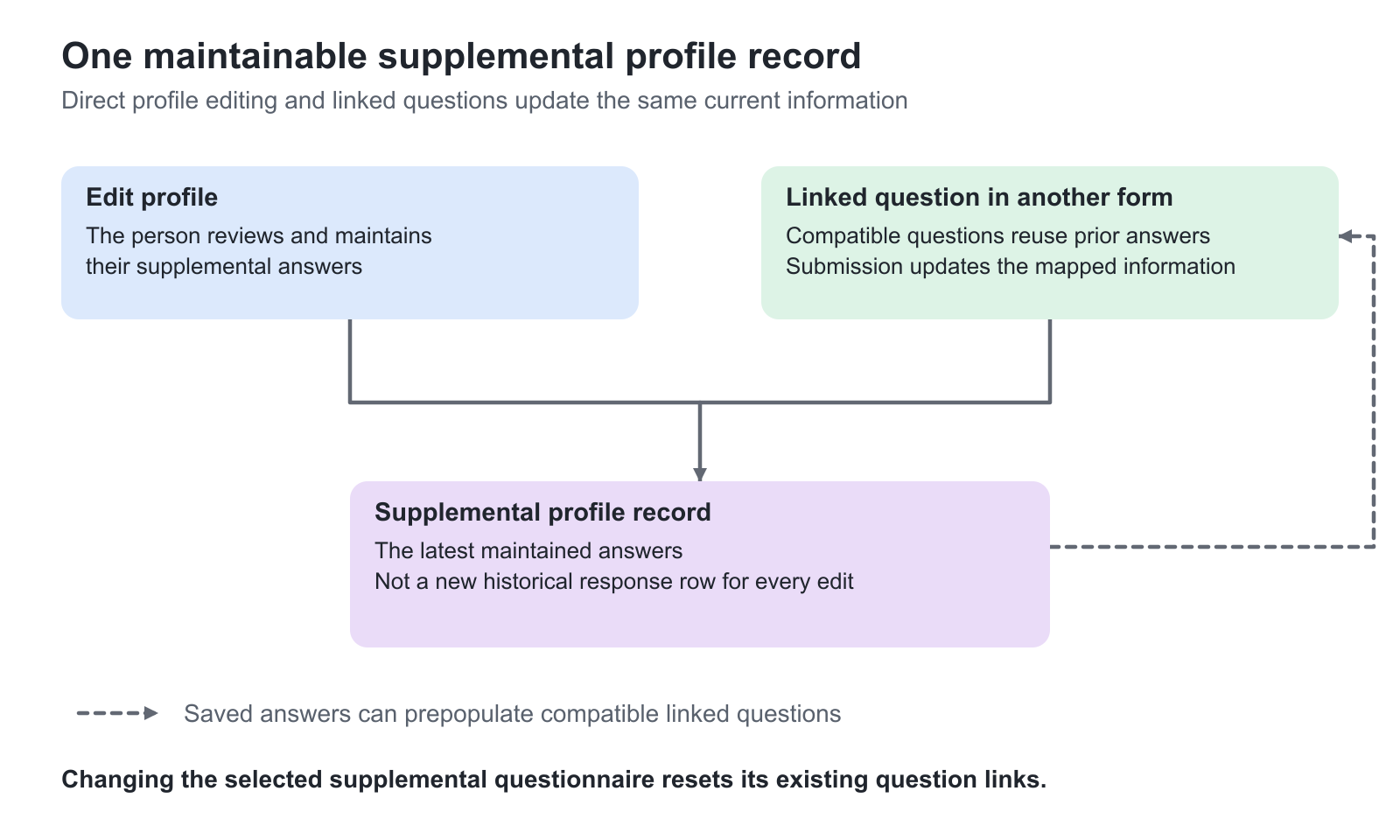
Supported questions in other questionnaires can be linked to the selected supplemental form. Existing answers can prepopulate those questions, and a later submission can update the person's supplemental information. This is an ongoing data relationship, not simply copying an answer list.
Use this article to:
- Decide when extended profile information is preferable to a one-off response
- Select the platform's Supplemental questionnaire
- Link compatible questions and choose their matching behavior
- Understand prepopulation, updates and authorized profile access
- Maintain the relationship when forms or answer options change
Use an extended profile for information that stays useful
A customer academy might need a learner's responsibilities, current equipment experience or preferred delivery region. A partner programme might need information relevant to planning practical training. These details can remain useful after one application or course ends, while still changing over time.
Use a supplemental profile when the person should be able to review and maintain that information. Use an ordinary questionnaire response when the purpose is a record of a particular evaluation or request at a point in time. A mutable profile answer and a historical survey answer solve different reporting needs.
Do not use this feature as an ungoverned replacement for identity or access-control master data. If a standard profile field already exists and has an authoritative owner, decide deliberately whether a direct update to that field or an additional supplemental question is appropriate.
Select the supplemental form at platform level
Prepare the questionnaire under Course administration → Questionnaires. An authorized administrator then opens Settings → General → Questionnaires, enables Supplemental questionnaire, selects the form and Saves.
The selected form is identified with (Supplemental) in the questionnaire and analytics listings. It becomes available to users through My overview → Profile → Edit profile → Supplemental questionnaire. The feature and access depend on the platform's enabled configuration.
Users can submit and later edit their supplemental answers there. Once the information exists, the profile's Supplemental questionnaire block presents the latest submission. Before an initial submission, that block is not shown as an already completed profile record.
Treat selection of another supplemental questionnaire as a structural change: it resets the existing links to supplemental questions. Review the connected regular questionnaires before changing the platform selection. The selected supplemental questionnaire also has restricted Clone and Delete maintenance actions.
Link a compatible question in another form
Open a regular questionnaire in the editor and add or expand a supported question. Enable Link to supplemental question, then select the corresponding question from the supplemental form. The available targets are filtered by compatible question type; a Short answer must link to an appropriate Short answer, not a Multiple choice question.
Supported linking includes Short answer, Long answer, Number, Date, Single choice, Multiple choice, Dropdown and Address. Use the actual available selector rather than assuming every question type or presentation element can be linked.
If the supplemental form has several questions of the same type, select the exact intended destination. A matching type does not establish matching business meaning: “Preferred delivery region” is not interchangeable with “Current service region”.
Choose how answer options relate
For linked choice questions, Behavior determines how the regular question and supplemental question interact. Choose the relationship deliberately before collecting responses.
| Behavior | Meaning | Best fit and caution |
|---|---|---|
| Number of options must match the selected supplemental question | The two questions must have matching option counts; selected positions correspond | Use equivalent ordered categories. Equal counts alone do not guarantee equal meanings |
| Use options from the supplemental question only | The regular question uses the supplemental question's options without independently editing them | Use when both forms should present the same controlled choices |
| Use options from this question. Unmatched answers saved as Other | Matches answer text against supplemental options; unmatched selections become an Other reply | Use only when those differences are intentional and the supplemental Other data will be reviewed |
For example, the supplemental question might list Installation, Commissioning and Support. A regular form containing an additional Training coordination option cannot be treated as equivalent simply because its first three choices look similar. Under the unmatched-answer behavior, an unrecognized answer is retained as Other rather than inventing a new equivalent predefined category.
With the position-matching behavior, keep the order and meaning aligned as well as the count. With text matching, review labels and translations carefully. A superficially similar label does not justify silently changing the person's declared responsibility.
Review inherited settings and the respondent experience
A linked question can inherit relevant configuration from its supplemental counterpart. Examples include character limits for text answers, Number limits, Date/date-time behavior, Address input type and own-reply behavior for choice questions. The linked Single/Multiple choice layout is also taken from the supplemental question.
Some controls therefore become unavailable in the regular question because the source relationship owns their values. Do not break a link merely to make an inherited field editable without reviewing the intended data relationship.
When compatible existing supplemental answers are available, the regular form can prepopulate them. The respondent should review whether they are still correct. Submitting the linked questions then creates or updates the corresponding supplemental answers. Text or other non-choice values update the mapped response; choice behavior follows the selected matching mode.
An ordinary submission of the same questionnaire from an unrelated route is not automatically an update to the supplemental profile. The profile form and the configured linked questions establish that relationship. Preview also does not create a submitted profile record.
Understand who can see and maintain it
The person can maintain their own supplemental answers through Edit profile. Other roles need the relevant profile-viewing/editing permission and relationship scope. A Manager, Partner or administrative role does not receive access to every person's supplemental information simply because the feature exists.
For another authorized user, the supplemental profile block and edit tab depend on the person already having a submission. Do not treat absence of the block before the first response as proof that the platform feature is disabled.
Questionnaire analytics has its own access rules. Supplemental responses are available to the appropriate administrative analytics scope, not automatically to every role that can view a profile or manage an activity. Use Roles, Responsibilities, and Management Scope to distinguish a capability from the people and data it covers.
Use the information without confusing it with a response history
The supplemental reporting record is created after the first relevant submission. Subsequent changes update that current record rather than adding a new historical response row every time a person edits their extended profile.
Where available, Users search and filters can use supported supplemental answers to help locate relevant people. Free-text search and structured answer filters support different question types; a field suitable for one is not necessarily offered in the other. Check the actual enabled filters before designing an operational process around them.
This can help an academy find people with relevant declared experience or delivery preferences. It does not turn a self-reported answer into a verified skill, certification or permission to perform regulated work. Use an assessment or governed evidence process where the requirement is competence or formal eligibility.
For the reporting workflow, see Questionnaires Analytics and Report. For writing standard profile fields rather than maintaining supplemental answers, use Configure Questionnaire Rules and Profile Updates.
Maintain and test the relationship
Before changing answer options, inventory the linked regular forms. Recheck option counts, positions, matching labels, inherited settings and translations. Changing the selected supplemental questionnaire resets links, so the change needs a planned review rather than an isolated settings edit.
Test a person with no supplemental submission and a person with existing answers. Verify prepopulation, change an answer through an authorized submission, inspect the resulting profile, and check the regular questionnaire's response context separately. Test an unmatched choice if that behavior is enabled.
Explain to respondents when an answer maintains their ongoing profile, not just the current request. Apply an appropriate data policy and avoid accumulating personal detail simply because the form can accommodate it. Data Privacy and Anonymization covers the relevant distinctions.
Troubleshooting
| Problem | What to check |
|---|---|
| Link to supplemental question is absent | Check platform enablement and whether the current question type supports linking |
| The desired target does not appear | Confirm compatible types and the exact selected platform supplemental form |
| A field cannot be edited in the regular question | It may inherit that configuration from the supplemental question |
| An answer becomes Other | Review the selected matching behavior and whether the answer label actually matches a supplemental option |
| A profile block is missing for another user | Check whether an initial supplemental submission exists, then profile permissions and relationship scope |
| All links disappeared after a settings change | Selecting another Supplemental questionnaire resets the links; review and reconnect the intended questions |
| The report has one updated record instead of several edits | Supplemental reporting represents the current record, not a complete history of every profile change |
FAQ
-
Why are some linked supplemental question settings not editable?
The linked question can inherit its relevant configuration from the selected supplemental question, such as character limits, number limits, date behavior, address input type, own-reply behavior or choice layout. Review the source relationship before breaking the link simply to change a field.
-
What happens if I select a different Supplemental questionnaire?
Selecting another questionnaire in Settings → General → Questionnaires resets the existing links to supplemental questions. Inventory the connected regular questionnaires and plan to review and reconnect the intended questions. Treat it as a structural change, not an isolated title or display edit.
-
Does editing a supplemental profile create another response-history row?
The supplemental reporting record is created after the first relevant submission. Later edits from the profile or linked questions update that current record rather than adding a separate row for every change. Use an ordinary response workflow when the requirement is a historical evaluation or request at a point in time.