Introduction to User Management - Article
Summary
User management helps the right people enter your academy, receive relevant learning, and get support from the right team. It connects the individual learner with the organizations, responsibilities, and learning opportunities that give their participation a purpose.
For a growing academy, the challenge is not simply to create more accounts. It is to welcome different audiences without confusing their access, distribute administration without losing control, and retain reliable records as people change jobs, organizations, or relationships with your business.
Use this section to:
- Choose how people join and how their information stays current.
- Separate account access, organizational membership, and training enrollment.
- Give central and local teams appropriate responsibilities.
- Support learners and manage changes without unnecessarily losing their history.
A foundation for a connected learning operation
An enterprise academy rarely serves one uniform population. Employees may arrive through an identity system. A customer may register while purchasing training. A distributor may maintain its own technicians. An association may invite professionals who participate independently of an employer. Some users need learning only; others coordinate a team, teach, support customers, or administer a part of the platform.
These audiences can share an academy without following the same administrative process. The important design decision is how each population should enter, which information can be trusted, who takes responsibility, and what the person should be able to do afterward.
Eurekos supports several routes into the platform and combines user information with organizational relationships, roles, and feature-specific rules. This lets an academy balance common standards with local responsibility. A central team can maintain the learning offer and governance while an authorized customer or partner Manager performs the member-management work that belongs close to that audience.
The result should be less repeated administration and a more coherent learner experience—not a more complicated registration form.
What good user management helps you achieve
| Business need | Practical approach | Intended outcome |
|---|---|---|
| Welcome different audiences | Choose an entry route for each population: connected identity, import, invitation, direct creation, or self-registration. | People can join through a process that fits their relationship with the academy. |
| Grow without centralizing every task | Delegate supported user-management responsibilities within an appropriate organization or staff relationship. | Local teams help their people while central administrators retain the intended oversight. |
| Provide relevant learning | Maintain the profile information and organizational relationships used by audience, onboarding, and enrollment rules. | Users receive or discover learning that is appropriate to them. |
| Maintain trustworthy information | Identify which system or person owns each important field and how updates reach Eurekos. | Administrators can explain and correct information instead of repeatedly repairing conflicting values. |
| Support people efficiently | Use a stable account identity and inspect account, enrollment, progress, and certificate records separately. | Support addresses the actual problem rather than creating a second account or enrollment unnecessarily. |
| Manage temporary or changing relationships | Use the appropriate membership, responsibility, and account-status controls. | Access changes deliberately while the consequences for existing learning records remain understood. |
| Preserve learning continuity | Reuse the correct account and handle genuine duplicates through a controlled merge. | A person's learning evidence is not needlessly fragmented across several identities. |
These outcomes depend on configuration. An account does not automatically receive every capability simply because a profile or organization exists.
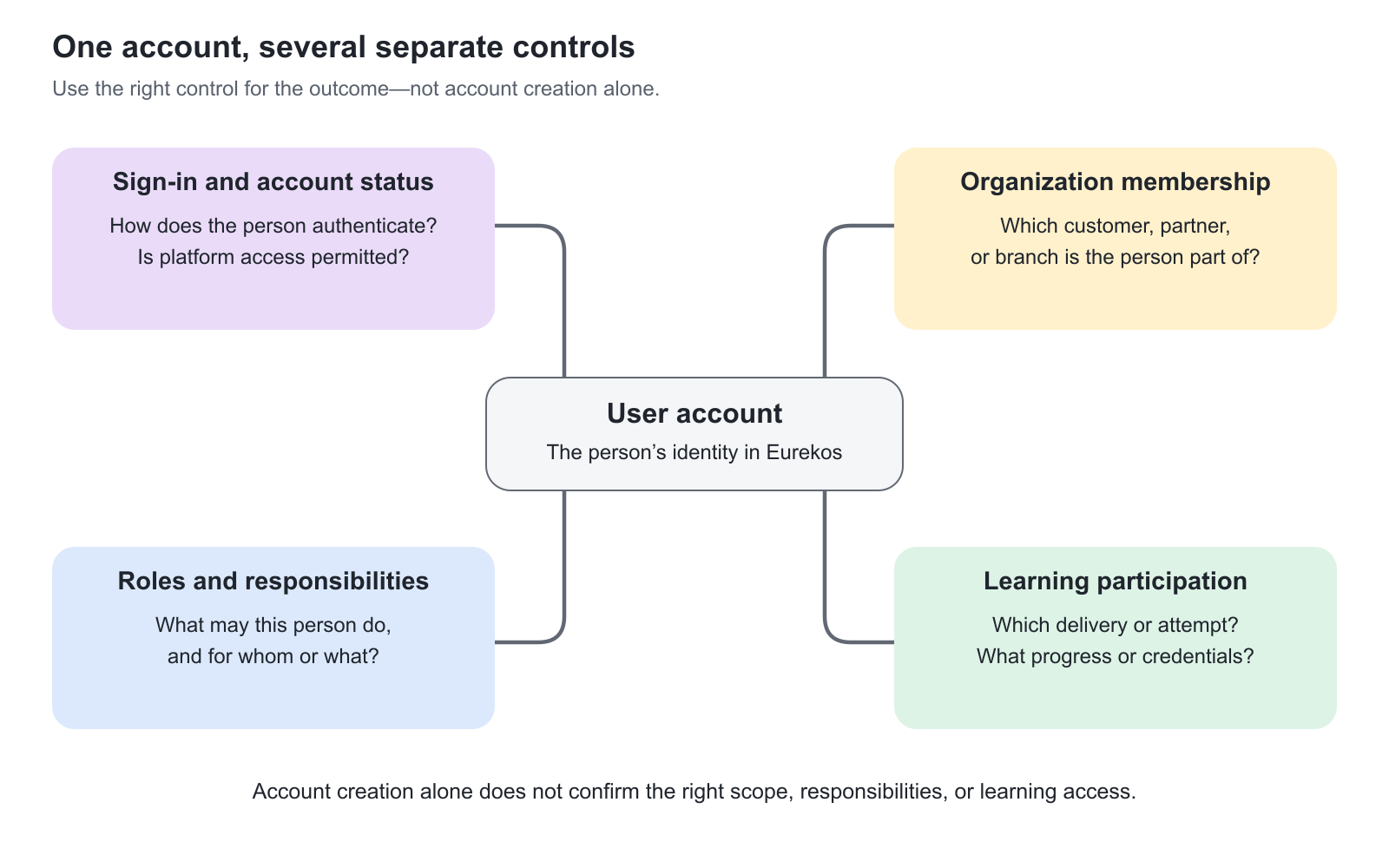
Understand the five building blocks
| Building block | The question it answers | What it does not prove |
|---|---|---|
| User account | Who is this person in Eurekos? | That the person can currently sign in or has completed registration. |
| Sign-in method and account status | How does the person authenticate, and is platform access currently permitted? | That a particular Training Activity is visible or available. |
| Organization membership | Which managed customer, partner, business unit, or branch is the person connected to? | That the person is enrolled in every activity associated with that organization. |
| Role and responsibility | Which actions may the person perform, and for whom or what? | That the person has platform-wide visibility or unrestricted access to Settings. |
| Training enrollment and learning evidence | Which delivery is the person participating in, and what have they achieved? | That account creation alone completed the enrollment, payment, assessment, or certification process. |
A single journey can combine several of these steps. For example, a new customer may create an account during checkout and then receive an activity signup. A bulk user import may create accounts without assigning any training. A successful SSO login may establish an identity while account approval or learning eligibility still needs attention.
Treat the final business outcome as the measure of success. “The account exists” is not enough when the actual requirement is “the technician can enter the correct certification program.”
Choose a model for each audience
| Operating model | How to organize it | Why this is useful |
|---|---|---|
| Internal employee academy | Use the approved identity or HR integration where available. Define ownership of employment information, manager relationships, and departure handling. | Reduces repeated account administration and aligns learning with changing employment relationships. |
| Customer self-service academy | Combine the intended registration or checkout route with appropriate audience, verification, and approval settings. | Customers can get started without a separate administrator creating every account. |
| Partner-managed learning | Represent the partner organization and give its authorized Manager the supported member-management responsibilities. | Partners maintain their people while the provider governs learning standards and reporting. |
| A defined launch cohort | Prepare a controlled import, select the intended registration communication, and handle enrollment deliberately. | Makes a large launch repeatable without mistaking a successful file upload for completed onboarding. |
| Temporary external audience | Establish account ownership and an agreed access period; use scheduled blocking where appropriate. | A temporary program has a clear access lifecycle instead of leaving forgotten active accounts. |
| Professional with several relationships | Identify the existing account before adding another organization, activity, or management relationship. | Preserves continuity where a person belongs to more than one legitimate audience. |
Participation can be free, individually paid, organization-funded, or supported through a separate commercial arrangement. User identity and administration remain necessary regardless of payment.
Agree who owns user information
The same field can be touched by several processes: an administrator, the user, an import, a questionnaire, or an integration. Without an agreed owner, a correct change can later be replaced by another source.
For example, the HR system might own department and employment information, while the user maintains a preferred language. A partner Manager may maintain the local membership relationship. A configured questionnaire may update selected address or company fields. A support administrator should understand those boundaries before changing data on behalf of someone else.
Maintain only information that supports a real operational purpose. Additional fields make registration and maintenance harder when nobody uses them. Conversely, omitting a dependable identifier or organizational relationship can make reporting and support much more difficult later.
Central standards, local responsibility
Delegation works when responsibility and scope are considered together. A role describes capabilities, but organizations, assigned responsibilities, and feature configuration influence where those capabilities apply.
A partner Manager and an Immediate Manager are not interchangeable concepts. A Manager is a system role with an organization-based scope. Immediate Manager is an enabled add-on and a staff relationship created when a person is selected on one or more staff profiles. That relationship defines which staff members are in scope; the person's underlying role, permissions, enabled features, and activity configuration still determine which actions are available. Responsibility for one Training Activity likewise does not create responsibility for every participant account across the academy.
Start with the smallest responsibility that allows the person to perform the intended work. Do not assign a broad administrator role merely to solve one missing action without understanding the wider effect.
Manage change as part of normal operations
People change departments, employers, email addresses, managers, and learning needs. An academy should be able to accommodate those changes without automatically starting their history again.
Before creating a replacement account, look for the existing identity. Before blocking an account, distinguish platform access from individual activity participation. Before deleting or merging, establish which records and relationships must remain and who has approved the action.
For reporting, use the evidence appropriate to the question. Enrollment shows participation; progress shows learning activity; a certificate shows the relevant credential outcome; a Transaction records its commercial or enrollment event. These are connected records, not alternative names for the same thing.
Where to start
Begin with one representative journey for each important audience. Identify the entry route, source of user information, organizational relationship, responsible support team, expected learning access, and eventual departure process.
Then use the focused articles in this Users section to configure and operate that journey. Organizational design belongs in Organizations, while the detailed learning-enrollment process is covered in Enroll and register participants.
Good user management makes the complexity of your business manageable behind the scenes, so the learner experiences a clear route into the learning that matters.
FAQ
-
Do we need different user accounts for employee, customer, and partner learning?
Not simply because the person has different relationships. First identify the existing account, then configure the appropriate memberships, responsibilities, and learning participation. A second account can fragment the person's learning history.
-
Is user management still relevant when all our training is free?
Yes. Identity, access, organizational membership, delegated administration, and learning evidence still need to be managed. These requirements do not depend on collecting payment.
-
Can one person use the same account across several business relationships?
Yes, when it represents the same person and the platform configuration supports the required relationships. Add the relevant organization memberships, enrollments, or responsibilities to the correct existing account instead of creating a duplicate. Confirm the User ID and any source-owned identity information before making changes.