Manage Account Status, Blocking, and Departure - Article
Summary
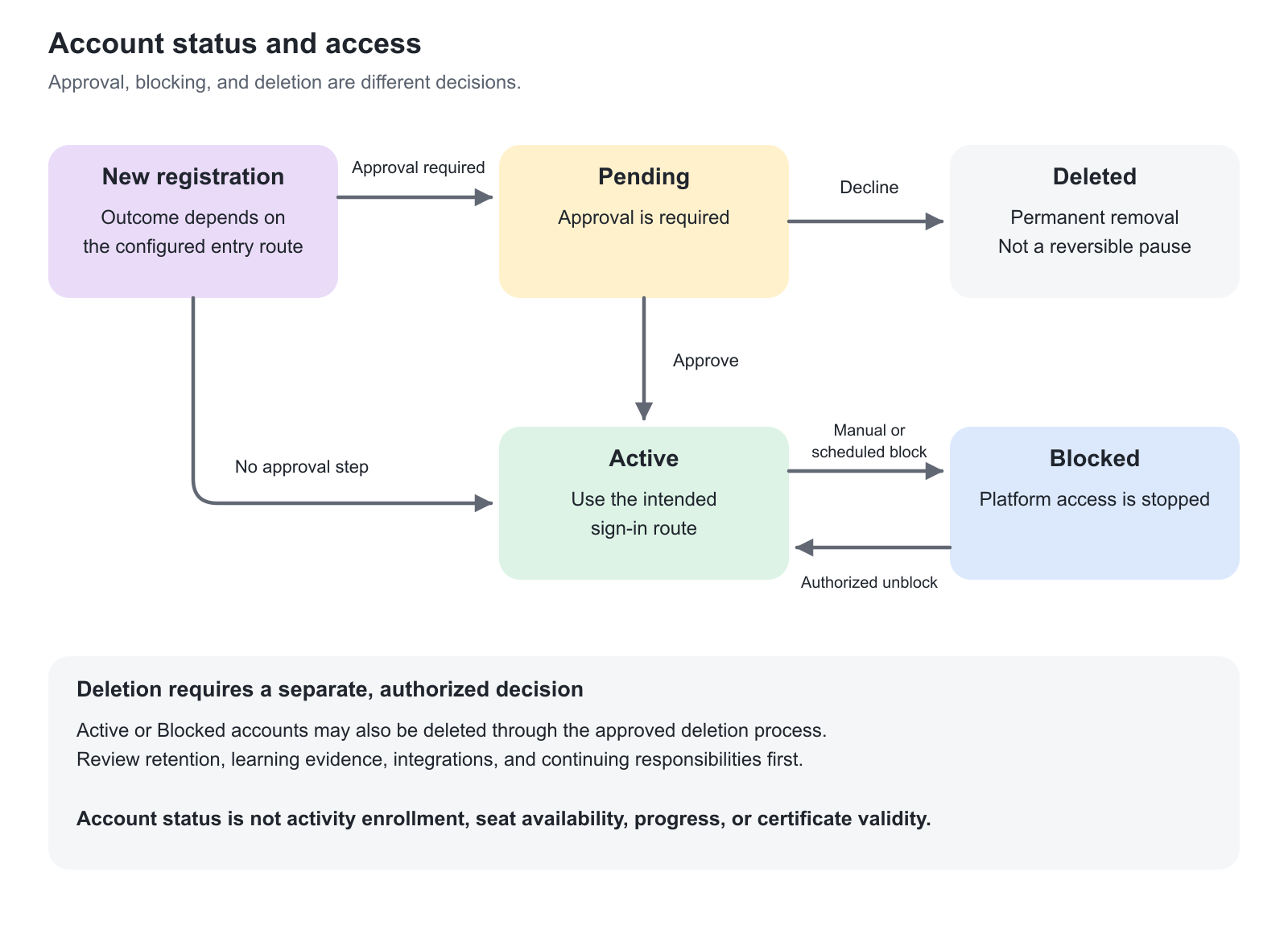
Account status controls whether a person can use the platform; it is not the same as their status in a Training Activity. Choose the action that matches the business relationship and understand its effect before changing a live account.
Use this article to:
- Distinguish Pending, Active, and Blocked accounts.
- Use manual or scheduled blocking for appropriate access boundaries.
- Restore access deliberately and handle deletion through an approved process.
Understand the account states
| State or condition | Meaning | What not to infer |
|---|---|---|
| Active | The account is active for the intended platform access process. | This does not guarantee that every activity is available or that every authentication requirement has been completed. |
| Pending | A new account requires the configured approval decision. | It is not a waiting-list entry or an activity enrollment request. |
| Blocked | The user cannot access the platform through that account. | Blocking is not cancellation of every enrollment, deletion of the account, or revocation of every certificate. |
| Deleted | The account has been removed through the deletion process. | Do not assume normal reactivation is available or that every report necessarily removes every historical trace. |
| Inactive usage | The person has not been active according to the measure being considered. | Inactivity is not automatically the same as Blocked status. |
The Users list can present account states for filtering and review. Learning signup and certificate states belong to their own records.
Choose the action by the business requirement
| Requirement | Appropriate starting point | Important consequence |
|---|---|---|
| Stop platform access temporarily | Block the account under the approved process. | The person cannot sign in; existing learning and seat relationships need separate consideration. |
| Restore an approved returning user | Unblock the existing account when appropriate. | Check current membership, responsibility, and learning requirements rather than creating a new identity automatically. |
| End participation in one activity | Use the activity’s participation process. | Do not block the whole platform account merely to cancel one delivery. |
| End a customer or employment relationship | Review login routes, membership, responsibilities, and account status together. | Removing one relationship is not a universal departure workflow. |
| Approve a new registration | Process the Pending account. | This is different from approving a specific training request. |
| Permanently remove an account | Use the authorized deletion process after reviewing consequences. | A Block action is not a substitute for an approved deletion requirement, and deletion is not a reversible pause. |
For activity-level timing, use Access Expiration. For activity participation, use Enroll and register participants.
Block an account
Authorized administrators can block users from the Users list or the supported profile-editing context. Confirm the intended User ID and reason before applying the action.
A blocked user cannot access the platform. A user already signed in when blocked is logged out by the system.
Blocking does not free every learning seat automatically. Blocked users remain counted toward occupied seats and active enrollment in the documented activity behavior. If capacity must be released, review the relevant activity participation process separately.
Schedule a future block
The Schedule user block option is available in the Status area of the Create/Edit user pages where supported. Use it when the access period can be expressed through a clear event or date.
| Scheduling option | Meaning | Useful example |
|---|---|---|
| Days after inactivity | Counts from the user’s last activity/access time, not simply the last-login date. | Review access for an audience that should not remain indefinitely available after prolonged inactivity. |
| Days after first enrollment | Uses the first enrollment after the schedule is configured. | A program grants a defined platform-access period beginning with the relevant enrollment event. |
| Days after account creation | Uses the creation date of the account. | A temporary audience has a fixed access period from account setup. |
| At a specific date | Blocks the account on the selected future date through scheduled processing. | A temporary relationship or access agreement has a known end date. |
Do not assume first enrollment means the user’s earliest historic enrollment: the documented scheduling rule uses the first enrollment after configuration.
The schedule is processed automatically. It is cleared after the scheduled block has been applied; removing the option disables that scheduled block. Accounts without a configured schedule are not affected by this particular feature.
Choose an explicit date when the business requirement is a known end date. Do not use inactivity as an indirect substitute for a contractual access deadline, and do not promise exact-to-the-second execution of scheduled processing.
Understand the effect on learning records
Blocking does not erase a previously earned certificate merely because access has stopped. Transcript and reporting behavior must be interpreted in the relevant view.
For blocked users, profile training cards can appear without normal status/progress presentation. The transcript retains supported training and certification evidence. Some reports can hide blocked users through configuration, and blocked users are excluded from certain manager/dashboard views.
A blocked user does not receive new re-certification attempts or related emails under the documented re-certification behavior. Unblocking can allow the renewal process to create the relevant attempt. Review the person’s current learning and renewal context after restoring access.
Do not infer “no evidence exists” from a filtered report or a reduced profile display.
Unblock and restore access
Confirm that the person is entitled to return, then use Unblock through the permitted account action. Review organizational membership, role, manager relationships, and any temporary-access requirement before treating reactivation as complete.
For a local account, unblocking triggers the documented password-reset process: the user receives a message to create a new password and cannot resume using the old password. This is not the same credential process for externally authenticated SSO users.
Retained learning progress becomes available again, subject to the current learning structure and changes made while the user was blocked. New modules or changed content can affect what the returning learner must complete; restoring account access does not freeze the academy at its previous state.
Handle departure as more than a status change
For an employee, customer contact, or partner coordinator leaving the audience, identify both access and continuing responsibility. The person may administer deliveries, supervise staff, own a group, or receive operational notifications.
Transfer the responsibilities that still need an owner. Coordinate identity-provider access and any local-login route. Review whether organization membership should remain for an approved historical or operational purpose. Apply the account action authorized by your policy.
Disabling an external identity is not proof that every local access path, membership, or assigned responsibility has been removed.
Delete only under an approved process
Deletion is materially different from blocking. Review the intended account, retention requirements, learning evidence, integration references, and any operational ownership before confirming.
Do not describe deletion as guaranteed removal of every historical report record. Supported reports can retain or include historical information under their configuration, and data may also exist in authorized exports or external systems. Equally, do not promise that deletion preserves everything needed to restore an account later.
Where enabled, users can delete their own accounts through the supported process. Administrative deletion permissions are role-dependent and do not universally allow a lower-level administrator to delete a higher-level account.
Declining a Pending registration also deletes that account. Use Block instead only when that is the appropriate approved business action—not as a way to avoid understanding the approval decision.
Troubleshooting
| Problem | What to check |
|---|---|
| A blocked account still occupies a seat | Blocking and activity enrollment are separate; review participation if capacity should be released. |
| The scheduled block has not occurred | Check the saved schedule, date or triggering event, inactivity definition, and automatic-processing timing. |
| A user reactivated successfully but cannot use the old password | Follow the new-password process for local accounts; use the identity provider for the relevant SSO credential issue. |
| Learning evidence seems to have disappeared | Check report filters and the transcript; a blocked profile view can hide progress presentation without erasing evidence. |
| A returning user sees new requirements | Compare current activity/module structure and re-certification state with the earlier learning record. |
Verify the outcome
| Scenario or check | Expected result or evidence |
|---|---|
| Access is stopped | The intended account is Blocked and the expected sign-in route no longer grants platform access. |
| Access is restored | The correct identity uses the appropriate credential route and has the intended current relationships. |
| A scheduled period is used | The saved trigger and timing match the policy, and responsibility exists for reviewing the result. |
| A person leaves | Required ongoing responsibilities have an owner, and the account, identity-provider, and learning decisions are recorded separately. |
FAQ
-
Does blocking a user automatically free their activity seats?
No. Blocking stops platform access, but the user remains counted toward occupied seats and active enrollment. Review the activity participation process separately if capacity should be released.
-
Does scheduled blocking for inactivity use the last-login date?
No. That scheduling option uses the user's last activity/access time, not simply the last-login date. Choose a specific-date schedule when the business requirement is a known access end date.
-
Does blocking a user delete their learning history?
No. Blocking prevents platform access, but it does not by itself remove Training Activity participation, progress, certificates, or historical evidence. Review any separate enrollment, automation, or retention consequences required by the departure process.