Roles, Responsibilities, and Management Scope - Article
Summary
A role gives a user a set of capabilities, but it does not by itself explain everything the person can see or manage. Organizational relationships, assigned responsibilities, and enabled features shape where those capabilities apply.
Use this article to:
- Select an appropriate responsibility without granting unnecessary access.
- Distinguish organizational Managers from Immediate Manager relationships.
- Investigate missing or excessive access through the relevant controls.
Start with the work and its boundary
Before assigning a role, describe the task and the population or content involved. “Support members of Customer A,” “teach one workshop,” and “maintain platform-wide commerce settings” are different requirements.
A job title is not a permission design. A senior business manager may need only staff oversight, while a learning coordinator may need substantial operational access within a limited scope.
Choose the narrowest supported responsibility that allows the intended work. Adding a broad administrator role can solve one missing button while exposing unrelated information or settings.
Understand the access layers
| Layer | What it contributes | Example |
|---|---|---|
| System role | The categories of actions available to the user. | Participant, Instructor, Manager, or an administrative role. |
| Organizational scope | The managed population or content relationships relevant to organization filtering. | A partner administrator’s work is associated with their intended branch rather than every customer. |
| Feature-specific responsibility | A direct relationship to a delivery, content item, or operational task. | An assigned Instructor or Course Administrator on a Training Activity. |
| Immediate Manager relationship | Staff assigned to a particular person where the feature is enabled. | A supervisor monitors the learning of named staff, regardless of their separate system role. |
| Platform and feature configuration | Optional capabilities and restrictions. | Whether Managers may create certain roles or edit otherwise restricted profile fields. |
The effect of these layers is feature-specific. Avoid treating one permission matrix as a universal promise that applies to every report, profile field, or content type.
Choose the appropriate responsibility
| Role or responsibility | Typical purpose | Scope decision to make |
|---|---|---|
| Participant | Take part in learning and use the participant experience. | Which learning is visible, assigned, or available through the person’s relationships and eligibility? |
| Instructor | Deliver or support learning within the permitted instructor responsibilities. | Which activities, modules, learners, and results belong to this person’s teaching assignment? |
| Course Administrator | Coordinate training delivery and its operational administration. | Which deliveries and audience relationships should the person manage? |
| Manager | Support members of the relevant organization or suborganization through enabled management capabilities. | Which organization and branch relationships define the managed population? |
| Support | Carry out the permitted learner-support work. | Which accounts and actions are needed, and which changes require escalation? |
| Platform Administrator | Maintain permitted platform administration. With advanced organizational filtering enabled, work within its stricter scope without access to Settings. | Does the platform use the light or advanced organizational model, and what should this administrator manage? |
| Global Administrator | Provide central oversight and manage Settings and advanced organizational configuration. A designated Platform Administrator is elevated during support-assisted setup. | Who is accountable for cross-organization oversight, shared resources, and platform-level changes? |
| Optional specialized roles | Support additional delegation or reporting arrangements where configured. | Which capabilities are enabled for this platform, and are they appropriate to the person’s work? |
Assistant, advanced or external instructor arrangements, and other specialized roles should be documented according to the capabilities actually enabled. Their existence in another academy is not evidence that the same role is available or identical in yours.
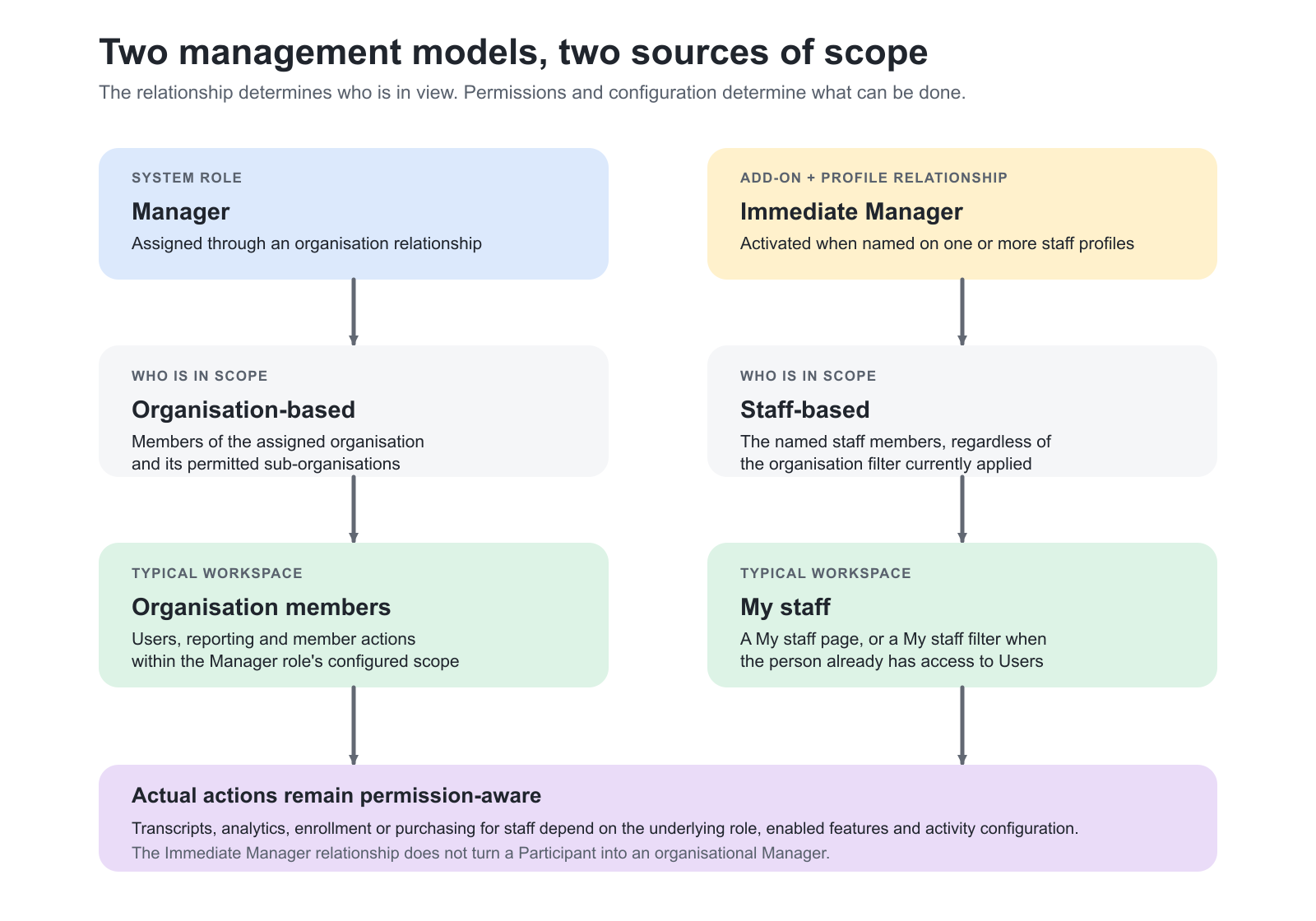
Manager and Immediate Manager are different
An organizational Manager operates through the supported management relationship with an organization or suborganization. The available member-management actions depend on the platform’s configuration.
Immediate Manager is an enabled add-on and a staff relationship created when a person is selected on one or more staff profiles. The relationship determines which people appear in scope. It does not by itself grant every staff-management action: the Immediate Manager’s underlying role, permissions, enabled features, and activity configuration determine which actions are available. If the person already has access to Users, a My staff filter appears there; without that access, the navigation presents a dedicated My staff page. Assigned staff remain in scope regardless of an organization filter.
This allows a person to remain, for example, a Participant while also supervising specific staff. It avoids using an unnecessary broad administrative role merely to create that supervisory relationship.
Assign or change an Immediate Manager
- Open Users and select the staff member whose reporting relationship you need to maintain.
- Edit the staff member’s profile.
- Under Personal information, find Immediate manager and select one or more eligible accounts.
- Save the profile.
- Verify that the staff member appears on the manager’s My staff page or in the My staff filter.
- Verify the intended action separately. The relationship establishes staff scope; it does not override the manager’s role, permissions, enabled features, or activity configuration.
For bulk maintenance or connected systems, use the supported Immediate Manager mapping and verify the resulting account relationship. Store the relationship as a link between accounts, not as an unverified manager name.
| Situation | Appropriate concept | Do not assume |
|---|---|---|
| A partner contact maintains the partner’s members | Organizational Manager and the relevant membership scope. | That a matching Company text field alone establishes management rights. |
| A supervisor follows specific employees | Immediate Manager relationships, where enabled. | That everyone in the same department automatically belongs to that supervisor’s staff list. |
| A coordinator manages one training delivery | The supported activity responsibility and required role. | That this grants platform-wide profile or Settings access. |
| A group lead manages a private Reselling Gateway delivery | The Contact Manager responsibility created and used by that process. | That Contact Manager, organization Manager, and Immediate Manager are interchangeable labels. |
Configurable delegation
Managers can be granted the ability to change users between Participant and Manager within their own organization or create users with the Manager role. This requires the relevant configuration through Eurekos Support; it is not a universal default.
Separate configuration can allow specified roles to edit managed users’ profile fields even where the users cannot edit those fields themselves. Role-creation limits and import permissions also influence which roles an administrator can assign through a particular route.
Define who may approve these capabilities and review a representative managed and out-of-scope account after configuration. Delegation should reduce operational dependence on the central team without turning local support into unrestricted platform administration.
Settings access is a separate consideration
Organization filtering can use a light model or an advanced configuration with stricter content and administrative separation. Using organizations for audiences and Manager responsibilities does not by itself introduce the advanced model.
Only Eurekos support enables the advanced configuration. Its controls are not initially visible to a Platform Administrator. During setup, a designated Platform Administrator is elevated to Global Administrator to manage central oversight and the additional configuration.
With advanced organizational filtering enabled, Platform Administrators no longer have access to Settings. The designated Global Administrator handles platform-level settings, while Platform Administrators work within the stricter organizational boundaries. If a person cannot reach a configuration area, establish whether the restriction is intentional. Do not bypass the design by assigning a broader role solely to reach one setting; use the authorized administrator or approved change process.
Change responsibilities deliberately
Before changing a role or management relationship, identify the intended new duties and the existing responsibilities that should end. A role change, organization change, activity assignment, and staff reassignment are separate records; one change should not be assumed to clean up every other relationship automatically.
For a departing coordinator, review the activities they administer, the staff they supervise, and any other ongoing operational ownership. Transfer responsibility through the supported feature process and check notifications or work queues relevant to that responsibility.
Preserve a clear decision record for material access changes in your designated administration or support process.
Practical delegation designs
| Business need | Design | Outcome |
|---|---|---|
| Customer maintains its own population | Organizational Manager with the approved creation, invitation, or import capabilities. | Routine membership work stays with the customer while the provider controls the learning offer. |
| Team leader monitors development | Immediate Manager relationships to the intended staff. | Staff oversight without unnecessary platform administration. |
| Instructor delivers one program | Appropriate role plus explicit teaching responsibilities. | Access follows the delivery rather than the instructor’s seniority or job title. |
| Central learning operations | Appropriate administrative role and governed organizational scope. | Coordinated oversight with deliberate separation from unrelated configuration or customer data. |
Verify the intended boundary
| Scenario or check | Expected result or evidence |
|---|---|
| The assigned person performs the intended task | The required action is available for the correct population or delivery. |
| The person opens unrelated content or accounts | Access remains limited according to the approved organizational and feature design. |
| A responsibility is transferred | The new owner has the expected work and the former owner’s unnecessary responsibility is removed. |
| A role is used for support | Support can resolve the intended issue without needing unrelated settings or broader personal-data access. |
Troubleshooting
| Problem | What to check |
|---|---|
| A user has the expected role but cannot see a person or activity | Check organizational scope, direct responsibility, and the feature’s own access rules. |
| An Immediate Manager has no expected staff view | Check that the feature is enabled and that the staff profiles name the correct account as Immediate Manager. |
| A Manager cannot create another Manager | Check the optional role-management configuration and permitted creation scope. |
| An administrator cannot edit a profile field | Check field configuration, delegated editing permissions, scope, and source ownership. |
| A user can see too much | Review role breadth, multiple organization memberships, direct responsibilities, and relevant feature settings. |
FAQ
-
Why can a Platform Administrator no longer open Settings?
With advanced organizational filtering enabled, Platform Administrators no longer have access to Settings. The designated Global Administrator handles platform-level changes. Ordinary use of organizations in the light model should not be confused with this advanced configuration.
-
Is Immediate Manager a separate system role?
No. Immediate Manager is a user-profile relationship, where the feature is enabled. A person can retain their existing system role while receiving the supported oversight of the staff assigned to them. It is distinct from an organizational Manager role.
-
Can an organization Manager create or promote another Manager?
Only where the relevant role-management capability has been enabled. The supported configuration allows specified Participant and Manager role changes within the Manager’s own organization; it is not a general right to assign any administrative role.
-
Does organization membership automatically grant administrative rights?
No. Membership identifies an organizational relationship; the person’s role and permitted responsibilities determine what they may do. The light or advanced organizational model and feature-specific rules then influence where those capabilities apply.
-
Does assigning an Immediate Manager automatically provide every management action?
No. The Immediate Manager relationship defines which staff members are in scope. The person’s underlying role, permissions, enabled features, and Training Activity configuration still determine which actions are available for those staff members.