Discussions, Topics, and Community Facilitation - Article
Summary
Community discussions help participants ask questions, compare experience, and apply what they have learned. Use a small, understandable structure and focused topics so useful answers remain easy to find. Facilitation gives that structure a purpose: someone introduces the conversation, supports participation, and turns useful contributions into shared understanding.
Use this article to:
- Organize discussions, topics, and comments.
- Choose an appropriate balance between member participation and owner control.
- Use following, pinning, mentions, and notifications purposefully.
- Facilitate realistic learning conversations without confusing them with formal assessment.
Understand the conversation structure
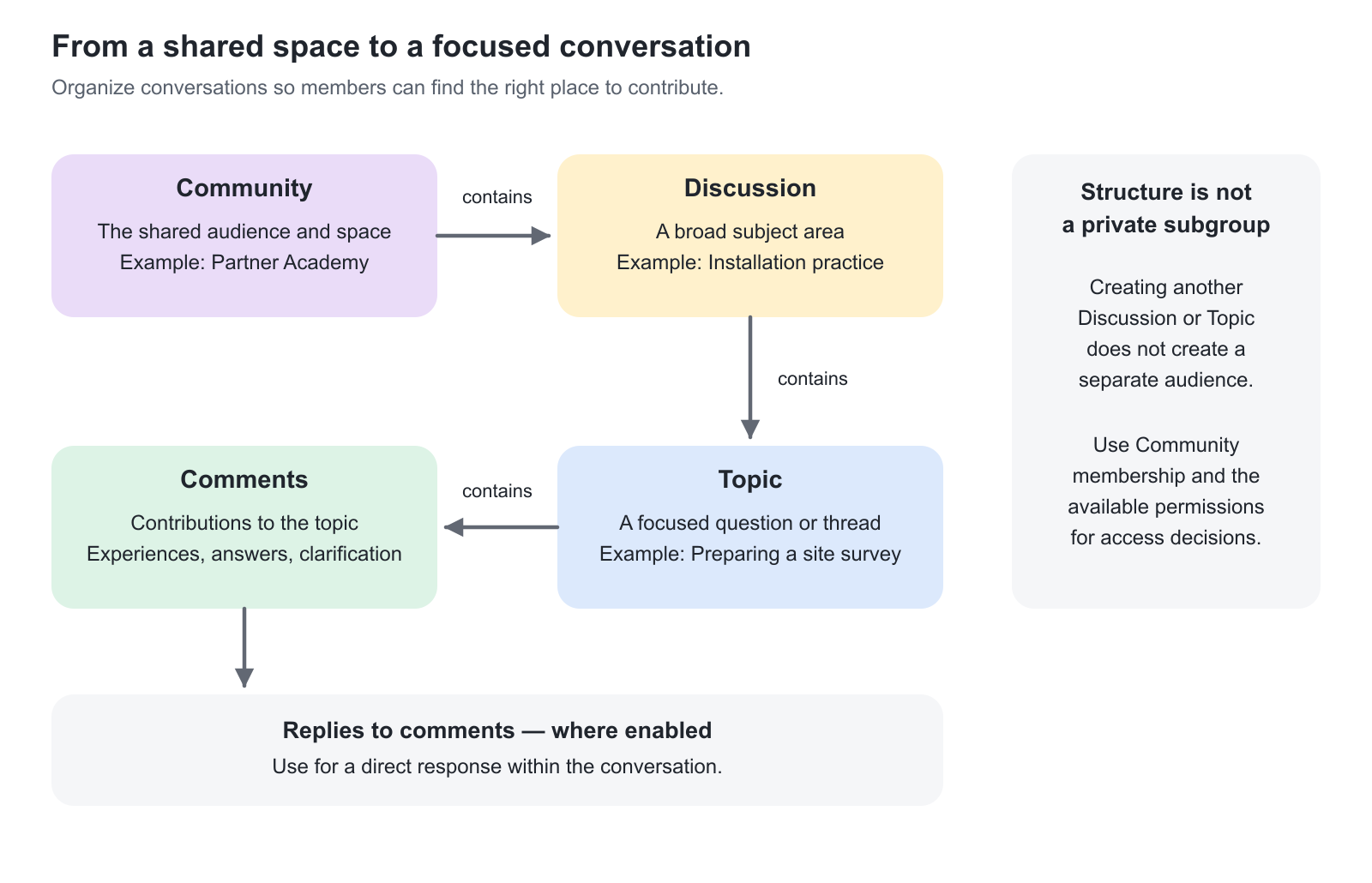
| Element | Purpose | Example |
|---|---|---|
| Community | The shared space and its membership. | “Customer implementation cohort — autumn” |
| Discussion | A continuing subject area that groups related topics. | “Applying the process” |
| Topic | A specific question, prompt, or conversation within a discussion. | “How did your team handle the first customer handover?” |
| Comment | A contribution to the topic. | A practical example, answer, clarification, or relevant resource. |
| Reply, where enabled | A response within the topic's comment conversation. | A follow-up question about one member's example. |
Start with a few discussion areas that members can understand immediately. Add a new area when the volume or subject matter justifies it, rather than creating a long empty structure in advance.
A Community is a shared audience. Do not treat separate discussion names as separate access groups within the same Community.
Decide who may organize the conversation
Create and Manage Communities explains the settings that govern the space; within those settings, discussion management and topic management are controlled separately.
| Approach | Useful when | Facilitation responsibility |
|---|---|---|
| Members can create discussions and topics under the applicable permissions | The Community is a self-directed professional network. | Keep names understandable and consolidate the communication approach when the structure becomes confusing. |
| Owner controls discussions; members can create topics | Consistent subject areas are needed, but members should raise their own questions. | Maintain a clear structure and help members choose the correct area. |
| Owner controls discussions and topics | A facilitator introduces a planned series of prompts or exercises. | Publish the prompts in time and make clear how members can suggest additional subjects. |
Restricting topic creation does not by itself make the Community read-only. Comments and the handling of existing member-owned content follow their own permissions and configuration. Test with an ordinary member rather than relying on the owner's view.
Create a discussion and a topic
- Open the Community's Discussions view.
- Select Create discussion where permitted, and provide a clear title and useful description.
- Open the relevant discussion and create a topic, or use Create topic and select the appropriate discussion where the interface offers that route.
- Give the topic a specific title and explain the question, expected contribution, or action.
- Add relevant resources and choose the notification option where offered.
- Save the contribution and verify that it appears in the intended discussion.
Use the available edit and delete actions only for content you are authorized to manage. For a substantial correction, explain the change in the conversation so replies do not become misleading.
Write a useful topic
| Part | Recommended wording approach | Example |
|---|---|---|
| Title | Name the concrete question or situation. | “What caused delays in your first installation?” |
| Context | Explain why the subject matters now. | “We have completed the preparation module and will compare field experience at Friday's meeting.” |
| Contribution | Ask for one manageable response. | “Describe one delay, what caused it, and the change you would try next time.” |
| Boundaries | Explain what should not be posted. | “Remove customer names, personal information, and confidential system details.” |
| Follow-up | Say what will happen to the contributions. | “The facilitator will group the recurring issues for discussion.” |
Avoid vague prompts such as “Discuss the course.” A focused question makes it easier for members to contribute something useful and for the facilitator to respond.
Comments, attachments, and replies
Members can contribute comments according to the Community's permissions. The editor supports text and supported attachments such as files, videos, and interactive content.
Choose the smallest useful contribution. A short explanation with an approved example is often easier to discuss than an unexplained document. If a resource should remain part of the Community's working materials, organize it through Community Files and Tasks rather than relying only on a long comment thread.
Threaded replies are a configurable Community-topic capability. They should not be assumed to be enabled on every platform or to work identically in Announcements, event comments, file comments, or tasks. Ask the platform administrator or Eurekos Support if this is important to the intended discussion design.
Following, pinning, and notifications
| Control or behavior | How to use it | Important distinction |
|---|---|---|
| Follow / Unfollow | Manage the topics whose updates you want to follow. | Following and email delivery are related but not identical; system-email configuration and user notification preferences still matter. |
| Pin / Unpin | Keep a useful topic easy to find in your own view. | Pinning is a personal organizing action, not a guarantee that the topic is pinned for every member. |
| @mention, where supported | Draw a relevant Community member's attention to a specific contribution. | Use mentions selectively. A mention is not a private message or an assignment of formal responsibility. |
| Notify Community Members, where offered | Choose whether a new contribution should actively notify the group. | Routine updates do not all need a separate email to every member. |
| Recent updates | Find current activity across the Community. | The configured view can emphasize new topics and comments or comments only. |
Community system emails are managed in Email Sending under System emails → Communities. A missing email does not prove that the contribution is unavailable on the platform; check access and delivery separately.
Do not create an operational deadline that depends solely on members noticing an optional discussion email. Use the appropriate task, event, or formal training requirement and a clear communication plan.
Facilitate the conversation
| Practice | What the facilitator does | Outcome |
|---|---|---|
| Welcome and orient | Explain the purpose, suitable contributions, and where to get individual support. | Members know how to participate safely and usefully. |
| Model a useful contribution | Post a brief realistic example and an answer of the expected depth. | The group sees what good participation looks like. |
| Invite relevant experience | Ask members to compare approaches without exposing confidential cases. | Discussion connects learning to real work. |
| Respond to unanswered questions | Review the Community at a sustainable cadence and involve the right expert. | Questions do not accumulate without an owner. |
| Summarize and connect | Draw together recurring themes and link back to the relevant training or resource. | The conversation produces something usable beyond the thread. |
| Close the loop | Explain the agreed action, answer, or next discussion. | Members can see why contributing was worthwhile. |
These are recommended working practices, not automatic platform functions. Choose an approach that the available facilitators can maintain.
Keep collaboration separate from assessment
Use Community conversation for reflection, peer support, and exploration. If every learner must submit work, receive an assessment, or satisfy a completion criterion, configure a formal Assignment.
A blended design can use both: members explore a case together in a Community, then submit the required individual or group evidence through an Assignment. Explain which contribution is optional collaboration and which is the formal requirement.
Native course authoring can support Community-related discussion presentation in an appropriately connected training design. Treat this as a specific integration design, not a promise that any arbitrary Community topic can be embedded in any course. Verify the relationship and learner view before adopting it.
Realistic facilitation patterns
| Scenario and requirement | Recommended approach | Why and what to check |
|---|---|---|
| Customer onboarding questions between sessions | Owner-managed discussion categories, with member-created topics for concrete questions. | Answers stay connected to the cohort. Assign someone to review unanswered questions. |
| Professional reflection after practice | A facilitator posts one focused topic per stage and summarizes common lessons. | Creates context without requiring members to repeat the same material in several places. |
| Partner troubleshooting exchange | Let members describe anonymized situations and invite qualified experts into the discussion. | Practical experience becomes reusable knowledge. Move confidential support cases to the approved support route. |
| Facilitator-led program with consistent prompts | Limit topic creation to the owner while retaining suitable member commenting. | Every cohort follows a recognizable facilitation sequence without preventing meaningful contributions. |
Verify the experience
| Verify | Expected outcome |
|---|---|
| Structure | A member can decide where to ask a question without help. |
| Permissions | The intended member can create a topic or comment, and restricted actions are unavailable. |
| Notifications | Following, mentions, and group notifications produce the intended communication under the platform configuration. |
| Facilitation | Members know who responds and what to do with confidential or urgent questions. |
Troubleshooting
| Problem | What to check |
|---|---|
| A member cannot create a discussion or topic | Review the separate owner-only settings and applicable permissions. |
| A reply control is missing | Threaded replies may not be enabled, or the content may not be a Community topic. |
| A pinned topic is not pinned for another member | Pinning is personal. Use a clear welcome structure and communication to direct the whole group. |
| A topic update did not generate an email | Check following, the contribution's notification option, user email preferences, and Community system-email configuration. Investigate delivery through Email Sending where needed. |
| Members cannot find an earlier answer | Review topic names, discussion structure, and available search. Add a concise summary or maintained resource rather than another parallel answer. |
| A Community discussion is being used as an untracked assessment | Move the formal submission and evaluation requirement to an Assignment, while retaining discussion for preparation and peer learning. |
FAQ
-
What is the difference between a discussion and a topic?
A discussion groups a continuing subject area. A topic is a focused conversation within that area, with comments providing the contributions.
-
Does pinning a topic pin it for every member?
No. Pinning is a personal organizing action. Use a clear welcome structure and communication when the whole group needs to find a particular topic.
-
Why are threaded replies unavailable?
Replies within Community-topic comments are configurable and may not be enabled. Do not assume the same reply structure applies to Announcements, events, files, or tasks.
-
Should mandatory assessed work be submitted in a Community topic?
Use an Assignment when a formal submission, evaluation, or completion record is needed. Community discussion can support preparation and peer learning around that requirement.
-
Does following a topic guarantee an email for every update?
No. Following helps govern updates, but actual email delivery also depends on the applicable notification behavior, system-email configuration, and user preferences.