Introduction to Communication and Facilitation - Article
Summary
Communication and Facilitation helps people stay informed, learn from one another, and put training into practice. Use Announcements for relevant updates, Communities for continuing collaboration, and Calendar events to bring people together. A clear purpose and a responsible facilitator turn these tools into a connected experience for employees, customers, partners, and professional networks.
Use this article to:
- Choose the right communication channel for the outcome you need
- Establish and manage Communities with appropriate membership and permissions
- Support discussion, shared resources, practical tasks, and live meetings
- Coordinate notifications and record attendance without confusing participation with learning completion
What this helps you achieve
Formal training defines what people need to learn. Communication and facilitation provide the support around that journey: a place to ask a question, discuss a practical problem, prepare for a meeting, or share what happened when someone applied the learning.
For an enterprise academy, this can connect a centrally maintained training offer with local experience. A provider can deliver consistent learning while instructors, customer coordinators, partner specialists, and participants contribute relevant examples and help one another. The collaboration can belong to one cohort or continue across several deliveries as a Community of practice.
The value comes from choosing a manageable operating model. A Community needs a purpose and an owner; an Announcement needs a relevant audience and a clear action; a meeting needs the right participants and usable joining information. More channels do not automatically produce better engagement.
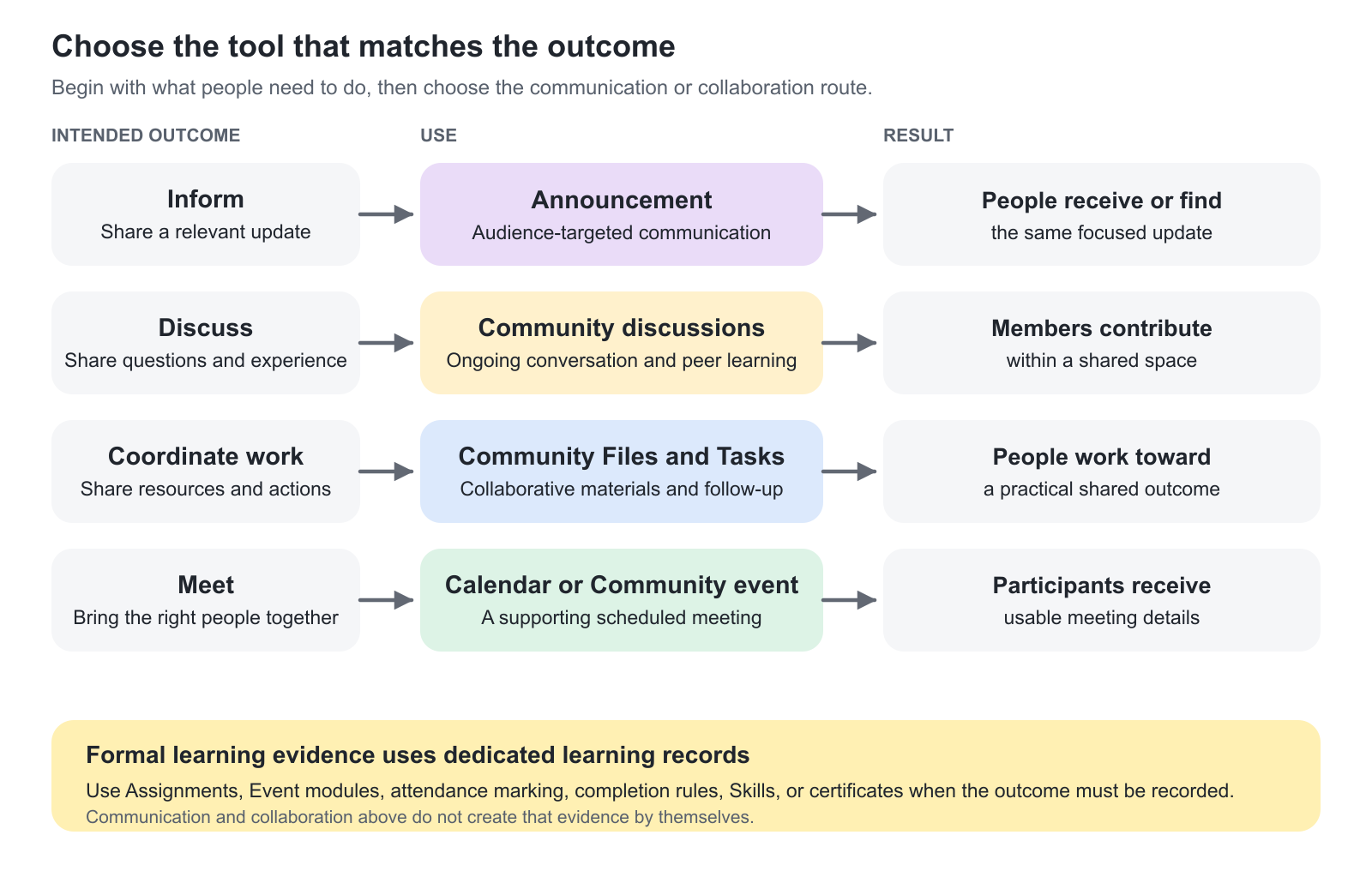
Choose the right tool
| What you need to achieve | Use | Important distinction |
|---|---|---|
| Tell a selected audience about a change, opportunity, or important update | Announcements | An audience-targeted update such as new products or options, important ad-hoc information, with optional comments and notifications; not a recurring training email sequence |
| Give people a continuing space for questions, peer learning, and shared experience | Communities | Membership governs participation in the space. A Community is not itself a Training Activity or a certificate requirement |
| Organize an ongoing subject and a specific conversation within it | Community discussions and topics | Use discussions as subject areas and topics for focused conversations. Avoid one unstructured thread for an entire program |
| Share working materials and assign practical follow-up | Community Files and Tasks | Suitable for collaborative work. Use a formal Assignment when submission, assessment, or learning completion must be recorded |
| Arrange a supporting meeting for activity participants or Community members | Calendar event or Community event | Connecting an event to an activity does not turn it into an Event module in its learning path |
| Make a live session part of a structured learning journey | Event module in a Training Activity | Configure the module and its learning requirements in Course Administration |
| Send planned messages based on enrollment, schedules, deadlines, or completion | Automated Email Workflows | Use rules for the communication journey; do not manually recreate each reminder as an Announcement |
| Confirm who attended a session | Attendance marking and supported conferencing integration | Registration, a calendar RSVP, live attendance, and training completion are different records |
See Automated Email Workflows, Assignments, and Calendar Events and Video Conferencing for their detailed configuration.
Choose the collaboration model
| Model | When it is useful | How to keep it purposeful |
|---|---|---|
| One Community for one cohort | A six-week customer onboarding program with preparation, live sessions, and follow-up | Use cohort-specific discussions, a named facilitator, and a clear decision about access and resources after the program |
| A continuing Community of practice | Certified partners share implementation experience across several training deliveries | Organize by enduring subjects, maintain current resources, and review who should remain a member |
| An organization- or role-based Community | Regional instructors or customer coordinators need a shared professional space independent of one course | Define membership by the business audience, with a governed manual or onboarding process |
| External collaboration through Microsoft Teams or Slack | Participants already work in a supported external environment | Define which system governs membership and verify external identity and access. A visible link does not guarantee entry |
Use Create and Manage Communities to establish the native space; use Community Membership and Access to govern who belongs and how they enter. Community Connection can coordinate activity participation with a native Community or a supported external collaboration space, and Onboarding Rules can assign membership from profile criteria. These mechanisms have different lifecycles; do not combine them without deciding which one governs membership. Review Community Connection and Onboarding Rules for their detailed behavior.
Understand audience, membership, and permission
These controls answer different questions:
| Control | Question it answers | Example |
|---|---|---|
| Announcement audience | Who should receive or see this update? | Participants in selected activities, or members of a particular organization |
| Community membership | Who belongs to this collaboration space? | A cohort plus its facilitators and approved subject-matter experts |
| Role and feature permissions | What can this person create, change, or manage? | Whether a member may invite others or create a discussion |
| Organization scope | Which people and content can this user discover or administer in this context? | A customer administrator works within the permitted customer population |
Do not assume that an organization boundary subdivides the content of an already shared Community. If people from different organizations are intentionally members of the same Community, plan its discussions, files, tasks, and events for that shared audience. Create separate Communities when groups must not share their working space.
Feature availability and creation permissions can be configured. A missing button does not always mean the feature is unavailable across Eurekos; it may reflect the user's role, Community settings, organization scope, or platform configuration.
Plan facilitation across the learning journey
| Stage | Useful practice | Intended outcome |
|---|---|---|
| Before training | Explain where questions belong, share preparation resources, and provide accurate meeting details | Participants arrive prepared and know how to obtain help |
| During training | Use focused discussion prompts, relevant meetings, and small follow-up tasks. Respond to unanswered questions | Participants connect the learning to their own work and learn from peers |
| After training | Summarize useful answers, share approved recordings or resources, and agree the Community's continuing purpose | Knowledge remains useful without leaving an unmanaged or misleading space behind |
A realistic facilitation plan can be simple: a weekly question, a facilitator who reviews unanswered posts twice a week, and a short summary after each live session. These are operating practices, not automatic platform promises. Choose the cadence your team can maintain, and use Discussions, Topics, and Community Facilitation to turn that cadence into focused, supported participation.
Coordinate notifications
Participants can receive Announcements, Community notifications, system emails, workflow messages, calendar invitations, and messages from a conferencing provider. Review the combined experience rather than each channel in isolation.
Use one primary place for each fact. Keep the meeting schedule on the event, the current working resource in the agreed file location, and the focused conversation in its topic. Other messages should point people there instead of creating competing copies.
Notification choices and user email preferences can affect delivery. Treat on-platform access and email delivery as separate checks. A person might have access to the content without receiving every optional email. See System Email Notification Overview and Email Sending.
Treat the header bell, browser notifications and System Emails as distinct routes. A browser notification depends on the supported browser experience and its permission; a System Email depends on its event, recipient and notification scheme. An external meeting provider can also issue its own messages. When a person misses a notice, identify the expected route before changing settings in another channel.
For example, a partner-training coordinator may plan an enrollment confirmation, a timely Event reminder and a Community discussion as three different parts of the learning journey. Define who receives each message, what they should do next and which record demonstrates success. A missing browser prompt is not evidence of an email delivery failure.
Keep formal learning evidence separate
Participation in a discussion, completion of a Community task, viewing a recording, and attendance at an event are not interchangeable evidence.
If the outcome must count toward training completion, assessment, Skills, or certification, configure and verify the corresponding learning process. Use Assignments for assessed work, Attendance Marking and Verification for participation evidence, and the appropriate Event module and Certificates criteria when attendance must contribute to a credential. A useful conversation should not accidentally become an undocumented assessment requirement.
Verify the overall experience
| Verify | Expected outcome |
|---|---|
| Intended audience and access | A representative participant can find the correct update, Community, or event; an unintended user does not gain inappropriate access |
| Ownership | Someone is responsible for responding, moderating, maintaining resources, and handling membership changes |
| Communication | Joining details and required actions agree across the event, messages, and external service |
| Learning evidence | Any required submission, attendance, or completion is recorded in the appropriate learning process |
| Continuing purpose | The team knows whether the space should continue, be reviewed, or be retired after the program |
Related guidance: Understand and Manage Notifications; Plan and Troubleshoot Platform Notifications.
FAQ
-
When should I use an Announcement instead of a Community topic?
Use an Announcement for a relevant update to a selected audience. Use a Community topic when the main purpose is an ongoing question, discussion, or exchange of experience among members.
-
Does Community participation automatically count toward training completion?
No. Use the appropriate module, assessment, attendance, and completion criteria when participation must form part of a formal learning requirement. Discussion, task completion, and learning completion are different records.
-
Do we need a Community for every Training Activity?
No. Create or connect one when the training benefits from peer interaction, facilitator support, or shared resources. A Community should have a purpose, an owner, and a suitable membership lifecycle.
-
Is a Microsoft Team connection the same as a Teams meeting?
No. A Team connection provides an ongoing external collaboration space. A Teams meeting provides a scheduled live session. Configure either or both according to the learning design.
-
Does changing a System Email template change the browser notification too?
Do not assume so. System Email, the header bell, supported browser notifications and external meeting-provider messages are distinct routes. Identify the event, audience and channel before changing configuration.