Understand Recommendations on My Overview - Article
Summary
Recommendations help an organization connect assigned learning with useful discovery. The same area can help a returning participant resume work and give a new user a relevant first offering before they have any learning history.
Recommendations is the first learning-focused section on My Overview. It can help a participant resume enrolled training or discover an available Storefront activity. The carousel is adaptive: users see only the configured slide types that produce an applicable result for them, up to six slides.
Use this article to:
- Interpret each recommendation type
- Understand why recommendations differ between users
- Distinguish a recommendation from enrollment
- Understand Storefront eligibility and exclusion rules
- Troubleshoot an empty or unexpected carousel
What Recommendations helps you achieve
Recommendations gives each learner a useful starting point at the top of My Overview. It can combine continuity—returning to learning already underway—with discovery of relevant activities that the user has not joined.
This allows an organization to support several outcomes in the same space:
- Help participants resume where they left off
- Bring several active learning commitments within reach
- Return users to activities they bookmarked
- Recommend activities based on similar learners and training history
- Promote a selected introduction, campaign or commercial offering
- Give a new user a useful destination before they have enrolled in training
Last visited is one of the recommendation types that can be included alongside other continuity and discovery options.
Understand the recommendation types
| Type | What the participant sees | Important distinction |
|---|---|---|
| Last visited | The activity the user opened most recently | It can represent an activity in any applicable status and provides continuity |
| In progress | Another recently visited activity the user has not completed | It helps the user choose between several current learning commitments |
| Personalized recommendations | A Storefront activity suggested from the user's profile and training history | It is discovery, not enrollment, and it updates through the recommendations engine |
| Bookmarked | A recently bookmarked Storefront activity | A bookmark does not reserve a seat, price or approval |
| Custom | A specific Storefront activity selected by an administrator | It appears only to users who can access that activity in their Storefront |
The same type can be configured more than once where supported. For example, several Personalized recommendations slides can show the user's first, second and third ranked suggestions. Several Bookmarked slides can show several recent bookmarks.
If only one applicable result exists, the section displays one slide without unnecessary carousel controls. If several apply, the participant can move between them. The user sees no more than six slides even if the administration contains more configured entries.
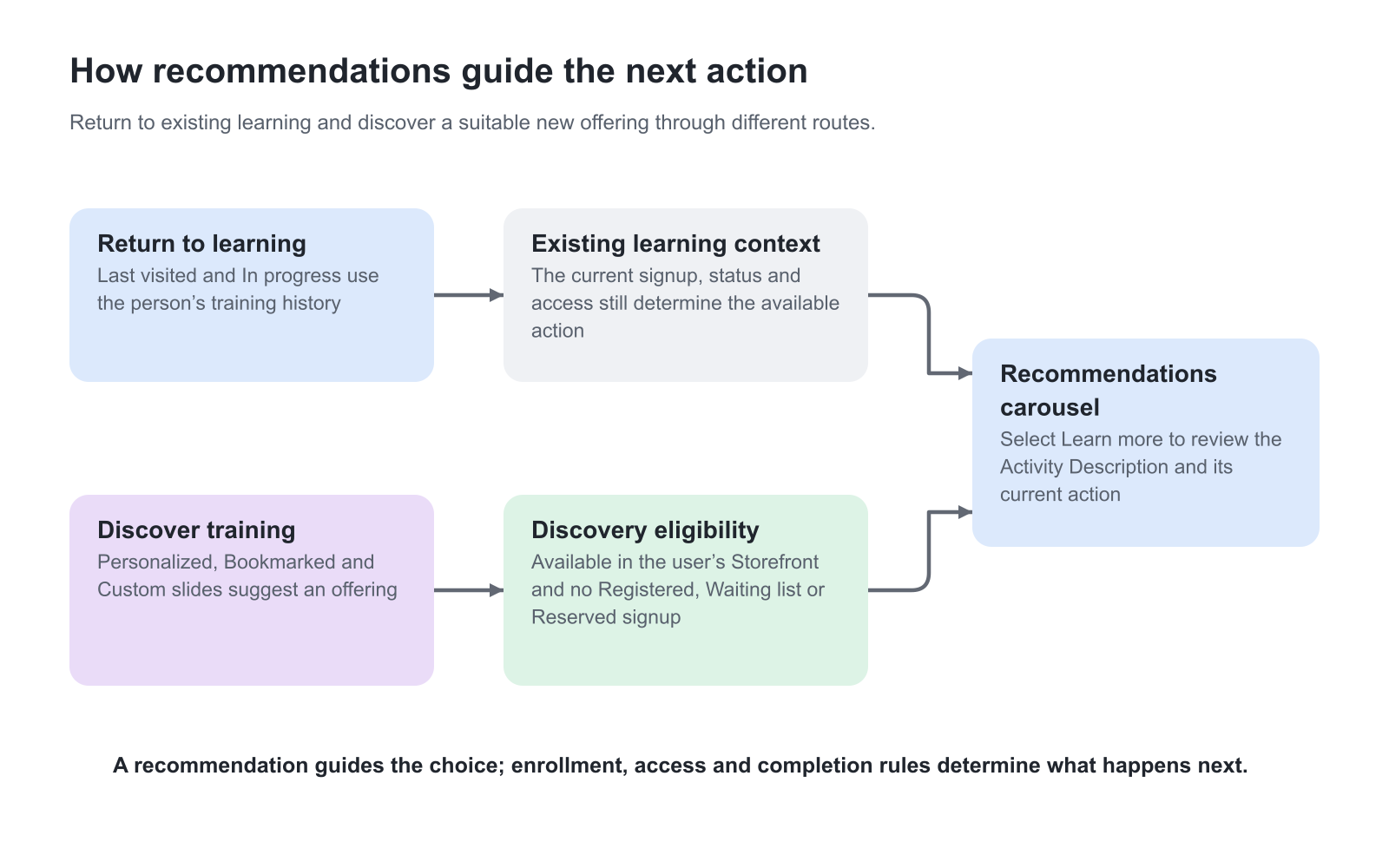
How personalized recommendations are selected
The recommendations engine uses similarities between learning histories and profile information. Available factors can include:
- Organization and Suborganization
- Country and Language
- Category and Job function
- Skills and skill levels
- Activities in which the user is or has been enrolled
- Activities completed by learners with similar characteristics and learning patterns
The engine then identifies available activities that similar learners took next. Only Storefront activities the current user can act on are eligible.
Paid activities can be ranked prominently, allowing the recommendations to support a commercial academy as well as internal learning discovery. This does not bypass the displayed price or checkout process.
Personalized recommendations are refreshed through scheduled processing rather than recalculated with every page load. A change to the user's profile or training history can therefore appear the following day.
Give new users a useful starting point
A personalized suggestion needs some training history from which to infer a next step. A brand-new user may therefore have no personalized result yet.
An administrator-selected Custom activity can provide a reliable first recommendation—for example:
- Welcome to the academy
- How to use the learning platform
- Product foundation training
- A current campaign or featured program
- A popular optional activity
The Custom activity must still be visible and available to the user in the Storefront. Use target audiences and Storefront arrangement to keep the recommendation appropriate.
Understand availability and exclusions
Personalized, Bookmarked and Custom recommendations do not override Storefront or enrollment rules.
An activity is excluded when applicable if:
- The user already has a Registered signup
- The user is already on its waiting list
- A seat is Reserved for the user
- The activity is not visible to the user through Storefront arrangement or target audience
- The activity is Closed, Cancelled or Completed
- Its schedule means it is no longer available for the relevant self-enrollment route
These exclusions keep discovery slides actionable and reduce recommendations that lead directly to unavailable content.
Last visited and In progress are different because they are based on the user's existing learning relationship.
Open a recommendation
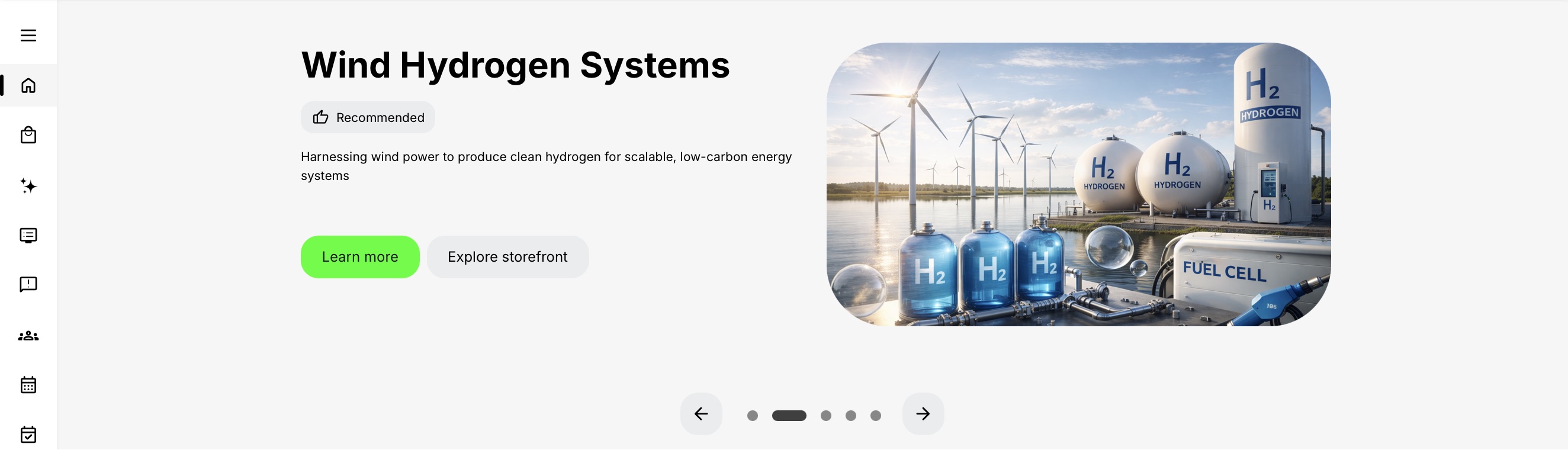
The slide can include the activity title, description, banner, tags, module information and the applicable action.
- Learn more opens the Activity Description so the user can review details and the supported enrollment, request or purchasing action.
- Explore Storefront opens the registered user's Storefront.
- An enrolled or resumable activity can provide the applicable route back into the training.
A recommendation is not evidence that the user has enrolled, paid, been approved or received access. The Activity Description and enrollment flow remain authoritative.
Compact and Vivid presentation
Recommendations can use Compact or Vivid presentation.
- Compact places the activity information on the left and the banner on the right.
- Vivid uses the activity banner across the section with text on an overlay. An activity with a video banner can present the video without sound according to the configured behavior.
The organization can also control whether several slides advance automatically and how long a slide remains visible. These presentation choices do not change recommendation eligibility.
The two examples below show the same activity and actions in the two layouts. Compare where the title and description sit relative to the banner, rather than treating the different appearance as a change in the recommended activity or its access rules.

Recommendations and the Storefront
My Overview and the Storefront serve different parts of the participant journey:
- My Overview prioritizes the user's current learning and selected recommendations.
- The Storefront provides the broader available catalog, scheduled-training views, search and filters.
The carousel provides cross-pollination between the two. It can introduce an appropriate Storefront activity without displacing mandatory or active learning already shown elsewhere on My Overview.
Choose a useful recommendation mix
Think about both the returning learner and the person arriving for the first time. A Last visited or In progress slide helps someone resume an existing learning relationship. Personalized recommendations, Bookmarked and Custom slides help them consider an available offering before enrollment.
A new user with no training history may have no personalized result yet. A Custom slide can provide a purposeful starting point, such as an introduction to available training, provided the selected activity is visible to that user in the Storefront. For an experienced participant, combine return-to-learning slides with relevant discovery rather than repeatedly promoting work they already have.
The discovery exclusions apply to Personalized recommendations, Bookmarked and Custom slides: a Registered, Waiting list or Reserved signup excludes that activity, and Storefront availability must still be satisfied. Last visited and In progress serve the different purpose of returning to existing learning. A card moving out of a discovery slide after enrollment can therefore be the correct result.
Personalized results refresh daily. After a relevant profile or training-history change, allow the next recommendation refresh before judging the result. A manager or administrator sees recommendations for their own learning context; their carousel is not a recommendation list for everyone they manage.
Example: offer a relevant next step without assigning it
An academy wants new Customer A users to discover an introductory activity without enrolling everyone automatically. An administrator selects that activity for a Custom slide and makes it available to the intended audience in the Storefront. A new Customer A user can review the offering and follow its enrollment action. A Customer B user who cannot see the activity in their Storefront does not receive that Custom recommendation merely because the slide exists in the platform configuration.
After the Customer A user registers, the activity is no longer eligible for that discovery slide. It belongs in the appropriate Trainings I attend group, and opening it can also make it relevant to a return-to-learning slide. Its disappearance from Custom is therefore not evidence that the enrollment failed.
If the introduction is an obligation, arrange the actual enrollment and applicable Mandatory rule. Promoting it through Recommendations alone does not assign it, set a participant Deadline, or provide evidence that it has been completed.
Do not confuse dashboard and assessment recommendations
Recommendations on My Overview are activity-level starting points based on history, bookmarks, availability or administrative selection.
Recommendations and Learning Guidance is a separate Course Administration feature. It uses answers in an H5P Question Set to recommend particular modules or Course pages after a test. Those learning recommendations appear inside the training experience and do not configure the My Overview carousel.
Troubleshooting
| Problem | What to check |
|---|---|
| Recommendations is missing completely | Confirm at least one slide type is visible in configuration and produces an applicable result. If every configured slide is hidden, the section is intentionally omitted. |
| A Custom activity is missing for one user | Confirm the activity is visible and available to that user in the Storefront. Check target audience, activity status, schedule, signup and Storefront arrangement. |
| Personalized recommendations are empty | Confirm the user has training history and wait for the next daily refresh. Use a Custom slide when a guaranteed starting point is required. |
| A bookmarked activity disappeared | Check whether the user enrolled, joined its waiting list, received a reservation or lost Storefront access. Those states can exclude the bookmark from recommendation slides. |
| A suggestion appears irrelevant | Review the user's profile, organization, job function, skills and training history. Confirm the activity's metadata and Storefront audience are accurate. |
| More than six configured results exist | The end-user carousel shows a maximum of six applicable slides. Review ordering so the most important types are evaluated first. |
FAQ
-
What happens when I select a recommendation?
The available action opens the Activity Description, Storefront or an existing learning route. A discovery recommendation does not itself enroll, approve or charge the user; the normal eligibility and enrollment process still applies.
-
Why did a recommendation disappear?
The activity may have become unavailable, been removed from the user's Storefront audience, or entered a state such as Registered, Waiting list, Reserved, Closed, Cancelled or Completed. Those conditions can make a discovery slide no longer actionable.
-
Why does a new user have no personalized recommendation?
Personalized recommendations need profile and learning-history signals. A new user may not have enough history yet. Use an administrator-selected Custom activity when a reliable first recommendation is required.
-
How often are personalized recommendations refreshed?
They are produced through scheduled processing rather than recalculated on every page load. A profile or learning-history change can therefore appear on the following day.
-
Can an administrator choose an exact activity for the carousel?
Yes. A Custom recommendation can feature a selected Storefront activity. It appears only to users who can access that activity through its visibility, target-audience, schedule and availability rules.
-
Why does the carousel show fewer than six slides?
My Overview shows only configured slide types that produce an applicable result for the user, up to six. If one result applies, the section shows one slide without unnecessary carousel controls.
-
Are My Overview recommendations the same as Question Set recommendations?
No. My Overview recommendations are activity-level starting points based on history, bookmarks, availability or administrative selection. Question Set recommendations guide participants to modules or Course pages after selected answers inside learning.