Create and Govern an API Client - Article
Summary
An API client gives a connected application a defined route into supported Eurekos services. Its scopes, ownership, organization boundaries and expiration should match the business task. Maintain the credential as an operational dependency: a working connection needs an owner and a replacement plan, not just an initial successful setup.
Use this article to:
- Find the client-management interface and create an appropriate client
- Choose scopes, organization boundaries and expiry deliberately
- Configure available expiry reminders and plan replacement
- Distinguish customer-managed options from Eurekos-managed limits
Open the API client workspace
Open Settings → Third party integrations → API. The list provides Add client and See documentation, together with actions for the clients you are permitted to manage.
Administrators, Global administrators and Platform administrators can manage API clients they own. Eurekos has broader service-level administration. A role’s access to a settings page should not be interpreted as ownership of every existing client.
Choose a name that identifies the application and its purpose, such as “Partner service portal — qualification lookup.” The title must be unique among the clients owned by that user. Keep the operational owner and the receiving application identifiable outside the credential itself.
Create the client around the required operations
Select Add client. Complete the title and select the Scopes required by the agreed integration. Scope names identify permitted operations; use the reference and the developer’s documented requirement instead of selecting every available scope.
Where the organization filter is enabled, Organizations can restrict the client to relevant organizations and suborganizations. Review this together with the user account’s permissions and the intended object access. Organization filtering is consequential even when a technical request is otherwise valid.
Provide Redirect URL when required by the selected authorization flow. Use the application’s agreed callback URL; it is not interchangeable with the platform’s home page. Refer to See documentation for the applicable authentication flow and request details.
Select Add to create the client, then retain the generated credentials through the organization’s approved secret-management process. The connection can involve a Client ID, Client secret and bearer token. Do not assume the secret can be recovered later as plain text. Do not include credentials in a screenshot or support message.
Set an expiration you can operate
The available choices depend on the account and service configuration. The interface includes fixed periods such as 30 days, 60 days and 90 days; longer-lived or non-expiring choices can be restricted to Eurekos administration. Choose a bounded lifetime with enough time for planned replacement.
An expired client can no longer be used. The expired-token response is 403 Token expired. Plan a replacement with the developer before expiry, update the consuming system and verify the intended access. Do not treat extending a deadline in a project plan as though it has renewed the credential.
Where Clone is available, it opens an editable new client using the original scopes that remain available to the current user. The clone generates new identifiers and credentials; it does not preserve the old credential’s identity or automatically update the connected application. Review copied scopes, organizations and expiry before using it.
Configure expiry notifications where available
Enable Enable client expiration notifications, provide the notification email and choose the available lead time: 10, 30, 60 or 90 days before expiration. The recipient email must belong to a Eurekos user. Choose a monitored owner who can coordinate replacement.
Notifications are processed in the background. If the selected reminder moment is already in the past—for example, a 60-day reminder for a client that expires in 30 days—the notice can be sent when processing next runs. These reminders are not sent for clients with an empty Scopes field.
A reminder is operational assistance, not renewal. Keep an independent replacement responsibility so a missed notification does not become an unexpected outage.
Understand request limits and service-level controls
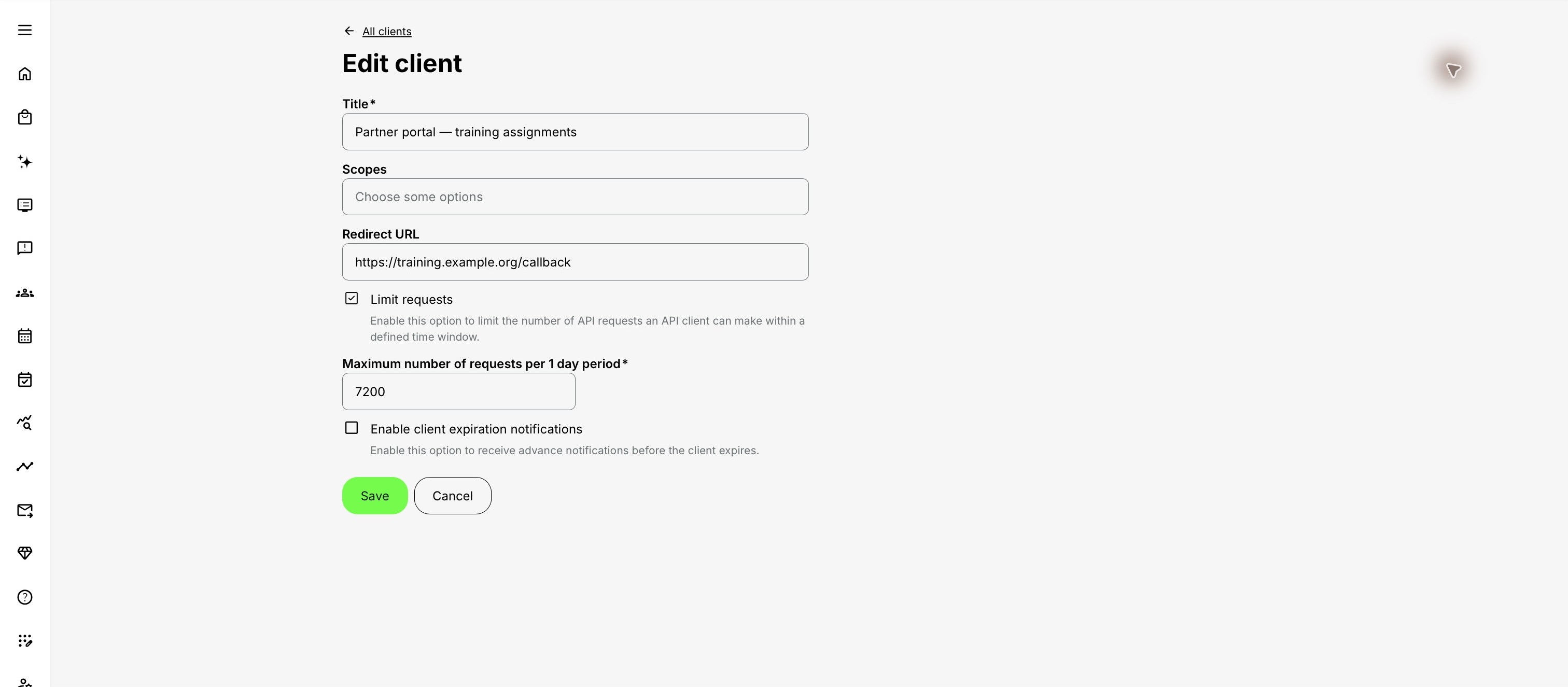
Limit requests and Maximum number of requests per 1 day period are service-level controls managed by Eurekos. The example shown uses a daily limit of 7,200 requests when its request-limit field is enabled. The effective configuration for a particular client can differ. Ask Eurekos to review a higher-volume requirement rather than assuming the limit can be changed by every administrator.
Your developer should use the reference’s supported pagination and handle rate-limit responses. A larger page size can reduce calls, but it can also increase response cost. Agree a suitable implementation rather than turning off a limit to compensate for inefficient polling.
Verify the client
| Scenario or check | Expected result or evidence |
|---|---|
| Client details are reviewed after creation | Title, owner, scopes, organization scope and expiry match the agreed integration |
| A permitted read request is made | The consuming application receives the expected records using the selected flow |
| An out-of-scope request is attempted in a controlled test | Access is denied under the intended scope and organization rules |
| A replacement client is introduced | The external application uses the new credentials and the old dependency is accounted for |
| An expiry reminder is configured | A valid monitored recipient and meaningful lead time are recorded |
Related guidance: Plan an API Integration; Operate and Troubleshoot an API Integration.
Troubleshooting
| Problem | What to check |
|---|---|
| An existing client is absent | Check ownership and the current account’s management permissions |
| A scope is unavailable when cloning | Only scopes available to the current user can be carried into the new client |
| The API returns Token expired | Replace the expired client credential in the connected application and retest |
| An expiry notice arrives immediately | Its configured reminder moment may already have passed |
| No expiry notice arrives | Check the recipient, lead time, non-empty scopes and background processing with Eurekos |
| The administrator cannot change a limit or long expiry | These controls can be restricted to Eurekos service-level administration |
FAQ
-
Does cloning renew the existing API credential?
No. A clone creates a new client with new identifiers and credentials. Update the connected application and verify the replacement workflow.
-
Can every administrator change API request limits?
No. The request-limit controls are managed by Eurekos. Agree the expected volume and request a review when the current allowance is insufficient.