Synchronize Organizations, Learners and Learning Evidence with Salesforce - Article
Summary
Salesforce integration can connect customer organizations, learner accounts, training offers and learning-status evidence. Its value depends on a clear source of truth for each object and a dependable relationship between records. Configure mappings and filters around that operating model, then use the connection’s logs and relationships to investigate outcomes.
Use this article to:
- Choose the supported object directions and ownership
- Configure application credentials, objects and field mappings
- Understand filters, identifiers and downstream account effects
- Use logs and relationships to verify synchronization
Define the CRM and learning responsibilities
An illustrative partner program maintains customer organizations in Salesforce and wants partner learning status visible to its account team. It needs consistent organization identifiers and correctly linked learner records, as well as outbound learning evidence. That does not require every object to synchronize in both directions.
Agree which system owns each field and how the connection should handle creation, updates and deletion. Scope the first rollout to a representative set of organizations and learners. Synchronization can change real records in both systems; a broad mapping is a business decision, not simply a convenient default.
Open the application workspace
Ask Eurekos to confirm activation of the Salesforce connection and its learning-status support. Open Settings → Third party integrations → Salesforce. Select Add app for a new connection.
The Credentials step includes Name, Environment, Consumer key, Username, Security token, Consumer secret and Password. Use the Salesforce administrator’s approved application and account configuration. Select the correct environment, such as the intended sandbox for a pilot, rather than assuming a successful test belongs to production.
Credentials and Salesforce application security need a technical owner. Do not copy a training example’s application identifier, weaken a provider policy or grant broad external access merely to get past a setup error. Complete the provider-side application configuration with that owner, then continue through the Eurekos Next steps.
Choose objects and direction
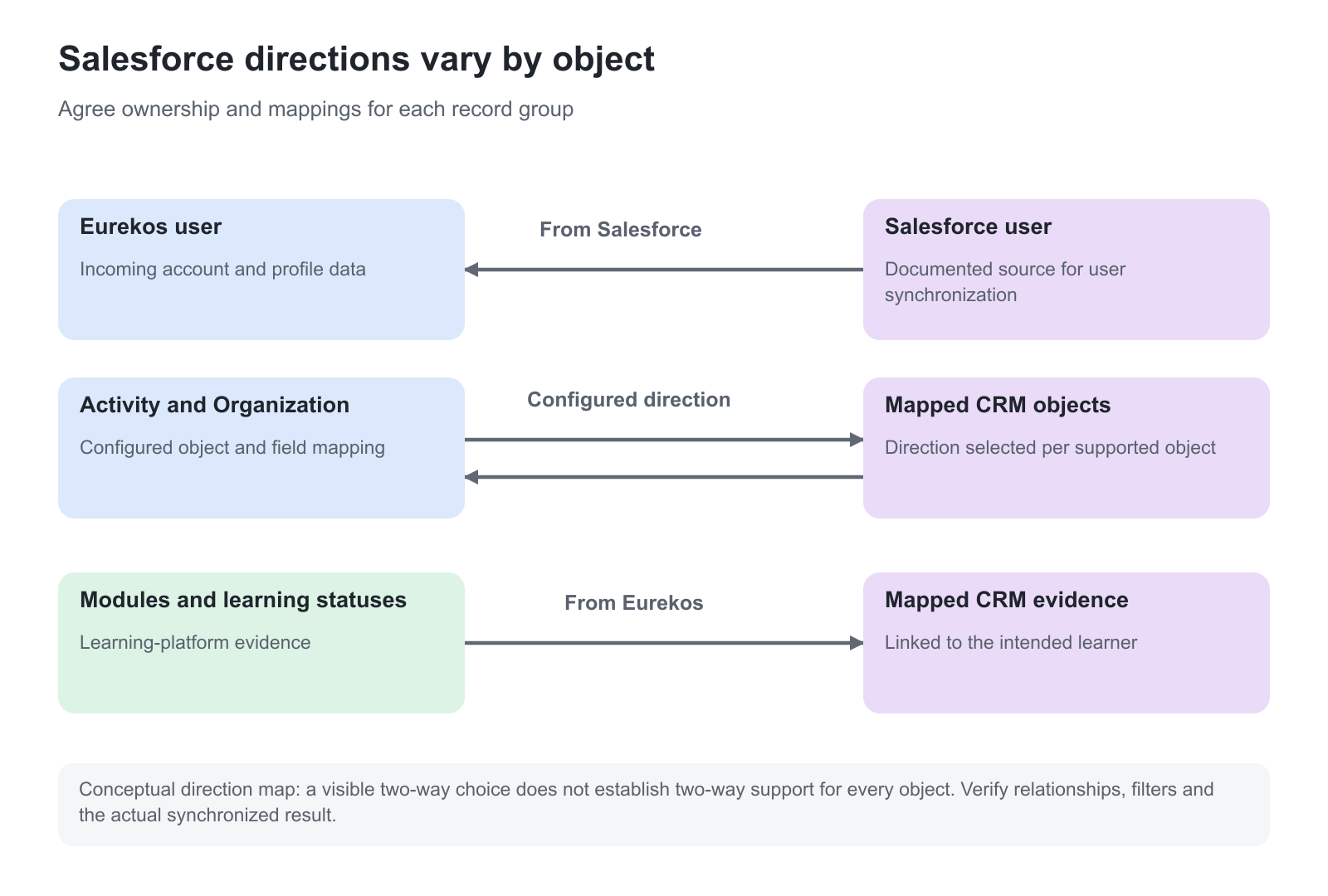
The next configuration step selects the API version and maps Eurekos entities to Salesforce objects. The following step maps their fields. Use a supported API version and the actual Salesforce object and field names for your account.
| Object group | Supported operating model | Important boundary |
|---|---|---|
| Activity and Organization | Configure the supported outgoing, incoming or two-way direction | Decide ownership and deletion behavior for each object |
| User | The current implementation synchronizes from Salesforce into Eurekos | Do not assume that a visible two-way option establishes outbound user support |
| Module, Activity Training Status and Module Training Status | Learning-platform evidence flows to Salesforce | These are not instructions to rewrite learning results from the CRM |
Map the identifiers and relationships as deliberately as display fields. A Eurekos system ID is not a value the CRM can dictate. Organization identifiers and relationship fields have different jobs: the identifier names the intended organization, while the relationship field connects the learner to that organization.
If an incoming learner references an invalid Salesforce organization ID, the flow skips that learner rather than creating the intended account. Establish valid organization relationships first and verify the resulting learner record.
Use filters without confusing them with every access boundary
Incoming and two-way configurations for supported objects can expose Set filters. Filters use Salesforce field machine names. The syntax allows multiple accepted values for one field, with OR between those values, and AND between separate field rules.
For example, a business-approved status filter can allow either of two text values while a second field restricts the intended group. Use the actual machine names and supported values from Salesforce. Boolean fields cannot be filtered directly; a suitable formula or text field can provide a value for the filter instead.
The user ProfileID filter refers to a Salesforce profile identifier, which can be shared by many users. It is not an individual learner ID. Do not use it as though it uniquely identifies one person.
Also review relationships that can create associated records. A user’s organization relationship can bring an organization into Eurekos even when a separate organization-object filter would not select it. Filters should therefore be tested with the complete user/organization model; they are not a substitute for reviewing access and data scope.
Account for the learner’s first access
The Salesforce-created user flow bypasses a pending-account stage and creates an active account. That makes the sign-in and notification plan important before the first synchronization.
The Complete registration – user email for new Salesforce-created users is separately controlled by Eurekos configuration. It can be appropriate when people need to establish a local password, and unnecessary when they use SSO. Ask Support to confirm the intended behavior. Updating an existing matched learner is not the same case as creating a new learner who needs first-access instructions.
Notification-scheme mapping can also carry a supported Salesforce value into the Eurekos profile preference. Coordinate that mapping with the System Email plan rather than treating it as unrelated profile text.
Inspect logs and relationships
Use the application’s More actions to open Logs or Relationships. Logs support investigation of synchronization messages; the log search matches message text. Relationships show the paired object records and support investigation across identifiers.
Processing occurs in the background. Confirm the actual record after processing rather than assuming that saving a mapping has completed synchronization. Keep useful error evidence promptly because integration logs have a retention period.
Full Re-sync to Salesforce and Re-sync from Salesforce are Eurekos-operated actions, requested through Support. They queue eligible records for background processing and can have significant resource and data effects. Do not describe them as an ordinary customer button or use a full re-sync before understanding the failed case.
Verify the connection
| Scenario or check | Expected result or evidence |
|---|---|
| A mapped organization is created or updated | Correct fields and identifiers follow the selected direction |
| An eligible learner arrives from Salesforce | One active account has the intended profile and organization |
| An invalid organization relationship is supplied in a controlled test | The failed case is identifiable without inventing an account relationship |
| A learner falls outside the intended filter | The complete filter and relationship behavior matches the approved scope |
| Training evidence changes in Eurekos | The mapped outbound status is linked to the correct Salesforce learner |
| A sync problem is investigated | Logs and Relationships identify the affected record and direction |
Troubleshooting
| Problem | What to check |
|---|---|
| A user is not created | Incoming direction, filters, profile ID, valid organization relationship and logs |
| An outbound learner edit does not reach Salesforce | Current User synchronization is incoming from Salesforce |
| An organization appears outside an expected object filter | Review the incoming user’s organization relationship and complete filter model |
| A new user receives no password-setting email | Confirm SSO intent and the Eurekos-controlled registration-notification configuration |
| Learning evidence is attached to the wrong person | Review stable learner identifiers and status-to-user field mapping |
| A full re-sync seems necessary | Preserve the case evidence and ask Eurekos to review the appropriate direction and scope |
FAQ
-
Can every Salesforce object synchronize both ways?
No. Supported directions differ by object. The current User implementation is incoming from Salesforce, while modules and learning-status evidence flow out from Eurekos.
-
Can I run a full Salesforce re-sync myself?
The full re-sync actions are operated by Eurekos through Support. They queue eligible records and should be scoped and investigated before use.