Establish Audiences, Ownership, and Access - Article
Summary
A dependable learning service needs a clear answer to three questions: who it serves, who maintains it and who may act on whose behalf. Those relationships affect access, discovery, delegation, reporting and the participant experience.
Plan identity, organizational membership, roles and training registration as connected but separate decisions. Start with representative people and journeys, then scale the structure once the relationships behave as intended.
Use this article to:
- Define useful audience segments across customers, partners and internal teams
- Separate account identity, organizational scope, roles and enrollment
- Assign practical ownership and appropriate delegated responsibilities
- Prepare reliable profile data for targeting and automation
- Verify representative access boundaries before scaling the audience
Begin with people and their work
Describe the audiences in terms that affect the learning service. A product operator may need introductory guidance; a seasoned service technician may need advanced troubleshooting and controlled manuals; a customer coordinator may purchase or assign training for others. All may work for the same customer, but they do not necessarily need the same content, responsibilities or entry route.
Avoid creating a separate technical structure for every label in a business spreadsheet. Ask what the distinction changes: content relevance, permitted actions, reporting scope, branding, language, commercial terms or support ownership. Choose the appropriate mechanism for that difference.
| Decision | Typical information to establish |
|---|---|
| Audience and learning need | Who needs what capability, why it matters and which first outcome is useful |
| Relationship to your organization | Customer, partner, distributor, member, internal team or another relevant relationship |
| Organizational scope | Which company, business unit or sub-organization owns or supervises the relationship |
| Personal relevance | Language, job function, interests and other maintained profile attributes |
| Responsibility | Who creates content, configures delivery, facilitates learning, manages people, purchases or supports participants |
| Training relationship | Which activities the person must receive, may choose or should not access |
For example, “partner” may describe a commercial relationship, while “technician” describes a learning need and “Manager” is a system role with particular responsibilities. Using one label for all three creates confusion in targeting, permission design and reporting.
Keep identity, membership, permissions and enrollment distinct
A person can have an account without being registered for a Training Activity. Organization membership can establish relationships and scope without automatically assigning every relevant offer. A system role controls permitted actions; it does not by itself prove that the person is enrolled as a participant.
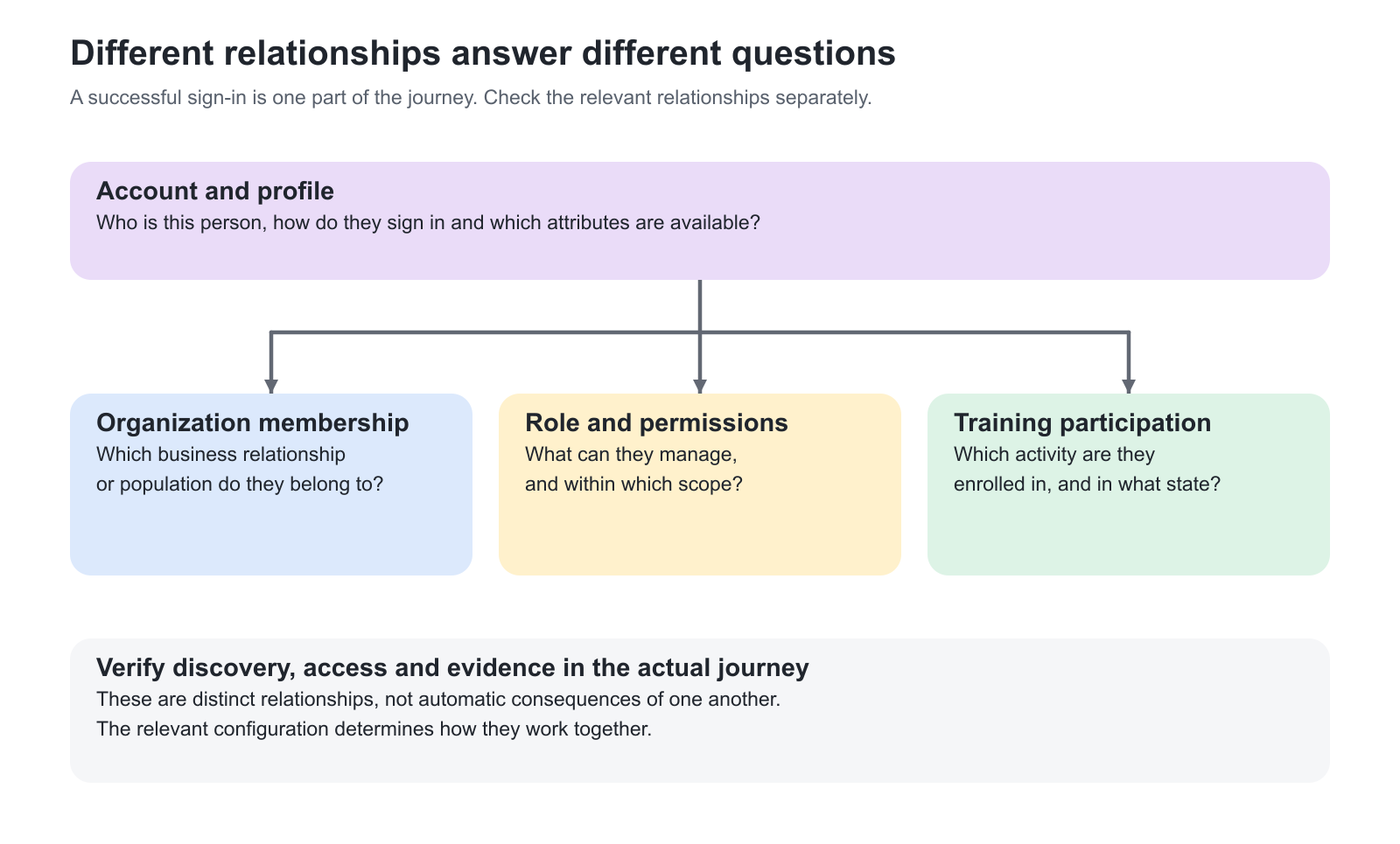
| Layer | What it establishes | Question to resolve |
|---|---|---|
| Account identity | The maintained person record and sign-in relationship | Which system owns the identity and which identifier matches an existing account? |
| Profile attributes | Data used for relevance, communication and eligible rules | Which fields are reliable, necessary and maintained by the right source? |
| Organization membership | The organizational relationships used by the selected configuration | Who belongs where, and what scope should membership provide? |
| Role and responsibility | Permitted operations and assigned content or delivery duties | What must this person do, and whose records may they act on? |
| Training enrollment | The individual participation relationship with an activity | How is the person registered, and which conditions remain to obtain access? |
| Learning and evidence | Progress, attendance, assessment and credential outcomes | What must the participant actually do, and where is that result recorded? |
Use Roles: Purpose and Feature Access and Roles, Responsibilities, and Management Scope to distinguish feature access from management scope. Introduction to User Management explains account management, while Enroll and register participants owns the enrollment procedures. These distinctions are especially important when a manager or administrator is also completing their own learning.
Choose a stable identity strategy before importing at scale
Agree which system owns account creation and changes. Some services use direct account creation or spreadsheet import; others use an identity provider or an API integration. A mixed approach can work, but only when the matching and ownership rules are clear.
Confirm how an existing person will be recognized when they later sign in through SSO or receive an update from another system. Do not assume that an email address will remain unchanged or that every integration uses email as its primary match. Provider-specific unique identifiers and import configuration may be relevant. Test the intended create-and-update sequence with representative accounts before loading a full population.
Download the current user-import example from the target platform. Its columns depend on enabled profile fields and configuration. Prepare organization names or identifiers, language, required fields and the permitted roles deliberately. Check the applicable update behavior before importing existing people, particularly where a spreadsheet is not the authoritative source for every field. Follow Import and Update Users in Bulk for the complete procedure.
For the first batch, include at least one new person, an existing account to update, a person with several relevant relationships and an exception that should be rejected or left unchanged. Inspect the resulting profile, memberships, sign-in and training relationships. An import success message alone does not prove all downstream audience rules.
Design the organization structure around meaningful boundaries
Use organizations and sub-organizations where they support a real operating boundary: a customer, partner, regional unit or delegated team. Start with a representative branch and a written explanation of what each level means. Avoid copying an entire corporate directory merely because it exists.
Decide who owns membership changes and how people enter and leave the structure. If an integration, import, email-based rule or invitation route manages membership, understand how it interacts with manual changes. A person leaving one customer relationship does not automatically imply that their complete user account or unrelated learning should be deleted.
Review the selected organization filtering and content-sharing model before treating the hierarchy as an access design. Scope depends on configuration and permissions; it must be verified through the actual learner and operating roles. Introduction to Organizations establishes the model, with Design Your Organization Hierarchy and Access Model and Import and Maintain Organization Structures for the relevant setup and maintenance work.
Delegate responsibilities with the right scope
Assign the least responsibility that still lets a person do their work effectively. Content expertise, delivery administration, facilitation and people management are different responsibilities. A person may combine them, but the combination should be deliberate.
| Working responsibility | Practical ownership decision |
|---|---|
| Content creation and review | Name the author, relevant co-authors and the person who approves content accuracy and maintenance |
| Training delivery | Name the people who configure the activity, manage participation and handle delivery exceptions |
| Facilitation and assessment | Assign the instructor who will respond to questions, monitor discussions and assess submitted work |
| Audience coordination | Decide who maintains members, assigns learning or purchases on behalf of the appropriate people |
| Platform governance | Keep shared settings, role administration and cross-organization decisions with authorized owners |
| Support and reporting | Give the support team the access and context needed to investigate, without assuming every role sees every person |
An Immediate Manager relationship is also distinct from assigning the Manager system role. Establish the relationship you intend to use and verify the resulting people and actions. Do not grant a broad role merely to make a particular dashboard appear.
Use targeting data that someone can maintain
Define a small shared vocabulary for useful categories such as product family, job function or training type. Agree the meaning, owner and change process for each field before using it in automated assignment or discovery. A large set of uncontrolled labels creates more exceptions than personalization.
Separate organization structure from classification. Organizations can represent a customer boundary, while tags describe a product or learning need across several customers. Interests can support relevance, but should not be used as a substitute for a required authorization decision. Tags explains vocabulary management and Forms explains the forms that expose relevant fields.
Where onboarding rules assign training from profile information, define the expected trigger as well as the matching audience. Creating, updating or publishing a rule is not the same as silently registering every existing user. Follow Onboarding Rules for the supported triggers and immediate-application decisions, then test the exact route used by your source data.
Work through a representative partner example
A manufacturer starts with two service partners. Each partner has a coordinator and technicians. Both need the same approved introductory Course; advanced activities and reference material depend on their learning needs and permissions. The academy team retains content ownership, while partner coordination is delegated within the intended scope.
- Create the representative organizational relationships and decide how membership is maintained
- Prepare participant profiles with the necessary language and targeting attributes, using the agreed account source
- Assign the coordinator’s role and relationships for the operations they actually need; keep technicians in the appropriate learner role
- Create the shared content and the Training Activities that deliver it under the required conditions
- Configure the intended assignment or self-enrollment route and the relevant discovery boundaries
- Test a technician, a coordinator and a person from the other partner; compare visible content, permitted actions and reporting scope
- Record the working pattern, then use it for the next partner rather than redesigning every relationship
The example is deliberately about relationships rather than an industry-specific hierarchy. The same approach can support association chapters, customer subsidiaries or internal units when their operating boundaries justify it.
Verify the foundation before scaling it
Use real sign-in and representative accounts where practical. An administrator view or a masquerade session may not reproduce every first-login or onboarding trigger.
| Scenario or check | Expected result or evidence |
|---|---|
| Existing person receives a new data update or sign-in method | The intended account is recognized; history and relationships remain with the correct person |
| People from two different organizations | Each has the intended discovery, learning access and organizational scope |
| Coordinator manages another person | Only the permitted actions and relevant people are available |
| Participant is also an administrator or manager | Personal learning and operational work remain understandable and correctly scoped |
| Profile data changes or a membership ends | The intended updates occur without assuming unrelated enrollments or history disappear |
| Targeting or assignment rule runs | The correct people and content are affected through the expected trigger, including a person who should not qualify |
Troubleshooting
| Problem | What to check |
|---|---|
| A duplicate or unexpected account appears | Review the unique identifier, matching order, existing record and the source that created or updated the account |
| A coordinator cannot see the expected people | Check the role, organizational memberships, relationship model, current scope and delegated permissions |
| Someone sees an unexpected offer | Separate Storefront targeting from actual enrollment eligibility and learning access; inspect the relevant configuration with the person’s real profile |
| A rule did not assign training | Check publication, trigger, required profile attributes, existing participation and applicable rule conditions |
| Manual membership changes are overwritten or not repeated | Identify which source or automatic membership mechanism owns the relationship before repeating the edit |
FAQ
-
Should we copy our entire company hierarchy into Eurekos before launch?
Only where it supports meaningful learning, administration, reporting or audience boundaries. Start with a representative structure and a clear purpose for each level. Keep classification such as product or job function separate where a shared vocabulary is the better mechanism.
-
Does organization membership automatically enroll someone in all relevant training?
Do not assume so. Membership, discovery and enrollment are separate relationships. Automatic assignment requires the applicable configured mechanism, such as an onboarding rule or an enabled organization-level activity assignment, with its own trigger and conditions.
-
Can one person be both a learner and an administrator or manager?
Yes. Plan the person’s own participation separately from the roles and relationships used to manage other people or deliveries. Verify both journeys, because operational permissions and personal training enrollment answer different questions.
-
What should we verify before combining imported users with SSO?
Confirm the identity owner, the provider’s identifier mapping and how an existing account is matched. Test an imported person signing in through the intended provider, then inspect the maintained account and learning history before scaling the process.