Introduction to Content Creation and Authoring - Article
Summary
Content creation turns the knowledge in your organization into learning that people can understand, practise, and apply. Eurekos helps teams build a reusable library of Courses and learning assets, so the same foundation can support employees, partners, and customers without rebuilding every delivery.
Authors shape the learning experience. Administrators establish ownership, access, quality standards, and a safe process for releasing and maintaining it. Together, they connect useful content with the evidence and business outcomes the training is intended to support.
Use this article to:
- Understand the advantages of the integrated Eurekos authoring ecosystem;
- Choose between native authoring, imported packages, and approved external services;
- Connect content choices with privacy, accessibility, analytics, personalization, and maintenance;
- Follow the Content Authoring guidance from planning through safe updates.
Understand content and delivery
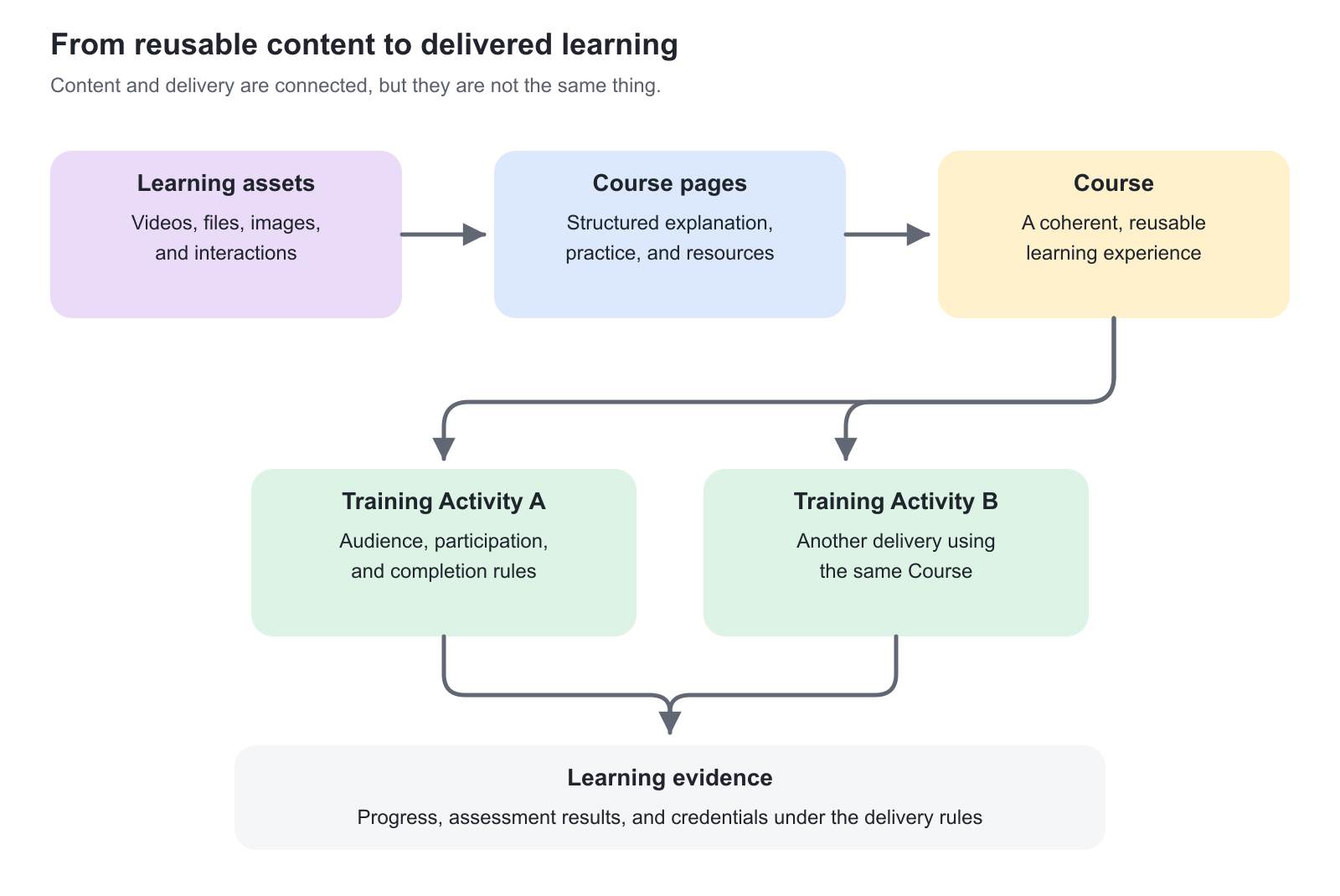
A Course contains the learning material. A Training Activity organizes how that material is offered and delivered: who participates, when learning takes place, and which completion or certification requirements apply. Creating a Course does not, by itself, enroll learners or publish an offer in the Storefront.
| Element | Purpose | Example |
|---|---|---|
| Learning asset | A reusable item such as a video, image, document, or H5P interaction. | A product-demonstration video used in several Courses. |
| Course page | A structured part of the learning experience, combining content and activities. | A troubleshooting lesson with an explanation, demonstration, and practice question. |
| Course | A coherent collection of pages, or an imported externally authored package. | Product Installation Foundation. |
| Training Activity | The delivery context in which people participate. A learning path can combine Courses with other supported modules. | A partner accreditation program combining foundation learning, a workshop, and assessment. |
| Learning evidence | The recorded results used to understand participation, progress, and achievement. | Course progress, assessment results, and a certificate issued under the configured rules. |
One Course can support several Training Activities. This creates consistency and reduces maintenance, but it also means that changing shared content can affect more than one delivery. Reuse should have an owner and a release process.
Choose an authoring route
| Route | When it helps | What to consider |
|---|---|---|
| Native Eurekos Course | You want to combine pages, media, resources, and interactions in the platform and maintain them there. | Plan a clear outline and use reusable assets deliberately. Page-level adaptivity and prerequisites require thoughtful testing. |
| Imported SCORM or xAPI Course | Your organization already uses an external authoring tool or receives packaged content from a supplier. | Check the supported package format, launch experience, and completion reporting. Changes to the package normally originate in its authoring tool. |
| A mixture across a learning path | Different parts of a program need different formats. | Course Administration brings the modules together. Do not force a live workshop, assessment, or practical task into a content page simply to keep everything in one Course. |
An interactive element is not automatically an assessment. Use practice to help people learn; use suitable assessed evidence when a decision depends on what they can demonstrate.
Use an integrated authoring ecosystem
Eurekos combines Course structure, responsive page authoring, managed files, native video streaming, interactive H5P content, collaboration tools and learning data in one governed ecosystem. Authors can build complete learning experiences without depending on separate video hosting, interaction services or specialist desktop software for every change.
This provides more than convenience. Content, learner interaction and outcomes remain under the same governance model, helping the organization protect intellectual property, apply access and privacy controls, reduce external service costs and avoid unnecessary restrictions imposed by third-party authoring or hosting services.
Native content also creates a more useful evidence base. Page visits, video engagement, interactive results and progress can contribute to analytics, personalization, adaptive learning and AI-assisted experiences at a level of detail that an opaque third-party package may not expose.
Use native Eurekos pages when content should be updated quickly, reused across the platform and measured at the level of individual learning objects. Native pages are responsive by default and can combine text, images, files, streamed video, playlists, H5P interactions, discussions and other page tools without requiring separate mobile layouts.
Use a packaged or embedded source when the learning experience depends on a specialist capability, an existing supplier package or an external system that must remain authoritative. Confirm what learner data it returns, how it behaves on intended devices, who controls accessibility and updates, and whether the organization accepts its privacy, licensing and availability dependencies. The approaches can be combined: a native Course can provide the structure, context, resources and follow-up around selected packaged or externally hosted elements.
A practical first-Course route
- Define the outcome: what should a person be able to do after learning?
- Identify the audience, starting knowledge, language, device, and access needs.
- Decide whether to build a new Course structure or clone an approved source Course that already reflects the intended learning purpose, audience, brand, or design pattern. Then build or adapt one representative lesson before producing the complete Course.
- Add the explanation, practice, and assessment that support the outcome.
- Review the content with a subject-matter expert and test it as a learner.
- Hand the approved Course to Course Administration for delivery, enrollment, completion, and certification configuration.
Start simply. A well-structured page with a relevant example and a useful practice task is often more effective than a large collection of interactions without a clear purpose.
Assign responsibility before scaling
| Responsibility | Expected outcome |
|---|---|
| Business or subject-matter owner | Confirms accuracy, intended use, and when the content must be reviewed. |
| Course author and co-authors | Maintain the Course structure and learning assets within their permitted scope. |
| Reviewer | Checks accuracy, clarity, accessibility, and whether the learning supports its purpose. |
| Course Administrator | Connects the approved content to the right delivery and verifies the participant journey. |
| Central platform administration | Maintains permissions, enabled services, and platform-wide configuration. Some capabilities require Eurekos support. |
One person may hold several responsibilities. What matters is that an important change does not fall between them. Organizational relationships and permissions can constrain which Courses and assets a person sees or may maintain; a job title alone is not proof of access.
Common operating models
| Need | Content design | Business outcome |
|---|---|---|
| Consistent partner onboarding | A shared foundation Course plus localized examples and delivery-specific modules. | A common standard without rewriting the complete program for every partner. |
| Compliance learning | Clear policy explanations, realistic decisions, and assessment evidence aligned with certification rules. | Learners understand the required behavior, and administrators can identify the evidence supporting completion. |
| Product and procedural knowledge | Short, searchable lessons with maintained videos and downloadable job aids. | People can learn initially and return to the material when performing the task. |
| Different starting knowledge | A common Course with intentionally optional or supplemental pages. | Experienced learners avoid unnecessary repetition while others receive support. |
Keep evidence meaningful
Reading a page, viewing a video, attempting a quiz, passing an assessment, completing a Course, and receiving a certificate describe different events. For example, video viewed status follows the configured tracking behavior; it is not proof that the learner understood the content or watched every second continuously.
Decide which evidence is sufficient for the business outcome, then connect the authoring and delivery rules accordingly. Use Course Administration for enrollment and certificate criteria, and the relevant reports for interpreting results.
Maintain a living content library
Give Courses and shared assets recognizable names, identifiable owners, and a review date. Before changing a live Course, decide whether the change belongs in the existing content or requires a separate version. Include language versions and reused media in that decision.
The authoring tools available on a particular platform depend on permissions, enabled services, and configuration. If an expected option is missing, establish those conditions before assuming the content is faulty.
Continue with the authoring workflow
Start with (1) Create and Structure a Native Course, then use (2) Build Course Pages with Layouts, Text, Images, and Buttons for the page-editing workflow. The related articles explain managed files and reusable resources, native videos and playlists, interactive H5P content and accessible, mobile-friendly design.
FAQ
-
Does creating a Course enroll learners or publish it in the Storefront?
No. A Course contains learning material. A Training Activity provides the delivery context, including participation and the applicable availability, completion, and certification rules. Configure and test the activity before offering the Course to learners.
-
Can the same Course support several Training Activities?
Yes. Reuse can provide a consistent learning foundation across several deliveries. It also creates a shared maintenance responsibility: assess which activities use the Course before changing its content or reused assets.
-
Should I build a native Course or import a packaged Course?
Use native authoring when you want to build and maintain pages and learning assets in Eurekos. Import a supported SCORM or xAPI package when content is maintained in an external authoring tool. A learning path can combine different module types; it does not need one authoring route for every component.
-
Does completing content prove that a learner is competent?
Not by itself. Page progress, a viewed video, an assessment result, and a certificate represent different evidence. Define the outcome first, then use suitable knowledge or practical assessment and configure the delivery rules accordingly.