Update Courses Safely: Revisions, Versions, and Shared Assets - Article
Summary
Courses and learning assets need maintenance, but different changes call for different actions. Correcting a sentence, restoring a page, adapting content for another audience, and releasing a new syllabus should not all be handled as an ordinary edit.
Before changing content used by learners, establish where it is used, what evidence already exists, and whether the change should affect every current delivery. Choose the maintenance action that preserves a clear learning and reporting history.
Use this article to:
- Choose between a minor revision, restoration, clone, or new Course version;
- Understand how shared files, videos, and interactions can affect several Courses;
- Protect established delivery and historical meaning while improving content;
- Verify affected learner routes, evidence, translations, and linked assets after changes.
Choose the right maintenance action
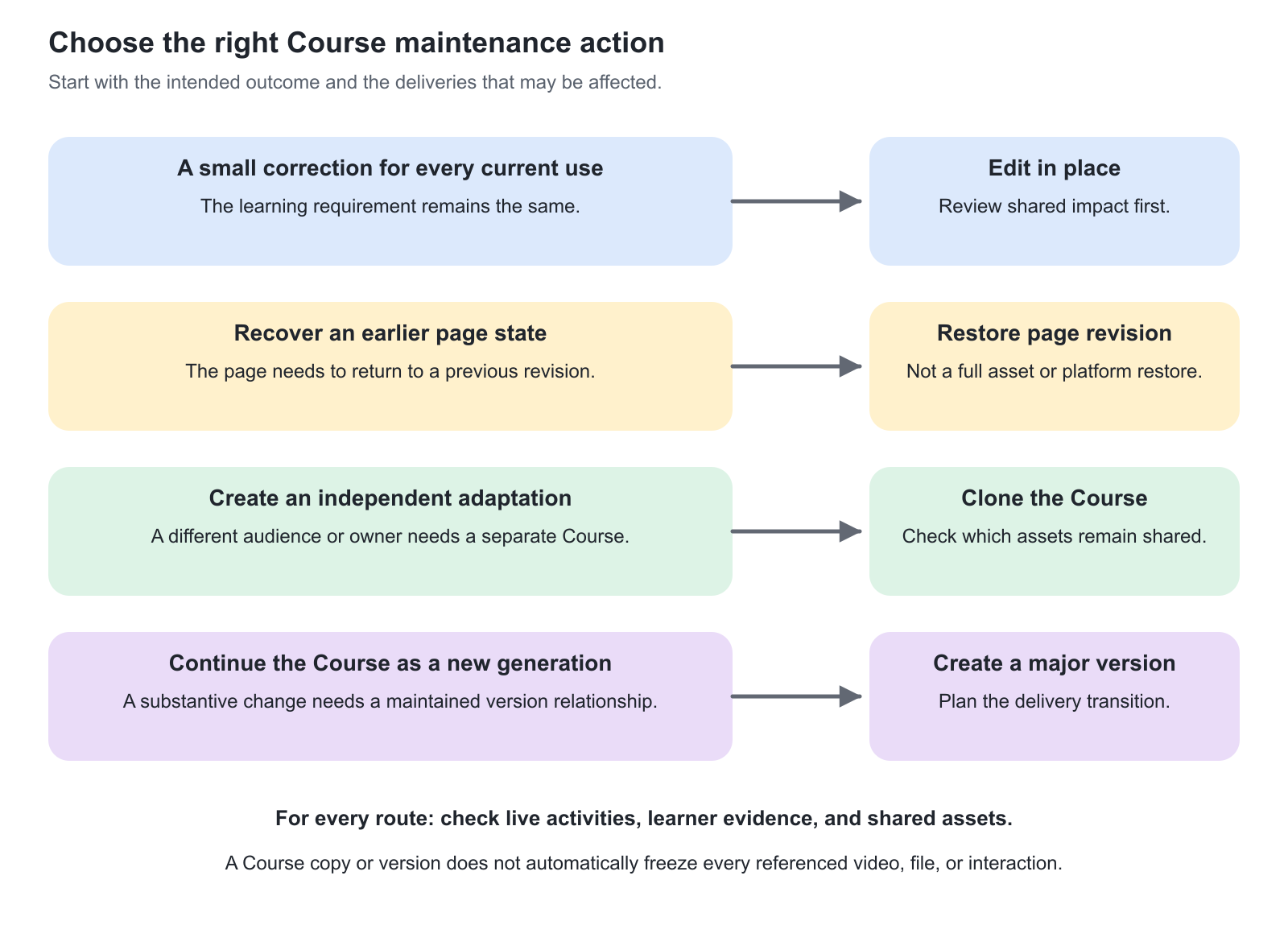
| Action | When to use it | What it means |
|---|---|---|
| Edit and save the existing Course page | A correction belongs in the current content. | Saving updates the existing page and its revision/minor-version history. Connected deliveries still use that Course. |
| Restore a page revision | A previous state of a specific page is the appropriate recovery point. | This is page-level recovery, not a rollback of the complete platform, all assets, or learner evidence. |
| Clone the Course | Create an independently maintained adaptation for another audience or purpose. | The new Course is a separate resource with its own identity; shared-asset dependencies still need review. |
| Create a new major version | Release a materially different edition of the same learning resource. | The new Course has version lineage and must be introduced into delivery deliberately. |
| Replace a shared asset | The new file, video, or interaction should serve its existing uses. | The change can affect several Courses independently of their Course-version history. |
| Create a separate asset | Different editions or audiences must retain different material. | Each intended use must be connected to the appropriate asset. |
Understand Course version history
Saving a Course page creates a restorable revision of that page and advances the minor Course version number within the current Course edition. These records serve different purposes:
- Revisions belongs to the current Course page and provides earlier page states that can be inspected and restored.
- Version history records the broader Course history, including version number, date, author, modification, internal comment, and documented relationships with Courses created through cloning or versioning.
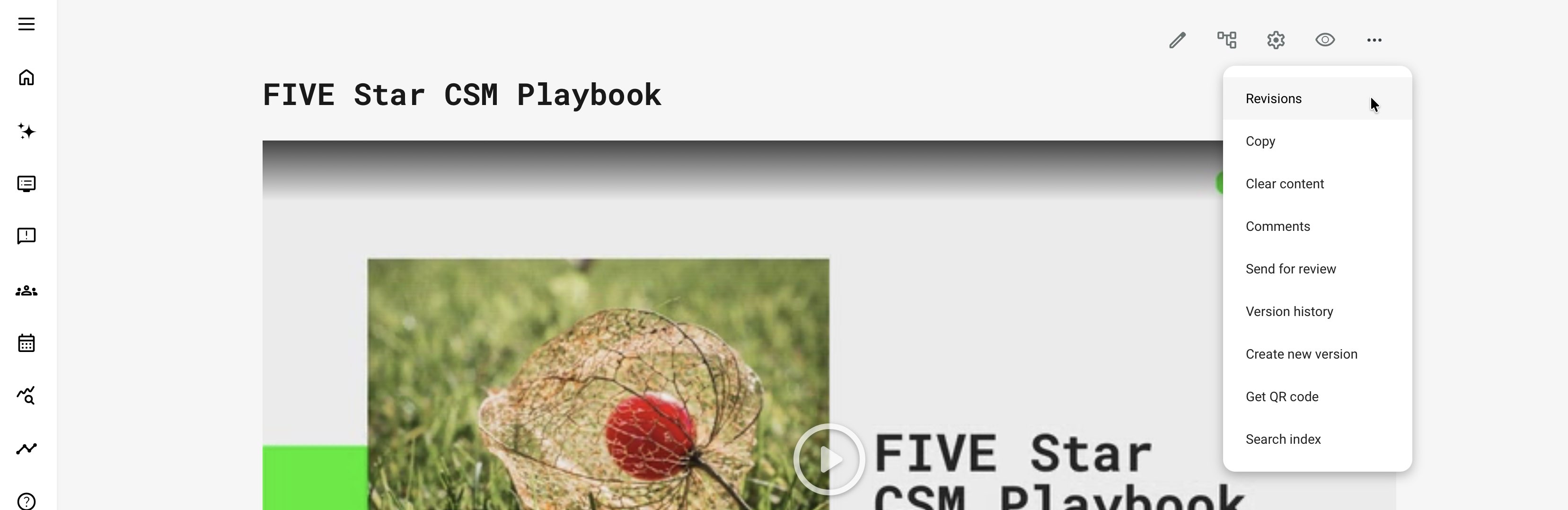
Use More → Create new version when a materially different edition should continue the lineage of the same Course. Eurekos creates a separate Course based on the current edition and assigns the next major version number automatically—for example, 1.0 becomes 2.0. Platform administrators, Course administrators, and Course owners can create a new version when their role and Course permissions allow it.
The internal comment is optional, can contain up to 255 characters, and can be edited later from Version history. Record what changed and why it matters, not only “updated.” For example, “Revised installation sequence and final assessment for Product Series 4” is more useful than a date alone.

A normal Course clone serves a different purpose. It creates an independent Course beginning at version 1.0, although the history can retain a link to its source. Use cloning for a separately governed adaptation and a new major version for the next maintained generation of the same Course.
Course version numbers are visible in the Course library, when Courses are selected for or viewed in Training Activities, and in relevant training statistics. This helps administrators identify which edition was delivered. Creating a new version does not automatically move participants, create a Training Activity, or initiate re-certification.
Assess the impact before saving
| Change | Typical decision | Relevant safeguard |
|---|---|---|
| Typographical correction | Edit the current page. | Confirm the correction does not change the meaning of an assessment or rule. |
| Broken reference or outdated contact detail | Correct the current resource where the new information applies. | Test the destination with learner permissions. |
| Customer-specific adaptation | Clone or otherwise create a separately governed edition. | Remove source-customer information and check asset sharing. |
| New policy or qualification requirement | Consider a new major version and controlled delivery transition. | Preserve the meaning of historical evidence and define who must complete the new requirement. |
| Revised assessment questions | Evaluate a separate assessment and Course version. | Check passing logic, adaptive question references, prerequisites, translations, and existing results. |
| Shared video replacement | Replace only when all existing uses should change. | Upload starts background replacement; cancelling afterwards does not stop it. Review subtitles, slides, cue points, and timing. |
The decision depends on significance, not the number of edited words. One changed passing condition can matter more than a complete visual refresh.
Restore a page carefully
Open the relevant Course page and select More → Revisions. The revisions are listed with the most recent first, and the current page state is identified as the current version. Select an earlier revision to inspect it and enable Restore. Select Cancel to close the revisions panel without making a change.
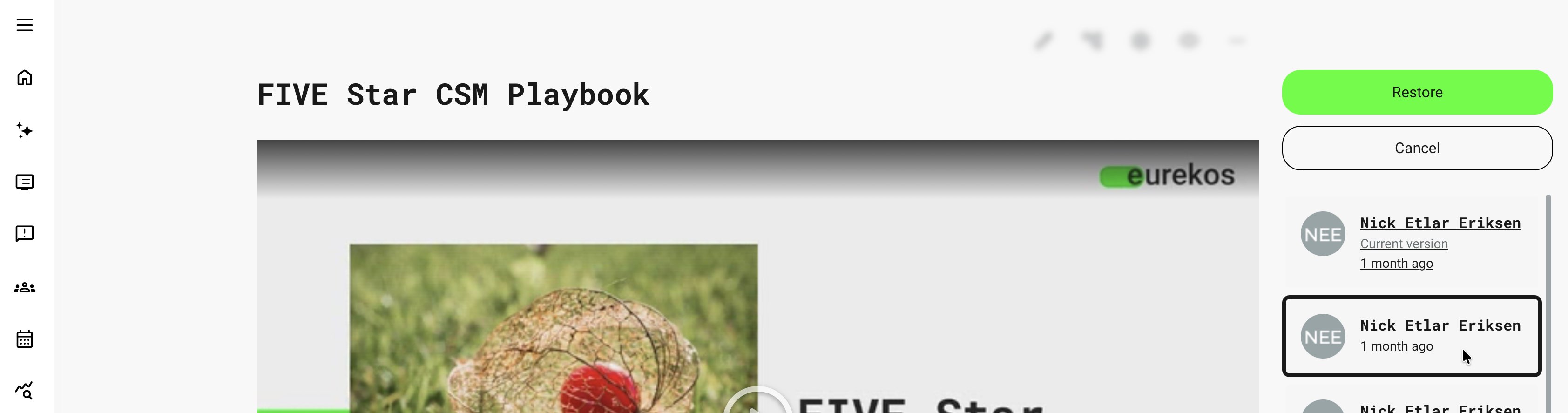
Restore only after considering whether another author has made valid changes since that revision. Restoration recovers an earlier state of the Course page; it is not a rollback of the complete Course, learner evidence, or independently maintained assets.
After restoration, inspect shared assets, links, Access Restrictions, adaptive rules, and the participant experience. Restoring the page does not necessarily recreate a deleted resource or reverse a video, file, or interaction that was independently replaced.
Available revisions can also be subject to configured retention and cleanup. Older revisions may therefore no longer be available. Keep an external record of important recovery decisions where the organization requires it. Page revisions are useful recovery evidence, but they are not an indefinite backup or a complete content-governance process.
Treat shared assets as separate dependencies
A Course may reference a video, H5P item, file, or playlist used elsewhere. Its major version does not automatically freeze all those resources in time.
If an old Course edition must retain the exact old media or assessment, use a separately controlled asset edition and verify the references. If every use should receive the correction, coordinate the shared update and review all affected contexts.
Changes to questions or prerequisite items can alter page behavior. Removing a referenced item can remove an effective gate; changing adaptive evidence can alter which pages count toward progress. Review dependencies before deletion or structural changes.
Transition live delivery deliberately
Identify the Training Activities using the current Course and decide which should remain on it, which should move to the new edition, and how existing participants are handled. Course Administration owns the delivery transition, including enrollment, completion, certification, and renewal implications.
For imported packages, keep/reset-statistics choices require an explicit decision. Preserving statistics is useful only when the replacement remains compatible with the existing evidence and resume state. Resetting statistics is not a routine formatting correction.
Do not assume that a new major Course version causes all learners to repeat the training. That requires a supported and deliberately configured delivery or re-certification process.
Verification overview
| Scenario or check | Expected result or evidence |
|---|---|
| Existing delivery after a correction | The intended update appears without changing unrelated requirements. |
| Page restored | Correct content is recovered and current asset links and rules still work. |
| New major version | Administrators can distinguish the edition and select it intentionally for delivery. |
| Shared asset changed | Every affected Course and language context has been reviewed. |
| Existing learner with results | Progress, assessment meaning, and any required transition remain consistent with policy. |
| A historical edition must remain stable | Its separately reused assets and dependencies are controlled, not merely its Course title or version number. |
Troubleshooting
| Problem | What to check |
|---|---|
| Old and new Courses show the same updated video | Check whether both Courses reference the same shared video asset |
| Restoring a page did not recover missing media | Review the asset’s separate state and history; a page revision is not an asset backup |
| A new Course version does not appear in a live delivery | Confirm that Course Administration has intentionally connected the new edition to the relevant Training Activity |
| Participant progress changes after a content edit | Review required pages, adaptive rules, assessment references, and any imported-package statistics decisions |
| An expected older page revision is no longer available | Revision history can be subject to configured retention and cleanup; confirm the platform’s retention configuration and consult any separately maintained approval or backup records |
FAQ
-
When should I edit a Course in place instead of making a new version?
An in-place edit may suit a small correction intended for every current use. Use a controlled new version or independent copy when the learning requirement, audience, or evidence changes materially. Review active deliveries and shared assets before choosing.
-
Is restoring a page revision a full Course backup restore?
No. Page restoration concerns the page content covered by that revision mechanism. It does not guarantee restoration of separately maintained files, videos, interactions, activity configuration, or learner records.
-
Does a new Course version freeze every shared asset?
Do not assume so. Separately reused videos, files, and interactions may remain shared dependencies. Check the references and create independent assets where the old and new learning versions must remain different.
-
How is cloning different from creating a new major Course version?
A clone creates an independent Course copy; a major-version operation maintains the documented version relationship. Choose according to whether you are continuing the same maintained Course or creating a separate adaptation, and verify asset and delivery dependencies in either case.