Design Adaptive and Recommended Course Pages - Article
Summary
Adaptive Course pages help match the learning route to demonstrated knowledge. Optional pages can stop contributing to required progress, while Supplemental pages can reveal focused support only when it becomes relevant. Recommended pages identify content designed for particular Job Functions without preventing other participants from opening it.
These choices solve different design needs. Decide whether you want to change required progress, reveal additional support, indicate role relevance, hide content, or control access before selecting the page behavior.
Use this article to:
- Choose the page behavior that matches the intended participant outcome
- Configure evidence-based Optional and Supplemental pages
- Use Job Function recommendations without treating them as access controls
- Understand effects on navigation, progress, reporting, and child pages
- Test every supported participant route
Choose the learner outcome first
| Page behavior | What the participant experiences | Progress and access meaning |
|---|---|---|
| Available | The page is part of the ordinary Course route | The page follows normal Course progress behavior |
| Optional with Always optional | The page remains available as optional material | The page does not contribute to required progress and is removed from the required previous-and-next sequence, but remains accessible from the Course outline |
| Optional with H5P object | A normal page becomes optional when the configured evidence is met | Demonstrated knowledge can remove the page from the participant’s required progress |
| Supplemental | A hidden support page appears when the configured question condition is met | The revealed page normally becomes required for that participant |
| Supplemental with Do not count progress | Hidden support appears when needed but remains optional | The page becomes visible without increasing required progress |
| Recommended | Participants with any selected Job Function see a normal page. Other participants see a subdued but accessible page with a suitcase icon and recommendation tooltip | The recommendation indicates the page’s intended role. It does not restrict access or change required progress |
| Restricted | The page is locked until its configured condition permits access | The restriction is an access gate rather than an indication of relevance |
| Hide | The page is removed from the active participant experience | The hidden page and its content are excluded from progress |
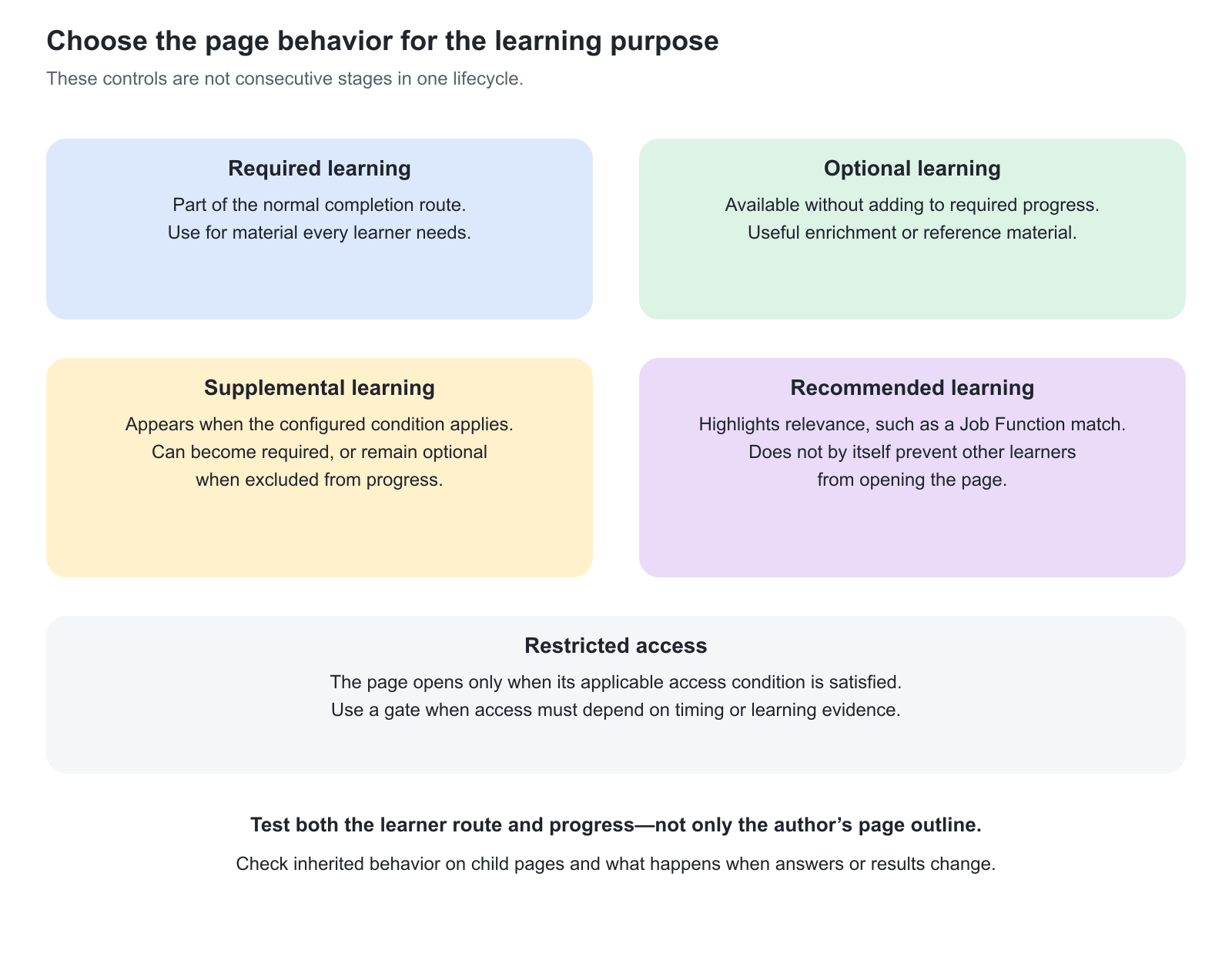
Configure page behavior in Course Builder
The page behaviors described in this article are configured on individual Course pages. Open the Course and select Pages. In Course Builder, locate the page and select More → Settings. Choose the required option under Display. Additional criteria become available when you select Recommended, Optional, Supplemental, or another behavior that requires further configuration.
The page’s Display setting belongs to Course Builder rather than the Training Activity configuration. A Training Activity can deliver the Course and provide assessment evidence that affects an adaptive page. Eurekos also has a separate assessment-based Recommendations feature associated with qualifying H5P Question Sets in Training Activities. That feature should not be confused with the Course Builder Recommended page setting.
Configure evidence-based optional pages
Use Optional when a page should remain available without always being required for completion. A page can be optional from the beginning or become optional after the participant demonstrates the required knowledge.
Select Always optional under Criteria when the page should be optional from the beginning. Select H5P object when assessment evidence should change the page from required to optional. One Question Set can control the page, but you can select one or more questions from that Question Set. Leave Based on correct answers unselected when incorrect answers should meet the criteria, or select it when correct answers should meet them.
For example, a diagnostic Question Set can establish whether a partner already understands basic site preparation. The matching foundation page becomes optional, while the current product-specific assessment remains required.
Changing a page to optional can immediately change overall Course progress. If it removes the final remaining requirement, the Course or connected Training Activity can reach completion. Test participants with no previous answers, existing answers, and later retakes before using this design for certification or another formal outcome.
Configure supplemental learning
Use Supplemental when a page should remain hidden until a participant’s answers indicate that additional learning is relevant. Select one Question Set and one or more questions, then determine whether correct or incorrect answers should reveal the page.
Leave Do not count progress unselected when the revealed page must become required. Select it when the support should become visible without delaying completion.
| Design | Appropriate use | Expected outcome |
|---|---|---|
| Supplemental, counted in progress | A misunderstanding requires additional learning before completion | The page begins hidden and becomes required when the configured evidence is met |
| Supplemental with Do not count progress | Additional explanation is useful but should not delay completion | The page begins hidden and becomes optional when the configured evidence is met |
| Optional with Always optional | Everyone may benefit from access to the same reference material | The page remains available without requiring a diagnostic condition or contributing to required progress |
A Supplemental rule uses selected question evidence from one supported Question Set. Do not substitute an Assignment result, an unrelated H5P object, or an overall score for the supported question condition. If an expected Question Set is unavailable, confirm that it is within the author’s applicable Organization scope.
Understand progress and reporting
Adaptive page settings affect both the participant route and how some learning activity is represented in progress and analytics. Review these consequences before using optional or supplemental pages in a formal program.
| Page behavior | Participant and progress behavior | Reporting consequence |
|---|---|---|
| Optional | The page remains available from the Course outline but is excluded from required progress and the required previous-and-next route | Page content and time spent are excluded from relevant Progress, Learning Performance, and Time and Engagement totals. Answers from an H5P assessment can still remain available in test reporting |
| Supplemental, counted in progress | The page remains hidden until its criteria are met. When revealed, it enters the required route and Course progress is recalculated | The page is absent from participant progress while hidden and is represented as required learning after it is revealed |
| Supplemental with Do not count progress | The page remains hidden until its criteria are met and then behaves as optional learning | The same progress and analytics boundaries that apply to Optional pages apply after the page is revealed |
A participant completing content on an Optional page can therefore produce assessment evidence without the page or its time automatically contributing to every Course progress or analytics total.
Use recommendations for relevance, not security
Use Recommended to indicate the Job Function for which a Course page is intended without preventing other participants from opening it. Select one or more Job Functions in the page settings.
A participant with any selected Job Function sees the page as a normal part of the Course. A participant without a selected Job Function still has access, but the page appears subdued with a suitcase icon and the tooltip Recommended for [Job Function]. When several Job Functions are selected, Eurekos uses ANY OF logic, so one matching value is sufficient for the page to appear normally.
This is suitable for role-specific examples or resources that remain useful and appropriate for other participants. Because Recommended changes presentation rather than access, do not use it to protect confidential content or enforce eligibility. Use the appropriate visibility, permission, or Access Restriction when another audience must not open the page.
Check hierarchy and existing evidence
An adaptive setting on a parent page also applies to its child pages. Course Builder warns that the adaptivity setting affects the complete child structure. A child page can also have its own configuration, so its final behavior may combine the inherited adaptive state with its own setting. Test the complete branch rather than evaluating each page only in isolation.
Access Restrictions work differently. Each page after the first Course page has its own Access Restriction configuration, and a child page does not inherit its parent’s restriction. If both a parent and its child must be gated, configure and test the required restriction on each page. For the complete restriction model, see Control Course Page Access and Prerequisites.
Adaptive criteria can use Question Set evidence from the same Course or another Training Activity. Existing participants may therefore enter with evidence that changes the route immediately. When the controlling Question Set is completed in the same Course, Eurekos can inform the participant that the page status has changed. Evidence from another Training Activity may already affect the route when the participant enters.
If answers, assessment content, or adaptive rules change, the resulting page state can change again. A previously optional page can return to normal required learning, and a Supplemental page can become hidden again. Include participants with no evidence, existing evidence, and changed answers when validating the design.
Keep adaptive design understandable
Explain why the participant sees a shorter or longer route. When selected answers in a Question Set meet the configured criteria and that Question Set is included in the same Course, Eurekos displays a standard notification explaining the resulting page change—for example, that a page is now optional or that an additional page is available. The selected answer determines whether the rule is met; the notification reports the route change rather than providing answer-specific instructional feedback. Administrators can review and adapt the relevant interface wording under Settings → Translations. Learn more in Translations.
Avoid describing additional support as punishment for an incorrect answer. Make its value explicit: the support addresses an identified knowledge gap and prepares the participant for the next decision or task. Because the standard notification explains what changed rather than why the change is beneficial, reinforce that purpose in the Course content.
For formal programs, record which learning outcomes the diagnostic covers and which evidence remains mandatory for everyone. Exempting a foundation explanation does not automatically exempt the final competence check.
Avoid adding adaptivity merely because the capability is available. A straightforward common route is easier to explain, maintain, test, and report. Use an adaptive variation when it produces a meaningful benefit for the participant or the program.
Practical configuration patterns
Use these patterns as starting points and adjust the evidence, progress effect, and participant explanation to the purpose of the Course.
| Requirement | Configuration | Expected result |
|---|---|---|
| Experienced participants may skip foundation material | Optional → H5P object, using correct-answer criteria | The page begins as required and becomes optional when the participant demonstrates the required knowledge |
| Participants with a knowledge gap must complete remediation | Supplemental, using incorrect-answer criteria with Do not count progressunselected | The page begins hidden and becomes required when the configured gap is identified |
| Participants with a knowledge gap should receive advisory support | Supplemental, using incorrect-answer criteria with Do not count progressselected | The page begins hidden and appears as optional support when the configured gap is identified |
| Reference material should remain available to everyone | Optional → Always optional | The page remains available without contributing to required progress |
| A page is principally intended for a particular role | Recommended, using one or more Job Functions | Matching participants see a normal page; other participants see a subdued but accessible role recommendation |
Verify the adaptive route
Test representative participants and evidence states before relying on adaptive pages in a live delivery.
| Scenario or check | Expected result or evidence |
|---|---|
| New participant with no diagnostic evidence | The intended starting pages and requirements are present |
| Participant meets the Optional-page condition | The page becomes optional, and progress and navigation change as intended |
| Participant triggers Supplemental support | The correct support appears with the intended required or optional behavior |
| Participants have and do not have the selected Job Functions | A matching participant sees a normal page; a nonmatching participant sees a subdued but accessible page with the expected recommendation tooltip |
| Adaptive parent and child pages have different settings | The combined visibility, navigation, and progress behavior is intentional and understandable |
| A Restricted page has child pages | Every page that must be gated has its own tested restriction; child pages are not assumed to inherit the parent restriction |
| Participant has evidence from another Training Activity | The route changes only in the ways the design expects |
| Participant opens and completes content on an Optional page | Required progress remains unchanged, the expected analytics boundaries apply, and H5P answers remain available in test reporting where applicable |
| Course is transferred to another platform | Referenced assessment dependencies are resolved and every adaptive state is tested. Missing references can leave pages Available without the intended rule |
Troubleshooting
| Problem | What to check |
|---|---|
| Required progress changes without another page visit | Check whether an adaptive condition changed which pages count |
| Support appears for the wrong answer pattern | Review the selected Question Set, questions, correct-or-incorrect condition, and Question Set edition |
| A Recommended page remains accessible | This is expected. Recommended indicates role relevance rather than restricted access |
| A child page does not behave as configured in isolation | Review the parent page’s adaptive state and the combined parent-and-child behavior |
| Activity on an Optional page is missing from progress or time totals | This can be expected. Optional page content and time are excluded from relevant progress and analytics totals, although H5P answers can remain available in test reporting |
| An H5P-controlled adaptive page becomes Available after Course transfer | Confirm that the referenced Question Set was included and resolved on the destination platform. An H5P-dependent adaptive state cannot be retained when its assessment reference is unavailable |
FAQ
-
Does a recommended Course page block learners who do not match its Job Function?
No. Recommendation highlights relevance; it is not an access restriction. Learners who do not match can still access the page under the applicable access rules. Use restrictions when access must depend on a condition.
-
Do optional Course pages count toward required progress?
Optional pages are excluded from required progress. They remain available through the outline, while normal next/previous navigation can skip them. Test the actual learner route so optional material is still discoverable when useful.
-
What is the difference between supplemental and supplemental-optional content?
Supplemental content appears when its condition applies and can then become required. Selecting the option not to count it toward progress makes the revealed content optional instead. Decide whether the learner needs mandatory remediation or additional support.
-
Can an adaptive page appear or disappear when an answer changes?
Yes, where its condition depends on that answer or result. Visibility and progress can change as the relevant evidence changes. Test correct, incorrect, and changed-answer scenarios, including inherited behavior on child pages.
-
Can more than one Question Set control an adaptive Course page?
No. An Optional or Supplemental rule can use one Question Set, but one or more questions from that Question Set can be selected.
-
Why is an Optional page missing from some progress or time reports?
Optional pages do not contribute to required progress, and their content and time are excluded from relevant Progress, Learning Performance, and Time and Engagement totals. Answers from an H5P assessment on the page can still remain available in test reporting.
-
Do adaptive settings affect child pages?
Yes. An adaptive setting on a parent page also applies to its child pages. A child can have its own setting, so its final behavior may combine the inherited adaptive state with its own configuration. Access Restrictions are different and do not inherit through the page hierarchy.
-
What happens to H5P-controlled adaptive pages when a Course is transferred to another platform?
The adaptive configuration depends on the referenced Question Set being available on the destination platform. If the reference is not transferred or cannot be resolved, the affected page can become Available without its intended adaptive rule. Always optional does not depend on an H5P reference.