Build Quizzes and Assessments with Question Set - Article
Summary
Use Question Set to organize a knowledge check or a deliberate recorded confirmation around the evidence the organization needs. A useful Question Set tests the intended learning outcome or records a clearly defined attestation, and gives administrators evidence with a clear meaning.
Decide whether it is practice, a diagnostic, a controlled assessment, or a confirmation before configuring it. The questions or statements, feedback, passing requirements, and opportunities to try again should support that purpose.
Use this article to:
- Build a Question Set with suitable question types and a purposeful sequence;
- Configure scoring, attempts, feedback, navigation, and completion behavior;
- Write plausible alternatives and feedback that support learning;
- Test the full assessment route and interpret results within its limitations.
Define the purpose and evidence
| Purpose | Design approach | How the result should be used |
|---|---|---|
| Practice | Short questions with explanatory feedback and suitable opportunities to retry | Help learners identify and correct misunderstandings. Do not overstate the result as independent proof of competence |
| Diagnostic or pre-assessment | Questions mapped to specific knowledge areas | Inform the supported optional or supplemental page rules, where configured |
| Final knowledge assessment | Representative questions, an approved passing policy, and controlled behavior appropriate to the program | Supply the supported evidence required by page access or delivery and certificate rules |
| Knowledge component of a practical qualification | Questions about preparation, decisions, and exceptions | Combine with the separate practical evidence required by the qualification. A quiz alone does not demonstrate physical performance |
| Recorded attestation | Clear first-person statements with deliberate affirmative responses and minimal quiz-style presentation | Record who confirmed what and when, then use the result through separately configured reporting and downstream rules |
Create the Question Set
- Open the H5P library and choose the available Question Set or quiz content type.
- Give the assessment a recognizable title that identifies its purpose and edition.
- Add questions individually in Default mode, or select Textual to create or revise several Multiple Choice questions in a structured text format.
- Review the available assessment settings, including passing, result presentation, and any supported attempt or timing controls.
- Save and test the item, then insert it into the intended Course page.
- Configure any dependent page, adaptive, or certificate rules separately and test the complete learner route.
The Question Set tutorial is the best reference for the object’s detailed fields and configuration. Before working through those settings, decide how many questions learners should receive and how much variation the assessment needs.
Useful starting points include:
- Short end-of-page or end-of-module check: Create a pool of approximately 7–10 questions and present 4 per attempt. This keeps the activity brief while allowing the questions to vary.
- Broader module assessment: Create a pool of approximately 12–20 questions and present 6–10. Check that every possible selection provides reasonable coverage and comparable difficulty.
- Controlled final assessment: Map questions to the required learning outcomes before deciding how many to show. A larger random pool is not automatically fair if one learner receives substantially easier questions or misses an essential topic.
Randomize questions changes the order in which questions are presented. Number of questions to be shown selects a smaller random subset from the complete Question Set. Some individual question types can also randomize their answer alternatives separately. These controls can make repeated assessments less predictable, but they serve different purposes.
When a learner returns to the assessment, the selected questions or their order can vary according to the configuration. Test the precise retry and revisit behavior in the intended Course instead of assuming that every retry creates a new selection.
If every topic must be represented, do not rely on one undifferentiated random pool. Use fixed questions or separate Question Sets for the required knowledge areas. For example, separate safety, product, and procedure checks prevent a random selection from omitting one complete subject.
Where a Time constraint is available, use it only when completing the assessment within a defined period is relevant to the learning outcome or operating environment. Explain the limit before the learner begins, allow for applicable accessibility or operational exceptions, and test what happens when time expires. A low-stakes practice quiz normally benefits more from sufficient thinking time and explanatory feedback than from time pressure.
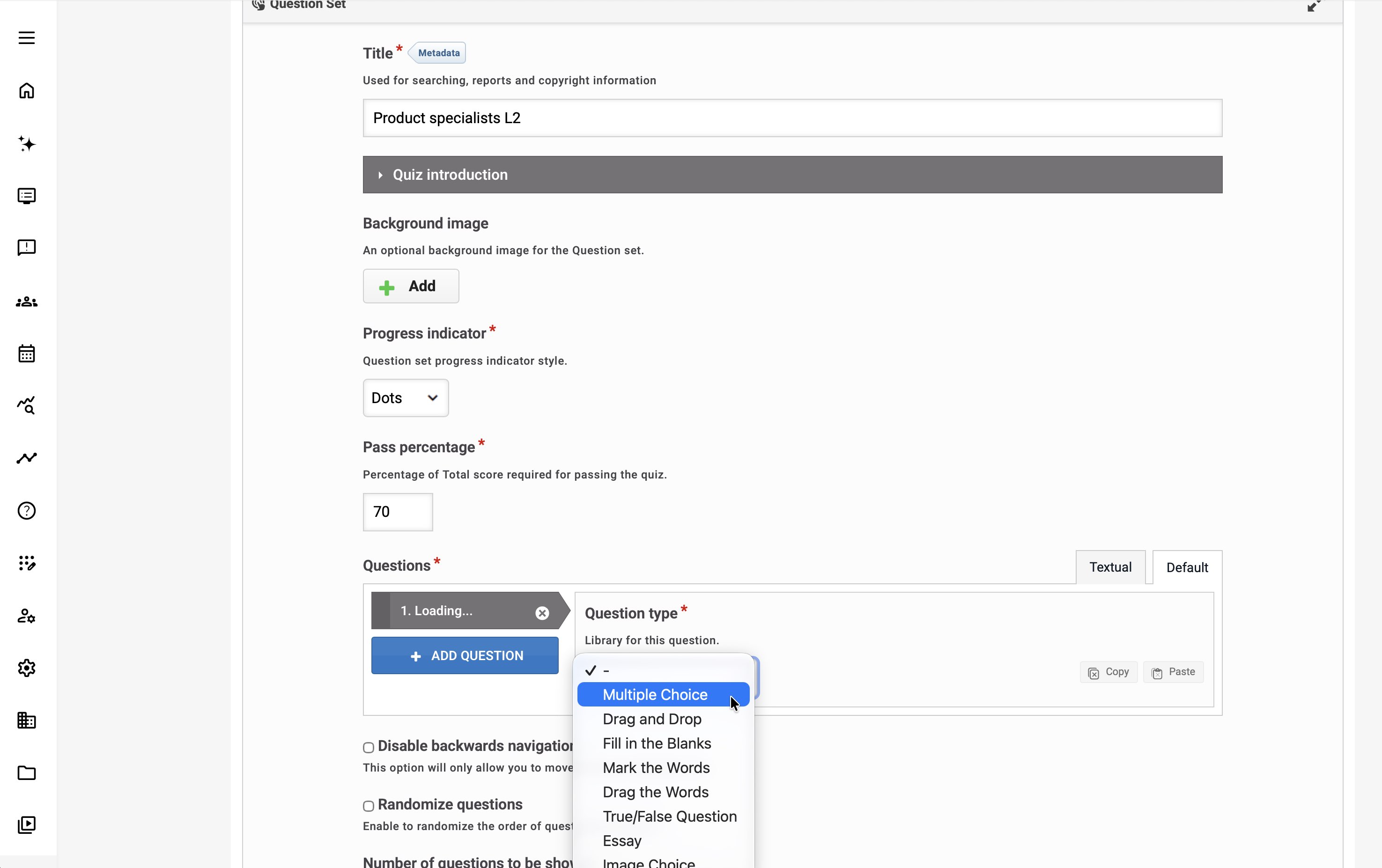
Create Multiple Choice questions in Textual mode
For a larger question bank, Textual mode can be quicker than opening and configuring each Multiple Choice question separately.
Select Textual above the question list. Enter each question on the first line, place each answer alternative on a separate line, prefix every correct alternative with an asterisk (*), and leave an empty line before the next question.
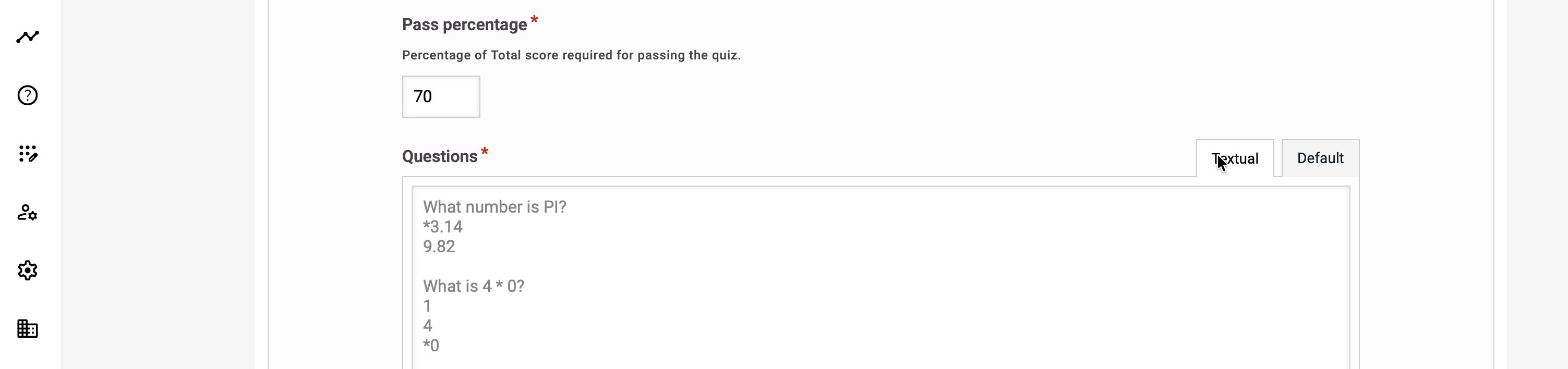
For example:
| Which channel should be used for confidential files? *An approved secure file-transfer service::Correct. This keeps the transfer controlled. An unencrypted email attachment::Incorrect. Use an approved secure channel. A personal cloud-storage link::Incorrect. Personal storage is not approved. When should a suspected data incident be reported? *Immediately::Correct. Early reporting supports containment. After collecting complete evidence::Incorrect. Do not delay the initial report. At the next scheduled meeting::Incorrect. Escalate immediately. |
Text following two colons (::) becomes feedback shown when that alternative is selected. The complete syntax can also include a tip and feedback for both selected and unselected alternatives:
| *alternative:tip:feedback if chosen:feedback if not chosen |
The example displayed below the Textual editor provides the authoritative formatting pattern.
An AI tool approved by your organization can help create a draft in this format. Specify the learning objective, audience, difficulty, number of questions, number of alternatives, and feedback requirements, and ask the tool to return only the Question Set textual format.
For example:
| Create 10 Multiple Choice questions for “the following learning objective”. Provide four alternatives per question and one correct answer. Prefix the correct answer with an asterisk. Add concise selected-answer feedback after two colons. Leave one empty line between questions. Return only the Question Set textual format. |
Treat AI-generated questions as draft material. Verify every question, correct answer, distractor, explanation, source statement, and difficulty level before using it. Do not provide confidential, personal, or otherwise restricted information to an AI service unless that use has been approved by your organization.
After entering or pasting the questions, return to Default mode and inspect every converted question before saving and previewing the Question Set.
Important: Changing questions in the textual editor removes rich-text formatting, including line breaks. Use Default mode for questions that depend on rich formatting, media, or question types not represented by the textual Multiple Choice structure.
Write questions that support a decision
| Element | Good practice | Example |
|---|---|---|
| Question | Present a clear situation and ask for one meaningful decision. | “The site inspection identifies this condition. What should you do before starting installation?” |
| Alternatives | Use plausible choices that reveal different interpretations. | Continue, correct the condition within authority, or escalate according to the procedure. |
| Correct-answer logic | Match the approved procedure and the selected question type. | If several actions are required, use a type and wording that make that expectation explicit. |
| Feedback | Explain why the decision is appropriate and what principle applies. | Identify the condition that makes escalation necessary rather than repeating “Correct.” |
| Coverage | Represent the important outcomes without unnecessary repetition. | Include normal practice and meaningful exceptions, not five versions of the same easy fact. |
Avoid relying on trick wording, visual position, or color to distinguish the answer. Keep translated questions equivalent in meaning and difficulty.
Configure the assessment policy
| Decision | What to establish |
|---|---|
| Passing requirement | The result that constitutes sufficient knowledge for this purpose. Agree it with the qualification or content owner. |
| Feedback timing | Whether the experience is intended to teach during practice or preserve the assessment's intended challenge. Use the supported controls accordingly. |
| Retry and attempt behavior | What the learner can do after an unsuccessful result and when administrator intervention is appropriate. |
| Timing, where supported | Whether a time condition is genuinely relevant, and what accessibility or operational exceptions are needed. |
| Question selection or order, where supported | Whether variation supports the purpose without making assessments inequivalent. |
| Result-dependent behavior | Which specific quiz or question evidence another page, rule, or delivery criterion references. |
Tell learners what is required before they begin. Include the purpose, expected effort, passing requirement where relevant, and what happens after an unsuccessful result.
Connect results to learning behavior
Page prerequisites, adaptive pages, and certificates are separate configurations. Referencing the correct assessment is essential, especially when copies, language editions, or new Course versions have similar titles.
Optional and supplemental page rules can use supported Question Set question evidence. A normal page may become optional after the configured evidence is met; supplemental material may appear when the selected answer condition calls for support. Test the exact questions and condition, not only the overall score.
If the program uses a pre-assessment and final assessment for adaptive reporting, use the supported Question Set design and relevant delivery configuration. A practical assignment or any arbitrary interaction is not interchangeable with that evidence.
Maintain questions without obscuring evidence
Question Set supports a dedicated XLSX import and export workflow in the H5P library. See Create and Reuse Interactive Learning with H5P for the supported workbook structure, question types, and migration procedure. This differs from downloading or uploading a complete .h5p package. After importing, validate every question, correct answer, feedback message, and assessment setting before use.
Record an attestation instead of assessing knowledge
A Question Set can capture a deliberate confirmation when the requirement is evidence that a person has acknowledged information or completed an action, rather than proof that they can distinguish a correct answer. Examples include a manager confirming that they have reviewed a procedural change and understand their responsibilities, a technician attesting that a safety inspection was completed, or a participant acknowledging that required policies were read.
Use a single Question Set item and phrase each required confirmation as a clear first-person statement. Provide one affirmative response such as I confirm, or use several affirmative checkboxes when the participant must attest to every listed statement. Mark only the confirmations that represent the required outcome as correct and set the passing requirement so the attestation is completed only when all required confirmations are submitted. If you provide an option such as I cannot confirm, do not mark it as correct; explain the appropriate support or exception route instead.
Configure the result or selected-answer feedback to confirm the submission, for example: Thank you. Your attestation has been recorded. Remove quiz-oriented controls such as Show solution when they add no value. Keep Retry only when a participant who submits an incomplete response should be allowed to correct and resubmit. Test the complete experience so the object feels like a deliberate confirmation rather than a knowledge quiz.
For supported Question Set question types, the full H5P report can include the participant, question, submitted answer, correct-or-incorrect status, and time of answer, subject to reporting permissions and Organization scope. The selected answer can also support adaptive Course page behavior. When the Question Set forms part of required Course or Training Activity completion, that completion can feed separately configured access or certificate rules. The response does not by itself unlock an unrelated Course or issue a certificate; configure and test every dependent rule separately.
A reportable attestation is not automatically a legal signature or sufficient evidence for every regulatory obligation. For formal use, agree the wording, identity assurance, retention period, reporting access, exception process, and audit requirements with the responsible compliance or legal owner. Use this pattern when recorded confirmation is the actual requirement—do not create a knowledge assessment merely because Question Set is commonly used for right-and-wrong questions.
Verify assessment behavior
| Scenario or check | Expected result or evidence |
|---|---|
| Correct and incorrect answers | Scoring and feedback match the approved answer model. |
| Result just below and at the passing requirement | The distinction between attempted, completed, and passed is correct. |
| Retry or exhausted attempts | The learner sees the intended next step; any administrator exception follows policy. |
| Adaptive question condition | The correct page becomes optional or supplemental for the intended answer pattern. |
| Dependent certificate criterion | The supported result satisfies only the intended part of the complete certification rule. |
| Shared quiz changed | Connected Courses, rules, translations, and reporting assumptions remain valid. |
Troubleshooting
| Situation | What to check |
|---|---|
| A learner completes the quiz but does not pass the gate. | Check the score condition, exact assessment reference, attempt context, and the complete rule. Completion alone may not mean passed. |
| An adaptive page reacts unexpectedly. | Check the selected questions, correct/incorrect condition, inherited page rules, and any changed question content. |
| The expected attempt control is absent. | Confirm the actual content type and enabled settings; do not assume uniform H5P behavior. |
| A translated assessment produces different outcomes. | Review question meaning, correct answers, and the localized rule references. |
FAQ
-
Is attempting a Question Set the same as passing it?
No. An attempt, a score, a passing result, and Course completion are distinct. Configure the intended assessment behavior and confirm which result is used by prerequisites, adaptivity, and activity-level certification.
-
Should practice quizzes and formal assessments use the same feedback design?
Not necessarily. Practice should help learners understand mistakes and improve. Formal assessment may need different feedback and attempt policies to protect the meaning of the evidence. Choose the design deliberately and explain it to learners.
-
Can changing a quiz affect adaptive Course pages?
Yes. Pages can depend on Question Set results or selected question outcomes. Before changing questions, answers, or assessment structure, review those dependencies and test the resulting visibility and progress.
-
What should I test before using a quiz result for a certificate?
Test passing, failing, incomplete, and repeated-attempt scenarios in the intended activity. Confirm the recorded result, required threshold, prerequisite behavior, and certificate criteria. A correct-looking quiz screen does not establish the whole certification chain.