Control Course Page Access and Prerequisites - Article
Summary
Page restrictions help release learning in a meaningful order or at the right time. Use them when a participant genuinely needs prior evidence or a scheduled stage before continuing—not merely to force additional clicks through the Course.
Page restrictions control progression inside an accessible Course. They do not determine who can enroll or whether an enrolled participant can enter the complete Course. The first Course page is therefore handled differently from later pages.
Use this article to:
- Choose the restriction layer that matches the intended outcome
- Configure prerequisites for pages after the first Course page
- Coordinate page restrictions with dates, assessments, videos, and repeated attempts
- Explain locked content and the participant’s next action clearly
- Test restrictions in the intended Training Activity and participant context
Choose the correct restriction layer
Course access and page progression are separate decisions. Use the control that matches where access should stop.
| Required outcome | Use | Result |
|---|---|---|
| A person must qualify before enrolling | Self-enrollment requirements | The person cannot self-enroll until the requirements are met |
| An enrolled participant must not open the complete Training Activity or Course yet | Activity- or module-level Access Restrictions | The activity or supported Course module remains locked |
| A participant can enter the Course but must not open a later page yet | Course page restriction | The selected page remains locked inside the Course |
The first Course page is the Course entry page and does not offer page-level restrictions. Its availability follows access to the Course module through the Training Activity. Use the first page to orient participants and explain the expected route through the Course.
Activity-level Access Restrictions are available when the Training Activity contains two or more modules. A supported Course module can have its own module-level restriction. Learn more in Access restrictions.
If a person must satisfy requirements before joining the Training Activity, use Self-enrollment Eligibility and Requirements instead.
Choose the page restriction condition
Configure page restrictions only on pages after the first Course page. The condition should represent evidence that is genuinely necessary before the participant continues.
| Requirement | Supported condition | What to verify |
|---|---|---|
| Release content at a defined time | A supported fixed or relative date condition | Date source, before or after relationship, schedule, and time zone |
| Require completion of an earlier page | Completion of the selected Course page | The earlier page is reachable and does not depend on the locked page |
| Require video evidence | The supported video-viewing condition | Correct native video and whether viewing evidence is sufficient for the purpose |
| Require knowledge evidence | A supported H5P assessment condition | Exact H5P object, supported content type, required result, and attempt |
| Require an imported Course result | Completion of a selected SCORM/xAPI Course | The package reports the required result in the intended delivery context |
The documented H5P types available for page restrictions include Question Set, Multiple Choice, Single Choice Set, and supported H5P SCORM content. Use the options presented by the restriction selector rather than assuming that every H5P content type can act as a prerequisite.
A video-viewing condition records engagement with the selected native video. It should not be presented as evidence that the participant understood the material. Use an assessment condition when demonstrated knowledge is required.
Configure a restriction
- Open the Course in the Course builder.
- Locate the page that should remain unavailable. Page restrictions are available only on pages after the first Course page.
- Open More → Settings for the page.
- Select Restricted.
- Add the appropriate condition and select the exact date, page, video, H5P object, or SCORM/xAPI Course.
- Review how multiple selected values and conditions will be evaluated.
- Save the setting.
- Test a participant who does not yet meet the condition.
- Satisfy the condition through the intended learning route and confirm that the page becomes available.
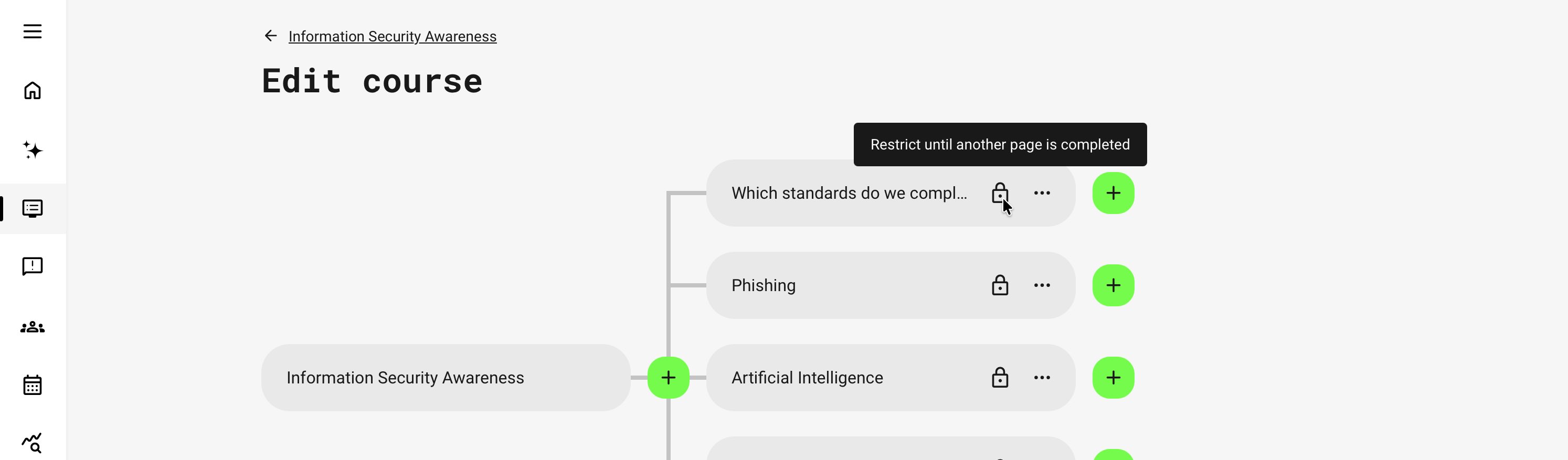
A locked page must give participants a clear explanation of why access is unavailable and what they need to do next. Review the lock indication and tooltip in the actual delivery context rather than assuming that the author-facing configuration is meaningful to participants.
If the wording is unclear, administrators can update the relevant platform-controlled label under Settings → Translations → Interface. Verify the revised wording in every affected language and interface context. Learn more in Translations.
Understand the participant experience
A restricted page remains visible as locked in the applicable Course navigation. The participant cannot open it, and the tooltip identifies the criteria that must be met.
When the participant satisfies the restriction:
- The page becomes available
- The participant can open it through the normal Course navigation
- Other pages using the same satisfied evidence can also become available
- Navigation to the next module can appear after the final Course page becomes available and is completed
When possible, Eurekos can notify the participant that a page has become available after they meet a supported page-completion, H5P, or video condition in the same Training Activity. Test the notification together with the page title and intended navigation route.
Evidence may be recognized through the same or another Training Activity. An existing participant can therefore satisfy a page prerequisite earlier than expected if the required evidence has already been recorded.
Test through the participant’s actual Training Activity and learning route. Administrative access or author preview does not necessarily reproduce the same access context.
Use the correct date context
Date conditions can use supported fixed or relative dates, including signup, Course start, or Course completion dates where offered. The selected date source determines when the page becomes available.
When the Course is delivered inside a learning path:
- Relevant module dates can take priority
- Activity dates can be used where the documented fallback applies
- The same reusable Course can produce different page-release dates in different Training Activities
A single-Course delivery and a learning path can therefore produce different outcomes when their schedules differ.
Test the Course in the actual Training Activity configuration. Do not validate a date rule only in author preview, where the necessary participant and delivery dates may not exist.
If the complete Course must remain locked until a date rather than only a later page, use the appropriate Training Activity or Course-module Access Restriction.
Avoid circular and unintended dependencies
Every prerequisite must remain reachable before the participant needs it.
| Risk | Safer design |
|---|---|
| Page A requires Page B while Page B requires Page A | Create a clear starting point and a one-way dependency |
| The required assessment is placed behind the page it unlocks | Make the evidence-producing assessment accessible first |
| A restriction is assumed to apply automatically to child pages or an entire branch | Configure and test every page that must be restricted |
| Prior evidence from another delivery unlocks a page unexpectedly | Test with realistic existing participants and review the supported evidence context |
| A date condition refers to a schedule that is not used in the delivery | Confirm which module or activity date applies |
| The complete Course needs to be locked but only later pages are restricted | Apply the appropriate Training Activity or Course-module Access Restriction |
The hierarchy shown in the Course builder does not make a parent page’s restriction an inherited branch restriction. Treat every restricted page as a deliberate configuration decision.
Manage changes, re-certification, and transfer
Page restrictions are evaluated in the participant’s attempt context. During re-certification, applicable restrictions can be evaluated again for the new attempt, and the participant is expected to enter through the first Course page.
Do not assume that an earlier unlock is a permanent entitlement to every future attempt. Coordinate page restrictions with the program’s completion, certificate, and Re-certification design.
Changing or deleting prerequisite content can also change access:
- A page restricted by another page becomes available if the prerequisite page is deleted
- A page restricted by a video or H5P object becomes available if that item, or the page containing it, is deleted
- Structural changes can therefore remove a gate without an administrator deliberately changing the restricted page
Review dependent pages before deleting or moving prerequisite content.
When a Course is exported in the Eurekos format, page restrictions can be preserved when their referenced content remains available in the Course or can be resolved on the destination platform. If a dependency cannot be resolved, the imported page can become available instead of remaining restricted.
Always test page access after an import.
Practical configuration patterns
| Need | Configuration approach | Why |
|---|---|---|
| Prepare before advanced practice | Require completion of the relevant foundation page before the advanced page | Participants reach advanced material with the intended preparation |
| Release a later section with the cohort schedule | Apply the appropriate date condition to each relevant later page | Participants can enter the Course while later material appears at the planned stage |
| Show a demonstration before a task | Use a native video condition where viewing evidence is sufficient | Participants are prompted to engage with the demonstration before continuing |
| Require demonstrated knowledge | Use a supported passing result from the selected H5P assessment | Progression follows assessment evidence rather than simply opening a page |
| Require completion of imported training | Use the applicable SCORM/xAPI Course completion condition | The native Course recognizes the required external package result |
| Keep the complete Course locked | Use a Training Activity or Course-module Access Restriction | The first Course page cannot be gated through page-level restrictions |
Verify the configuration
Test both an unmet and a satisfied condition through the intended Training Activity.
| Scenario or check | Expected result or evidence |
|---|---|
| Inspect the first Course page in the Course builder | No page-level Restricted setting is available |
| Inspect a later Course page through “More → Settings” | Restricted can be selected and configured |
| Open the Course as a participant who does not meet the condition | The target page is locked and its tooltip explains the requirement |
| Meet the prerequisite through the intended route | The target page becomes available |
| Meet a supported page, H5P, or video condition in the same activity | The page unlocks and an availability notification can appear |
| Start a new re-certification attempt | Applicable restrictions are evaluated for the new attempt and the participant enters through the first Course page |
| Import the Course with every dependency available | The intended restrictions remain configured |
| Import the Course without a referenced dependency | The affected page can become available and must be reviewed |
Troubleshooting
| Problem | What to check |
|---|---|
| “Restricted” is unavailable for the first Course page | This is expected; control entry through the Training Activity or Course module and use page restrictions only for later pages |
| A page remains locked after an assessment | Confirm the exact object and required result, the participant’s attempt, whether another restriction still applies, and whether the learner view needs to be refreshed |
| An xAPI-based result has been completed but the page remains locked | Refresh the Course and confirm that the selected package reported the expected completion result |
| A page opens earlier than expected | Check prior evidence from the same or another activity, date sources, selected values, and whether a prerequisite was deleted |
| The restriction works in one Training Activity but not another | Compare module and activity dates, signup context, available evidence, and the route through which the Course was opened |
| An imported Course has unlocked pages | Check whether every referenced prerequisite was included or could be resolved on the destination |
| A participant cannot find the prerequisite | Confirm that it is accessible and not hidden, restricted behind another unmet condition, or outside the participant’s permitted delivery |
| Several pages unlock at the same time | Check whether they use the same condition and whether the participant has just satisfied that shared evidence |
| The participant does not receive an availability notification | Confirm that the supported condition was met through the same Training Activity and verify the notification in the actual participant context |
FAQ
-
Can I restrict the first Course page?
No. The first Course page is the Course entry page and does not provide page-level restriction settings. Use the appropriate Training Activity or Course-module Access Restriction when participants must not enter the Course until a prerequisite is met.
-
Does a Course page restriction replace module Access Restrictions?
No. A page restriction controls progression after the participant has entered the Course. Activity- and module-level Access Restrictions determine whether an enrolled participant can open the Training Activity or Course module.
-
Does a Course page restriction prevent enrollment?
No. It controls access to a page inside an accessible Course. Use self-enrollment requirements when a person must qualify before joining the Training Activity.
-
Do child pages inherit a parent page’s restriction?
No. Configure every page that must be restricted. The hierarchy in the Course builder does not turn one page restriction into a rule for the complete branch.
-
What happens if a page prerequisite is deleted?
A dependent page can become available automatically. The same can happen when a referenced video, H5P object, or the page containing that item is deleted. Review dependencies before changing live Course content.
-
Why can a participant already satisfy a prerequisite in a new delivery?
The required evidence may already exist from the same Course or another Training Activity. Test with realistic existing participants when prior evidence should or should not unlock the page.
-
Why did a page become available without a notification?
Availability and notification are separate outcomes. Notifications can be shown for supported page-completion, H5P, and video conditions met through the same Training Activity, but not every evidence route necessarily produces the same notification.
-
Do page restrictions remain during re-certification?
Applicable page restrictions can be evaluated again for a new attempt. The participant is expected to enter through the first Course page and meet the requirements belonging to the new attempt.