Calendar events and video conferencing - Article
Calendar- and virtual events in your learning path
You can add an Event module to your training activity and make this part of a sequence within a learning path.
- Events are shown in the order you like - e.g., create a QA session with a specialist at a certain point during the learning journey.
- Events can be both virtual or in-person and supports many other facilitation features. This includes integrating to different conferencing tools for virtual meetings, video conferences and webinars.
Add module type Event in your learning path. Here you can fill in a title, set dates and write a description of your event.
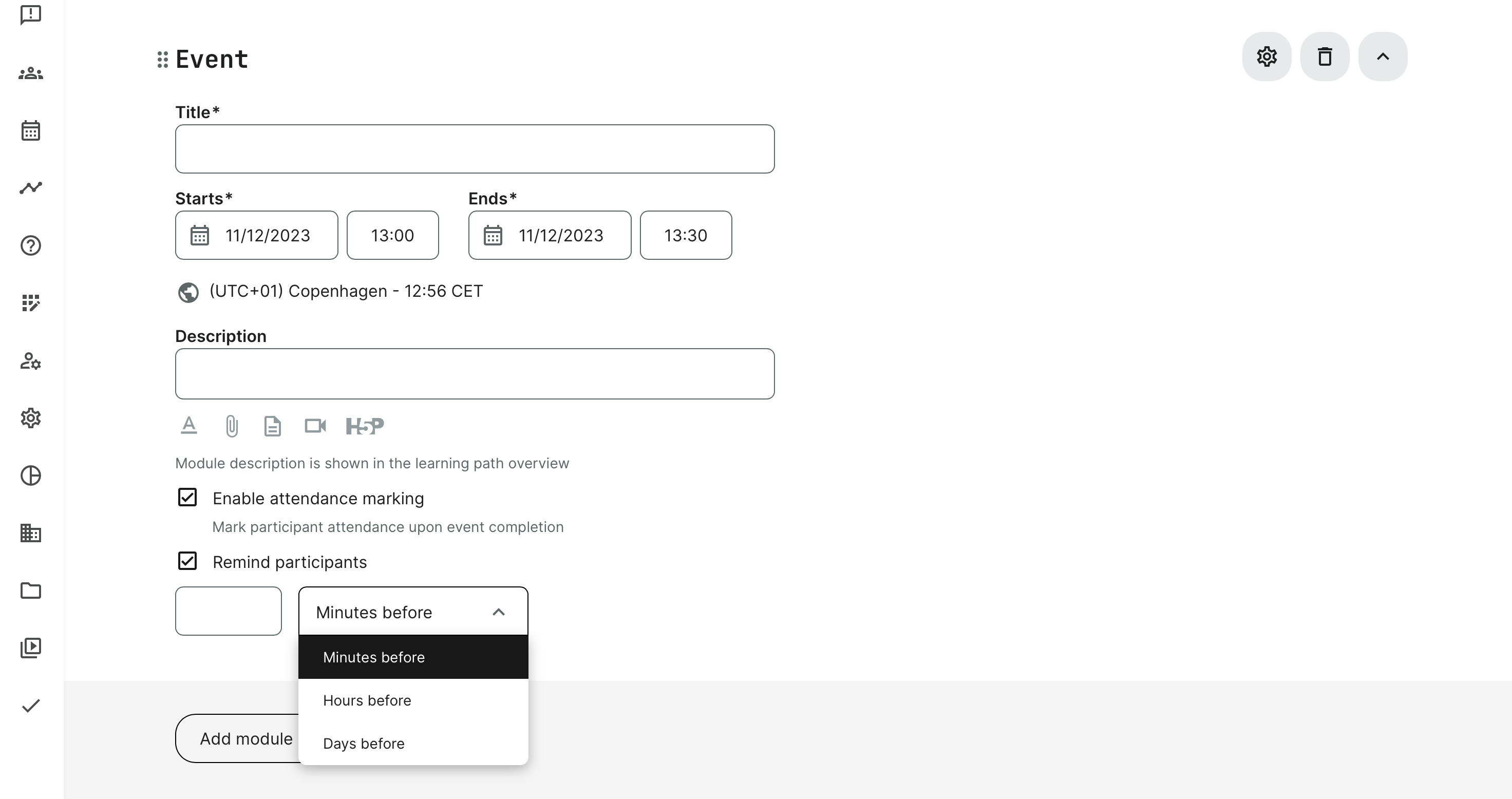
- The description allows inclusion of attachments and the native options, such as accessing the video archive and documents from course materials. PDF, zip, Word and typical standard files are all allowed.
- Attendance marking defines whether the instructor can mark attendance upon completion of the event, based on end time and date.
- An automated reminder for participants can be easily defined within the event itself. The reminder will be sent to the participants at the appointed schedule and whatever you find appropriate for your target audience.
- Schedule in other time zones for convenience directly, by selecting the time zone below the calendar start and end date. Time and date format is defaulted to the user setting up the event.
Features
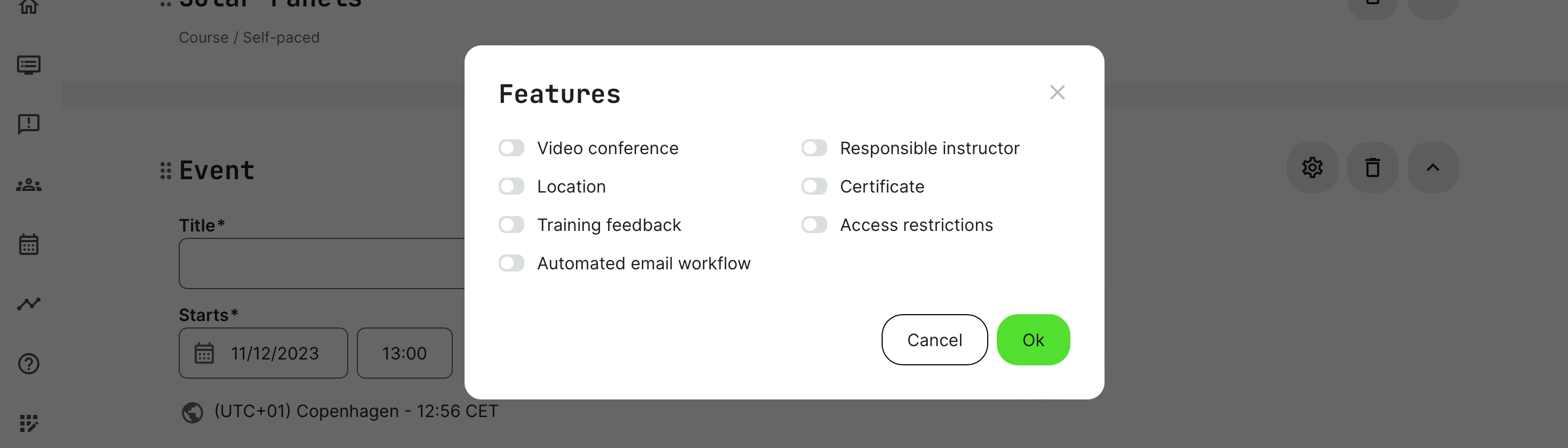
In Features, activated through the gear icon on the module details, you will find options relevant to each type. These include:
- Video conference: define the URL or use one of the integrated web conference tools such as Microsoft Teams, Zoom, et al. This will show a join button to participants and make it easy to enter the conference.
- Location: when relevant for in-person training events, a pre-created location is added. These are defined in the Course administration → Surveys section.
- Locations also have capacity information, correlating any seat restrictions set on the event. This is to prevent overbooking.
- Training Feedback: add a pre-created survey to your course to collect participants’ assessments of the event. Create your survey in the Course administration → Surveys section. They can also be reminded to complete the exit survey by an automated emails through the automated email workflows. Instructors can also be prompted to give feedback in a separate survey, giving their assessment of the training event.
- Automated email workflow: customize pre-defined email workflows to minimize administration by schedules and other triggers of completion. These are defined in the Course administration → Surveys section.
- Responsible instructor: allign an administrator and instructor responsible for the module.
- Certificate: This can be ticked to indicate that the participant will receive a certificate at the end of the event. Certificates are created in advance, along with issuance criteria in the Course Administration → Certificates section.
- Access Restrictions: the function allows to create specific conditions that have to be fulfilled by a participant to get access. This way you can restrict and control a sequential or desired pathway through your trainings.
Video conferencing and recordings
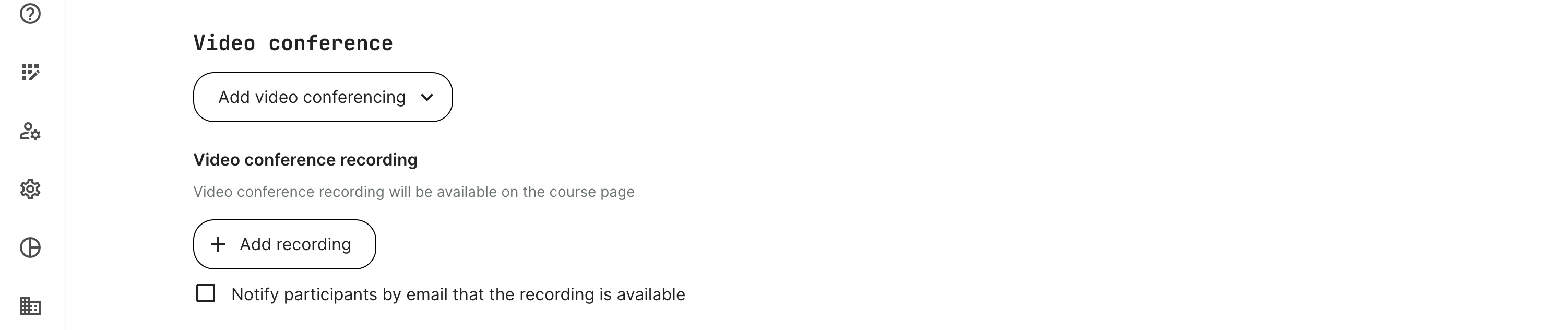
It is possible to include the recordings of your video conferences and make them available from within the same eco-system. This will make it easier to share to everyone and will help participants establish the single-point-of-contact.
- Upload the video recording to the video archive, once the recording is available.
- Add the recording through the event.
- Make sure you notify participants by email. They will all be notified and they will be able to find the recording, coming back to the platform at any time.
Dates format for event modules
If you have a learning path with multiple dates and multi-day events, the date format is the following, adjusted to the time zone appropriate to the user:
- Day to day: 20 Jul 2022, 5:00 pm - 11:00 pm
- Day to another day: 20 Jul 2022, 5:00 pm - 21 Jul 2022, 5:00 pm
- Day to day in another month: 20 Jul 2022, 5:00 pm - 1 Aug 2022, 5:00 pm
- Day to another year: 20 Jul 2022, 5:00 pm - 1 Aug 2030, 5:00 pm