Activity Settings - Article
Activity settings - Tags, Language, multi-language and SEO
Use the gear icon to access settings of your Activity. This will impact the way your training activity will be catagorized in the catalog for self-enrollment.
Tags, priority of tags and available languages are created and maintained in the appropriate sections for each. This is not defined in settings on the activity.
Activity settings
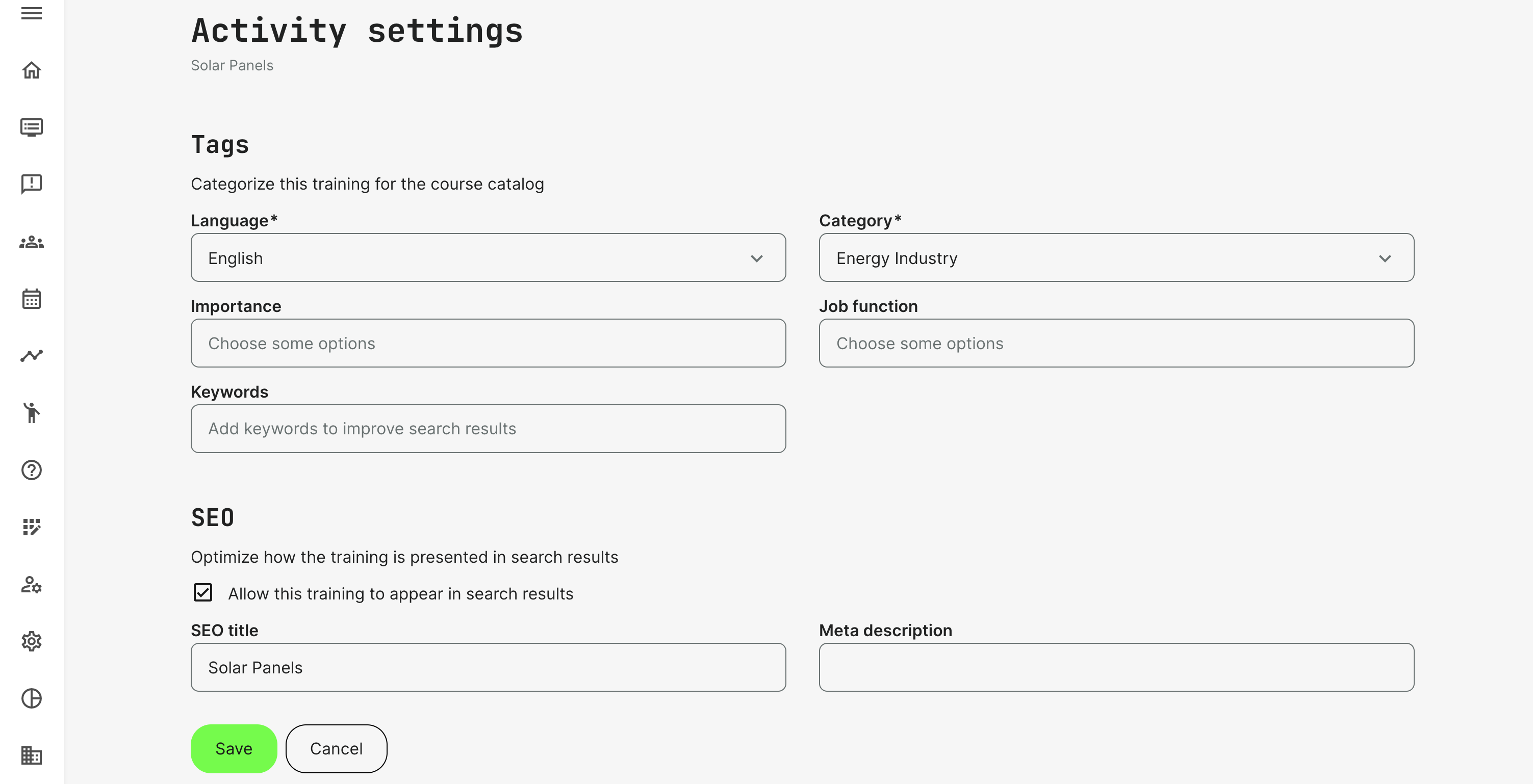
- Tags: Used to categorize training for the course catalog. As minimum there are two required fields, which are language and category.
- You can pick from any language enabled on the platform.
- Category can be main and subcategory, if subcategories are used to identify products and services.
- Keywords will enhance the search capabilities by widening the scope of alternative terms to find the training through the global search option.
- SEO: Used for optimize purposes and to configure how the training is presented in search results You can add both the SEO title and apply a Meta description and define whether this activity should be crawled and show up in search results on the internet.
- Multi-language: this will allow a relation to "the same training is available in another language" and for you to pick these other language options. More than one language must be enabled for this option to show.
Multi-lingual courses and training activities
A course instance or a training activity is created once for each language, it is available in. This provides maximum flexibility to create localized variants and direct them to specific audiences.
Use the option to identify "This training is available in other languages" to ensure the activity will show up just once in the catalogue for self-enrollment. Users will be able to see other languages this training is available in, read the descriptions in each language, prior enrollment.
The catalog will default show in the user's language preference, when already registered on the platform. Unregistered users will see languages based on their browser language settings as priority, if multiple versions are available.
On-demand for "Request Training"
This option, which is an opt-in feature, makes it possible to support a "request training" scenario. Several organizations provide on-demand training upon request at either client locations or based on specific needs.
- The activity description allow you to describe the offering and what the process is, while the on-demand option will change the enrollment flow.
- On-demand will not register users and enroll them into a training, but will send an email to facilitate the request to be contacted and plan the custom training scenario.
FAQ
-
Why do participants still see the access expiration indicator after it has been removed?
Removing access expiration from an activity only affects users who register after the change is made. Existing participants retain the access expiration settings that were applied when they enrolled, so they may continue to see the access expiration indicator (bell icon).
Possible solution: Expire and then reactivate the existing participants in bulk. This refreshes their enrollment, applies the current activity configuration, and removes the access expiration indicator.