Existing Training (nesting) - Article
Existing Training lets you nest activities within each other
Existing training are nested activities. This means you can add multiple existing training activities and allow the user to access these or choose to enroll from within the same learning path. This is an incredibly powerful facilitation option that supports the most demanding of use cases. These include:
- Conferences where you want participants to choose track A, B or C after lunch. Breakup rooms where they sign up to individual tracks.
- Option to choose to join the followup session on Thursday or Friday. Not a fixed date, but present multiple options and split the group into those options.
- Simply assigning people automatically to complex certification paths where each has its own set of rules, restrictions, payment options and so on.
Write a title, choose an existing training activity and write a description. Besides this you can click the options for automatically enroll participants and include linked activities as enrollment options.
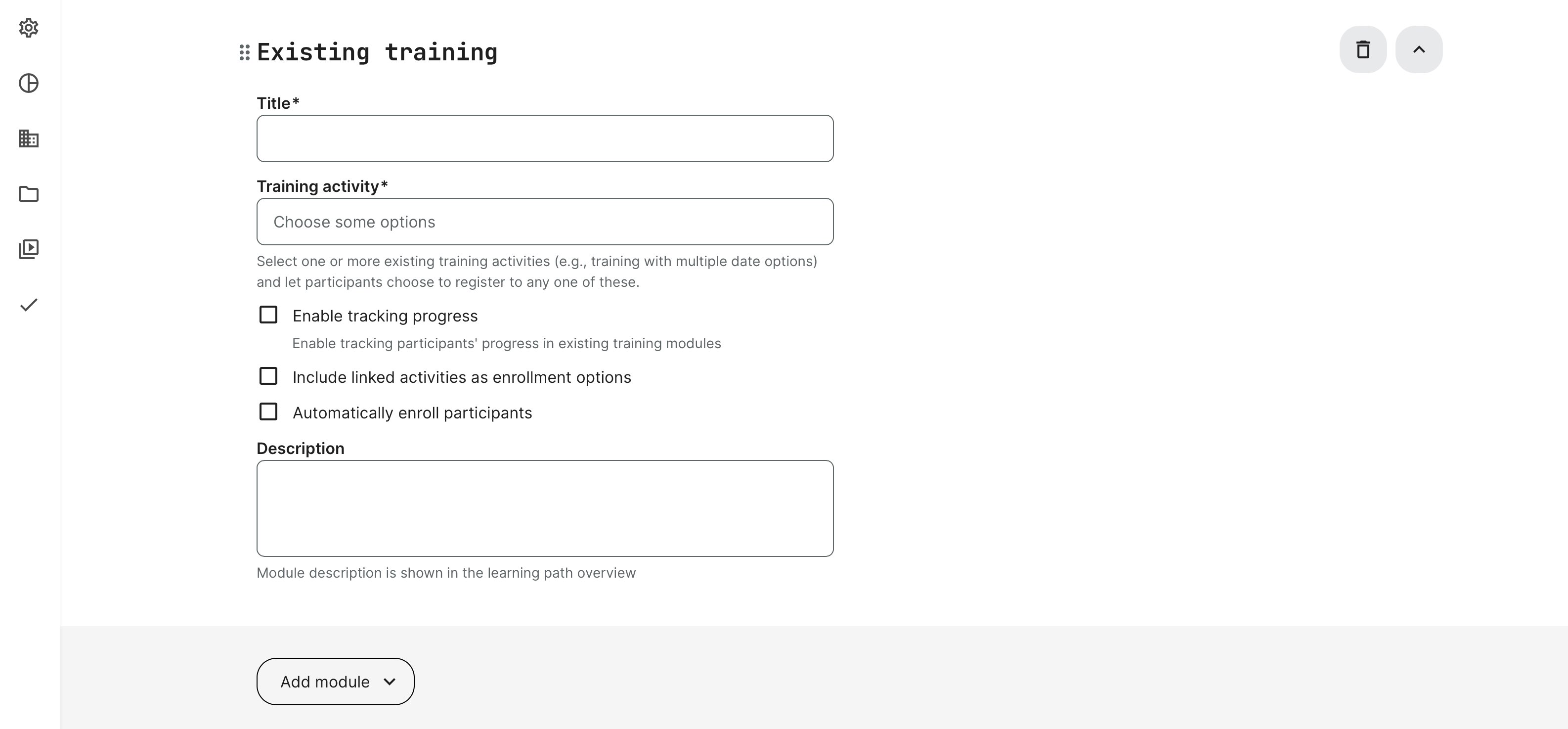
Automatically enroll participants
This option will automatically enroll participants into another existing training activity. You have a complex training scenario with multiple sequenced steps AND you want to provide a SINGLE and easy access to all of this for your audience.
Imagine you have 3 different learning paths and all of these are required to achieve your learning goals or level of competence.
- Each represents a set of modules or a combinations of achievements through self-paced, event based, assignments, etc.
- Each potentially has its own certification.
- Each has its own email workflows, processes, access restrictions, feedback routines and so on.
- Effectively, each of your learning paths have the full list of features available to it. And any facilitation you desire.
A participant will have access to your 3 nested training activities through a single enrollment to the training activity, which holds the lot. This provides the best user experience and contains isolated learning paths, from a single view.
This option is only available with one training activity per added module in your learning path. If you want more than one nested activity using the approach above, simply add one more Existing Training module to your main activity.
Participants will be automatically enrolled to existing training or join the waiting list.
Allow enrollment within the learning path
Another way of using the Existing Training module is to include multiple activities and let participants choose which one to enroll to, by ticking Include linked activities as enrollment option.
This will present the learning path as a whole, but allow participants to choose which one they want. The use cases are:
- Do you want to join the virtual session on Tuesday or Thursday? Effectively splitting the co-hort into different groups on some of the offered options.
- Organizing conferences, where you want to provide options for same time, but again breaking into different groups for some of the learning journey.
- Upsell, by requiring payment using any available payment option to get access to another part of the learning path.
- Allowing a free choice module, but only one.
For any of these cases it is important to notice that any other feature such as seat restrictions and waiting lists, are still in place. Even within the nested options. The same goes for scheduled events, for example, as you can't enroll to something that happened in the past.
The structure and design makes it possible to use all the features of each training acitivity you add. The scenarios you can support are mind-boggling.
Enable tracking progress
When using nested activities within a learning path, these are not by default calculated as part of the overall progress of the parent (the activity it is nested within). Please remember that nested activities can be single modules, events or could be a complete learning path on its own, with multiple modules inside, have its own certificates, etc.
If you wish to have calculation of the parent activity include the nested activities, enable tracking progress. Progress will be recalculated for all existing participants, if applicable.
- Once the nested activity has the status of "complete", this will count towards the overall progress.
- Nested activities count as any other module as a "1 out of n modules completed", no matter how complex the nested activity is. Within each activity, it will show more detailed progress.
Linked activities
For nested training activities, the linked activities are especially interesting.
Imagine you have a recurring self-paced course, but you are offering a QA session every second week, available to everyone who signs up.
The feature named linked activity allows you to relate an activity to another. For example, you can set up a virutal event on Thursday. This can be repeated, which can best be understood as a recurring event. This means that you can repeat this a number of times over the next months.
Once an activity is repeated, it is related to the series of activities. It is linked. Once you add a linked activity as an Existing activity module, you just pick any of the linked training activities...once. It will automatically know that there are n number of linked activities and when this is used with a schedule, it wil also list enrollment options within you learning path, based on these options. Automatically.
It will only list the ones that are available in the future and not the ones that have passed.
Effectively, this means you only need to maintain any upcoming recurring options, using the repeat function, and these will automatically show in the main activity as they are all linked.
Now consider this: this example was based on an activity with a single virtual calendar event. The nested activity can hold more than one option and can be a full complex entity on its own.
Compared to a traditional "recurring calendar event" we all know and love, this concept is carried over into a full learning path, making it possible to link entire sections of facilitation at training activity level in the exact same way.