Re-certification - Article
Automate re-certification with variable rules and rolling dates
This solves the problem of managing the very complex task of re-certification upon existing certificate expiry. Reality simply dictates that people are certified across the whole calendar year on a rolling schedule and typically based on when they get introduced to the organization or training on products. Multiply this with numerous, simultaneous, comprehensive compliance programs and large groups of people and you have a recipe for an extremely cumbersome tracking task. Unless automation is in place.
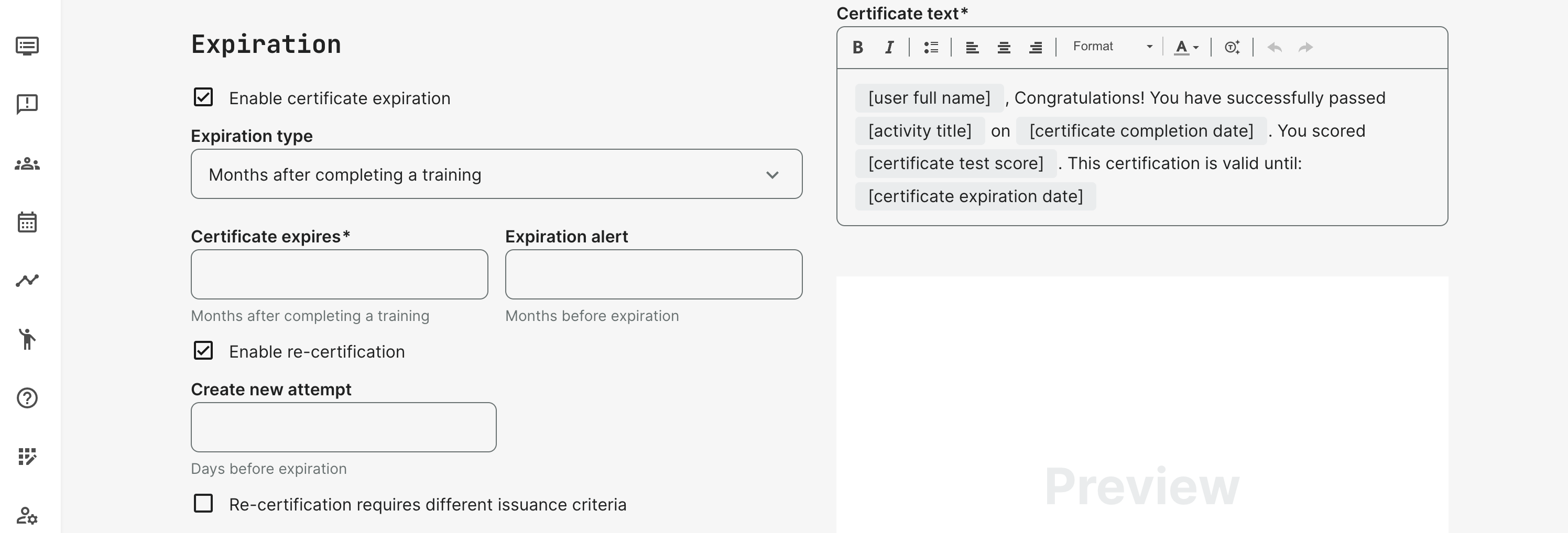
Enable re-certification on the certificate, to set up the criteria:
- Specific date is irrespective of when the training started, ended or when the participant enrolled. It's a fixed date. This one is for controlled and managed groups that are overwhelmingly facilitated one way or another.
- Months after completing the training is a variable and great for "rolling" enrollment of participants over time, with a minimum of administration. This can still have facilitation on monthly or bi-weekly basis as part of learning path. This is often self-paced or hybrid training models.
- In both cases, an expiration alert, which is an automated email will be sent the the predefined number of months prior expiration.
New certification attempt
The existing certificate is valid until expiry, but a new attempt at certification is available from a certain period, before the valid certificate is invalidated. This is defined in days before expiration.
When a new certification attempt is created the certification status is changed to pending to the participant. It will default to the upcoming status, while historical certificates are still preserved.
Reports will also show pending status and without a certificate link, reflecting that the certificate has not yet been earned.
When a new attempt is created, all course module statuses are re-calculated and set to "not started". Scenarios with schedules are set to "completed" when the date has passed, etc.
Everything is reset. However, the participant will be able to use the selection box in analytics to see previous attemtps. As will other roles with access to analytics in general.
Additional comments and behaviors to take note of, in this relation.
- Blocked users will not get new attempts at certification, nor any emails.
- The standard automated email "Re-certification available" is sent only if a new attempt is executed.
- Re-certification date is displayed on user’s profile section in certificate’s section near each certificate and upon tooltips while hovering "Get certificate" links.
- If re-certification is defined AFTER the user already received his first certificate, the re-certification attempt will also accommodate this user according to the dates defined.
Automated emails
A number of automated emails does not need additional management.
- Expiration standard email if this is set on the certificate. An email with the title "Time to plan your re-certification" is sent to the participant. This is also sent to the Manager of the organization, the participant belongs to.
- Re-certification available when "Enable re-certification" is set. An email with the title "Re-certification available" is sent at the moment the re-certification is can be started.
- Automation email workflows can be used to create further and intermediate reminders based on status and other details.
- Manually uploaded certificates: Participant recertification reminder is also available for manually uploaded certificated, earned from 3rd party. This is a manual choice upon uploading the certificate from the user profile page.
Postpone/extend expiration
Instructors and administratos can extend the expiration date of a certificate with an expiry set. This is to accommodate exceptions, where circumstances makes it impossible to complete a re-certification, in time.
This extension can be set through the statistics view of a participant by an instructor or administrator.
Extending the expiration date is set on each individual module or on activity level, respectively.
It is possible to extend the certificate expiration only on the current attempt. If the certificate has already expired, it is not possible to extend it.

Stop and start re-certification attempts
For special cases, it is possible to start and stop re-certification attempts for individual users. This is achieved for an administrator from the Training Activities list.
- This option is available for course modules and event modules and only possible for activities with re-certification enabled.
- Cancelled and blocked users will not have this option, even when they are enrolled in activities with re-certification.