Re-certification - Article
Summary
Use Re-certification to renew a time-limited certificate through a new, traceable learning attempt. Configure the certificate's fixed or rolling expiration first, decide how long before expiry renewal becomes available, and define what the participant must do again. When the renewal window opens, Eurekos creates a new activity- or module-level attempt while preserving the earlier certificate and attempt as history. By default, progress is recalculated for the new attempt; optional module-attempt rules can carry selected Course progress forward or stop first-attempt access restrictions from repeating. Administrators can monitor attempts, extend a current unexpired certificate, and stop or start new attempts for eligible participants.
In this article you will learn:
- How expiration, renewal availability, attempts, and certificate validity differ
- When to use a fixed expiration date and when to use rolling months after completion
- How the expiration alert and re-certification availability window work together
- How to enable re-certification on an activity- or module-level certificate
- How original certification criteria can differ from renewal criteria
- What happens when a new activity-level or module-level attempt is created
- Which progress, schedules, deadlines, confirmations, ratings, and certificates reset or remain historical
- How Configure rules for module attempts, Keep progress, and Override access restrictions upon activity recertification work
- How Group Assignments behave in activity-level renewal
- Which standard emails are sent and when Automated Email Workflows add value
- How to extend expiration for an individual without changing the certificate for everyone
- How to stop and start new attempts for eligible participants
- How blocked, cancelled, forced-complete, and manually certified participants are handled
- How renewal appears to participants, managers, instructors, administrators, Analytics, and reports
- How to troubleshoot missing attempts, premature renewal, carried progress, email, deadline, and reporting problems
What re-certification is
Re-certification is the controlled process of earning a new certificate attempt when an existing time-limited certificate approaches expiration.
It is designed for credentials that must remain current, such as:
- Annual compliance certification
- Product or service authorization valid for 24 months
- Periodic safety or clinical competence
- Partner accreditation tied to a commercial agreement
- Continuing professional education that must be renewed
- Instructor or operator qualifications requiring repeated assessment
Re-certification is configured on the certificate, not as a separate Training Activity type. The certificate supplies the validity date, the renewal window, and the certification criteria. Its connection determines whether the new attempt applies to one Course or Event module or to the complete multi-module Training Activity.
Re-certification is not the same as repeating an activity
A repeated or cloned Training Activity is a separate delivery with its own activity record and participant enrollment. Re-certification creates a new attempt for an existing participant within the certification lifecycle of the connected activity or module. Use Repeat for another scheduled cohort or occurrence; use Re-certification when the same person's credential must be renewed and the attempt history must remain connected.
For creating the credential, choosing its layout, and configuring issuance, see Certificates.
Understand the lifecycle
A re-certification design connects five different dates or states.
| Concept | What it controls | Example |
|---|---|---|
| Original issue/completion date | When the participant earned the current certificate | 15 May 2026 |
| Expiration date | Last date of the certificate's configured validity | 15 May 2028 |
| Expiration alert | When advance planning communication is sent | Two months before expiry |
| Re-certification available from | When the new attempt may be created and started | 60 days before expiry |
| New certificate issue date | When the participant satisfies the renewal criteria | 20 April 2028 |
The current certificate can remain valid while the new attempt is available. This overlap lets participants renew before a compliance gap occurs.
A simplified lifecycle looks like this:
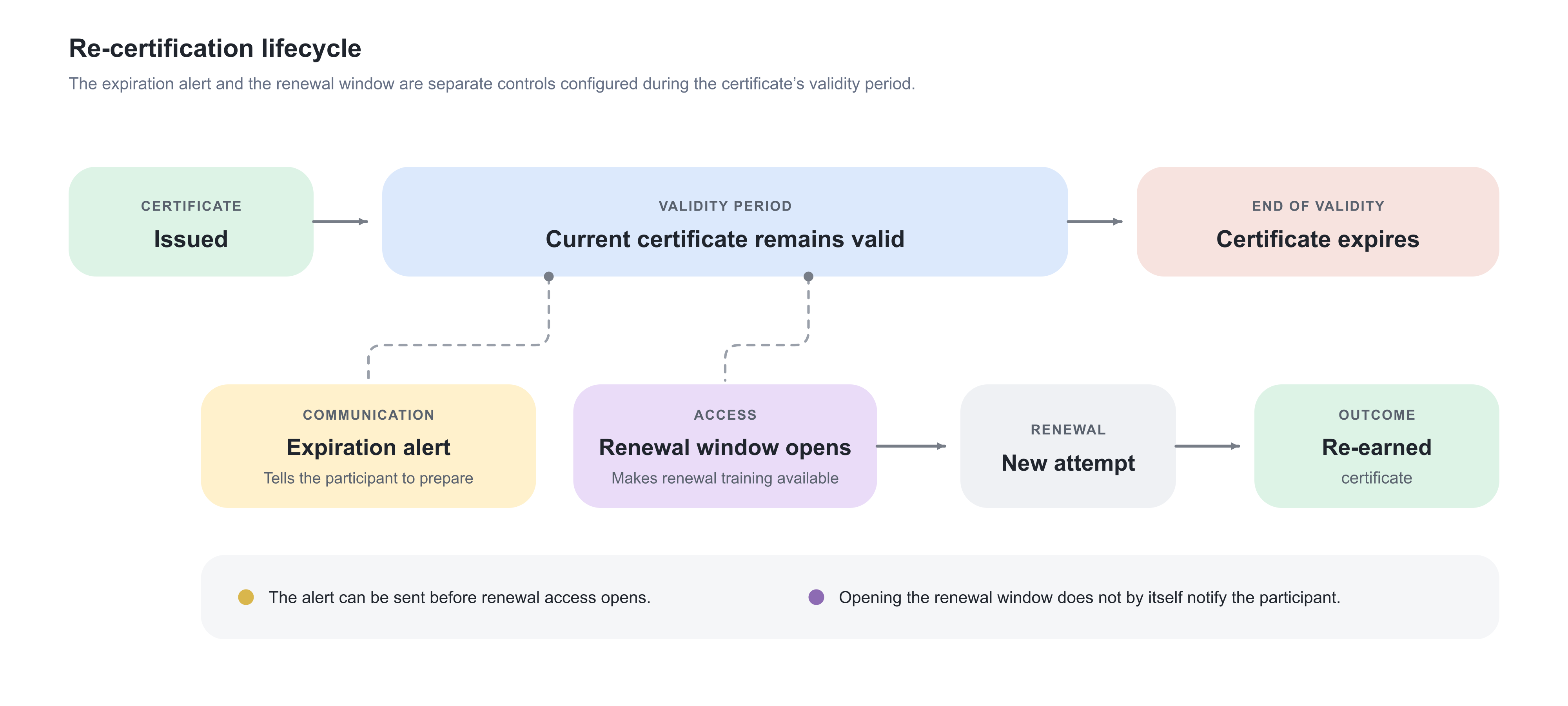
The alert and the renewal window are separate controls. An alert can tell the participant to plan before the training is available. Conversely, opening a new attempt without suitable communication can leave participants unaware that action is required.
Keep related controls separate
| Control | What it means | What it does not do |
|---|---|---|
| Certificate expiration | Ends the current credential's validity | Does not by itself limit access to the training |
| Re-certification window | Makes a new certification attempt available before expiry | Does not extend the existing certificate |
| Expiration alert | Sends lifecycle communication before expiry | Does not create a new attempt unless the renewal window is reached |
| Access expiration | Removes or limits access to a Training Activity after configured conditions | Is not certificate expiration |
| Mandatory deadline | Defines when the current attempt should be completed | Is not the certificate's expiry date |
| Repeat activity | Creates another linked delivery or occurrence | Is not a new certification attempt in the same lifecycle |
| Force completion | Administratively completes the current attempt | Does not pre-complete a future renewal attempt |
| Extend expiration | Changes one participant's current unexpired certificate date | Does not redesign renewal criteria for everyone |
| Stop new attempts | Suspends future/new re-certification attempt handling for an eligible participant | Does not revoke or delete historical certificates |
These controls can be used together. For example, a mandatory renewal attempt can receive a fresh Deadline while the previous certificate remains valid until its expiration date.
Decide whether re-certification is the right model
Use Re-certification when:
- The same named credential expires and must be earned again.
- Renewal should preserve a connected attempt history.
- Participants should be prompted automatically before validity ends.
- Current and previous certificates must remain auditable.
- The renewal path can be expressed through the same Training Activity and certificate structure.
Use another approach when:
- The next cohort is a separate scheduled delivery rather than a personal renewal cycle—use Repeat or create another Training Activity.
- The qualification changes materially in name, meaning, accrediting authority, or required evidence—create a new certificate and, where appropriate, a new Training Activity.
- Access should merely end after a period—use Access expiration.
- A completion deadline is required without credential validity—use Mandatory.
- The certificate was earned outside Eurekos and only a reminder is needed—use the manual external-certificate reminder options from the user profile rather than assuming a full Eurekos attempt exists.
Plan the renewal policy
Before configuring the certificate, agree on:
- What legal, regulatory, product, or business rule determines validity?
- Does everyone expire together, or does each person receive the same period after completion?
- How early may someone renew?
- How much time do participants realistically need to complete the renewal path?
- Should the current credential remain valid throughout the renewal window?
- Must all original content be repeated?
- Can prior Course progress or a module certificate carry forward?
- Are first-attempt prerequisites still meaningful during renewal?
- Are live Events available during every renewal window?
- Does a practical assessment require instructor capacity?
- Should required feedback, user confirmation, or Assignment work repeat?
- Does renewal grant or restore a Skill or Skill level?
- Which participants, managers, instructors, and administrators need communication?
- Who may extend validity, stop attempts, force completion, or make exceptions?
- Which report proves that certification was current at the required time?
A compact policy table is useful:
| Decision | Example policy |
|---|---|
| Credential | Authorized Installer – Level 1 |
| Validity | 24 months after completion |
| Alert | Two months before expiration |
| Renewal available | 60 days before expiration |
| Renewal evidence | Refresher Course completed AND practical assessment passed |
| Carried progress | Product introduction retained; assessment repeated |
| Deadline | 45 days after renewal attempt starts |
| Escalation | Participant at opening, manager after 30 days, administrator before expiry |
| Exception authority | Certification owner may extend an unexpired certificate |
| Evidence | Certificate and Progress reports retained according to policy |
Re-certification setting reference
The certificate editor brings the lifecycle decisions together. The exact display can depend on platform configuration, but the operational settings are:
| Setting | What you enter or select | Result |
|---|---|---|
| Expiration method | Specific date or months after completing the training | Determines how each issued certificate receives its expiration date |
| Specific date | One calendar date | Every governed certificate expires on the common date |
| Months after completing the training | Number of months | Each certificate expires after the same rolling period from its participant's completion |
| Expiration alert | Number of months before expiration | Schedules the standard planning notification before validity ends |
| Enable re-certification | Enabled or disabled | Determines whether the expiring certificate can create a renewal attempt |
| Re-certification available | Number of days before expiration | Determines when the new attempt is created and opened |
| Renewal issuance criteria | The evidence required for the next certification attempt | Determines what the participant must complete, pass, attend, or have assessed again |
Expiration method and renewal availability solve different problems: one ends the current credential's validity; the other opens the next attempt. Configure both from the approved policy rather than choosing dates only because they appear convenient in a test activity.
Choose the expiration model
Re-certification depends on an expiring certificate. Configure the certificate’s expiration model before defining when the renewal window opens.
| Expiration model | When to use it | What happens and what to plan for |
|---|---|---|
| Specific date Every certificate governed by the definition expires on the configured calendar date, regardless of the participant’s enrollment or completion date. | Use a fixed date for a controlled cohort or a common regulatory, contractual, product, academic, or seasonal cycle. Examples:
| Participants who certify late in the cycle receive a shorter validity period. If the re-certification window is already open when they certify, their renewal attempt may become available soon after the original certificate is issued. Test late-completer scenarios and confirm how the common expiration date will be managed for the next cycle. |
| Months after completing the training Each participant’s expiration date is calculated from the date on which they earn the certificate. | Use rolling validity for ongoing enrollment when every participant should receive the same certification period. Examples:
| Expiration and renewal dates are distributed throughout the year. This gives participants the same validity period but requires dependable automation, communication, monitoring, and reporting because participants enter renewal continuously. |
| No expiration The certificate remains valid indefinitely unless it is revoked or otherwise governed through a separate process. | Use no expiration when the qualification is permanent or when future renewal is managed through another documented and controlled process. | A certificate without expiration does not create the normal time-driven re-certification cycle. Do not enter an arbitrary far-future date merely to postpone a validity decision. Document the intended validity and renewal policy first. |
Governance considerations
For a specific-date model, assign ownership for maintaining the certificate definition when the common expiration date changes. Decide whether the next cycle represents the same continuing credential or a materially different qualification that requires a new certificate definition.
For a rolling model, ensure that expiration alerts, renewal availability, automated communication, and reporting can operate continuously rather than only during an annual campaign.
The expiration model determines certificate validity. The separately configured re-certification window determines when the participant can begin the next attempt.
Configure the expiration alert
The expiration alert warns before the current certificate becomes invalid. Enter the number of months before expirationas part of the certificate's expiration lifecycle.
Use it when participants and their relevant managers need planning time for:
- Completing a self-paced refresher
- Booking a live Event
- Arranging practical assessment
- Gathering evidence or approvals
- Avoiding loss of access that depends on a current Skill or certificate
The standard expiration message is commonly presented as Time to plan your re-certification. It is sent to the participant and the Manager of the participant's organization according to the configured certificate lifecycle and available relationship data.
Choose the interval based on the real effort and scheduling constraints. An alert one month before expiry may be adequate for a short online refresher but too late for a program requiring a scarce classroom session and assessor.
The alert does not guarantee that a new attempt exists. Coordinate it with the days before expiration renewal setting:
- Alert before the window: useful planning notice; the participant may need to wait before starting.
- Alert at the same time: one clear call to action when the attempt opens.
- Alert after the window: the attempt is available earlier, but the participant is not proactively told through the expiration alert until later.
Enable re-certification
- Open Course Administration → Certificates.
- Edit the certificate connected to the relevant Course, Event, or multi-module Training Activity.
- Confirm that expiration is configured as a specific date or months after completion.
- Enable Re-certification.
- Enter how many days before expiration the new certification attempt becomes available.
- Review or configure the issuance criteria for the renewal attempt.
- Save the certificate.
- Review Used in and every connected activity or module.
- Test the lifecycle with certificates representing early, normal, and late expiration dates.
- Validate the new attempt, progress, emails, participant display, Skills, deadlines, and reports.
Re-certification can be applied through a certificate connected at:
- Activity level for renewal of the complete multi-module learning path
- Course module level for renewal of that Course credential
- Event module level for renewal of that Event credential
The level matters because it determines the scope of the new attempt and which progress can reset or carry over.
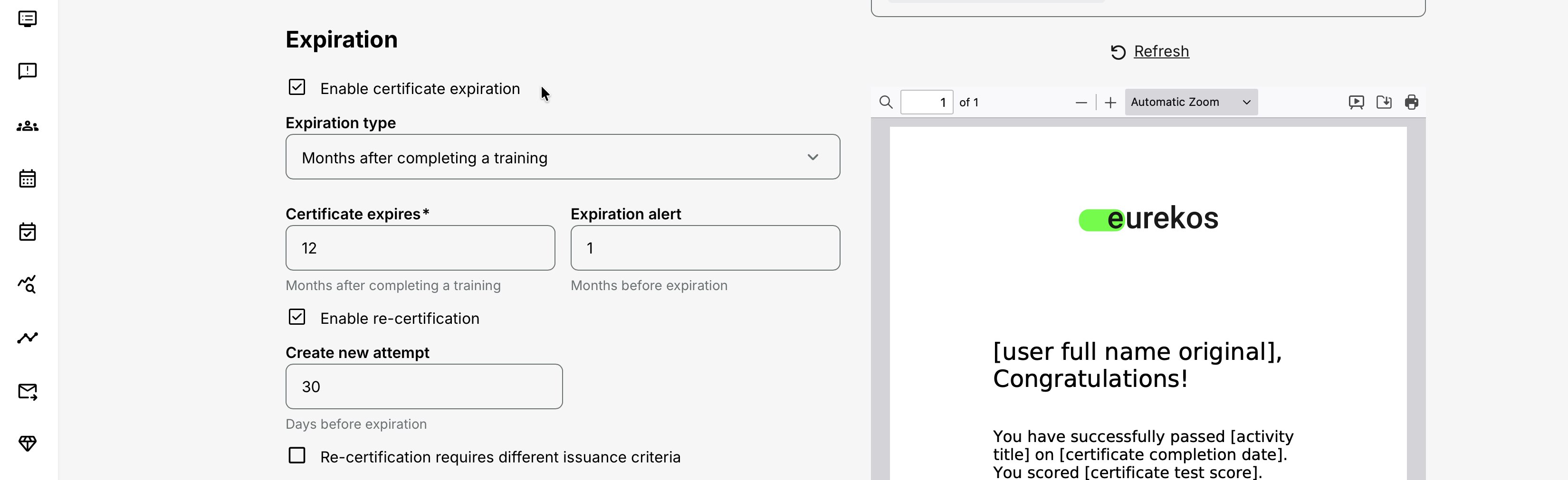
Configure the renewal availability window
The days before expiration value determines when the new certification attempt is available.
Example:
Current certificate expires: 30 September Renewal available: 60 days before expiration New attempt opens: approximately 1 August
At the opening of the window:
- A new attempt is created for the eligible participant.
- The participant's current certification view can move to a renewal or Pending state.
- The standard Re-certification available email is sent only when the new attempt is actually created.
- The earlier certificate and earlier attempt remain available as historical evidence.
- The current certificate can remain valid until its expiration date.
Select a window long enough for the complete process. Include:
- Expected Course duration
- Test retries and remediation
- Event frequency and seat capacity
- Instructor availability
- Assignment review time
- Practical-assessment scheduling
- Participant absence or leave
- Manager and administrator escalation time
Opening too early can create unnecessary repeat work or allow a new certificate before policy intends. Opening too late increases the risk of expired credentials and operational non-compliance.
Define original and renewal criteria
Re-certification can repeat the original certificate criteria or use a separate set of renewal criteria.
| Configuration | When to use it | What happens |
|---|---|---|
| Use the original issuance criteria | Leave Re-certification requires different issuance criteria cleared when participants must repeat the same requirements used for their initial certification. | The new attempt evaluates the participant against the certificate’s original issuance criteria. |
| Use different re-certification criteria | Select Re-certification requires different issuance criteria when an already-certified participant may follow a different renewal route—for example, a refresher Course and updated assessment instead of the complete original program. | A separate criteria builder appears. Add the Courses, tests, Events, assessments, Existing Training, or other evidence required specifically for re-certification. Multiple criteria can be combined where necessary. The original criteria continue to govern initial certification. |
Different criteria should not mean weaker evidence by default. The renewal requirements must still demonstrate the competence, attendance, knowledge, or compliance outcome that the renewed certificate represents.
Test the initial certification and re-certification routes separately. In particular, confirm that every referenced module or assessment is available during the renewal window and that the configured logic cannot issue the certificate without the intended current evidence.
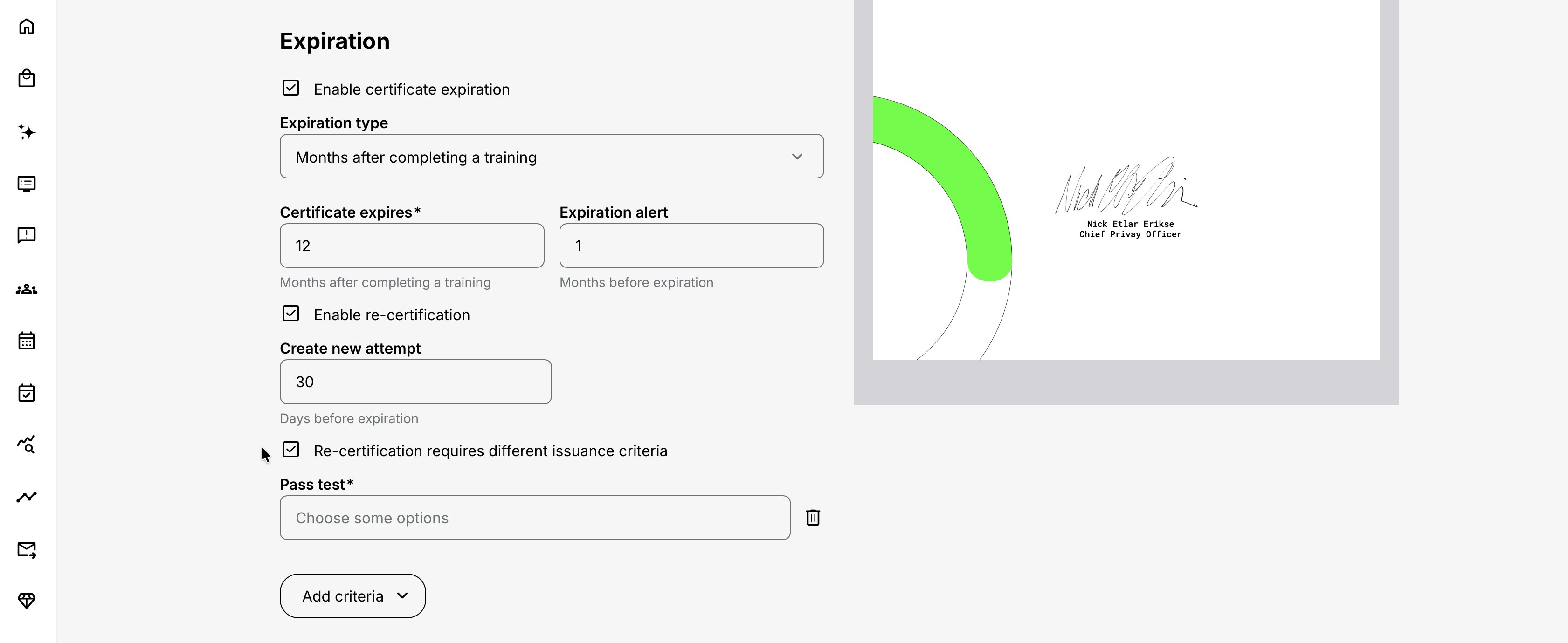
For example:
Original certification Full foundation Course AND live workshop attendance AND practical assessment passed Re-certification Short refresher Course AND updated knowledge test passed AND practical assessment passed
Use different renewal criteria when prior qualification justifies a shorter update path, while still proving continued competence. Repeat the original criteria when regulation or policy requires complete retraining.
For each renewal criterion, confirm:
- The referenced Course, video, Question Set, Event, Existing Training, or assessment remains available.
- The evidence can be collected during every participant's renewal window.
- Adaptive rules do not hide a mandatory renewal requirement.
- Access restrictions do not make the new attempt impossible.
- Scheduled Events have viable future occurrences.
- A responsible instructor can complete practical assessments.
- Any required Training Feedback or Complete button has a clear participant action.
Do not rely on yesterday's course structure
Re-certification can begin months or years after the original setup. Review linked content, H5P objects, SCORM/xAPI behavior, schedules, instructors, Locations, email text, and access rules before each renewal cycle or material product/regulatory change.
What happens when a new attempt is created
A new attempt is not a deletion or rewrite of the previous one. It is another attempt in the same certification history.
By default:
- The earlier certificate remains historical and stays valid until its expiration date.
- The new attempt is shown as upcoming, renewal, or certification Pending according to the interface context.
- The pending attempt does not show a new certificate download link because the new certificate has not been earned.
- Course and module statuses are recalculated for the new attempt and normally begin again from Not started.
- Scheduled scenarios are recalculated from their dates; a module whose relevant date has already passed may resolve differently from an unscheduled Course.
- The participant must meet the configured renewal criteria.
- Authorized users can select earlier attempts in Progress/Analytics to inspect their results.
The attempt does not normally require the participant to self-enroll in a new activity. It is created from the certificate lifecycle for the existing certification context.
Activity-level re-certification
An activity-level certificate creates a new attempt for the overall learning path. Each included module is recalculated within that new activity attempt.
Use this when the credential represents the complete program. Review every module, because one carried, scheduled, adaptive, nested, or group-based component can change the new attempt's initial state.
Module-level re-certification
A certificate connected to a Course or Event module creates a new attempt at that module level. This supports a module credential with its own validity cycle inside a larger activity.
Module-level renewal is independent from an activity-level renewal. If both levels have expiring certificates, participants can have overlapping attempt cycles. Use this only when the organization genuinely needs separate credentials and renewal clocks.
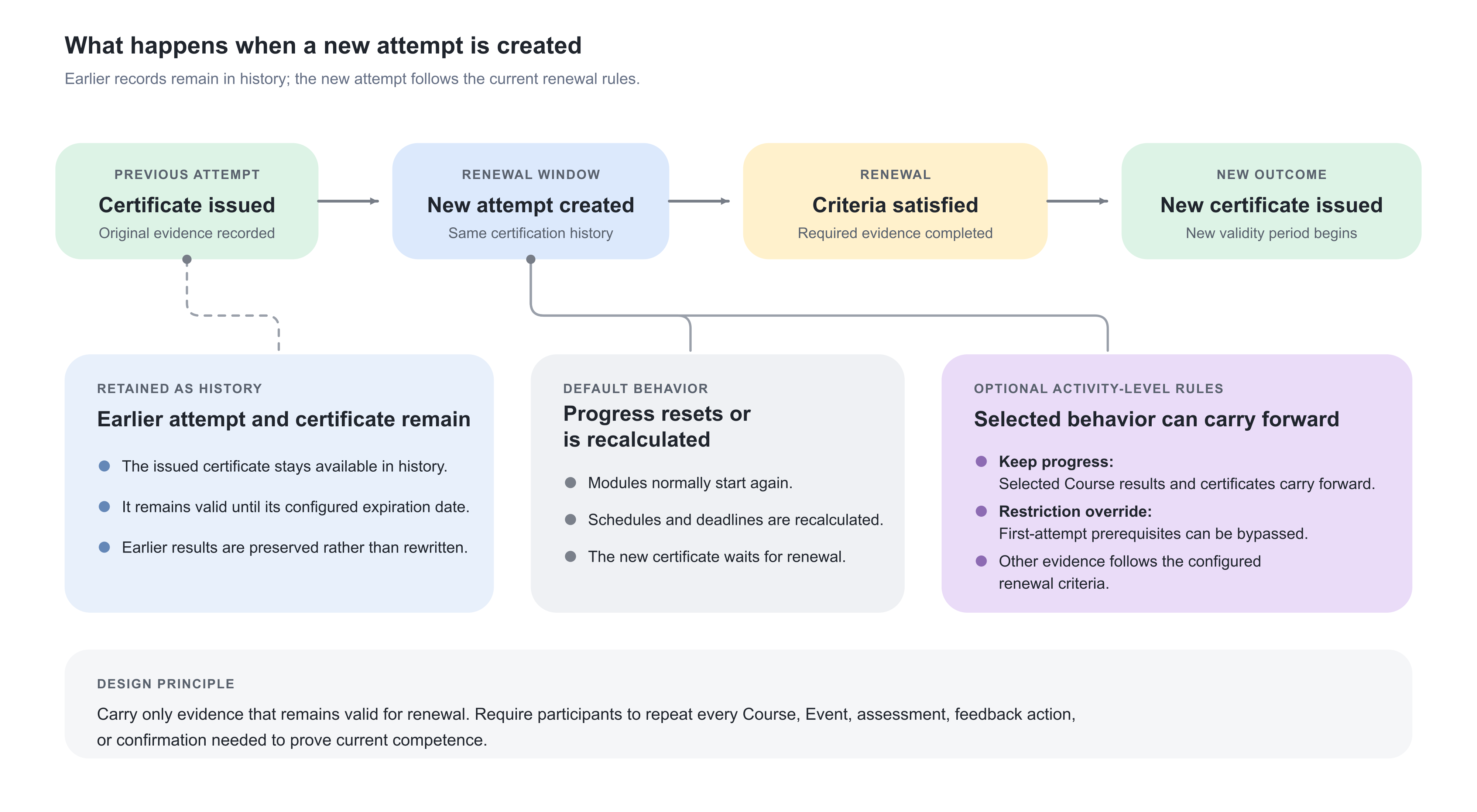
Progress reset and recalculation
“Reset” does not mean every technical record is erased. It means the new attempt receives its own current progress context while previous attempts remain available for history.
Review these behaviors:
| Area | New-attempt behavior |
|---|---|
| Course progress | Normally recalculated and starts again unless Keep progress applies |
| Certificate | The new attempt has no new certificate until renewal criteria are satisfied; the earlier issued certificate remains historical |
| Schedules | Re-evaluated against their configured dates; already-passed dates can affect the initial status |
| Event attendance | Must satisfy the renewal attempt's attendance rules; a historical attendance record is not automatically new attendance unless specific carried behavior applies |
| Practical assessment | Must reach the renewal result required by the criteria |
| User confirmation | The Complete button appears again in each new attempt when required |
| Mandatory deadline | Reapplied to the new attempt using the original duration from the new-attempt date |
| Force completion | Remains on the attempt where it was performed; the future attempt is separate |
| Ratings | The participant can leave a rating in each attempt |
| Historical analytics | Earlier attempt details remain selectable to authorized users |
Test exact module types. Native Course, SCORM, Event, Assignment, Existing Training, adaptive modules, and Group Assignments do not all generate or retain evidence in the same way.
Configure rules for module attempts
Some platforms have the optional Settings → General → Configure rules for module attempts setting. When enabled, additional certification configuration becomes available at activity level, and two module controls can support activity-level re-certification:
- Keep progress on Course modules
- Override access restrictions upon activity recertification on Course and Event modules
If you need this complex use case, contact Eurekos support to have this configuration enabled.
Keep progress
| Aspect | Guidance |
|---|---|
| What it is | A Course-module option that carries previous module progress, including certificates, into the next activity-level re-certification attempt. |
| When to use it | Use it when the Course does not need to be repeated during every renewal—for example, permanent foundation knowledge that supports an annually repeated assessment. |
| What happens | The carried module can appear with its previous progress in the new activity attempt. If the Course forms part of the activity-level certificate criteria, its carried result can immediately satisfy that part of the new certification rule. Depending on the complete rule, the activity-level certificate may be issued and the new attempt may be completed without the participant reopening the Course. |
Use Keep progress intentionally. Carrying everything can turn re-certification into an empty administrative cycle, while carrying nothing can force unnecessary retraining.
Important special cases:
- Keep progress applies to Course modules.
- It is designed for activity-level re-certification.
- If re-certification is configured at module level, Keep progress is ignored because a new module attempt is created.
- When a carried Course also has an access restriction, it can appear restricted while still displaying carried progress.
- Transfer into the new attempt can be processed asynchronously, so an immediately opened attempt may need time before the carried state is visible.
Override access restrictions upon activity recertification
| Aspect | Guidance |
|---|---|
| What it is | A Course- or Event-module option that makes its configured access restrictions apply only to the first activity attempt. |
| When to use it | Use it when a prerequisite establishes eligibility for the original program but should not prevent an already-certified participant from entering a renewal attempt. |
| Example | Original attempt: The Foundation Course must be completed before the workshop opens. Renewal attempt: The already-certified participant may proceed directly to the refresher workshop. |
| What happens | The module restriction is overridden in later activity-level re-certification attempts. The option does not erase the original prerequisite record or disable restrictions for unrelated first-time participants. |
Do not override a restriction that remains a regulatory, compliance, or safety requirement for every attempt.
Design these controls together
| Desired renewal behavior | Keep progress | Override access restriction |
|---|---|---|
| Repeat everything in order | Off | Off |
| Retain foundation Course and open later modules | On for foundation | On where the first-attempt prerequisite would otherwise block renewal |
| Repeat Course but skip an old entry prerequisite | Off | On for the affected later module |
| Retain Course result but keep another current eligibility check | On for Course | Off for the continuing eligibility restriction |
Always test a first-time participant and a renewing participant. A configuration that works in the new attempt may unintentionally weaken the original journey if it is attached at the wrong level.
Group Assignments in re-certification
When an activity-level re-certification contains a Group Assignment, the Assignment module's training status is transferred automatically into the next attempt. This resembles Keep progress, but the transfer is automatic for the Group Assignment rather than selected through the Course-module option.
At new-attempt creation, the Group Assignment status at that moment becomes the initial fixed status for the attempt. Group activity can still affect the appropriate current attempts: when a submission is updated or an instructor changes its status or grade, members can be affected according to their group membership and attempt context.
This requires careful testing when group members are on different renewal attempts. Before opening the cycle:
- Confirm current group membership.
- Decide whether the earlier group outcome should satisfy renewal.
- Check members who join or leave after the attempt is created.
- Review the submission and assessment available to each attempt.
- Avoid mixing first-time and renewing participants in one group unless the outcome is intentional.
Learn more in Assignments.
Mandatory deadlines in new attempts
When the Training Activity is Mandatory, its Deadline is reapplied to each new re-certification attempt. Eurekos preserves the configured duration and calculates it from the new-attempt date.
Example:
Mandatory deadline: 30 days after enrollment/attempt start New re-certification attempt: 1 August New attempt deadline: 31 August
This is separate from the certificate's expiration date. A participant can therefore have:
- A current certificate expiring on 30 September
- A new renewal attempt available on 1 August
- A mandatory completion deadline on 31 August
That design deliberately requires renewal before the old certificate expires. If the deadline were later than expiry, the participant could become uncertified while still being within the Training Activity's allowed completion period.
Coordinate:
- Re-certification availability
- Mandatory duration
- Certificate expiration
- Event dates and seat availability
- Automated Email Workflow triggers
The deadline is also recalculated when an applicable signup returns to Registered after a status change according to the Mandatory rules.
Completion behavior in new attempts
If User confirmation is required on a module, the Complete button appears again in every new re-certification attempt after the underlying completion criteria are met. The renewal certificate waits until the participant gives the required acknowledgement.
Don't show congratulations message continues to affect only the popup experience. It does not stop completion, certificate issuance, or future attempts.
Changing Completion behavior after a participant has already received a certificate does not rewrite the participant's existing training status. Test it against the next attempt before using it as part of a renewal-process change.
Force completion and re-certification
Force completion applies to the participant's current attempt only.
When an authorized user marks the current activity or module complete:
- The current attempt becomes complete.
- A connected certificate can be issued.
- Required feedback can be bypassed.
- The actor, timestamp, and optional completion comment remain audit evidence.
When a future re-certification attempt is created, that new attempt remains separate. The previous forced completion does not automatically complete it.
Use force completion for documented exceptions, not as a renewal method. If the policy permits renewal solely through administrative recognition, define an explicit governed process and supporting evidence rather than repeatedly overriding a design whose criteria cannot be met.
Standard re-certification emails
The certificate lifecycle provides standard messages without requiring an Automated Email Workflow for the core events.
| Message | Trigger | Typical recipients | Important condition |
|---|---|---|---|
| Time to plan your re-certification | Configured expiration-alert point | Participant and Manager of the participant's organization | Certificate expiration and alert must be configured; manager delivery needs a valid relationship/context |
| Re-certification available | A new re-certification attempt is actually created | Participant | Sent only when the attempt exists, not merely because re-certification was enabled |
| Certificate achieved | Renewal criteria are met and the new internal certificate is issued | Participant | Certopus uses its external email flow |
Review the current templates and language versions under Settings → Email Sending → System Emails. Confirm sender, links, terminology, and notification-scheme behavior. Registered and Expired signups can receive relevant re-certification messages when the remaining lifecycle conditions are met; Cancelled, Reserved, and Waiting list signups are excluded, and a cancelled participant must first be reactivated through the approved process.
Add Automated Email Workflows when needed
Use an Automated Email Workflow for additional communication such as:
- Reminder 30 days after the renewal attempt opens if incomplete
- Escalation to an Immediate Manager before expiration
- Instructor reminder to schedule practical assessment
- Course Administrator task to review participants at risk
- Organization-specific instructions or support contacts
Do not duplicate the standard lifecycle messages without purpose. Map the complete communication journey and confirm whether each message is driven by certificate expiry, attempt availability, Mandatory deadline, activity Schedule, Event date, or participant completion.
Learn more in Automated Email Workflows, Email Sending, and System Email Notification Overview.
Re-certification for manually uploaded certificates
An administrator can upload a certificate earned outside Eurekos to a user's profile. A participant re-certification reminder can be enabled as part of that manual certificate process.
Use this for external qualifications that need visibility and reminder support. It is not automatically the same as an Eurekos certificate connected to a Training Activity:
- There may be no Eurekos issuance criteria.
- There may be no automatic activity or module attempt.
- The external evidence and renewal process require their own governance.
Document where the participant should renew, who validates the external result, and how the replacement certificate is uploaded.
Extend an individual's certificate expiration
Authorized instructors and administrators can postpone the expiration date of a certificate for an individual participant from the relevant participant statistics/Progress context.
Use an extension for an approved exception such as:
- The participant is on leave during the renewal window.
- A required Event was cancelled.
- Assessor capacity or a technical problem prevented timely completion.
- A regulator or credential owner approved temporary continued validity.
To extend:
- Open the Training Activity's participant Progress or statistics.
- Select the relevant participant and certificate at the correct activity or module level.
- Choose the expiration-extension action.
- Enter the approved new date.
- Confirm the change.
- Record the business justification in the organization's governing process.
- Verify the new date in the participant view and report.
Important limitations:
- The certificate must have an expiration date.
- Only the current attempt can be extended.
- The certificate must not already be expired.
- An activity-level extension does not silently extend a separate module-level certificate, or vice versa.
- Extending validity does not prove that renewal requirements were completed.
Decide whether the existing renewal attempt and its deadline should continue during the extension. An extension solves certificate validity; it does not automatically redesign every surrounding date or message.
Stop or start new attempts for an individual
Administrators can use Stop new attempts and Start new attempts from the participant actions in the Training Activity context for special cases.
Use Stop when new renewal attempts should be suspended for one eligible participant—for example, an approved exemption, a duplicate certification process, or a temporarily inapplicable qualification. Use Start to resume attempt creation when the participant should re-enter the governed lifecycle.
The control:
- Is available only for activities with re-certification enabled.
- Applies to supported Course and Event module certification contexts.
- Is not available for Cancelled or Blocked users.
- Does not revoke the participant's historical certificate.
- Does not replace an expiration extension when the current certificate must remain valid longer.
- Should be documented because it changes the person's future renewal processing.
After using either action, verify the participant's attempt state, current certificate validity, notification timeline, and reporting result.
Blocked and cancelled users
Blocked users
Blocked users do not receive new re-certification attempts or the related emails. Their earlier certificates and attempt history can remain visible to authorized roles for historical and audit purposes.
When a user is unblocked and otherwise eligible, a new re-certification attempt can be created. Review current eligibility, certificate dates, attempt history, and communication immediately after unblocking; do not assume every missed lifecycle event will replay automatically. Use Progress and reporting to confirm the authoritative state.
Cancelled participants
Cancelled participants do not have the manual Stop/Start new attempts action. Cancellation and certificate history are separate states; cancelling an enrollment does not by itself erase an issued certificate.
If a Cancelled or Expired signup should resume renewal, use the approved reactivation or enrollment process and then verify whether a current attempt and deadline exist. When reactivation happens inside the certificate's active re-certification period, Eurekos can create the new attempt immediately even when the scheduled re-certification date is later. Displayed renewal dates remain based on the configured schedule, and Stop new attempts does not prevent this reactivation-triggered creation; govern the status change itself and verify the attempt, certificate expiration, and Mandatory deadline separately.
Skills and access during renewal
A certificate can grant Skills or Skill levels. When a certificate expires, its Skill-level contribution is deducted from the participant's current total. This can affect:
- Access restrictions based on Skills
- Self-enrollment eligibility
- Qualification dashboards
- Workforce or partner readiness reporting
Opening re-certification before expiry provides time to earn the next certificate before the Skill contribution lapses. However, making an attempt available does not itself renew the Skill; the participant must earn the new certificate.
If a Skill controls access to the renewal activity itself, test for circular logic. A participant must not lose the Skill needed to enter the very training that restores it unless a deliberate alternative route or restriction override exists.
Participant experience
Participants can see renewal-related information in their training, Progress, and profile contexts according to platform configuration and permissions.
The experience can include:
- Current certificate and expiration date
- Re-certification date or availability information
- A Re-certificate, renewal, upcoming, or Certification pending status
- A new attempt with recalculated module progress
- The standard Re-certification available email
- A Complete button when confirmation is required
- The newly issued certificate after renewal
- Earlier attempts selectable in Progress/Analytics
- Historical expired certificates available for download
The Certificates section of the user profile preserves historical credentials. A new pending attempt can appear without a certificate link until it is earned. The User Transcript can include certificate expiration and re-certification information.
Monitor renewal operations
Use Progress for individual diagnosis and attempt comparison. Review:
- Current and previous attempt selector
- Activity- and module-level status
- Certificate issue and expiration dates
- Re-certification readiness or pending status
- Course, H5P, SCORM/xAPI, Event, Assignment, and Existing Training evidence
- Attendance and practical assessment
- Mandatory deadline
- Administrative completion actions
Use Certificates Analytics and Learning Performance for portfolio supervision:
- Current issued certificates
- Upcoming expirations
- Renewal readiness
- Eligible-versus-issued gaps
- Average time to certification
- Organization or cohort differences
Use detailed reports for audit evidence. Depending on report type and configuration, fields can include certificate name, activity/module source, issue date, completion date, expiration, status, re-certification date, and attempt-related progress. Use the participant's attempt history and the re-certification log to distinguish an attempt created through reactivation from one created by scheduled processing; this explains why an attempt can exist before the date expected from the ordinary schedule.
Analytics may emphasize the latest issuance to avoid double counting when the same participant earns the same certificate again in the selected period. Detailed reports and the attempt selector preserve the history needed to understand earlier cycles.
Expired certificates remain historical evidence. Blocked users can remain visible to authorized roles; deleted-user and Cancelled-signup treatment depends on the report and platform governance configuration.
Govern configuration changes after issuance
Re-certification settings can affect people who already hold the certificate. If re-certification is enabled after the first certificate was issued, Eurekos can include those participants according to their configured dates.
Before changing a live certificate:
- Review Used in and identify every activity and module connection.
- Export a baseline of current certificates, expiration dates, and attempts where required.
- Identify participants already inside or near the proposed window.
- Test fixed-date late completers and rolling cohorts.
- Compare original and renewal criteria.
- Review Keep progress and restriction overrides.
- Check Mandatory deadlines and Event availability.
- Review standard emails and Automated Email Workflows.
- Confirm Skill and access effects at expiration.
- Decide whether the change belongs in the existing certificate or a new credential definition.
Do not remove a connected certificate to stop renewal. Removing a Certificate feature after issuance can remove the associated issued certificates after confirmation. Use the specific Stop new attempts control for an individual or redesign the certificate through the governed process.
Common re-certification designs
| Re-certification design and requirement | Recommended configuration | Why it works |
|---|---|---|
| Rolling product authorization A partner remains authorized for 24 months from certification and must complete an update before expiry. |
| Every partner receives the same validity period, while early renewal reduces the risk of gaps in certification, Skills, or dependent access. |
| Annual compliance cohort All employees must hold the same annual compliance certificate by year-end. |
| Fixed expiration aligns reporting and audit evidence across the cohort. The certificate owner must govern the next cycle’s expiration date, content, and renewal criteria. |
| Foundation retained, assessment repeated The permanent foundation Course does not need to be repeated, but the annual test and practical assessment must be passed again. |
| Prior learning is recognized without weakening the recurring competence check. |
| Live Event renewal Operators must attend a refresher Event every year. |
| The process accounts for actual scheduling and seat capacity instead of opening renewal after the final suitable Event has occurred. |
| Temporary extension A participant cannot attend the only available assessment because of approved leave. |
| The governed exception protects continuity without changing the certificate validity applied to the wider population. |
| External certificate reminder A professional qualification is renewed through an external body, while its evidence is stored in Eurekos. |
| Renewal reminders and evidence are managed without implying that Eurekos issued or assessed the external credential. |
Verify the renewal configuration
Use representative participants and the module types included in your program. Check both a normal renewal and relevant exceptions before enabling or changing the process for existing certificate holders.
| Scenario or check | Expected result or evidence |
|---|---|
| Fixed or rolling validity | A representative participant receives the intended expiration and renewal dates. Test a late completer in a fixed-date cycle and confirm who maintains the next cycle. |
| Alert and renewal availability | The alert arrives with useful planning time, and its wording reflects whether renewal is already available. The window allows time to complete training and any required assessment. |
| Original and renewal evidence | A new attempt requires the intended renewal criteria, not an unintended repeat of the original path. Test the Course, H5P, SCORM/xAPI, Event, Assignment, or Existing Training evidence actually used. |
| Retained progress and prerequisites | Keep progress retains only Course work that need not repeat and does not unintentionally satisfy the entire new certificate rule. Restriction overrides apply only where first-attempt prerequisites should no longer block renewal. |
| Activity- and module-level attempts | Progress resets or carries forward at the intended level. Do not expect module-level re-certification to honor the activity-level Keep progress behavior. |
| Completion dependencies and delivery capacity | Required feedback, participant confirmation, adaptive rules, attendance, and practical assessment form a reachable renewal path. Future Events, seats, and responsible assessors are available within the renewal window. |
| Deadlines, Skills, and access | The new attempt receives the intended Mandatory deadline. Certificate expiry and Skill changes have the expected access consequences, and participants can still reach the renewal work they need. |
| Communication and exceptions | Participant and manager messages reach the intended recipients without unnecessary duplication. Blocked or Cancelled users, extensions, Stop/Start new attempts, and Force completion are handled through the documented exception process. |
| Reporting and history | Progress shows the correct current and previous attempts, certificate dates, and renewal state. Reports provide the required evidence, with a named owner monitoring upcoming expirations, overdue renewals, and exceptions. |
Troubleshooting
| Problem | What to check or do |
|---|---|
| Re-certification settings are missing | Confirm that the certificate has an expiration model and that the administrator has permission to edit it. Re-certification is configured on the certificate, not directly as a Training Activity feature. |
| No new attempt was created | Check the certificate’s expiration date, configured days-before-expiration window, current date, participant eligibility, certificate connection, and whether new attempts were stopped. Blocked users do not receive new attempts. |
| The attempt opened earlier than expected | Recalculate the opening date from the participant’s actual certificate expiration date and the configured number of days. With rolling expiration, participants have different dates. With fixed expiration, late certification may place someone inside the renewal window immediately. |
| The attempt opened later than the expiration alert | The alert and renewal window are configured separately. This can provide intentional planning time. If participants should act immediately, align the settings or make the alert wording explain when the training becomes available. |
| The participant received no expiration alert | Confirm that certificate expiration and an alert interval are configured, the participant’s email address is valid, and any required Manager relationship exists. Review the System Email template, language and notification scheme, Email Sending logs, sender configuration, provider delivery, and spam handling. |
| The participant received no Re-certification available email | Confirm that a new attempt was actually created. Then review the participant’s status and email address, the System Email template, language and notification scheme, and Email Sending logs. Saving the re-certification configuration alone does not send this email. |
| The Manager did not receive the planning email | Verify the participant’s organization and current Manager relationship, the Manager’s active account and email address, organizational scope, and notification configuration. Then review Email Sending logs, sender configuration, provider delivery, and spam or quarantine handling. |
| The pending attempt has no certificate link | This is expected until the participant earns the new certificate. Select the earlier attempt or open the certificate history in the participant’s profile to access the currently or previously issued document. |
| The previous certificate disappeared from the current attempt | The new attempt does not display a new certificate before it is earned. Use the attempt selector or profile history to view the earlier certificate. If the historical record is also missing, investigate whether the Certificate feature was removed. |
| A historical certificate was removed | Check whether an administrator removed the connected certificate from the activity or module and confirmed the destructive warning. That action removes associated issued certificates; it is not part of the normal re-certification reset. |
| Every Course returned to Not started | This is the default behavior for a new attempt. Enable and govern Configure rules for module attempts and Keep progress only for Courses whose previous results should carry into activity-level re-certification. Request Eurekos support to have it enabled if you require this feature. |
| Keep progress is not visible | Confirm that Settings → General → Configure rules for module attempts is enabled and that you are editing a Course module in an activity-level certification context. The option is not a general Event or Assignment control. |
| Keep progress is enabled, but the Course still looks empty | Confirm that the participant had progress in the previous attempt, the option was saved before the new attempt was created, and the correct attempt is selected. Carried progress can be processed asynchronously, so check again after processing completes. |
| Keep progress did not work for module-level re-certification | This is expected. Keep progress is ignored when the certificate renews at module level because Eurekos creates a new module attempt. |
| The new activity certificate was issued immediately | Inspect the carried Course progress and every activity-level certificate criterion. A Course using Keep progress may already satisfy part or all of the certificate rule. Remove carried progress only when the governing policy requires that evidence to be repeated. |
| A carried Course is shown as restricted | This can occur when the Course has both previous progress and an active access restriction. Decide whether the restriction should still apply. Use the specific renewal override only when the restriction represents a first-attempt prerequisite. |
| The access-restriction override is missing | Confirm that the platform-level module-attempt configuration is enabled and that the Access restrictions feature belongs to a supported Course or Event module. |
| A renewing participant is still blocked by a first-time prerequisite | Enable Override access restrictions upon activity recertification on the affected module when the prerequisite should apply only to the first attempt. Do not weaken a requirement that remains mandatory for every renewal. |
| A first-time participant bypassed a prerequisite | Review the restriction rule and module-attempt context. The renewal override should affect later activity attempts, not the first attempt. Confirm that the participant is not being viewed in an already-created renewal attempt. |
| A scheduled module is already Completed in the new attempt | Schedules are recalculated against their configured dates. A date that has already passed can produce a completed schedule state. Confirm whether the old dated module belongs in a rolling renewal design. Provide a future Event or another renewal criterion when new participation is required. |
| No future Event is available during the renewal window | The certificate configuration cannot create instructor capacity or a new Event occurrence. Add suitable future Events, use linked delivery choices, or open the renewal window earlier. Do not use force completion as the standard solution to unavailable Events. |
| Attendance from the original Event satisfied—or failed to satisfy—renewal unexpectedly | Confirm whether renewal occurs at activity or module level, which Event is referenced, and whether any carried-progress or schedule behavior applies. Renewal attendance should represent the approved evidence for the current certification cycle. |
| The SCORM Course did not reset correctly | Open the new attempt and inspect SCORM completion, success, score, time, and package resume behavior. Verify that the package supports a fresh attempt and reports the Passedstate required for certification. |
| The participant completed SCORM but received no renewed certificate | Check whether the package reported Passed as well as Completed, and whether any other renewal criteria remain unmet. Validate any platform configuration used when the package does not send a success signal. |
| The Complete button appears again | This is expected when User confirmation is required. Each re-certification attempt requires its own acknowledgement after the other completion criteria have been satisfied. |
| Required feedback blocks the new certificate | Confirm that the correct Training Feedback questionnaire is connected and available in the current attempt. Test that the participant can access and submit it without an impossible certificate-dependent completion loop. |
| A forced-complete participant must train again | Force completion applied only to the earlier attempt. The new attempt follows the configured renewal criteria. Use another documented exception only when the policy owner approves it. |
| The new Mandatory deadline is unexpected | The configured Mandatory duration is reapplied from the date on which the re-certification attempt starts. Compare the new-attempt date, deadline method, certificate expiration, and any later signup reactivation. |
| The Mandatory deadline falls after certificate expiration | The two controls are configured independently. Shorten the completion duration, open renewal earlier, or revise the policy so participants have a realistic opportunity to complete renewal before their credential becomes invalid. |
| The deadline falls before the required Event | Align the renewal window, Mandatory duration, and Event calendar. A participant cannot satisfy an attendance requirement before the first suitable Event occurs. |
| Group Assignment status carried forward unexpectedly | Activity-level re-certification automatically transfers the Group Assignment’s training status into the next attempt. Review whether the Group Assignment is appropriate for a repeated competence requirement and test different member and attempt combinations. |
| Group members show different renewal results | Members may be on different attempts or their group membership may have changed. Review membership at attempt creation, subsequent membership changes, submission updates, and instructor assessment history for each participant. |
| An individual certificate cannot be extended | Confirm that the certificate has an expiration date, belongs to the current attempt, and has not already expired. Also confirm that the administrator or responsible instructor can access the correct activity or module context. |
| Extending the certificate did not change the attempt deadline | Certificate expiration and the Mandatory deadline are separate controls. Change only the dates authorized by the approved exception and communicate the resulting validity and completion dates clearly. |
| Extending the certificate did not remove the open renewal attempt | An extension changes the current certificate’s validity; it does not necessarily remove an attempt that already exists. Decide whether the participant should continue the attempt and use the specific attempt control only when governance requires suspension. |
| Stop new attempts is unavailable | Confirm that re-certification is enabled in the relevant Course or Event certification context, the participant has an eligible status, and the administrator has the required permission. The action is unavailable for Cancelled and Blocked users. |
| Starting new attempts did not immediately create a completed renewal | Start new attempts resumes renewal processing; it does not satisfy the renewal criteria. Confirm that the renewal window has been reached and then review the evidence required in the new attempt. |
| A blocked user missed renewal | Blocked users receive neither new attempts nor related emails. After unblocking the user, inspect the participant’s current certification lifecycle and use the authorized process to restore access or address any certification gap. |
| A reactivated participant has an unexpected deadline | Mandatory can recalculate the deadline when a signup returns to Registered. Compare the participant’s status history, new-attempt date, and configured deadline duration. |
| A Skill or restricted activity became unavailable at expiration | The expired certificate’s Skill-level contribution was removed from the participant’s current total. Verify whether the participant earned the renewal certificate, whether another valid source grants the Skill, and whether the access rule creates circular renewal access. |
| The participant earned the new certificate but still appears Pending | Confirm that the current attempt is selected and that any activity Schedule or end date, required feedback, user confirmation, or remaining module condition has been satisfied. Certificate issuance and overall activity completion can occur at different times. |
| The participant sees several simultaneous renewal paths | Review whether module-level and activity-level certificates both have re-certification enabled and whether reused certificates have overlapping renewal windows. Retain only the distinct renewal cycles required by the business. |
| A live certificate change affected existing holders | Re-certification enabled after issuance can apply to existing certificates according to their dates. Review Used in, identify affected certificate holders and active windows, and communicate or correct the governed configuration. |
| The manually uploaded certificate produced no Training Activity | The manual profile option provides reminder support for external evidence; it does not automatically create a connected Eurekos certificate attempt. Define the external renewal process and replacement-certificate upload procedure. |
| Analytics counts differ from attempt history | Analytics can emphasize the latest issuance to prevent double counting, while attempt-level views and detailed reports preserve earlier cycles. Align the selected period, certificate, activity, organization, user status, and attempt filters. |
| The latest certificate is visible, but an older one is missing from a report | Confirm whether the current view is an analytical summary or a detailed lifecycle report. Use the attempt selector and the Certificate or Progress report configured to preserve historical evidence. |
FAQ
-
Can reactivation create a re-certification attempt before the scheduled date?
Yes. If a Cancelled or Expired signup is reactivated while the certificate's re-certification period is active, Eurekos can create the new attempt immediately even when the scheduled re-certification date is later. Verify the attempt, certificate expiration, and Mandatory deadline after reactivation.
-
Why does the displayed re-certification date differ from the attempt creation date?
The displayed re-certification date remains based on the configured certificate schedule. Reactivation can create the actual attempt earlier. Treat the scheduled date, attempt creation time, certificate expiration, and Mandatory deadline as separate lifecycle values.
-
Does Stop new attempts prevent an attempt created by reactivation?
No. Stop new attempts controls scheduled creation for eligible participants, but it does not prevent an attempt triggered by reactivating a Cancelled or Expired signup during the active re-certification period. Govern and audit the status change itself.
-
Which signup statuses can receive standard re-certification emails?
Registered and Expired signups can receive relevant standard re-certification messages when the remaining lifecycle conditions are met. Cancelled, Reserved, and Waiting list signups are excluded, and blocked users receive neither new attempts nor related emails. Reactivate a cancelled participant through the approved process first.
-
What happens to re-certification when a user is blocked or unblocked?
While blocked, the user receives no new re-certification attempt or related email. Earlier certificates and attempt history remain available to authorized roles. When the user is unblocked and otherwise eligible, an attempt can be created; review eligibility, certificate dates, attempt history, and communication immediately.
-
How can I tell whether an attempt was created by reactivation or by the schedule?
Review the participant's attempt history together with the re-certification log. The creation timestamp and surrounding signup-status changes help distinguish a reactivation-triggered attempt from ordinary scheduled processing and explain why an attempt may exist before the expected schedule date.
-
Does re-certification remove the earlier certificate or attempt?
No. The current certificate and earlier attempts remain as historical evidence. The new attempt has its own progress and pending certification state, while the existing certificate follows its configured validity and expiration lifecycle.
-
Can renewal criteria differ from the original certification criteria?
Yes. The administrator can define criteria appropriate for renewal rather than repeating every original requirement. Document the intended renewal evidence, test every valid route, and verify that carried progress or alternative criteria cannot issue the new certificate unintentionally.
-
Does Keep progress apply to module-level re-certification?
No. Keep progress is ignored for module-level re-certification because Eurekos creates a new module attempt. When the platform option Configure rules for module attempts is enabled, Keep progress can instead carry selected Course-module progress into a new activity-level attempt.