Attendance Report - Article
Summary
The Attendance Report provides an audit-ready record of who attended scheduled instructor-led training sessions and events. It confirms real participation, supporting compliance documentation, operational oversight, and planning across event-based learning programs.
In this article you will learn:
- How the Attendance Report confirms participation in instructor-led sessions
- How administrators analyze attendance outcomes across events and activities
- How attendance data supports compliance and certification requirements
- How attendance reporting supports operational planning and follow-up
Attendance Reporting
Attendance reporting in Eurekos provides detailed insight into who actually shows up for scheduled training activities and events. While enrollments and registrations show intent, attendance data confirms participation—making it a critical metric for instructor-led training, events, certifications, and compliance programs.
By tracking attendance across activities, administrators gain a clear picture of learner commitment, program reach, and operational effectiveness. This supports better planning, targeted follow-up, and informed decisions about scheduling, capacity, and instructor resources.
Attendance reporting focuses specifically on event modules within training activities. It does not track standalone calendar events without an associated activity, ensuring that attendance data is always tied to governed learning content and reporting structures.
What the Attendance Report Covers
The Attendance report provides row-level, auditable data for participation in scheduled sessions. Each record represents a learner’s attendance status for a specific event module.
The report includes participant information, activity context, event details, and attendance outcome—allowing administrators to answer questions such as:
- Who attended a specific session?
- Who was absent or did not complete attendance requirements?
- How participation varies across organizations, regions, or instructors
- Whether mandatory or compliance-driven sessions were actually attended
This makes the Attendance report especially relevant for:
- Instructor-led training
- Classroom and virtual events
- Regulated or compliance programs
- Audits and operational reviews
Generating an Attendance Report
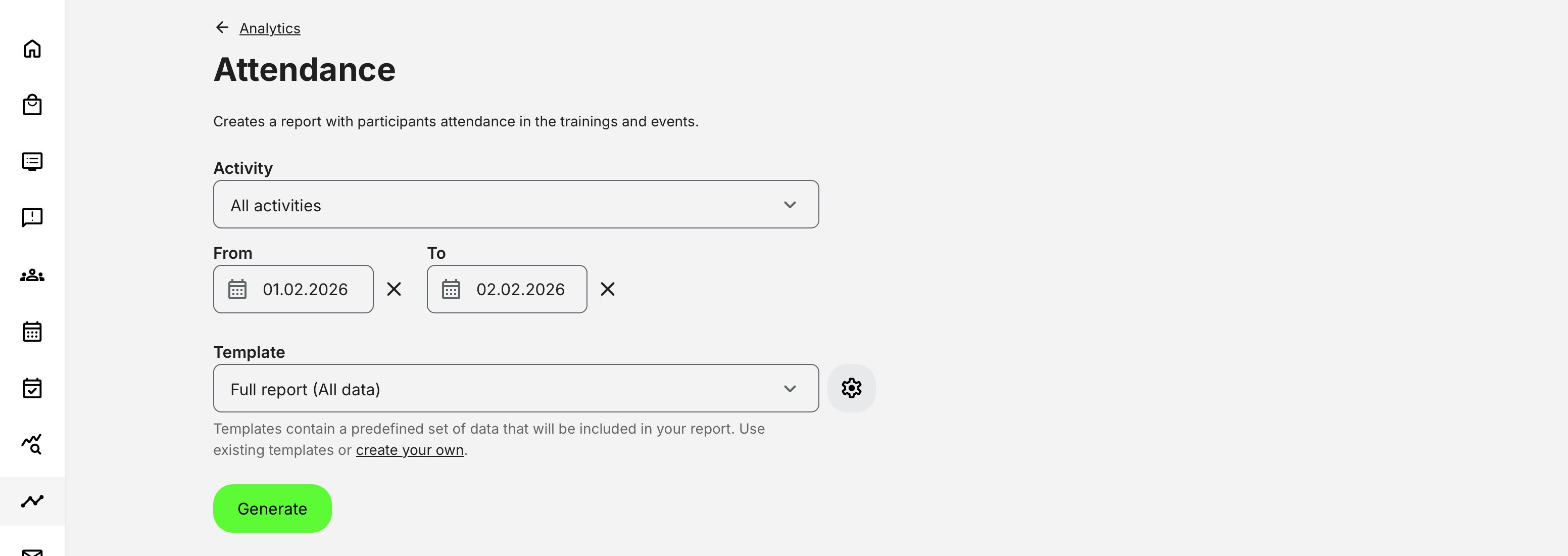
When generating a report, administrators can:
- Select one or multiple activities (default is All activities)
- Filter by date range using a time picker
- Use report templates (if configured) or generate a full report
If an activity is scheduled, its date is displayed directly in the activity selector, making it easier to choose the correct session or event series.
Attendance Report Fields
The Attendance report contains a comprehensive set of fields. Depending on whether a full report or a template-based report is used, the visible fields may vary. This structure allows attendance to be analyzed not just per event, but also across learner profiles, organizations, and time periods.
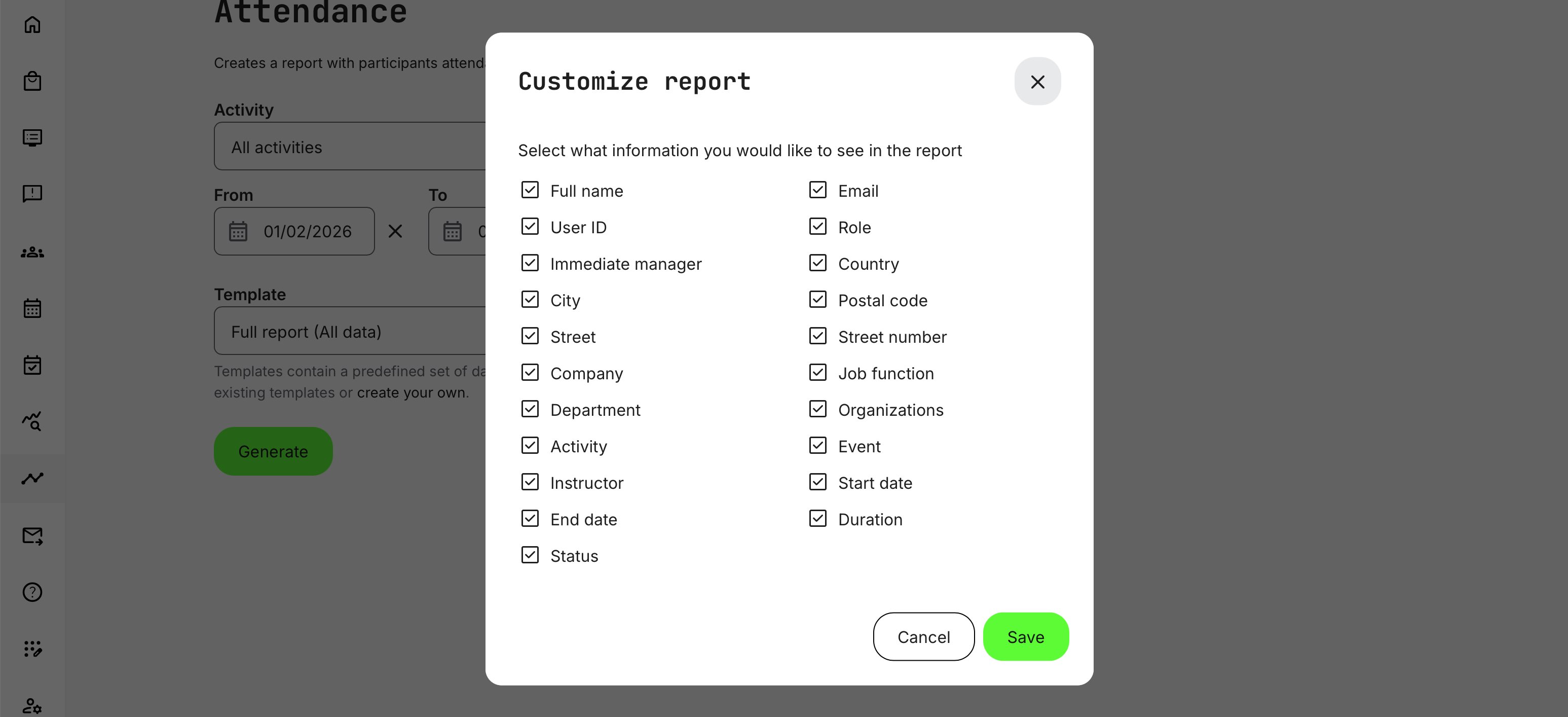
| Category | Fields Included |
|---|---|
| Participant information | Full name, Email, User ID, External ID |
| User profile & role | Role, Immediate manager, Employee ID, Hire date |
| Organization & location | Organization, Sub-organization, Company, Country, Region, City, Postal code |
| Professional context | Job function, Workplace |
| Activity context | Activity title, Activity ID |
| Event details | Event title, Instructor |
| Schedule | Event start date, Event end date |
| Duration | Calculated duration based on event schedule |
| Attendance outcome | Attendance status (e.g. attended, missed, or equivalent status based on marking) |
Permissions, Data Access, and Organization Layer
The Attendance Report is governed by role-based permissions and the organization layer. Users can only see data they are authorized to access based on their role, organizational affiliation, and scope of responsibility.
In practice:
- Data visibility is limited to permitted organizations, activities, and entities
- Parent organizations can see aggregated sub-organization data; sub-organizations cannot see upward or sideways
- Blocked users remain visible for historical accuracy; deleted users are excluded for privacy compliance; Cancelled and expired enrollments remain visible for audit and traceability
- The same rules apply consistently to both on-screen analytics and exported reports
As a special mention: Participants and Trial users do not have access.
This ensures secure, consistent, and audit-ready access to data across the platform.
Attendance Reporting vs. Attendance Marking
It is important to distinguish between attendance marking and attendance reporting:
- Attendance marking is the operational process where instructors or administrators record whether participants attended an event
- Attendance reporting aggregates this data into structured reports for analysis, audits, and follow-up
The Attendance report consolidates attendance markings across activities into a single, exportable dataset—removing the need to manually review individual sessions. This glossary explains key concepts used in attendance analytics and reports.
| Term | Description |
|---|---|
| Attendance marking | A manual or instructor-led action that records whether a participant attended a scheduled session or event. This is commonly used for instructor-led training, webinars, workshops, or live sessions |
| Attendance status | The outcome of attendance marking for a participant. Typical statuses include attended, missed, or equivalent values depending on the configuration and event type |
| Event | A scheduled instance of a training activity, often with a defined start and end time, instructor, and location (physical or virtual) |
| Participant | A registered user enrolled in or invited to an activity or event whose attendance can be tracked |
| Attendance report | A structured dataset showing who attended, who did not, and when—used for operational follow-up, compliance, and audit purposes |
Comparison: Attendance vs Progress vs Completion
This table helps clarify how attendance reporting differs from other common learning metrics in Eurekos. Used together, they provide a complete picture—from participation and engagement to formal outcomes—supporting everything from daily operations to compliance audits and strategic program evaluation.
| Aspect | Attendance | Progress | Completion |
|---|---|---|---|
| What it measures | Physical or live participation in scheduled events | Ongoing learning activity engagement | Whether a learning requirement is fulfilled |
| Typical use cases | Instructor-led training, webinars, workshops, compliance sessions | Self-paced learning, blended programs | Certifications, mandatory training, audits |
| How it’s recorded | Manually marked* by instructor or administrator | Automatically tracked by the system | Automatically or rule-based upon meeting criteria |
| Time sensitivity | Tied to specific dates and events | Continuous over time | Point-in-time outcome |
| Indicates learning? | Presence, not learning depth | Learning effort and engagement | Formal achievement or requirement met |
| Best for | Operational follow-up, attendance compliance, participation rates | Monitoring learner journey and engagement | Regulatory compliance, certifications, reporting |
| Common reports | Attendance report | Progress report | Completion / certification report |
Although labeled as “manually marked,” attendance can in certain scenarios be recorded automatically. This typically applies to virtual events where third party integrations are configured to detect participation and either suggest or automatically mark attendance.
Recommended Approach for Audits and Compliance Reporting
For audits, regulatory reviews, and formal compliance checks, attendance and completion reports should always be used together. Each serves a distinct purpose and strengthens the overall audit trail.
Start by using Attendance reports to document participation in scheduled sessions. These reports provide clear evidence of who attended live or instructor-led events, when attendance was recorded, and by whom. This is especially important for regulated training, clinical education, safety training, or any program where presence is a formal requirement.
Next, use Completion and certification reports to confirm that participants not only attended, but also fulfilled all learning requirements defined by the activity—such as assessments, adaptive paths, or mandatory modules. Completion reports demonstrate formal achievement and readiness, which auditors typically require alongside attendance records.
Best-practice recommendations
- Use attendance reports as proof of participation and engagement
- Use completion or certificate reports as proof of fulfillment and compliance
- Align reporting periods and organizational filters across reports for consistency
- Export reports in structured formats and store them as part of your audit documentation
- Avoid relying on dashboards alone—use reports for traceability and verification, even when created in context with external visualization tools
By combining attendance and completion data, you create a defensible, transparent audit record that shows both presenceand outcome—supporting regulatory compliance, internal governance, and external audits with confidence.
Real-World Context
Some organizations use attendance reporting as a key KPI, not only to track participation but also to support broader measures such as satisfaction surveys or NPS—especially in cases where formal certification is not required or applicable.
It is also important to recognize that a single learning journey may include multiple attendance points: for example, several sessions within a full-day seminar, multiple events across a conference, or a series of instructor-led modules within a learning path. Attendance reporting helps capture engagement across these touchpoints, not just at the program level.
While attendance metrics are valuable on their own, we strongly recommend issuing certificates whenever possible—even when they do not represent formal accreditation. In many regions, any form of documented acknowledgement carries significant professional and personal value, contributing to motivation, recognition, and career development.
Beyond learner perception, certificates also offer clear technical advantages: automated completion tracking, consistent reporting, improved audit readiness, and tighter integration across learning workflows. When used together, attendance reporting and certification provide a more complete, reliable, and meaningful picture of learning impact. Certificates can be issued based on attendance marking, allowing participation in events or sessions to be formally recognized.