Conversion Report - Article
Summary
The Conversion Report analyzes how users move from the promotion phase to enrollment within the platform. It helps administrators understand how training offerings convert from invitations into actual registrations or purchases across different audiences and access paths.
In this article you will learn:
- How the Conversion Report measures transitions from invitations to enrollment
- How administrators analyze which activities generate registrations or purchases
- How conversion insights support storefront optimization and marketing decisions
- How conversion analytics helps evaluate training demand and user behavior
Overview
Conversion metrics provides insight into how effectively Invitations and Promotions result in actual enrollments. It bridges the gap between outreach activity and learning participation by tracking what happens after an invitation is sent—who responds, who enrolls, and under which conditions. The Conversion Report makes the invitation process itself measurable. It allows organizations to evaluate whether their promotional efforts, audience targeting, timing, pricing, and follow-up strategies are working as intended.
This is especially valuable in environments where training is capacity-limited, commercially driven, or relationship-based—such as customer education, partner enablement, certification programs, and instructor-led events.
What Conversion Measures
Conversion metrics focuses on the lifecycle of an invitation, from promotion to enrollment. It answers questions such as:
- How many users were invited to a training activity?
- How many of those invitations resulted in sign-ups?
- Original price and offered price differences?
- Which activities, Contact Managers, organizations, or regions convert most effectively?
- Where are invitations stalling or expiring without action?
By connecting invitations directly to enrollments, the platform enables both operational monitoring and strategic optimization of outreach efforts.
Core Metrics
Conversion metrics focuses on the full lifecycle from invitation → enrollment → participation, providing transparency into both commercial and learning outcomes. The report output is row-based, where each row represents one invitee tied to one promoted activity, allowing precise traceability and follow-up.
Filtering and Segmentation
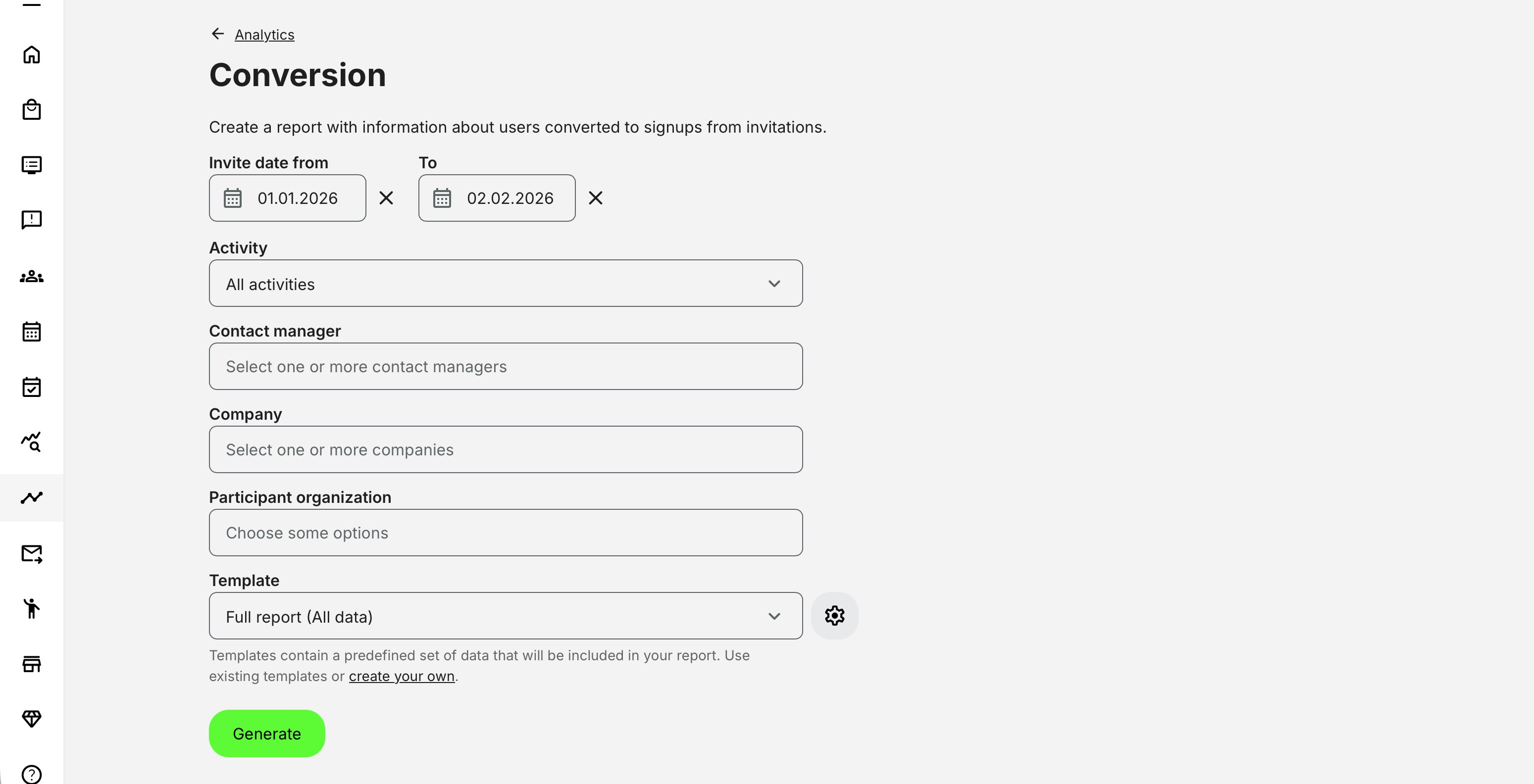
The Conversion Report filters by:
- Training activity or program
- Organization or sub-organization
- Company
- Contact Manager
- Date range (invitation or enrollment date)
Filters dynamically affect all report outputs, ensuring administrators see only the data they are authorized to access and allowing meaningful comparison across regions, partners, or customer segments.
Report Metrics Included and Explained
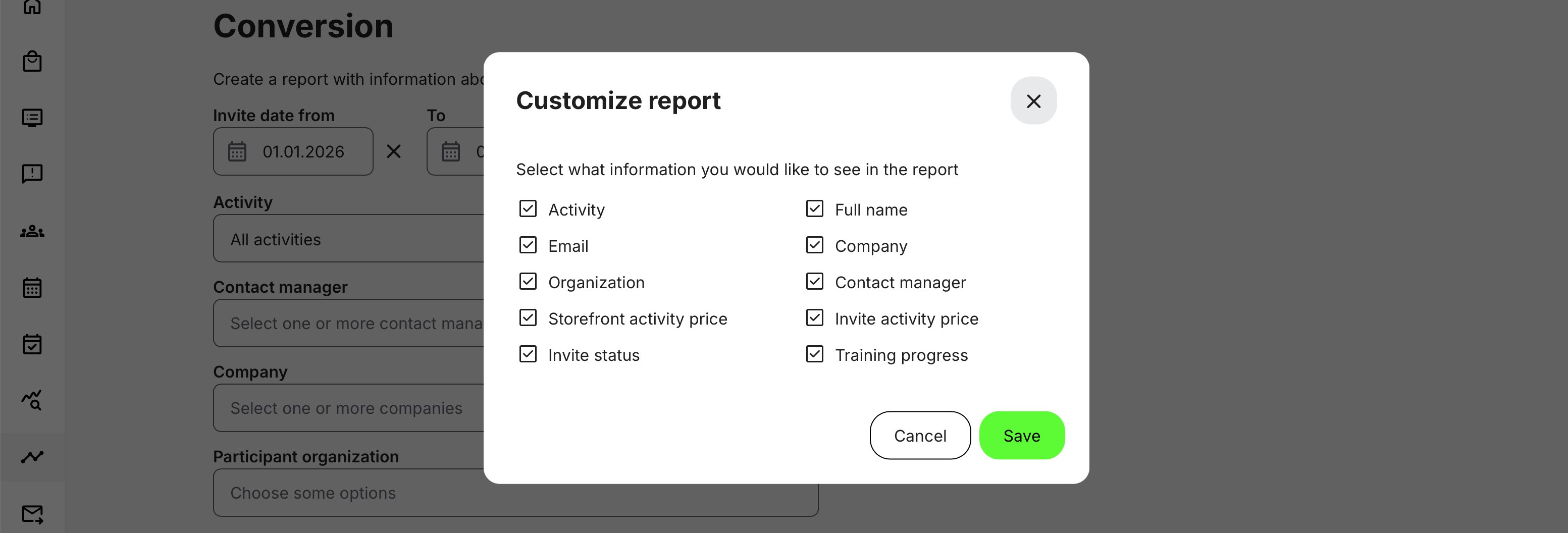
| Metric | Description | Why it matters |
|---|---|---|
| Activity | The promoted training activity the invitation relates to | Enables analysis of conversion performance per course, event, or program |
| Full name | Name of the invited individual (when available) | Supports operational follow-up and audit traceability |
| Unique identifier for the invitee | Ensures one-to-one tracking of invitations, pricing, and enrollment | |
| Company | Company associated with the user (if available) | Useful for customer, partner, or account-level reporting |
| Organization | Organization or sub-organization at time of invitation | Critical for regional, partner, or departmental analysis |
| Contact manager | The Contact Manager who sent the invitation | Enables accountability, performance comparison, and coaching |
| Storefront activity price | Standard price shown on the Storefront | Provides reference for commercial comparison |
| Invite activity price | Price offered through the invitation (Free / Specific price) | Measures commercial impact of promotions and discounts |
| Invite status | Current invitation state (e.g. Invited, Enrolled, Expired, Cancelled) | Core indicator of conversion success |
| Training progress | Learner’s progress status after enrollment | Connects conversion to actual learning engagement |
Understanding Conversion in Context
Conversion metrics should always be interpreted in context. A low conversion rate does not automatically indicate failure—it may reflect:
- Invitations sent early for future programs
- Long lead times for instructor-led or premium training
- Reserved seats still within their acceptance window
- Strategic targeting of high-value but low-volume audiences
Permissions, Data Access, and Organization Layer
The Engagement Report is governed by role-based permissions and the organization layer. Users can only see data they are authorized to access based on their role, organizational affiliation, and scope of responsibility.
In practice:
- Data visibility is limited to permitted organizations, activities, and entities
- Parent organizations can see aggregated sub-organization data; sub-organizations cannot see upward or sideways
- Blocked users remain visible for historical accuracy; deleted users are excluded for privacy compliance; Cancelled and expired enrollments remain visible for audit and traceability
- The same rules apply consistently to both on-screen analytics and exported reports
This ensures secure, consistent, and audit-ready access to data across the platform.
Deviation: The report may include invitation and signup states for users who have not yet completed registration.
Practical Use Cases
From a governance standpoint, Conversion metrics provides traceability and accountability across decentralized outreach efforts.
Customer and Partner Education: Organizations delivering customer or partner training use Conversion metrics to understand which programs resonate, which audiences respond, and which Contact Managers are most effective in driving enrollment.
Commercial and Revenue-Driven Training: For paid training, certifications, or premium programs, conversion data connects promotional effort directly to business outcomes. It allows teams to assess whether pricing strategies, special offers, or reservation logic are influencing enrollment behavior.
Operational Planning and Capacity Management: Conversion metrics helps administrators identify when programs are likely to fill, when additional promotion is needed, or when deadlines should be adjusted—reducing last-minute scrambling and underfilled sessions.