H5P Question Set Report - Article
Summary
The H5P Question Set Report aggregates learner responses across H5P assessments used throughout the platform. It enables administrators to analyze outcomes across programs, identify knowledge gaps, and validate question quality.
In this article you will learn:
- How the H5P Question Set Report aggregates assessment responses
- How administrators identify patterns in learner answers and outcomes
- How the report supports curriculum quality assurance
- How assessment data can reveal knowledge gaps across cohorts
Purpose of the H5P Question Set Report
H5P Question Sets are commonly used to assess understanding through a sequence of questions using multiple interaction types. While activity-level reports show outcomes within a single course, organizations often need meta-level insight:
- How did all learners respond to this assessment over time?
- Are certain questions consistently misunderstood?
- Do outcomes vary across regions, programs, or cohorts?
- Are assessment results improving after content changes?
The H5P Question Set Report answers these questions by aggregating responses across activities and organizational structures—without requiring administrators to stitch together multiple reports manually.
This makes it particularly valuable for:
- Curriculum quality assurance
- Regional or program-wide assessments
- Instructor-led or blended programs using shared assessments
- Continuous improvement initiatives
- Audits requiring detailed assessment traceability
Report Configuration
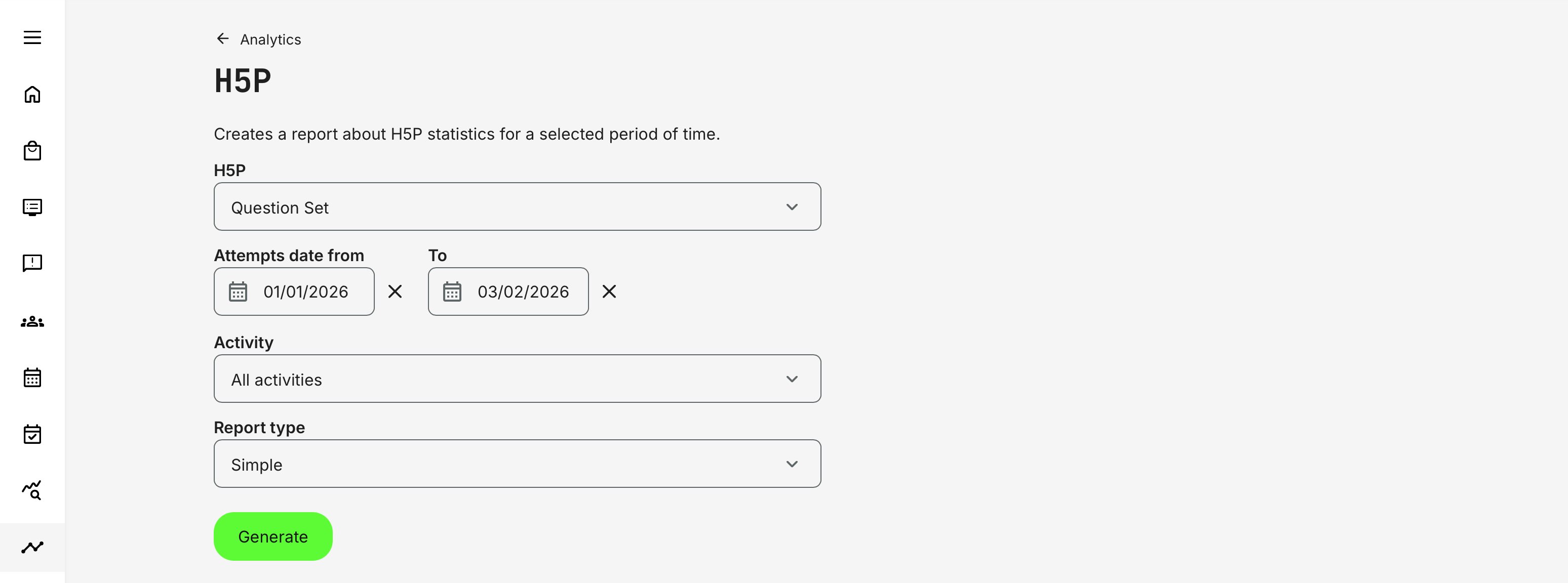
When generating the report, administrators define the scope using the following parameters:
- H5P: A specific assessment of the type Question Set
- Time Period: All data is based on the learner’s last attempt within the selected date range. This ensures the report reflects the most recent and relevant outcome per learner
You may:
- Include all activities, or
- Filter to specific activities where the Question Set is used
If the activity is scheduled, its date is displayed in the report filters to help contextualize results.
Scope and Supported Question Types
The report covers H5P Question Set objects only and includes responses from the following question types:
- Multiple Choice – Evaluates recognition and decision-making by asking learners to select the correct option among alternatives
- True / False – Validates basic factual understanding or compliance knowledge with clear pass/fail outcomes
- Fill in the Blanks – Tests recall and precision by requiring learners to actively reproduce correct terms or values, rather than recognize them
- Drag and Drop – Assesses classification, sequencing, or spatial understanding by asking learners to place items correctly within a structure or flow
- Drag the Words – Measures contextual comprehension by having learners insert correct terms into sentences or explanations
- Mark the Words – Evaluates reading comprehension and concept recognition by asking learners to identify relevant words or phrases within a larger text
Each question is reported consistently, regardless of where the Question Set is used across the platform.
Report Types and Data Output
The drill-down offers two report types: Simple and Full. Both reflect the same assessment data, but the Full report expands the dataset with additional columns to support detailed analysis and forensics.
| Report Type | Purpose | Data Included | Best Used For |
|---|---|---|---|
| Simple Report | High-level overview of assessment outcomes |
|
|
| Full Report | In-depth assessment analysis and forensics |
|
|
Data Integrity and Special Behaviors
- If an activity containing an H5P Question Set is deleted, its records are hidden from the report to avoid presenting orphaned or misleading data
- Results always reflect the last attempt within the selected timeframe
- Duplicate answers across attempts are not shown—only the final state is reported
Permissions, Data Access, and Organization Layer
The H5P Question Set Report is governed by role-based permissions and the organization layer. Users can only see data they are authorized to access based on their role, organizational affiliation, and scope of responsibility.
In practice:
- Data visibility is limited to permitted organizations, activities, and entities
- Parent organizations can see aggregated sub-organization data; sub-organizations cannot see upward or sideways
- Blocked users remain visible for historical accuracy; deleted users are excluded for privacy compliance; Cancelled and expired enrollments remain visible for audit and traceability
- The same rules apply consistently to both on-screen analytics and exported reports
This ensures secure, consistent, and audit-ready access to data across the platform.
Practical Use Cases
Below are a few practical examples showing how administrators use this report to support analysis, quality improvement, and decision-making.
Example 1—Curriculum Quality Review: An organization running technical certification programs uses the Full Report to identify that a specific “Drag the Words” question has a high incorrect rate across regions. The instructional team reviews the question wording and revises the supporting content, then monitors improvement in subsequent reporting periods.
Example 2—Regional Program Analysis: A global training team filters the report by activity to analyze how learners in a localized rollout performed compared to the global baseline—without manually extracting data from each course.
Example 3—Audit and Compliance Support: An auditor requests proof of assessment rigor. Administrators export the Full Report to show:
- Who answered which questions
- When answers were submitted
- Whether learners passed or failed
- How outcomes align with defined assessment standards