Participant Change History Report - Article
Summary
The Participant Change History report records enrollment status changes over time, showing what changed, when, and in which activity. It supports audits, dispute resolution, and operational oversight by documenting participant lifecycle events in a traceable format.
In this article you will learn:
- How the Participant Change History report captures enrollment status changes
- How change history supports audits and dispute resolution
- How the report helps monitor cancellations, rebookings, and other lifecycle events
- How participant change data supports operational oversight across training activities
Purpose and Scope
The Participant Change History Report provides a complete, audit-ready record of how participant enrollment statuses change over time within training activities. It is designed for course administrators, training managers, and compliance owners who need clear visibility into what changed, when it changed, and in which context—across courses, programs, and organizations.
In real-world training operations, participation is rarely static. Learners cancel, rebook, move between sessions, are placed on waiting lists, or expire due to missed deadlines. These changes may be initiated by administrators, automated rules, or participants themselves. The Participant Change History Report ensures that all such movements are captured in a structured and traceable way.
This report is particularly valuable for:
- Operational oversight of instructor-led and scheduled programs
- Managing rescheduling, cancellations, and attendance volatility
- Supporting audit trails and dispute resolution
- Identifying programs with high churn or frequent status changes
- Demonstrating governance and consistency in training administration
Rather than showing only the current state, the report focuses on change events within a selected period, making it possible to understand patterns, causes, and administrative impact over time.
The Participant Change History Report helps answer questions such as:
- Which participants changed status during a given period?
- What types of changes occurred (for example, registered → cancelled, reserved → expired)?
- When did these changes happen, and for which activities?
- Are certain programs, regions, or delivery formats more prone to changes?
- Can participant movements be documented and explained during an audit or inquiry?
Together, these insights allow organizations to move beyond static enrollment views and gain a clear understanding of how participation evolves across learning programs.
Report Form and Filters
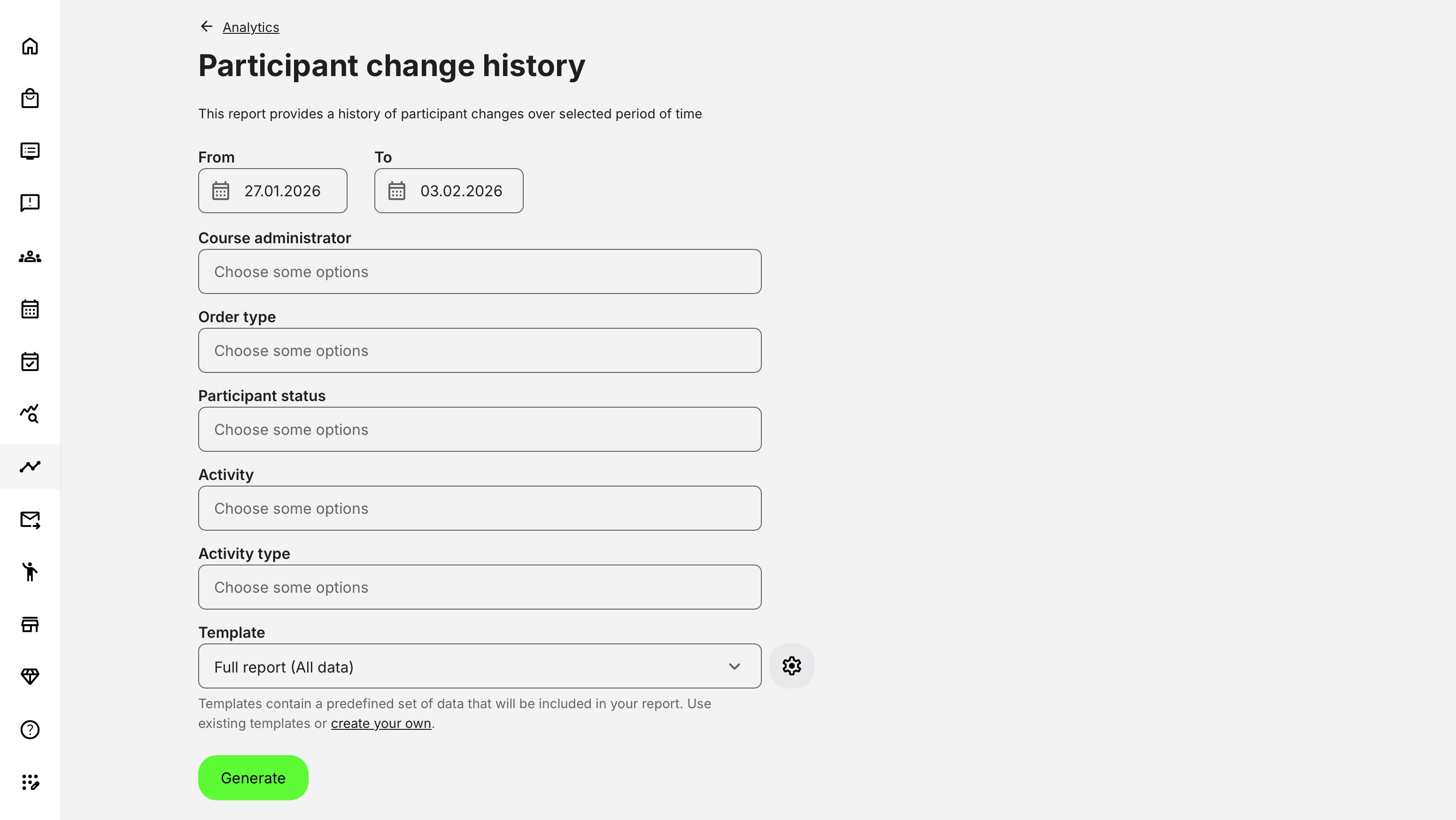
Before generating the report, administrators can narrow the output using a flexible set of filters, including:
- Time period – Filter changes by date using the date picker
- Course administrators – One or more responsible administrators
- Order types – Online, Manual, Virtual Credits, and other enrollment sources
- Participant statuses – Registered, Cancelled, Expired, and related states
- Activities – All or selected activities, including scheduled activities with defined dates
- Activity types – Webinar, Classroom, Learning Path, and other delivery formats
This allows the report to be tailored for both operational follow-up and historical analysis of participant changes.
What Data Is Included
A participant appears in the report only if their signup status changed during the selected period. This ensures that the report remains focused on meaningful operational activity rather than static enrollments.
The report captures changes across common signup statuses, including:
- Registered
- Cancelled
- Expired
- Reserved
- Waiting list
If a participant’s status changed multiple times within the selected period, each change is reflected in the report output.
Report Output and File Structure
The Participant Change History Report produces a structured, exportable dataset suitable for audits, reviews, and operational analysis. Field availability may vary depending on whether a full or custom template is used.
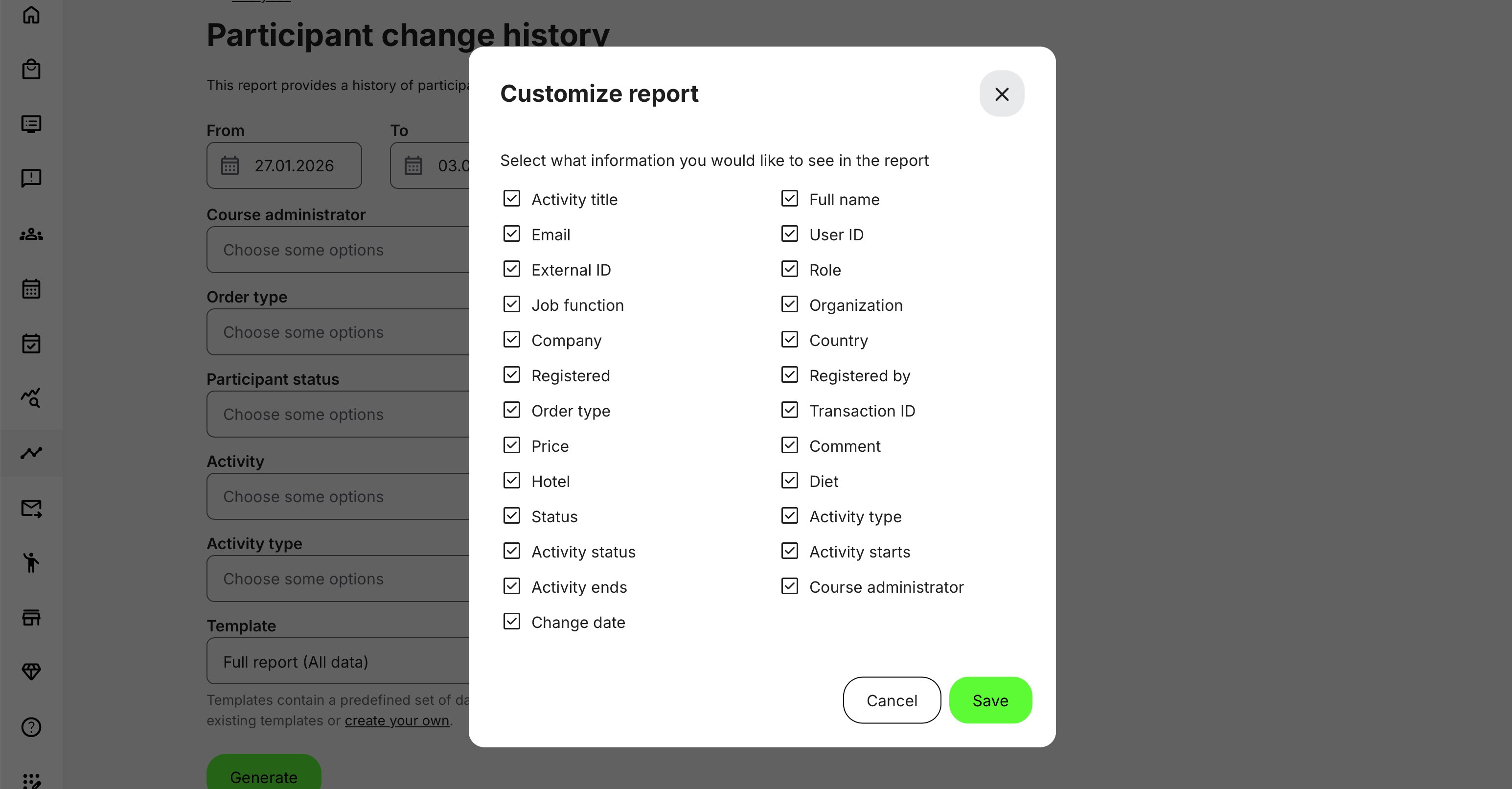
| Field | Description |
|---|---|
| Activity title | Name of the training activity where the change occurred |
| Participant full name | Full name of the participant |
| Email address | Participant’s email address |
| User ID / External ID | Internal platform identifier and any external system identifier |
| Role / Job function / Company / Country | Participant’s role and job function at the time of the change with other tags enabled |
| Organization | Organizational context of the participant |
| Registration date | Date the participant was originally registered |
| Registered by | Indicates whether registration was performed by an administrator or automatically by the system |
| Order type / Transaction ID | Commercial context of the registration, where applicable |
| Price | Price applied at the time of registration, if relevant |
| Participant status | Status after the change (e.g. Registered, Cancelled, Expired, Waitlisted) |
| Activity type | Delivery type of the activity (e.g. Instructor-led, Online, Blended) |
| Activity status | Current state of the activity (e.g. Active, Completed, Cancelled) |
| Activity start date | Scheduled start date of the activity |
| Activity end date | Scheduled end date of the activity |
| Course administrator | Administrator responsible for the activity |
| Change date | Timestamp of the status change |
| Administrative context (optional) | Additional context such as comments or logistics fields (e.g. hotel, dietary requirements), where configured |
This structure allows administrators to reconstruct both the learning context and the administrative context of each participant change—supporting audits, investigations, and operational analysis over time.
Deleted Users and Historical Accuracy
The report maintains historical accuracy even when users are deleted:
- Deleted users still appear in the report if they had relevant changes during the period
- Personally identifiable fields such as full name, email, and country are removed
- Other contextual data (activity, status change, timing) remains available
This ensures long-term auditability without violating data minimization principles.
Permissions, Data Access, and Organization Layer
The Participant Change History Report is governed by role-based permissions and the organization layer. Users can only see data they are authorized to access based on their role, organizational affiliation, and scope of responsibility.
In practice:
- Data visibility is limited to permitted organizations, activities, and entities
- Parent organizations can see aggregated sub-organization data; sub-organizations cannot see upward or sideways
- Blocked users remain visible for historical accuracy; deleted users are excluded for privacy compliance; Cancelled and expired enrollments remain visible for audit and traceability
- The same rules apply consistently to both on-screen analytics and exported reports
This ensures secure, consistent, and audit-ready access to data across the platform.
Real-World Scenario: Managing Change in a Scheduled Training Program
A course administrator is responsible for overseeing a capacity-limited, instructor-led certification program delivered across multiple regions. The program spans several days, involves travel logistics, and has strict enrollment deadlines.
As the start date approaches, participant changes occur frequently:
- Some learners cancel due to scheduling conflicts or travel issues
- Others request to move to a later session
- Seats open up and participants are promoted from the waiting list
- A number of reservations expire because confirmation deadlines are missed
- Administrative adjustments are made in response to external factors such as regional constraints or instructor availability
Using the Participant Change History Report, the administrator can review a complete timeline of these changes—capturing what changed, when it happened, and in which activity context.
The report makes it possible to:
- Trace every participant status change within the selected period
- Distinguish between changes initiated by administrators, participants, or automated rules
- Confirm timestamps and activity details for each change
- Reconstruct the full administrative and learning context during reviews, audits, or inquiries
Over time, this insight allows the organization to identify patterns—such as programs with high rescheduling rates, regions with frequent cancellations, or delivery formats prone to late changes. These insights can then be used to refine scheduling practices, improve communication, adjust deadlines, or redesign program logistics for future deliveries.