SCORM Details Report - Article
Summary
The SCORM Details Report provides detailed insight into learner activity inside SCORM courses, including completion status, scores, time spent, and answers. It supports compliance documentation, outcome verification, and quality assurance for SCORM-based training.
In this article you will learn:
- How the SCORM Details Report tracks completion, scores, and time spent
- How learner attempts and answers are recorded for SCORM content
- How the report supports compliance and regulatory audits
- How detailed SCORM analytics supports outcome verification
Purpose and Scope
SCORM remains a widely used industry standard for packaged learning content, particularly in regulated industries, external content libraries, and legacy learning ecosystems. While Eurekos supports native authoring and modern assessment tools, many organizations still rely on SCORM packages for certifications, compliance training, and standardized assessments.
The SCORM Details Report is designed to answer a core operational and governance question:
“What actually happened inside this SCORM course?”
Unlike high-level progress views, this report exposes detailed execution data at the learner level, including completion, scores, time spent, and—where applicable—question-level answers. This makes it especially valuable for:
- Compliance and certification documentation
- Outcome verification for external or legacy content
- Assessment review and quality assurance
- Regulatory audits and training evidence
- Investigations into learner attempts and performance
The report applies to both SCORM courses and SCORM-based H5P content used inside activities.
What Questions This Report Answers
The SCORM Details Report helps organizations answer questions such as:
- Who completed (or failed) a specific SCORM course?
- What score did each participant achieve?
- How much time was spent in the content?
- When was the attempt completed?
- What answers were given in embedded quizzes?
- Which attempt was considered the final or most successful?
- Can we document outcomes for audit or regulatory review?
SCORM Details Report – Report Form
The report is generated from the SCORM Details report page and is configured using a small but powerful set of filters:
- SCORM object: Selects the specific SCORM course or SCORM H5P object
- Report type: Defines the level of detail (Summary or Answers)
- From/To dates: Limits included attempts to specific reporting period
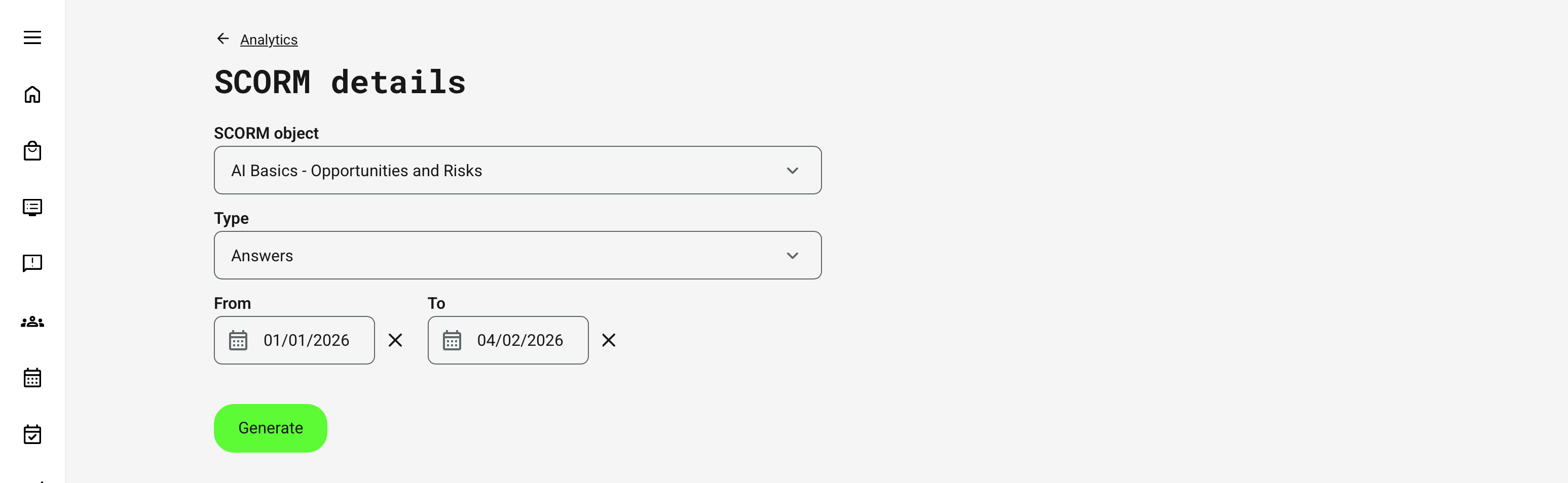
The report supports cached generation. Large reports for past periods may download immediately if previously generated by background processing, improving performance for historical audits.
Report Types
The SCORM Details Report supports two report types, depending on the analytical depth required.
| Report Type | Purpose | Included Data | Best Used For |
|---|---|---|---|
| Summary Report | High-level outcome and completion tracking | One row per learner attempt, including:
|
|
| Answers Report | Detailed assessment and question-level analysis | Question-level data from embedded SCORM quizzes, including:
|
|
Report File Structure
The exported file is row-based and may vary slightly depending on the selected report type. Core fields are across all report types, while the Answers report includes additional fields.
| Core Fields (All Report Types) | Description |
|---|---|
| SCORM title | Name of the SCORM package |
| Activity title | Activity in which the SCORM is used |
| Full name | Learner name |
| Learner email | |
| User ID | Internal platform identifier |
| External ID | External system identifier (if configured) |
| Completion | Completed / Not completed |
| Status | Passed / Failed / Unknown |
| Score | Final score (if available) |
| Total time | Time spent in the SCORM |
| Date | Completion or submission timestamp |
| Additional Fields (Answers Report) | Description |
|---|---|
| Question text | Human-readable question description |
| Answer | Learner’s submitted answer |
| Pass criteria | Whether the answer met passing criteria |
This structure ensures the report can be used directly for audits, investigations, and downstream analysis in external BI or compliance systems .
Permissions, Data Access, and Organization Layer
The SCORM Details Report is governed by role-based permissions and the organization layer. Users can only see data they are authorized to access based on their role, organizational affiliation, and scope of responsibility.
In practice:
- Data visibility is limited to permitted organizations, activities, and entities
- Parent organizations can see aggregated sub-organization data; sub-organizations cannot see upward or sideways
- Blocked users remain visible for historical accuracy; deleted users are excluded for privacy compliance; Cancelled and expired enrollments remain visible for audit and traceability
- The same rules apply consistently to both on-screen analytics and exported reports
This ensures secure, consistent, and audit-ready access to data across the platform.
Real-World Use Case: Legacy Compliance Training Audit
A global manufacturing company delivers mandatory safety training using a legacy SCORM package that includes a final assessment. The training is required annually across multiple regions and must be auditable for regulatory inspections.
During an audit, compliance officers need to prove:
- Who completed the training within a specific period
- Whether participants passed the embedded assessment
- What scores were achieved
- That outcomes are traceable to individual users
Using the SCORM Details Report (Summary), the organization exports completion and score data for the audit window. For flagged cases, they generate the Answers report to inspect question-level responses and confirm assessment validity.
Because the report respects organizational access and instructor responsibility, regional managers only see data for their own programs, while central compliance teams retain full oversight. The result is a defensible, structured audit trail—without manual reconciliation or fragmented exports.
FAQ
-
Why all answers may not appear in the SCORM details report?
Answers type generates report for quiz answers from course or H5P object. If a learner has made multiple attempts, the report shows only the most successful attempt.
For SCORM content, the data shown depends on how the package is structured. We display the information provided by the SCORM package, as its structure is not controlled by the LMS.