Learning Performance Analytics - Article
Summary
Learning Performance Analytics provides a consolidated view of training completion, certification status, and compliance readiness across learners. It helps administrators monitor learning outcomes, identify gaps, and track readiness across activities, organizations, and reporting periods.
In this article you will learn:
- How Learning Performance Analytics tracks training outcomes and completion
- How administrators monitor certification and compliance readiness
- How performance analytics highlights gaps and risk areas
- How learning performance insights support governance and program evaluation
Purpose and Scope
Learning Performance Analytics is designed to answer a deceptively simple but business-critical question:
“Who is trained, certified, compliant—or at risk—right now?”
Unlike static reports, this analytics view is optimized for situational awareness, using the selected date range and the current date as a reference. This makes it possible to understand not just what learners completed in the past, but whether they are currently eligible, compliant, or overdue.
The dashboard combines progress status, certification lifecycle data, deadlines, and organizational context into a single, navigable interface. This makes it particularly valuable for:
- Compliance and regulatory monitoring
- Managerial supervision (“My staff”)
- Partner and channel enablement
- Ongoing certification and re-certification programs
The analytics surface both individual-level detail and aggregate trends, allowing users to switch perspective depending on the task at hand.
What Data Is Included
Activities and participants appear in Learning Performance Analytics when:
- The activity has at least one signup
- The participant was enrolled during the selected period
- The selected date range applies (by default from the start of the current month up to the current date, unless adjusted)
Importantly, learning performance is always evaluated relative to the selected date context. Certifications may appear valid, expired, upcoming, or overdue depending on the chosen timeframe—reflecting real eligibility rather than historical completion alone.
The analytics intentionally focus on active learning relationships, ensuring relevance and reducing noise while preserving accurate compliance and re-certification logic.
Key Performance Indicators
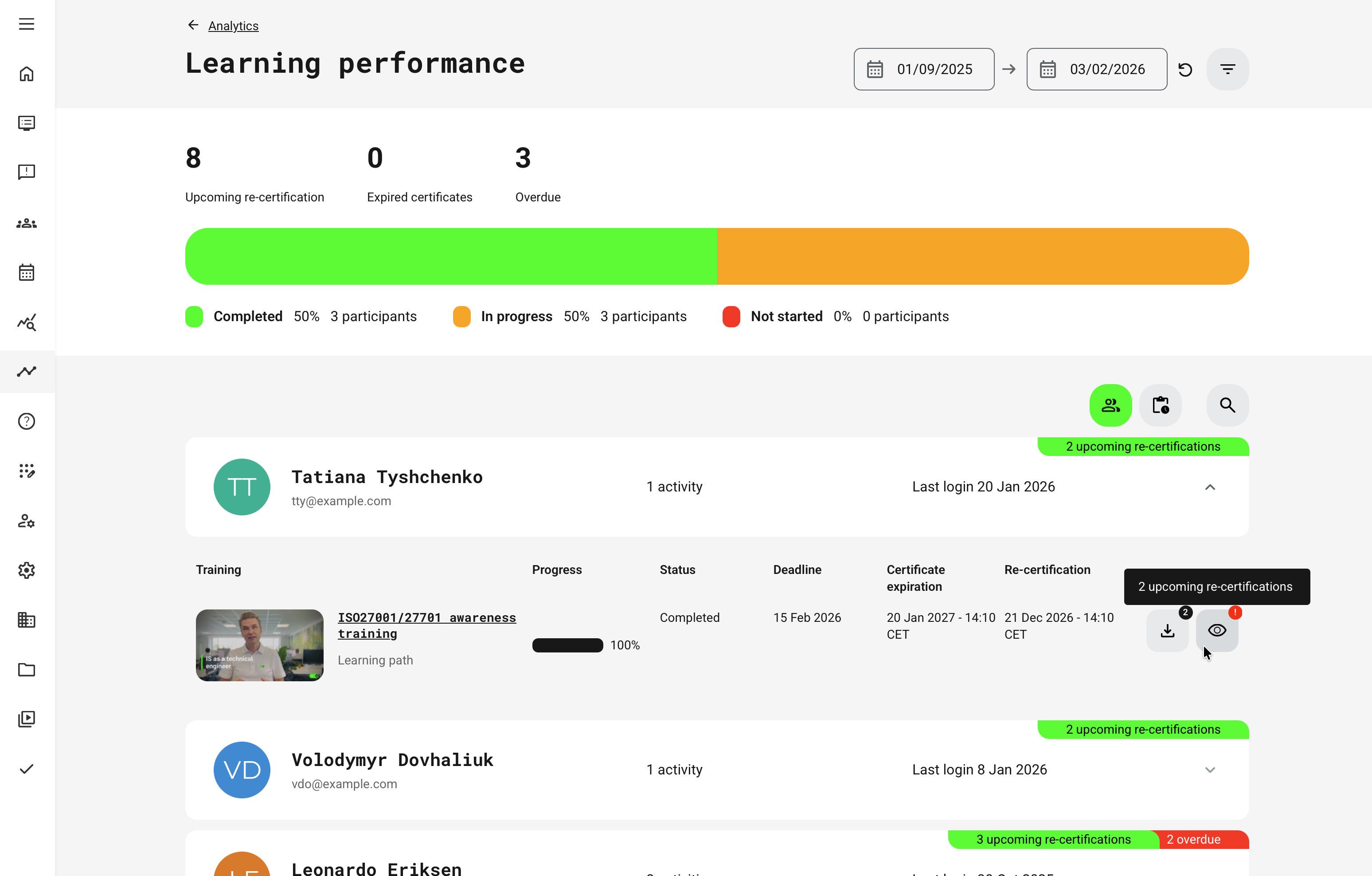
- Upcoming Re-certification: Shows participants whose re-certification is scheduled after the selected date, allowing organizations to proactively manage renewal cycles rather than reacting to expirations
- Expired Certificates: Indicates certificates that are no longer valid as of the selected date for participants enrolled during the selected period—critical for compliance audits and risk mitigation
- Overdue: Highlights participants who missed mandatory deadlines relative to the selected timeframe, often used as a trigger for follow-up actions.
- Progress Distribution (Horizontal Bar): Visualizes how participants are distributed across Not started, In progress, and Completed statuses—providing an instant snapshot of overall learning momentum
User-Centric View (Who Needs Attention?)
The Users section groups learning activity by participant, making it easy to supervise individuals across multiple enrollments.
For each user, administrators can see:
- Name and email
- Number of enrolled activities
- Last login timestamp
Expanding a user reveals activity-level detail, including:
- Training name, type, and banner
- Progress percentage
- Current status (Not started, In progress, Completed)
- Mandatory deadlines
- Certificate expiration and re-certification dates
- Get certificate (eye icon)—If a least one certificate has been achieved
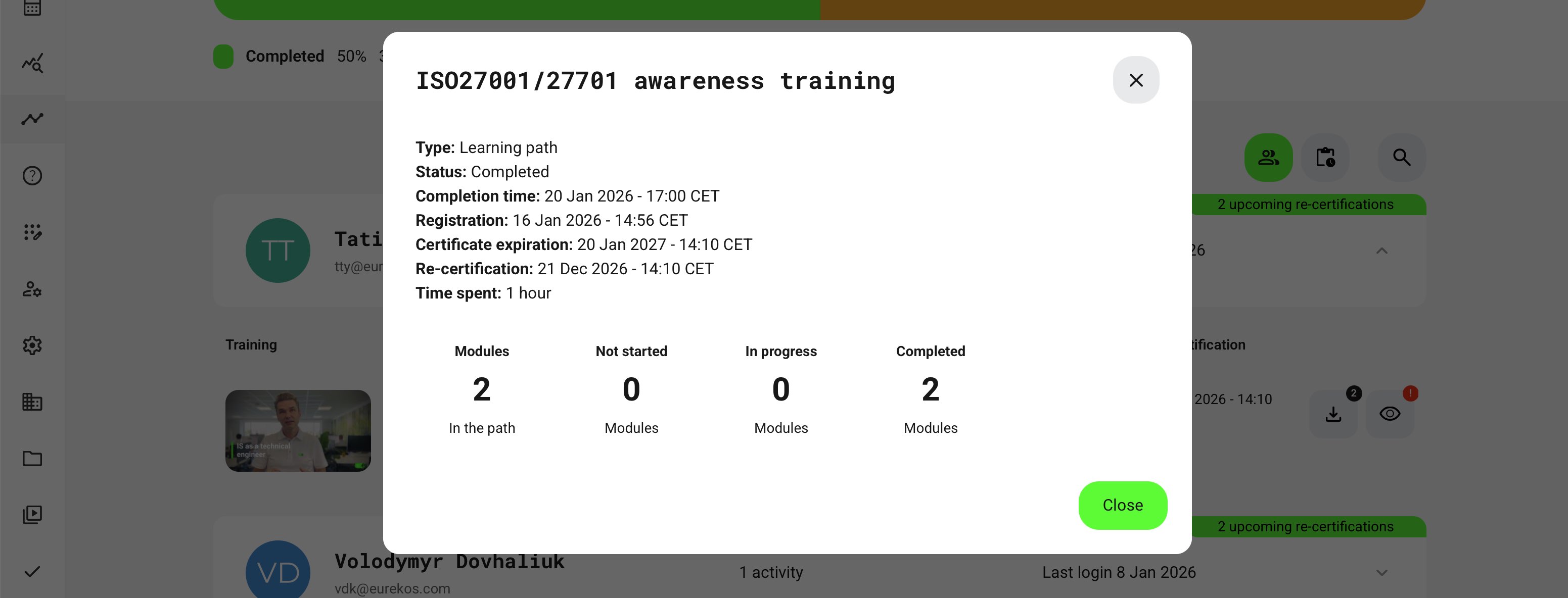
- Details (eye icon)—Time spent and path complexity
Visual badges further highlight:
- Number of expired certificates
- Upcoming re-certifications
- Overdue mandatory activities
This view is especially useful for managers, partner leads, and compliance owners who need to prioritize outreach and remediation.
Activity-Centric View (Where Are the Gaps?)
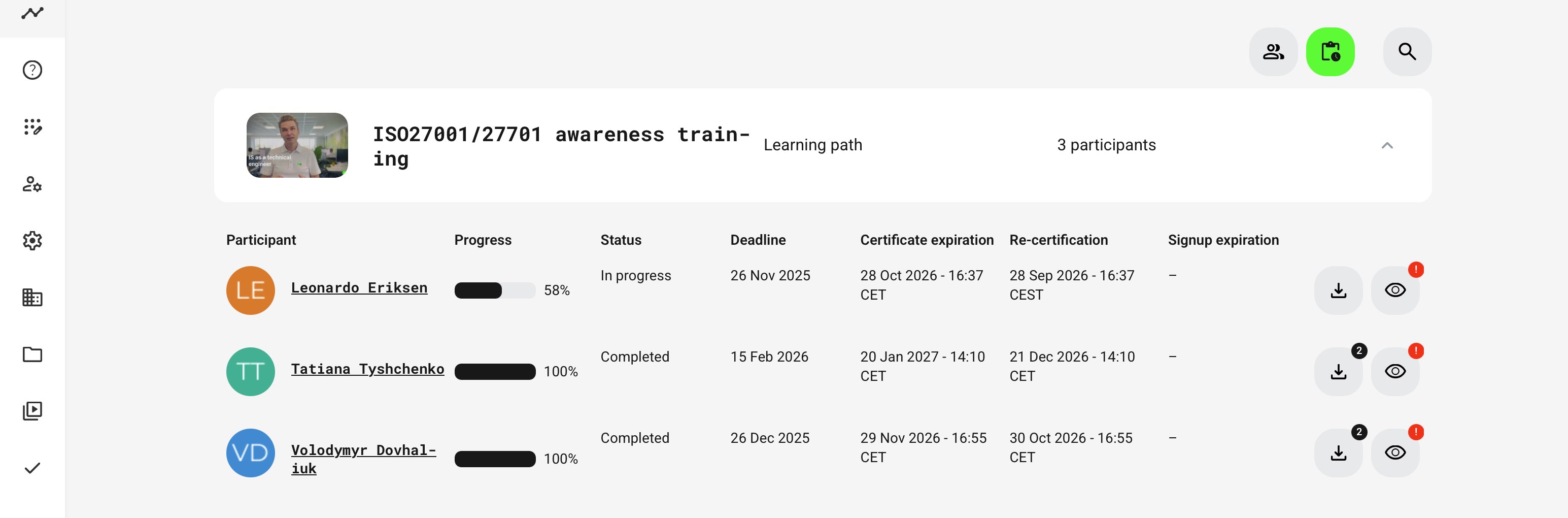
The Activities section flips the perspective and groups data by training activity instead of user.
In compliance-driven scenarios, the Activities view is used to answer a very practical question: Who do I currently have that is certified, eligible, and allowed to perform this task? By focusing on a specific training or certification program, supervisors and compliance owners can quickly verify which individuals are certified, who is still in progress, and who may be missing required training.
This makes it easy to confirm operational readiness, identify gaps, and ensure that only qualified personnel are assigned to regulated work, equipment, or responsibilities.
For each activity, you can see:
- Number of participants enrolled in the period
- Per-participant progress and status
- Deadlines and access expiration
- Certificate expiration and re-certification logic
- Certificate download access (where earned)
This view supports program-level evaluation, helping learning owners identify activities that consistently stall, expire, or generate overdue participants.
Filters and Segmentation
Filtering always applies to the current enrollment attempt and date context, ensuring accuracy when re-certification cycles create multiple enrollment records over time. This prevents false positives where historical completions might otherwise appear compliant. Filters include:
- Organization (including sub-organization logic)
- Activity and activity status
- Training type
- Progress status
- Mandatory vs. optional
- Overdue
- Re-certification timing (upcoming, in 1 month, in 3 months)
- Certificate expiration windows
- Profile tags such as job function, department, workplace, category, and more
Filtering always applies to the current attempt, ensuring accuracy when re-certification cycles create multiple enrollment records.
Permissions, Data Access, and Organization Layer
Learning Performance Analytics is governed by role-based permissions and the organization layer. Users can only see data they are authorized to access based on their role, organizational affiliation, and scope of responsibility.
In practice:
- Data visibility is limited to permitted organizations, activities, and entities
- Parent organizations can see aggregated sub-organization data; sub-organizations cannot see upward or sideways
- Blocked users remain visible for historical accuracy; deleted users are excluded for privacy compliance; Cancelled and expired enrollments remain visible for audit and traceability
- The same rules apply consistently to both on-screen analytics and exported reports
This ensures secure, consistent, and audit-ready access to data across the platform.
Special logic applies for the Immediate Manager concept (“My staff”), allowing supervisors to access analytics even if their role would not normally include it.
When to Use Learning Performance Analytics vs. Reports
- Use Analytics for real-time monitoring, supervision, and prioritization
- Use Reports when you need exportable, structured evidence for audits, compliance documentation, or external BI systems
Together, they provide both operational clarity and formal accountability—See other articles for various reporting options.
Learning Performance Analytics — Real-World Context
Learning Performance Analytics is designed for organizations where training and certification are directly tied to compliance, operational permission, and partner readiness. In regulated industries, certification is not just a learning outcome—it determines who is allowed to work, sell, support products, or remain compliant with external standards.
From a compliance perspective, the dashboard enables continuous monitoring of certification status, expirations, and overdue training across teams, regions, or organizations—helping you stay audit-ready and address gaps before they become risks.
In partner and channel programs, it provides immediate insight into whether partners are certified, eligible, and ready to operate. Managers can quickly answer questions like “Who is certified on this product?” or “Is this individual compliant and ready?”—without manual checks or fragmented reporting.
For managers and supervisors, Learning Performance Analytics offers a clear, visual overview of individual and cohort progress, supporting follow-up, accountability, and timely re-certification.
The result is a focused, easy-to-navigate dashboard that connects learning progress, certification status, and re-certification cycles in one place—enabling confident decisions across compliance, partner enablement, and workforce readiness.