External Resources Report - Article
Summary
The External Resources Report provides a system-wide inventory of external links and embedded resources used across courses and activities. It helps administrators monitor link validity, maintain integrations, and ensure external content remains accessible and reliable for learners.
In this article you will learn:
- How the External Resources Report lists external URLs used across courses and activities
- How administrators identify embedded videos, buttons, HTML links, and other external references
- How the report supports quality assurance and platform maintenance
- How external resource data helps maintain a consistent learner experience
Why External Resources Need Governance
Modern learning experiences rarely live in isolation. Courses and activities often include links to external videos, partner platforms, documentation portals, commerce flows, or third-party learning providers. These references add flexibility and integration power—but they also introduce operational risk.
Over time, external URLs can change, permissions may be updated, integrations may be deprecated, or ownership of content can shift. Without visibility, broken or outdated links often go unnoticed until a learner reports an issue.
The External Resources Report addresses this challenge by providing a centralized, system-wide inventory of all external references—regardless of where or when they were added.
What the External Resources Report Covers
The report captures every external URL added to supported content types across the platform. Whenever an external reference is included on a page, it is automatically registered and becomes available for reporting.
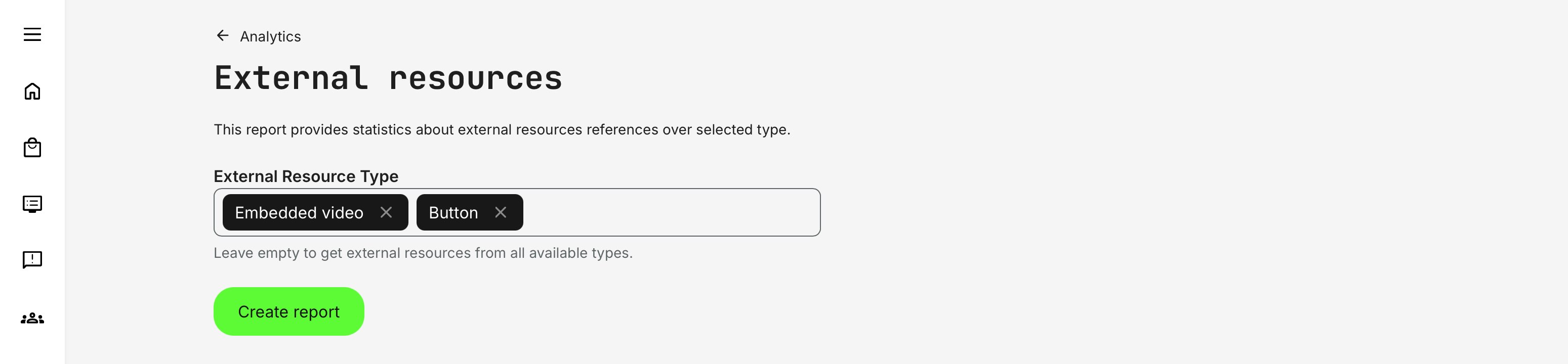
| Category | Supported Type | Description |
|---|---|---|
| External Resource Type | Embedded video | External video content embedded directly into a page |
| Button | Call-to-action buttons linking to external destinations | |
| HTML block | Custom HTML content containing external URLs | |
| Text content | Inline or formatted text with external links | |
| Image | Images linking to external resources | |
| Quickchannel | Embedded Quickchannel video integrations | |
| Page Location | Course pages | Learning content pages within a course |
| Course description pages | Public or catalog-facing course overview pages | |
| Activity description pages | Description pages for activities such as events or instructor-led training |
Administrators can generate the report for one specific resource type or multiple types at once. Leaving the filter empty returns all external resources across the platform.
Report Structure and Data Fields
When exported, the External Resources Report is delivered as an Excel file with a simple, actionable structure.
| Field | Description |
|---|---|
| External resource type | The widget type used (e.g. Button, Embedded video, HTML) |
| External resource URL | The full external URL referenced |
| Page URL | The internal Eurekos page where the resource is used |
This makes it easy to:
- Validate links
- Test access permissions
- Identify where changes are required
- Trace ownership and responsibility
Handling Deleted Content: The report is designed to remain clean and operationally accurate—If a course, activity, or page is deleted from the platform, its associated external resources are automatically removed from the report upon next export
Permissions, Data Access, and Organization Layer
The External Resources report is governed by role-based permissions and the organization layer. Users can only see data they are authorized to access based on their role, organizational affiliation, and scope of responsibility.
In practice:
- Data visibility is limited to permitted organizations, activities, and entities
- Parent organizations can see aggregated sub-organization data; sub-organizations cannot see upward or sideways
- Blocked users remain visible for historical accuracy; deleted users are excluded for privacy compliance; Cancelled and expired enrollments remain visible for audit and traceability
- The same rules apply consistently to both on-screen analytics and exported reports
This ensures secure, consistent, and audit-ready access to data across the platform.
Practical Operational Use
Many organizations use this report as part of regular platform hygiene:
- Quarterly or bi-annual link audits
- Pre-release validation before major launches
- Compliance or vendor reviews
- Proactive learner experience checks
Because the report does not depend on authorship, ownership, or creation date, it is especially valuable in large organizations where content is maintained by many teams over time.