Transactions Report - Article
Summary
The Transactions report provides a complete record of enrollment and purchase transactions, including paid, invoiced, discounted, and free activity. It supports reconciliation, invoicing, audits, and financial reporting across training operations.
In this article you will learn:
- How the Transactions report captures commercial activity across enrollments and purchases
- How transaction data supports invoicing, reconciliation, and audit processes
- How discounted, invoiced, and free transactions appear in reporting
- How transaction reporting supports financial follow-up and ERP-related workflows
Purpose and Scope
The Transactions Report captures every transaction created when users enroll in training activities, purchase subscriptions, or add additional products—whether the transaction involves payment, deferred invoicing, discounts, or free access.
Unlike enrollment or participation reports, the Transactions Report focuses on the commercial event itself, not just learning activity. This makes it essential for organizations that:
- Operate pay-by-invoice or manual billing workflows
- Offer free or discounted access to VIPs, partners, or strategic audiences
- Bundle additional products (manuals, equipment, materials) with training
- Sell subscriptions alongside individual activities
- Require accurate financial audit trails independent of learning completion
- Reconcile training enrollments with external finance or ERP systems
Every enrollment creates a transaction—even when the price is zero—ensuring a complete and traceable financial record across the platform. The Transactions Report helps answer questions such as:
- What transactions occurred during a specific period?
- Which enrollments were paid, invoiced, discounted, or free?
- Which activities, subscriptions, or products generated transactions?
- What amounts were charged, discounted, taxed, or settled?
- Which transactions still require invoicing or financial follow-up?
- Can we provide an audit-ready record of all commercial activity?
Transactions Report Form
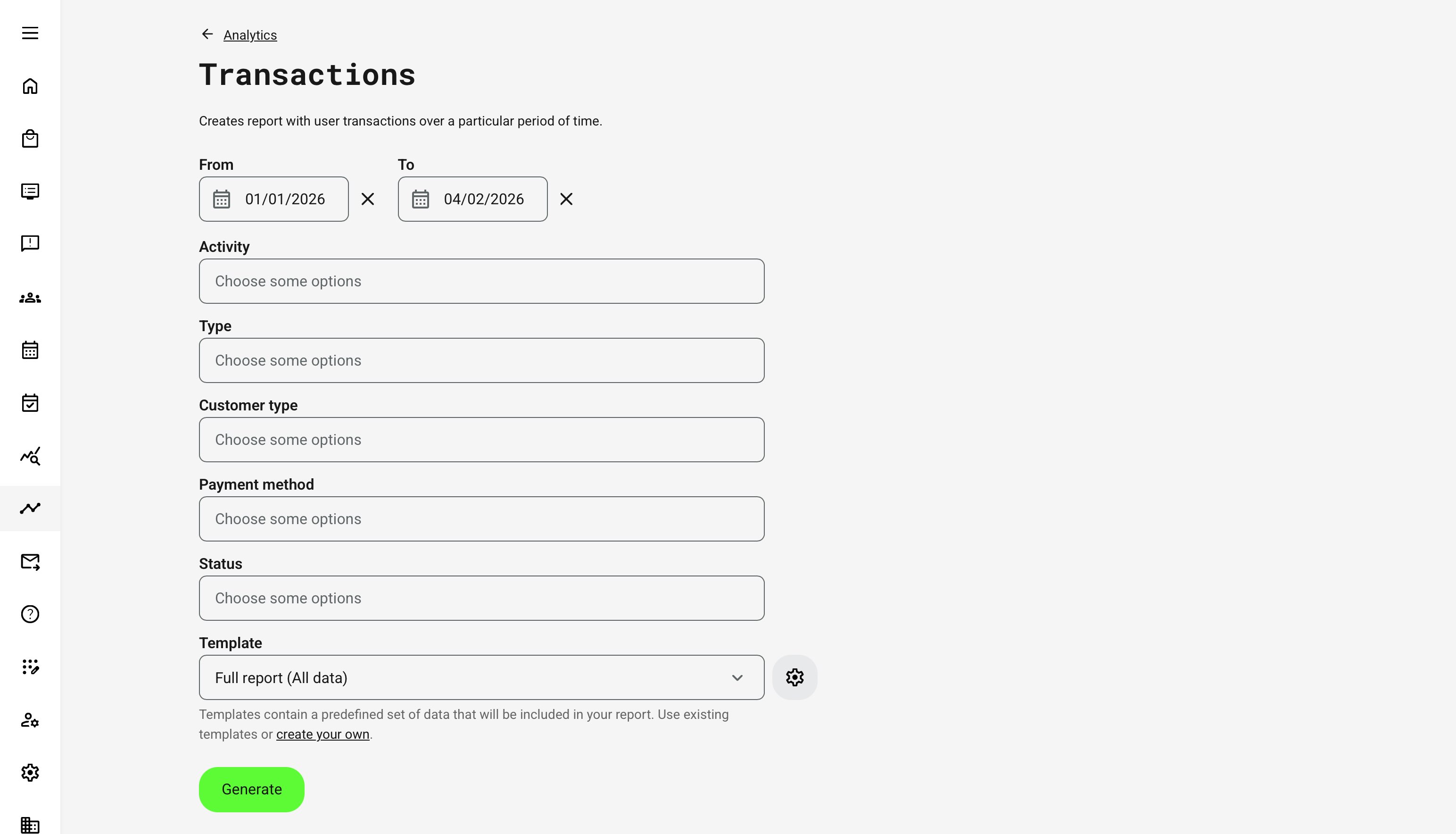
When generating the report, administrators define which transactions are included by configuring filters before export.
- Time range: Selects transactions created within the chosen period
- Activity: One or more activities (only activities that generated transactions are shown)
- Transaction type: Signup, Additional Product, Subscription
- Customer type: Private, Company, Government institution
- Payment method: Credit card, Invoice, Free, or other configured methods
- Status: Completed, Pending, Cancelled, Failed (multi-select supported)
You can use the full report or select a custom template to tailor the output for your needs, or customize the report on the fly for a one-time export.
Transactions Report – Data Fields
The Transactions Report is exported as a structured, row-based file where each row represents a single transaction. Field visibility may vary depending on the selected template (Full or Custom) and platform configuration.
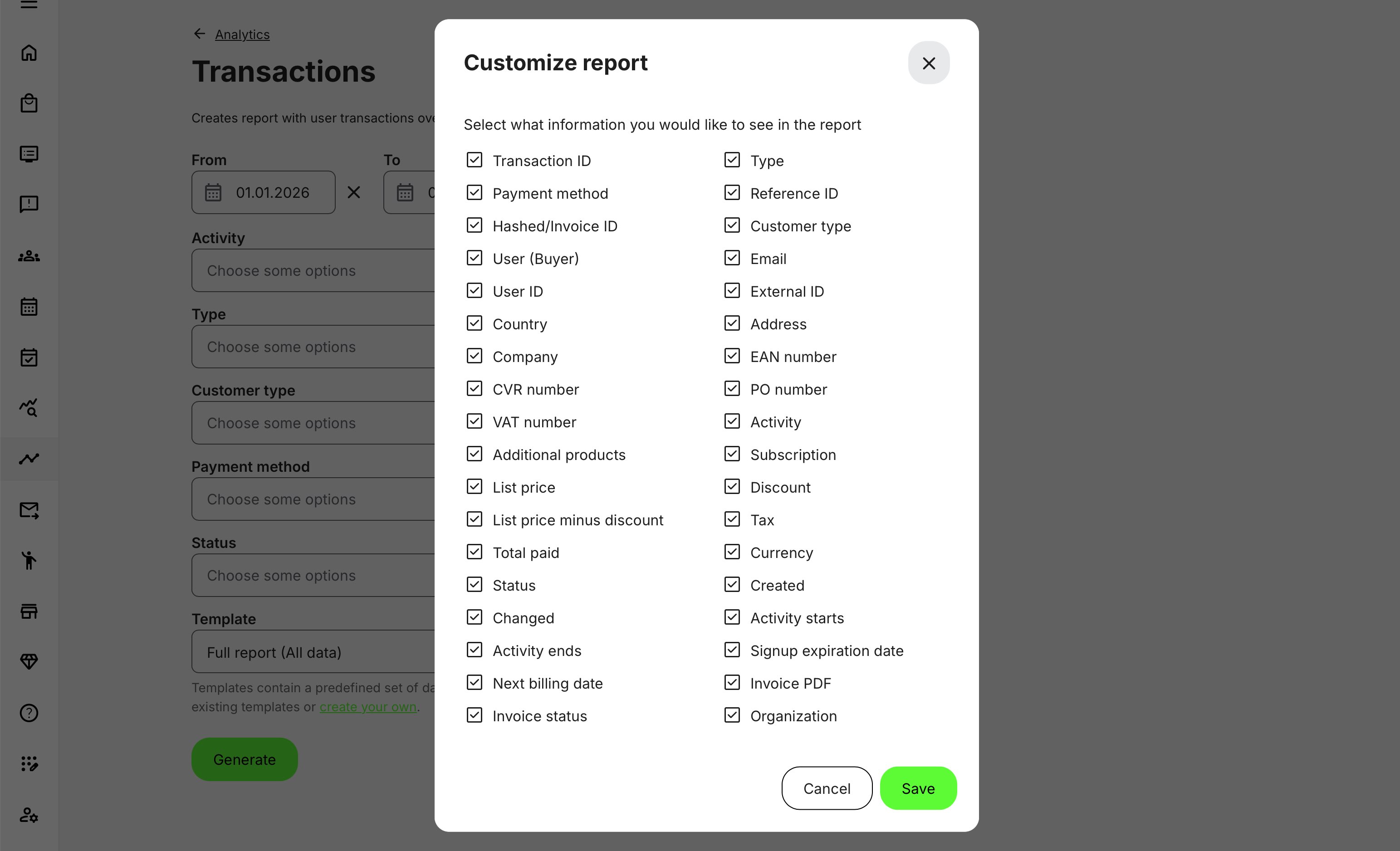
Core Transaction Fields
| Field | Description |
|---|---|
| Transaction ID | Unique identifier for the transaction |
| Type | Signup, Additional Product, or Subscription |
| Payment method | Method used or deferred (e.g. Invoice) |
| Reference ID | Internal or external reference |
| Hashed / Invoice ID | Invoice reference where applicable |
| Status | Transaction lifecycle state |
| Created | Transaction creation timestamp |
| Changed | Last update timestamp |
Buyer and Customer Information
| Field | Description |
|---|---|
| User / Buyer | User associated with the transaction |
| Buyer email | |
| User ID | Internal platform identifier |
| External ID | External HR / CRM identifier |
| Customer type | Private, Company, Government |
| Country | Buyer country |
| Address | Billing address |
| Company | Company name |
| CVR / Company registration | Business identifier |
| VAT number | VAT identifier |
| PO number | Purchase order reference |
| EAN number | Government institution identifier (where applicable) |
Commercial and Financial Fields
| Field | Description |
|---|---|
| Activity | Related training activity |
| Additional products | Products purchased with enrollment |
| Subscription | Subscription reference |
| List price | Original price |
| Discount | Applied discount |
| List price minus discount | Net price before tax |
| Tax | Tax amount |
| Total paid | Final amount |
| Currency | Transaction currency |
Activity and Schedule Context
| Field | Description |
|---|---|
| Activity starts | Start date (if scheduled) |
| Activity ends | End date (if scheduled) |
| Signup expiration date | Enrollment expiration |
| Next billing date | Subscription renewals |
If a transaction spans multiple activities (e.g. subscription), activity start/end fields may be empty.
Invoice-Specific Fields (Configuration-Dependent)
| Field | Description |
|---|---|
| Invoice PDF | Downloadable invoice (if enabled) |
| Invoice status | Invoice lifecycle state (if enabled) |
Important Structural Notes
- Every enrollment creates a transaction—even free enrollments
- Deleted users’ transactions are excluded from the report
- Transactions for deleted activities remain visible for historical accuracy
- Country values are taken from the user profile at time of enrollment
- Organization columns reflect tagging at time of transaction
- Numeric fields (prices, tax, totals) are exported in numeric format for finance systems
Permissions, Data Access, and Organization Layer
The Transactions Report is governed by role-based permissions and the organization layer. Users can only see data they are authorized to access based on their role, organizational affiliation, and scope of responsibility.
In practice:
- Data visibility is limited to permitted organizations, activities, and entities
- Parent organizations can see aggregated sub-organization data; sub-organizations cannot see upward or sideways
- Blocked users remain visible for historical accuracy; deleted users are excluded for privacy compliance; Cancelled and expired enrollments remain visible for audit and traceability
- The same rules apply consistently to both on-screen analytics and exported reports
This ensures secure, consistent, and audit-ready access to data across the platform.
Real-World Use Case: Deferred Invoicing and Partner Agreements
A training organization delivers certification programs to partners across multiple regions. Under a framework agreement, each partner is entitled to a limited number of free enrollments per quarter, with additional enrollments invoiced retrospectively.
During the quarter, course administrators manually admit participants without requiring immediate payment. Each enrollment still generates a transaction, marked with zero price or invoice payment method.
At month-end, the finance team pulls the Transactions Report filtered by:
- Customer type: Company
- Payment method: Invoice
- Period: Current quarter
Using the report, they:
- Identify all enrollments requiring invoicing
- Validate pricing, discounts, and tax handling
- Export structured data to the ERP system
- Generate consolidated invoices per partner
Because every enrollment created a transaction—even when free—the organization maintains a complete financial audit trail without disrupting operational workflows.
The API also supports transactions and some organizations choose to integrate.