Newsletter Consent Status Report - Article
Summary
A newsletter audience changes as people opt in and withdraw their consent. The Newsletter consent status report helps you identify those recorded changes and provide the relevant information to the team maintaining your communications audience.
The report is a change-focused export, not a complete list of everyone who can receive every type of email. It also does not send a newsletter, synchronize an external mailing service or prove that a particular message was delivered. Use the recorded preference together with your organization's communication policy and the current state of the sending service.
Use this article to:
- Export newsletter-consent changes for a defined period
- Read the latest Yes/No result and change time for each included person
- Distinguish consent changes from a full audience list or complete event history
- Understand permissions, missing records and external mailing-system boundaries
Use the report for a clear operational purpose
The report can support a regular audience-maintenance process. For example, a customer academy may offer optional product-learning newsletters in addition to the enrollment and training messages needed to deliver its service. Its communications team needs to recognize both new opt-ins and withdrawals, rather than simply copying every newly created platform account into a promotional mailing list.
Export the relevant consent changes, review the results and apply the authorized audience updates in the sending service. A No is an important outcome, not a row to discard because it is not a new subscriber. Follow your organization's handling procedure for withdrawals and other sending restrictions. This product report is evidence of a recorded preference, not a universal determination that a communication is legally permitted.
A person can hold a training seat without opting into newsletters, or opt into a newsletter without purchasing training. Do not use commercial subscription status as a replacement for the recorded communication preference.
Understand where the preference comes from
When Newsletter consent is enabled in Settings → General, Eurekos makes the relevant collection points available. These include I want to receive newsletters during supported sign-up and under Edit profile → Preferences, where a person can subscribe or unsubscribe. Depending on the configured consent text and user state, a consent prompt can also appear on My overview.
The overview prompt is for a person whose newsletter choice is still unset; it is not a guaranteed re-consent campaign for all existing users. Its appearance also depends on configured text for the user's language and the supported account-creation circumstances. If you are investigating why it did not appear, check the feature, wording/language and actual user state rather than assuming that opening My overview always triggers it.
The wider user export can represent Yes, No and an unset value, shown as –. The consent-change report described here concerns recorded Yes/No changes. An absent row is therefore not proof that a person consented or refused. Users can maintain their preference through the account route described in Use Your Profile and Account Settings.
Select the change period and generate the report
Open Analytics → Newsletter consent status. Set From and To to the period you need to review, then select Create report to generate the downloadable file.
The dates concern newsletter-consent changes. They are not account-creation dates, enrollment dates, course-completion dates or dates when an email was sent. A person whose preference did not change within the selected period is not included merely because they logged in or enrolled in training during that period.
For a repeatable operational process, record the period covered and the time you generated the export. Investigate gaps and overlapping runs deliberately. Do not assume that generating the file marks its changes as processed or updates an external service.
Read the exported evidence
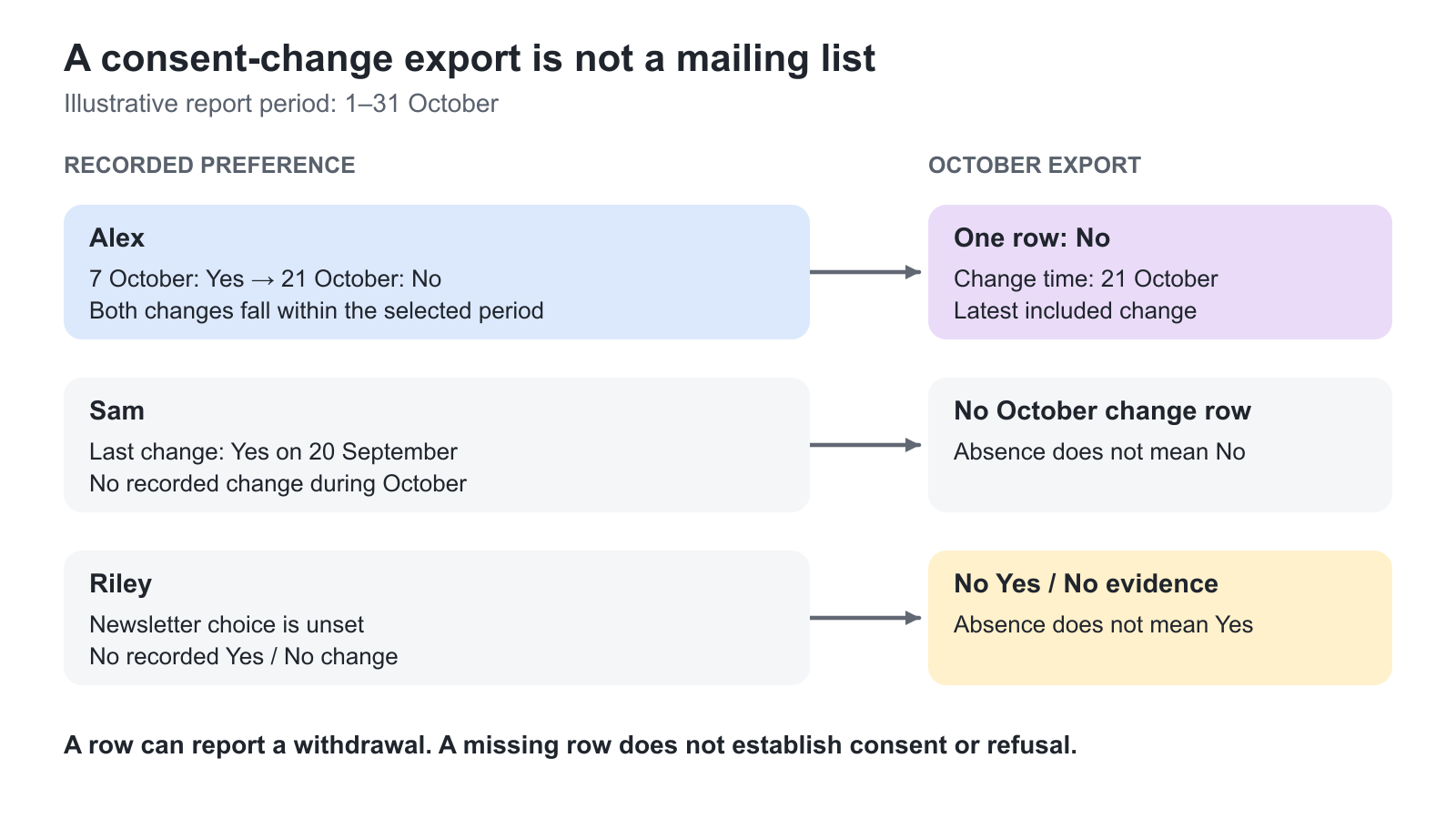
The report contains users whose newsletter-consent status changed within the selected period. For each included person, only the most recent included status change is reported—not a separate row for every opt-in and withdrawal.
| Field | What it helps you establish |
|---|---|
| Full name and Email | The person and address associated with the recorded preference |
| Consent status | The recorded Yes or No result |
| Change time | When the reported preference change occurred |
| Company, Organization and Country | Available profile context for the communications handoff |
Column headings and consent answers are generated in the report user's language, and change times use that user's time zone. Keep this context when combining exports produced by different people or comparing them with an external service's timestamps.
Illustrative example: During October, Alex opts in on 7 October and withdraws on 21 October. An export covering those changes reports Alex's latest result, No, with the change time for 21 October. It is not a two-row history of the earlier Yes and later No. The communications team should act on the withdrawal, not interpret the presence of a person in the file as permission to send.
Do not use a narrow-period export as a complete mailing-audience snapshot. Someone with an older Yes may have no row in that period. Nor is this file a complete audit log of every historical transition or a record of the exact consent wording shown at each transition. If your governance process requires those forms of evidence, establish the appropriate retention and evidence process separately.
Apply the correct reporting scope
Access to the report is configured through Settings → Analytics permissions. Participant and Trial roles do not have this report. Other roles still see only the user population permitted by their role, organizational scope and relevant responsibility relationships; enabling the report does not grant platform-wide access.
Administrator and Global Administrator roles have the broad administrative scope. Organization filtering and suborganization hierarchy affect other roles where applicable. Responsibility and Immediate Manager relationships can add their own permitted population. For a customer or partner contact, validate the actual scope before distributing an export; do not assume that everyone with the same job title can see the same people. See Introduction and Basic Configuration for the wider analytics approach.
Blocked users remain in the report. Deleted users are removed. Consequently, a later export is not necessarily a permanently reproducible snapshot of an earlier population. An earlier download can contain personal information that is no longer present in a newly generated file; handle retained copies under your organization's policy.
Keep audience maintenance separate from email delivery
Generating this report does not send emails, confirm delivery or automatically reconcile another mailing platform. The external service may have its own unsubscribe state, suppression list, address validation or access rules. Verify that service's final audience and sending configuration before using it.
Do not use newsletter consent to infer that training-service notifications have the same purpose, recipient rules or configuration. Enrollment, reminders, certification and other operational messages follow their relevant workflows. System Email Notification Overview explains those messages and their configuration relationships.
An effective handoff identifies who exports the changes, who applies the authorized updates, which period was covered and how completion is checked. This makes the report useful without presenting a download as an automated mailing integration.
Verify the audience-maintenance handoff
| Check | What to confirm |
|---|---|
| Period and population | Record the consent-change From/To dates and your permitted user scope. This is a change report, not a complete snapshot of every person who has ever consented. |
| Meaning of each row | Review both Yes and No outcomes. When several changes occur for one person in the selected period, do not interpret the single reported row as the complete sequence of changes. |
| Missing people | Do not classify an absent row as a refusal or permission to send. The person may have no change in the period, no recorded preference, be outside your scope, or have been deleted. |
| External sending service | Confirm that the responsible person has applied the authorized updates and checked that service’s own suppression and unsubscribe rules. Generating the Eurekos file does not perform that work automatically. |
Troubleshooting
| Problem | What to check |
|---|---|
| A known user is missing | Check whether a Yes/No change occurred within the selected period, the user's reporting scope and whether the user was deleted |
| The file does not list every newsletter subscriber | It is a consent-change report, not a full audience snapshot |
| A person appears only once despite several changes | Only the latest included status change is reported for that person |
| An absent row is being treated as consent | Absence can mean no change in the period, unset preference or unavailable data; it does not establish Yes |
| Dates differ from another team's export | Check the report user's time zone and the period selected |
| A blocked user still appears | Blocked users remain included; blocking and newsletter-consent status are different records |
| The overview consent prompt is missing | Check Newsletter consent activation, configured language text, unset preference and supported user-creation circumstances |
| The external mailing list did not change | The report is a download; verify the separate audience-update process or integration |
| A user cannot access the report | Check report permission separately from organizational and responsibility-based data scope |
FAQ
-
Is the Newsletter consent status report a complete list of people I may email?
No. It reports recorded Yes/No consent changes in the selected period, not every existing preference or every sending restriction. A row can record a No withdrawal, while someone with an older unchanged Yes may have no row. Verify the final audience and applicable rules in the sending service.
-
Does a missing newsletter-consent row mean the person refused?
No. The preference may not have changed during the selected period, may still be unset, may be outside your permitted reporting scope, or the user may have been deleted. Absence does not establish either Yes or No.
-
Does the newsletter report show every opt-in and withdrawal as a separate row?
No. Only the latest included consent-status change is reported for each included person. The report is not a complete event-by-event history or a record of the exact consent wording shown at each change.